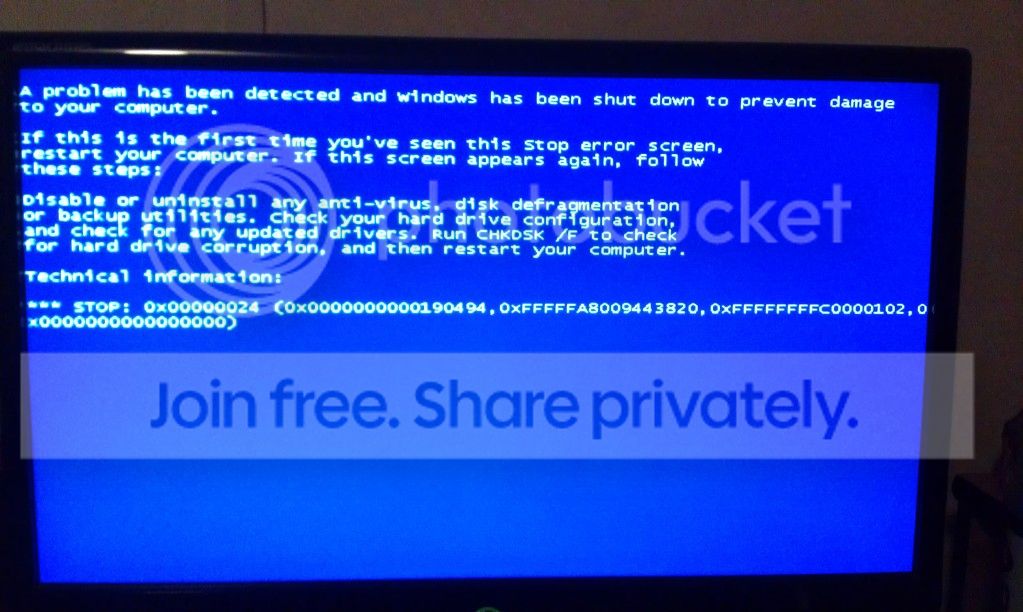
Failure to boot/post BSOD

brian60

New member
Local time
9:21 AM
Messages
11
This issue just arrived when I got a new headset, Azio GH808 Levetron. I plugged in the headset and the 7.1 surround wasn't working right so I went to their site and downloaded the windows driver, installed the driver and computer started acting up and kept going unresponsive so I restarted my pc and it shows the asrock screen then the Windows Error recovery pops up and says "Windows failed to start. A recent hardware or software change might be the cause." Which is clearly my headset. With the headset unplugged I start windows normally and it blue screens and restarts to the same screen. When I do startup repair, it does nothing...so now I'm stuck. I don't have any points that I can restore to it seems because I get an error when I try that option. If there is any way to remove the driver it would be appreciated.
 

My Computer

Computer type
PC/Desktop
Computer Manufacturer/Model Number
custom build
OS
Windows 7 Ultimate x64
CPU
Athlon II x4 630
Motherboard
ASRock 970 Extreme4
Memory
10gb ddr3
Graphics Card(s)
MSI R6850 Cyclone OC/PE
Hard Drives
1tb Western Digital Green drive
Antivirus
Malwarebytes Antimalware, Avira free
Browser
Chrome and Firefox
Hello and welcome :) .

If you're able to access your desktop, please follow
http://www.sevenforums.com/bsod-help-support/96879-blue-screen-death-bsod-posting-instructions.html


If you're unable to follow the instructions rules, please report back.
What is the bugcheck code you're getting?

Follow this tutorial and select Disable Automatic Restart on System Failure that way it won't restart
right away and you can snap a picture of the BSOD.

Upload it here.

Did you try a http://www.sevenforums.com/tutorials/700-system-restore.html?
How does it act when you try to logon into http://www.sevenforums.com/tutorials/69585-safe-mode.html?
 

My Computer

Computer type
PC/Desktop
OS
Windows 10
CPU
Intel Core i5 3570K
Motherboard
Asus P8Z77V-PRO
Memory
16GB 1600Mhz G.Skill
Graphics Card(s)
Gigabyte GTX 970 G1-Gaming
PSU
Seasonic 1000W Platinum
Case
Fractal Design Define R4
Cooling
Noctua NH-D14
I am not able to reach desktop, I am posting from my phone. The BSOD has stop code 0x00000024 (0x0000000000190494, 0xFFFFFA8009443820, 0xFFFFFFFFC0000102, 0x0000000000000000) I did not do a system restore because I can't. I do not have a restore point made. And I can not get into safe mode, it blue screens when it boots into safe mode as well.
My apologies if this picture is too large, doing this from my phone once again..
IMAG0357_zpsa95e982d.jpg
 
Last edited:

My Computer

Computer type
PC/Desktop
Computer Manufacturer/Model Number
custom build
OS
Windows 7 Ultimate x64
CPU
Athlon II x4 630
Motherboard
ASRock 970 Extreme4
Memory
10gb ddr3
Graphics Card(s)
MSI R6850 Cyclone OC/PE
Hard Drives
1tb Western Digital Green drive
Antivirus
Malwarebytes Antimalware, Avira free
Browser
Chrome and Firefox
OK thanks for the added info :) .
If you have anything you can't afford to lose now would be the time to back it up, following this tutorial:

STOP 0x00000024: NTFS_FILE_SYSTEM

Usual causes: Disk corruption, insufficient physical memory, Device driver, Indexing, Resident antivirus, backup, defrag programs, Disk/Drive failing/failure

   Warning
The Following Method Should NOT Be Performed On An SSD!

:ar: Testing the HDD:

  1. Perform a Disk Check | Disk Check- Scroll down to OPTION TWO of the tutorial and use the /R switch in the CHKDSK command | chkdsk C: /R.
  2. Then Post the Disk Check results following | This Tutorial.
  3. Once back in Windows, download Crystal Disk Info and post a screenshot (multiple shots if you have more than one drive).
  4. Download SeaTools for DOS if you don't want to use a CD to test the HDD you can use YUMI – Multiboot USB Creator to create a bootable USB (instructions are found at the bottom of both pages).
  5. If SeaTools for DOS is unable to recognize your HDD:
  6. Visit HDDdiag and follow the instructions | Or follow the instructions below.
If SeaTools For DOS does not recognize the drive;
Boot into the BIOS using the *Fx key.
Look for an entry called SATA Mode (or something similar), it should be set to IDE / AHCI.
It's probably set to AHCI which is why SeaTools doesn't recognize them in the DOS environment.
Set it to IDE then save and exit usually by pressing the F10 key.
Now boot into SeaTools and it should detect the drives.
Start the Long Test and let it run.
Upon completion don't try to boot into Windows as it will only result in a BSOD, go back into the BIOS
and change the SATA setting back to what it was in the first place.


Re-seat the sata and power.

72974453_zps85c47d93.jpg

Let us know the results.
 

My Computer

Computer type
PC/Desktop
OS
Windows 10
CPU
Intel Core i5 3570K
Motherboard
Asus P8Z77V-PRO
Memory
16GB 1600Mhz G.Skill
Graphics Card(s)
Gigabyte GTX 970 G1-Gaming
PSU
Seasonic 1000W Platinum
Case
Fractal Design Define R4
Cooling
Noctua NH-D14
I can't do any of this because I can't get to my desktop to download anything
 

My Computer

Computer type
PC/Desktop
Computer Manufacturer/Model Number
custom build
OS
Windows 7 Ultimate x64
CPU
Athlon II x4 630
Motherboard
ASRock 970 Extreme4
Memory
10gb ddr3
Graphics Card(s)
MSI R6850 Cyclone OC/PE
Hard Drives
1tb Western Digital Green drive
Antivirus
Malwarebytes Antimalware, Avira free
Browser
Chrome and Firefox
Do you have access to another PC?
 

My Computer

Computer type
PC/Desktop
OS
Windows 10
CPU
Intel Core i5 3570K
Motherboard
Asus P8Z77V-PRO
Memory
16GB 1600Mhz G.Skill
Graphics Card(s)
Gigabyte GTX 970 G1-Gaming
PSU
Seasonic 1000W Platinum
Case
Fractal Design Define R4
Cooling
Noctua NH-D14
Not at the moment, we don't have our laptop so mine is our only computer.
 

My Computer

Computer type
PC/Desktop
Computer Manufacturer/Model Number
custom build
OS
Windows 7 Ultimate x64
CPU
Athlon II x4 630
Motherboard
ASRock 970 Extreme4
Memory
10gb ddr3
Graphics Card(s)
MSI R6850 Cyclone OC/PE
Hard Drives
1tb Western Digital Green drive
Antivirus
Malwarebytes Antimalware, Avira free
Browser
Chrome and Firefox

My Computer

Computer type
PC/Desktop
OS
Windows 10
CPU
Intel Core i5 3570K
Motherboard
Asus P8Z77V-PRO
Memory
16GB 1600Mhz G.Skill
Graphics Card(s)
Gigabyte GTX 970 G1-Gaming
PSU
Seasonic 1000W Platinum
Case
Fractal Design Define R4
Cooling
Noctua NH-D14
How do I check for other bug codes? And does that mean until I have another computer I'm stuck?
 

My Computer

Computer type
PC/Desktop
Computer Manufacturer/Model Number
custom build
OS
Windows 7 Ultimate x64
CPU
Athlon II x4 630
Motherboard
ASRock 970 Extreme4
Memory
10gb ddr3
Graphics Card(s)
MSI R6850 Cyclone OC/PE
Hard Drives
1tb Western Digital Green drive
Antivirus
Malwarebytes Antimalware, Avira free
Browser
Chrome and Firefox
How do I check for other bug codes? And does that mean until I have another computer I'm stuck?
Try to boot a few more times and see which bug check codes you get.
Well if you feel that the issue is the headset driver you could simply remove it by "loging in"
using a Linux distribution as suggested in post #4.
A different option is using the command prompt but that involves knowing the driver's name.
The drivers are located:
Code:
C:\Windows\System32\drivers\[I]DriveName.sys[/I]


My Computer

Computer type
PC/Desktop
OS
Windows 10
CPU
Intel Core i5 3570K
Motherboard
Asus P8Z77V-PRO
Memory
16GB 1600Mhz G.Skill
Graphics Card(s)
Gigabyte GTX 970 G1-Gaming
PSU
Seasonic 1000W Platinum
Case
Fractal Design Define R4
Cooling
Noctua NH-D14
Sorry I was away so I couldn't do anything further about this. I would be willing to try and delete the driver with command prompt if I only knew what the driver was called...any clue how I would find that out? Maybe someone could download it it let me know?
 

My Computer

Computer type
PC/Desktop
Computer Manufacturer/Model Number
custom build
OS
Windows 7 Ultimate x64
CPU
Athlon II x4 630
Motherboard
ASRock 970 Extreme4
Memory
10gb ddr3
Graphics Card(s)
MSI R6850 Cyclone OC/PE
Hard Drives
1tb Western Digital Green drive
Antivirus
Malwarebytes Antimalware, Avira free
Browser
Chrome and Firefox
Don't worry about it :) .
Do you still not have access to a different PC?

The driver names are as follow:

For an x64 (64bit) Windows: cm10864.sys
For an x86 (32bit) Windows: cm108.sys
 

My Computer

Computer type
PC/Desktop
OS
Windows 10
CPU
Intel Core i5 3570K
Motherboard
Asus P8Z77V-PRO
Memory
16GB 1600Mhz G.Skill
Graphics Card(s)
Gigabyte GTX 970 G1-Gaming
PSU
Seasonic 1000W Platinum
Case
Fractal Design Define R4
Cooling
Noctua NH-D14
Are you sure that these are the correct driver names for my headset? Sorry I took this long to reply again i have been quite busy lately. I went into system recovery then entered the command prompt and after system32> I type the command "del\drivers\cm10864.sys" and it says "The system cannot find the file specified." I also tried cm108 just in case, no luck.
 

My Computer

Computer type
PC/Desktop
Computer Manufacturer/Model Number
custom build
OS
Windows 7 Ultimate x64
CPU
Athlon II x4 630
Motherboard
ASRock 970 Extreme4
Memory
10gb ddr3
Graphics Card(s)
MSI R6850 Cyclone OC/PE
Hard Drives
1tb Western Digital Green drive
Antivirus
Malwarebytes Antimalware, Avira free
Browser
Chrome and Firefox
I download the driver for Azio GH808 Levetron and there they were.
Why not go for a clean install, do you have anything to lose?
 

My Computer

Computer type
PC/Desktop
OS
Windows 10
CPU
Intel Core i5 3570K
Motherboard
Asus P8Z77V-PRO
Memory
16GB 1600Mhz G.Skill
Graphics Card(s)
Gigabyte GTX 970 G1-Gaming
PSU
Seasonic 1000W Platinum
Case
Fractal Design Define R4
Cooling
Noctua NH-D14
I have tried just about everything and I think I'm just gonna factory reset my computer...but I have a new issue, I don't know how to do it without your computer being able to boot.
 

My Computer

Computer type
PC/Desktop
Computer Manufacturer/Model Number
custom build
OS
Windows 7 Ultimate x64
CPU
Athlon II x4 630
Motherboard
ASRock 970 Extreme4
Memory
10gb ddr3
Graphics Card(s)
MSI R6850 Cyclone OC/PE
Hard Drives
1tb Western Digital Green drive
Antivirus
Malwarebytes Antimalware, Avira free
Browser
Chrome and Firefox
Most (if not all) laptops have a boot key you can press to access the restore software,
what is the exact model of yours?
 

My Computer

Computer type
PC/Desktop
OS
Windows 10
CPU
Intel Core i5 3570K
Motherboard
Asus P8Z77V-PRO
Memory
16GB 1600Mhz G.Skill
Graphics Card(s)
Gigabyte GTX 970 G1-Gaming
PSU
Seasonic 1000W Platinum
Case
Fractal Design Define R4
Cooling
Noctua NH-D14
I don't have a laptop, I have a custom built desktop. Does that make a difference?
 

My Computer

Computer type
PC/Desktop
Computer Manufacturer/Model Number
custom build
OS
Windows 7 Ultimate x64
CPU
Athlon II x4 630
Motherboard
ASRock 970 Extreme4
Memory
10gb ddr3
Graphics Card(s)
MSI R6850 Cyclone OC/PE
Hard Drives
1tb Western Digital Green drive
Antivirus
Malwarebytes Antimalware, Avira free
Browser
Chrome and Firefox

My Computer

Computer type
PC/Desktop
OS
Windows 10
CPU
Intel Core i5 3570K
Motherboard
Asus P8Z77V-PRO
Memory
16GB 1600Mhz G.Skill
Graphics Card(s)
Gigabyte GTX 970 G1-Gaming
PSU
Seasonic 1000W Platinum
Case
Fractal Design Define R4
Cooling
Noctua NH-D14
It sucks that im gonna have to lose all my files, but I guess that's my only option.
 

My Computer

Computer type
PC/Desktop
Computer Manufacturer/Model Number
custom build
OS
Windows 7 Ultimate x64
CPU
Athlon II x4 630
Motherboard
ASRock 970 Extreme4
Memory
10gb ddr3
Graphics Card(s)
MSI R6850 Cyclone OC/PE
Hard Drives
1tb Western Digital Green drive
Antivirus
Malwarebytes Antimalware, Avira free
Browser
Chrome and Firefox
Do you still not have access to different PC, for approximately ten minutes?
 

My Computer

Computer type
PC/Desktop
OS
Windows 10
CPU
Intel Core i5 3570K
Motherboard
Asus P8Z77V-PRO
Memory
16GB 1600Mhz G.Skill
Graphics Card(s)
Gigabyte GTX 970 G1-Gaming
PSU
Seasonic 1000W Platinum
Case
Fractal Design Define R4
Cooling
Noctua NH-D14
Back
Top