My computer has two network adapters connected to two different internet gateways. One is Ethernet and the other is WIFI.
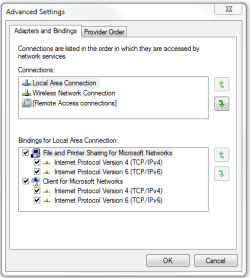
The Ethernet connection is first on the access order list (if you don't know what I'm talking about, see the image attached) and the WIFI is second.
Today, the internet access was lost on the Ethernet connection, however internet access was still available on the WIFI connection. In spite of this, Windows and all other applications were sill trying to use the first connection, instead of switching to the one with internet access!
What I want to know is, why, for example, when only the internet access is lost on one adapter (i.e. the adapter is still connected, (has an IP) but no internet gateway or DNS server address(es) are available), Windows doesn't fallback to the other connection, which has internet access?
In the same sense; why can't Windows 7 divide outgoing connections between all internet-connected adapters, and utilize two separate bandwidths?
Thank you very much!
The Ethernet connection is first on the access order list (if you don't know what I'm talking about, see the image attached) and the WIFI is second.
Today, the internet access was lost on the Ethernet connection, however internet access was still available on the WIFI connection. In spite of this, Windows and all other applications were sill trying to use the first connection, instead of switching to the one with internet access!
What I want to know is, why, for example, when only the internet access is lost on one adapter (i.e. the adapter is still connected, (has an IP) but no internet gateway or DNS server address(es) are available), Windows doesn't fallback to the other connection, which has internet access?
In the same sense; why can't Windows 7 divide outgoing connections between all internet-connected adapters, and utilize two separate bandwidths?
Thank you very much!
My Computer
- Computer Manufacturer/Model Number
- Custom built PC
- OS
- Windows 7 Ultimate 32bit
- CPU
- Intel Pentium 4 3GHz Prescott
- Motherboard
- Asus P5GD1-VM
- Memory
- 2048 DDR Dual Channel
- Graphics Card(s)
- Sapphire ATI Radeon HD5450 1GB RAM
- Sound Card
- M-Audio Audiophile 192
- Monitor(s) Displays
- 2: Samsung 710v and 560v
- Screen Resolution
- 1280x1024 + 768x1024 (portrait mode)
- Hard Drives
- 2 - Seagate (360GB) and WD (80GB)
- PSU
- Enermax NAXN 450w (model number: ENP450AST)
- Case
- Original Asus case
- Cooling
- Stock cooling fans
- Keyboard
- Microsoft v2000
- Mouse
- Microsoft Explorer Mouse
- Internet Speed
- Fast