
Solved Fallout 3 GOTY crashes after player movement (USING MODS)

JonnyLectron

New member
Local time
3:29 AM
Messages
30
I have fallout 3 goty for windows, it crashes after walking a short distance in any direction, with or without mods active. I have done several "fixes" with no results.
I have added "bUseThreadedAI=1 iNumHWThreads=2" to the FALLOUT.INI file.
I have enabled large address handling (though I only have 2 gigs of ram and a 32 bit OS)
I have archive invalidation enabled
I used Fallout Mod Manager to disable GFWL
The game boots and loads all mods, so I have suspicion to believe its not a mod conflict.
I can load a game, and create a new game. If I walk too far/much in any direction the game crashes.
I have counted roughly 30 footstep sounds before each crash, and even crashes when walking against a wall.

My specs
HP Comquack dx2300 microtower
MSI 0A90 mobo
Intel Pentium Dual Core e2160 @ 1.8GHz (non core 2 duo)
2 gigs of DDR2 533mhz ram
2 nvidia graphics cards, ASUS gt210 1 gig model with passive cooler OC'ed, ASUS gt720 2 gig OC'ed "corporate stable model" with aftermarket cooler (Evercool Everlubricate VC-RF Universal VGA Cooler, copper color) The gt210 is OC'ed to 650mhz core and memory speed, the gt720 is OC'ed to 1100mhz core and 980 mhz memory, both are done in MSI afterburner.
Windows 7 32 bit Home Premium
WD Caviar 80gig 7200rpm main
WD Scorpio Blue 320gig 5400rpm 2.5" storage
Sandisk 64gig USB2.0 formatted for NTFS (this is where I have fallout 3 installed with all of the mods and fallout mod manager. I install games here that normally studder on my hard drives. transfer rate of 40 mb/s)
USB DAC for Sony MDR XD100 headphones for when I want some "nice" sound
pdp afterglow universal headset for chat and games, as well as onboard sound into cheapo speakers for games.
250 watt PSU
Temps on the CPU reach 60c at load
Temps on the gt210 never pass 41c
Temps on the gt720 never pass 35c
Temps on my hard drives never pass 35c

I can upgrade my ram to 4 gigs if that is an issue, and I can overclock the CPU to 2.4GHz.
I don't want to overclock the CPU because my power supply is already stretched thin and I don't want to change it out, though I can do that because I have a 350 watt power supply from an old AMD 64fx dual core build that I no longer use.
I have a key to use for w7 64bit from my old AMD build, but that's a daunting task to change OS's, but if that will help after upgrading to 4 gigs of RAM, I will switch.

My main issue is I AM CHEAP and I would like to get this running on my existing hardware and software combination. This computer runs far cry 2 on the gt720 at 50 fps avg. , and 30fps avg. on the gt210, with the settings nearly maxed at 1366x768, vsync off.
I am a little more of an advanced user, and I know basic DOS from being a 90's kid. I am new to Fallout 3 modding because I never had a GPU powerful enough to handle PC Oblivion/fallout at good framerates until recently BECAUSE I'M CHEAP and gamed on console.

Mod list / boot order determined by LOOT

(starting here, these are in bold in Fallout mod manager 0.13.21)

Fallout3.esm
Anchorage.esm
ThePitt.esm
StreetLights.esm
BrokenSteel.esm
PointLookout.esm
zeta.esm
Unofficial Fallout 3 Patch.esm
Enhanced Weather - Rain and Snow.esm
WastelandGuards01.esm
CRAFT.esm
CALIBR.esm
FO3 Wanderers Edition - Main File.esm
DCInteriors_ComboEdition.esm
Mart's Mutant Mod.esm
Project Beauty.esm
EVE.esm
Hairday.esm
Xepha's Dynamic Weather.esm
FO3 Wanderers Edition - Alternate Travel.esp

(the following are not in bold)

BeardsofFallout.esp
FO3 Wanderers Edition - Main File.esp
Chems and Meds Re-Textures Pack.esp
Enhanced Weather - Weather Sounds in Interiors.esp
Enhanced Weather - Rain and Snow in Fallout.esp
Enhanced Weather - REBOOT.esp
Enhanced Weather - Sneak Bonus during Storms.esp
Fellout-Full.esp
FO3 Wanderers Edition - DLC Broken Steel.esp
FO3 Wanderers Edition - DLC Anchorage.esp
Xepha's Dynamic Weather - Main.esp
F3ProjectRealityMkI.esp
FO3_WRP.esp
Project Beauty- Point Lookout.esp
Project Beauty- Broken Steel.esp
FO3 Wanderers Edition - DLC Mothership Zeta.esp
Fellout-Zeta.esp
Mart's Mutant Mod.esp
Mart's Mutant Mod - Project Beauty.esp
Mart's Mutant Mod - DLC Zeta.esp
Fellout-PointLookout.esp
Fellout-pipboylight.esp
Fellout-BrokenSteel.esp
Fellout-Anchorage.esp
Flora Overhaul.esp
FO3 Wanderers Edition - Optional Restore Tracers.esp (unchecked)
FO3 Wanderers Edition - DLC Point Lookout.esp
FO3 Wanderers Edition - DLC The Pitt.esp
FO3 Wanderers Edition - Optional Restore Tracers (automatics only).esp (unchecked)
Mart's Mutant Mod - DLC Broken Steel.esp
megalight.esp
NPC Height Randomizer.esp
PureWater-VeryClearNoRad.esp (unchecked)
PureWater-VeryCleanLittleRad.esp (unchecked)
PureWater-NoRad.esp (unchecked)
PureWater-LittleRad.esp
UWWUT - Broken Steel Addon.esp (unchecked, confirmed to cause issues with ALL my other mods, base fo3 game, and DLC)
RubberPilesFix.esp

The game also crashes without the mods on, and being installed on my other hard drives. All of the files, except FOSE, were downloaded with the Nexus Mod Manager (a glitchy, crash prone piece of crap) and installed with Fallout Mod Manager. I no longer have NMM due to rage delete, but if it will help I will (regretfully) re-install.
 

My Computer My Computer

Computer type
PC/Desktop
Computer Manufacturer/Model Number
Custom Build
OS
Windows 7 64Bit Ultimate
CPU
AMD A10 7800k Stock clock 3.5ghz
Motherboard
Gigabyte F2A78M-D3H
Memory
2x4gb GSKILL Sniper 2400 running 2133mhz dual channel
Graphics Card(s)
Onboard R7 260 with a UEFI forced 2gb framebuffer
Sound Card
Realtek Onboard
Monitor(s) Displays
Dell SE198WFP 16:10
Screen Resolution
1440 x 900
Hard Drives
ADATA 128gb SSD
WD Blue 1TB 7200rpm spinner
PSU
Corsair CX430
Case
Cougar Spike
Cooling
Stock AMD X4 860k Cooler
Keyboard
PS/2
Mouse
Microsoft Wireless 3500
Internet Speed
Charter, 5 up 50 down
Antivirus
Microsoft Security Essentials
Browser
Chrome/Firefox
Other Info
Added VRM Heatsinks
SATA Multicard reader.
SATA optical drive.
I'm not sure about your knowledge of internals of PC's but I'm assuming you've done the aftermarket cooling on the GPU so I feel you could do this one thing, just as a test, remove the 210 and try the game with one GPU, let us know how you get on.
 

My Computer My Computer

Computer type
PC/Desktop
Computer Manufacturer/Model Number
Custom Build
OS
Windows 7 Ultimate x64 SP1
CPU
Intel Q6600 @ 2.6Ghz
Motherboard
Evga NF78-CK-132-A 3-Way SLI
Memory
4Gb DDR2 Corsair Dominator @ 800Mhz 5-5-5-15
Graphics Card(s)
EVGA 560 GTX SC FTW 1GB
Sound Card
Realtek HD 7.1 Audio, Plantronics GameCom780 7.1 Headset
Monitor(s) Displays
Dell S2409W
Screen Resolution
1920 x 1080
Hard Drives
SanDisk SDSSDHII-120G-G25 120GB SSD
Samsung 7200RPM 750Gb SATA
Samsung 850 EVO 120GB SSD
Western Digital Green 1TB 7200RPM
PSU
Xigmatek 750W Quad sli quad core 80% eff
Case
Antec 900 Gaming Case
Cooling
Zalman CNPS9700-NT NVIDIA Tritium
Keyboard
Logitech generic keyboard, MS wireless keyboard
Mouse
Razor Lachesis Banshee V2 Blue, 4000DPI, MS wireless mouse
Internet Speed
152Mb Virgin Media Fibre Optic
Antivirus
Microsoft Security Essentials
Browser
Google Chrome
Other Info
Wireless Gaming Receiver for Windows, Wireless Xbox 360 Pad
My specs
HP Comquack dx2300 microtower
MSI 0A90 mobo
Intel Pentium Dual Core e2160 @ 1.8GHz (non core 2 duo)
2 gigs of DDR2 533mhz ram
250 watt PSU

A 250W PSU will not run two GPUs. The rest of your specs are nowhere near the level required to game.


Temps on the CPU reach 60c at load
Temps on the gt210 never pass 41c
Temps on the gt720 never pass 35c
Temps on my hard drives never pass 35c

The GPU temps are so low because they're never stressed. When you stress them the machine will crash because A) The GPUs can't handle the game and B) the PSU can't handle the GPUs.
 

My Computer My Computer

Computer type
PC/Desktop
Computer Manufacturer/Model Number
Custom Build
OS
W7 Pro x64 SP1 | W10 Pro IP x64 | W8.1 Pro x64 VM | Linux Mint VM
CPU
i7-4790k @ 4GHz (4.4GHz Boost)
Motherboard
ASUS Sabertooth Z87 (BIOS Rev 2004)
Memory
16GB DDR3 Kingston HyperX Fury @ 1600MHz CL 9-9-9-27
Graphics Card(s)
EVGA GTX 980 Classified
Sound Card
Realtek Onboard
Monitor(s) Displays
Samsung S27D390
Screen Resolution
1920 x 1080
Hard Drives
240GB Intel 520 Series SSD |
Samsung 850 EVO 120GB SSD |
2TB WD Caviar Black |
2TB WD Caviar Green
PSU
Corsair HX850-80 Gold Modular
Case
Cooler Master Silencio 650
Cooling
Corsair H80i w/2 x Corsair SP120 | 2 x 120mm Noctua NF-S12B
Keyboard
Microsoft Sidewinder X4
Mouse
Gigabyte M6900 optical
Internet Speed
152mb
Antivirus
F-Secure
Browser
Firefox 38.0
Other Info
Backup Rig: Win 7 Pro 64-bit | AMD A10-5800k | ASUS F2A85-V Pro | 8GB Samsung DDR3 @1600MHz | 120GB Toshiba SDD | 2TB Seagate HDD | Cooler Master Silencio 550
A 250W PSU will not run two GPUs. The rest of your specs are nowhere near the level required to game.
I am running 2 graphics cards well within my power supply's limit. Combined power usage of both cards is 90 watts. They are both stripped down ITX frame cards that don't have high power requirements, and I purchased both of them because I am extremely power conscious. Since posting, I have removed the overclock on the 210, and use it for playing older 3dfx games (with a wrapper) and movie viewing. The 720 has a clock speed that is too high to run older games, and games are running too fast (example: Streets of SimCity runs all of the other cars, and the water/lava fx, at somewhere around 3x the normal speed)
I am cheap and don't like paying a ridiculous power bill. the 720 is my horsepower card, and the 210 is just for running light things.
The GPU temps are so low because they're never stressed. When you stress them the machine will crash because A) The GPUs can't handle the game and B) the PSU can't handle the GPUs.
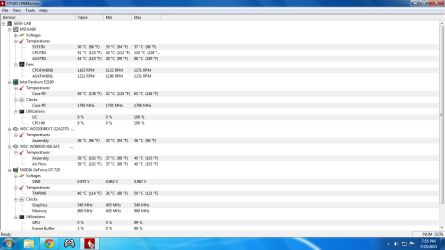
My GPUs do get stressed. I have taken them apart (voiding the warranties) and replaced the old thermal paste with fresh paste. I played "scarface the world is yours" with the 210 (EDIT I meant the 720 here) and it has reached 45c.
Evidence in photo, room temperature was roughly 90f, so the temps are a bit higher.

I'm not sure about your knowledge of internals of PC's but I'm assuming you've done the aftermarket cooling on the GPU so I feel you could do this one thing, just as a test, remove the 210 and try the game with one GPU, let us know how you get on.
Yes I changed the cooler on my gt720 to cool it better under load with OC. The stock clock is 500somethingMHz and the Memory clock is 900Mhz. The OC is more than double on the core clock, and almost 100MHz more on the memory.
I have removed the OC on the gt210 because I feel it is plenty fast enough for browsing the web and h.264 playback.
I will try that out, normally I just disable the gpu's in BIOS and re-enable when I plan on gaming.
 

Attachments

  • singlecoregaming.png
    singlecoregaming.png
    46.8 KB · Views: 2

My Computer My Computer

Computer type
PC/Desktop
Computer Manufacturer/Model Number
Custom Build
OS
Windows 7 64Bit Ultimate
CPU
AMD A10 7800k Stock clock 3.5ghz
Motherboard
Gigabyte F2A78M-D3H
Memory
2x4gb GSKILL Sniper 2400 running 2133mhz dual channel
Graphics Card(s)
Onboard R7 260 with a UEFI forced 2gb framebuffer
Sound Card
Realtek Onboard
Monitor(s) Displays
Dell SE198WFP 16:10
Screen Resolution
1440 x 900
Hard Drives
ADATA 128gb SSD
WD Blue 1TB 7200rpm spinner
PSU
Corsair CX430
Case
Cougar Spike
Cooling
Stock AMD X4 860k Cooler
Keyboard
PS/2
Mouse
Microsoft Wireless 3500
Internet Speed
Charter, 5 up 50 down
Antivirus
Microsoft Security Essentials
Browser
Chrome/Firefox
Other Info
Added VRM Heatsinks
SATA Multicard reader.
SATA optical drive.
The photo was before overclock, and before I changed the cooler. It has stock paste in the photo with a stock clock and stock cooler.

Funny thing about the aftermarket gt720 cooler, it didn't initially fit because the stock cooler has grooves that rise it a bit above the components. I jammed flattened out american pennies in between the aftermarket cooler and the GPU chip because it was rubbing on the components the stock cooler was designed not to touch.
 

My Computer My Computer

Computer type
PC/Desktop
Computer Manufacturer/Model Number
Custom Build
OS
Windows 7 64Bit Ultimate
CPU
AMD A10 7800k Stock clock 3.5ghz
Motherboard
Gigabyte F2A78M-D3H
Memory
2x4gb GSKILL Sniper 2400 running 2133mhz dual channel
Graphics Card(s)
Onboard R7 260 with a UEFI forced 2gb framebuffer
Sound Card
Realtek Onboard
Monitor(s) Displays
Dell SE198WFP 16:10
Screen Resolution
1440 x 900
Hard Drives
ADATA 128gb SSD
WD Blue 1TB 7200rpm spinner
PSU
Corsair CX430
Case
Cougar Spike
Cooling
Stock AMD X4 860k Cooler
Keyboard
PS/2
Mouse
Microsoft Wireless 3500
Internet Speed
Charter, 5 up 50 down
Antivirus
Microsoft Security Essentials
Browser
Chrome/Firefox
Other Info
Added VRM Heatsinks
SATA Multicard reader.
SATA optical drive.
A 250W PSU will not run two GPUs. The rest of your specs are nowhere near the level required to game.
I am running 2 graphics cards well within my power supply's limit. Combined power usage of both cards is 90 watts.

Which leaves 160W for eveything else which is nowhere near enough. Still, if you know better I'll leave you to it.
 

My Computer My Computer

Computer type
PC/Desktop
Computer Manufacturer/Model Number
Custom Build
OS
W7 Pro x64 SP1 | W10 Pro IP x64 | W8.1 Pro x64 VM | Linux Mint VM
CPU
i7-4790k @ 4GHz (4.4GHz Boost)
Motherboard
ASUS Sabertooth Z87 (BIOS Rev 2004)
Memory
16GB DDR3 Kingston HyperX Fury @ 1600MHz CL 9-9-9-27
Graphics Card(s)
EVGA GTX 980 Classified
Sound Card
Realtek Onboard
Monitor(s) Displays
Samsung S27D390
Screen Resolution
1920 x 1080
Hard Drives
240GB Intel 520 Series SSD |
Samsung 850 EVO 120GB SSD |
2TB WD Caviar Black |
2TB WD Caviar Green
PSU
Corsair HX850-80 Gold Modular
Case
Cooler Master Silencio 650
Cooling
Corsair H80i w/2 x Corsair SP120 | 2 x 120mm Noctua NF-S12B
Keyboard
Microsoft Sidewinder X4
Mouse
Gigabyte M6900 optical
Internet Speed
152mb
Antivirus
F-Secure
Browser
Firefox 38.0
Other Info
Backup Rig: Win 7 Pro 64-bit | AMD A10-5800k | ASUS F2A85-V Pro | 8GB Samsung DDR3 @1600MHz | 120GB Toshiba SDD | 2TB Seagate HDD | Cooler Master Silencio 550
Yes I changed the cooler on my gt720 to cool it better under load with OC. The stock clock is 500somethingMHz and the Memory clock is 900Mhz. The OC is more than double on the core clock, and almost 100MHz more on the memory.
I have removed the OC on the gt210 because I feel it is plenty fast enough for browsing the web and h.264 playback.
I will try that out, normally I just disable the gpu's in BIOS and re-enable when I plan on gaming.

Everything will run smoother if you just remove the lesser card, there's absolutely no reason to have the 210 in there at all, it does nothing for your system apart from consume power (even when disabled), I have a 750w power supply and it's not consuming more than my PC allows it to, when Idle my PC consumes about 200w, but when gaming it uses 500w+ and even higher at the wall socket due to efficiency rating of 80%.
 

My Computer My Computer

Computer type
PC/Desktop
Computer Manufacturer/Model Number
Custom Build
OS
Windows 7 Ultimate x64 SP1
CPU
Intel Q6600 @ 2.6Ghz
Motherboard
Evga NF78-CK-132-A 3-Way SLI
Memory
4Gb DDR2 Corsair Dominator @ 800Mhz 5-5-5-15
Graphics Card(s)
EVGA 560 GTX SC FTW 1GB
Sound Card
Realtek HD 7.1 Audio, Plantronics GameCom780 7.1 Headset
Monitor(s) Displays
Dell S2409W
Screen Resolution
1920 x 1080
Hard Drives
SanDisk SDSSDHII-120G-G25 120GB SSD
Samsung 7200RPM 750Gb SATA
Samsung 850 EVO 120GB SSD
Western Digital Green 1TB 7200RPM
PSU
Xigmatek 750W Quad sli quad core 80% eff
Case
Antec 900 Gaming Case
Cooling
Zalman CNPS9700-NT NVIDIA Tritium
Keyboard
Logitech generic keyboard, MS wireless keyboard
Mouse
Razor Lachesis Banshee V2 Blue, 4000DPI, MS wireless mouse
Internet Speed
152Mb Virgin Media Fibre Optic
Antivirus
Microsoft Security Essentials
Browser
Google Chrome
Other Info
Wireless Gaming Receiver for Windows, Wireless Xbox 360 Pad
Possibly you could add a couple more pennies ;)
Fallout 3: Game of the Year Edition System Requirements


Minimum:
Operating system: Windows XP/Vista
Processor: 2.4 Ghz Intel Pentium 4 or equivalent processor
Memory: 1 GB (XP)/ 2 GB (Vista)
Hard disk space: 7 GB
Video: Direct X 9.0c compliant video card with 256MB RAM (NVIDIA 6800 or better/ATI X850 or better)
Sound: DirectX®: 9.0c
Controller support: Xbox 360 controller
Other Requirements: Online play requires log-in to Games For Windows - Live

Supported Video Card Chipsets:
NVIDIA GeForce 200 series, Geforce 9800 series, Geforce 9600 series, Geforce 8800 series, Geforce 8600 series, Geforce 8500 series, Geforce 8400 series, Geforce 7900 series, Geforce 7800 series, Geforce 7600 series, Geforce 7300 series, GeForce 6800 series
ATI HD 4800 series, HD 4600 series, HD 3800 series, HD 3600 series, HD 3400 series, HD 2900 series, HD 2600 series, HD 2400 series, X1900 series, X1800 series, X1600 series, X1300 series, X850 series

Recommended:
Operating system: Windows XP/Vista
Processor: Intel Core 2 Duo processor
Memory: 2 GB System RAM
Hard disk space: 7 GB
Video: Direct X 9.0c compliant video card with 512MB RAM (NVIDIA 8800 series, ATI 3800 series)
Sound: DirectX®: 9.0c
Controller support: Xbox 360 controller
 

My Computer My Computer

Computer type
PC/Desktop
Computer Manufacturer/Model Number
Custom assembled by me :}
OS
Win-7-Pro64bit 7-H-Prem-64bit
CPU
i7-5930K 2nd i9-9940x both water blocked VRM's too
Motherboard
ASUS SABERTOOTH X99 2nd ASUS x299 Apex
Memory
Trident-z 3200C14 2nd Trident-z 3600C16
Graphics Card(s)
EVGA 1080ti ftw3 2nd Titan Xp both water blocked
Sound Card
Built-in Realtek
Monitor(s) Displays
1-AOC G2460PG 24"G-Sync 144Hz/ 2nd 1-ASUS VG248QE 24" 144Hz
Screen Resolution
1920 x 1080 144Hz
Hard Drives
2-Samsung M.2 Evo & Evo Plus
2-Samsung 850 EVO 500GB SSD's/ 3-2.5 W.D. Black 1tb-&3-1tb/3-3.5 WD Black 1tb hdd's
PSU
EVGA SuperNOVA 1000-P2 2nd 1200-P2
Case
2-Corsair Obsidian Series 450D Black ATX Mid Tower
Cooling
Custom water loops
Keyboard
Logitech G710+/ 2nd Logitech G910
Mouse
2-RedDragon M901 Perdition 16400 dpi Gaming mouse = wired
Internet Speed
Comcast Ping 19ms 89.31mbps download speed 6.12mbps upload
Antivirus
Malwarebytes Pro/ Superantispyware Pro
Browser
FireFox & Pale moon
Other Info
2nd ASUS X299 Apex/Intel i9-9940x with Custom water loop/7H-Prem-x64/Corsair 450D case/Ram Trident-z 3600C16 4x8gb / Samsung970Evo plus 500gb SSD/Dual ssd EZ swap evo/PSU EVGA SuperNova 1200w-P2 80+Platinum/GPU Titan Xp /8-ML-140 on push-pull on 2-280GTX rads
I'm not sure about your knowledge of internals of PC's but I'm assuming you've done the aftermarket cooling on the GPU so I feel you could do this one thing, just as a test, remove the 210 and try the game with one GPU, let us know how you get on.

I have removed the gt210, and tested it out. I'm still having the mentioned problem.

Everything will run smoother if you just remove the lesser card, there's absolutely no reason to have the 210 in there at all, it does nothing for your system apart from consume power (even when disabled), I have a 750w power supply and it's not consuming more than my PC allows it to, when Idle my PC consumes about 200w, but when gaming it uses 500w+ and even higher at the wall socket due to efficiency rating of 80%.
I imagine your computer is quite awesome, running that much power. I'd love to be able to afford that, and the power bill that comes with it, but alas I'm poor. So, I'm working with what I have, and what I have is a dual dell monitor setup on 2 nvidia itx workstation oriented gpus.
I'm not here to talk about specs or power usage on PCs, I'm here seeking help.
I really don't mean that in a snotty way, so PLEASE don't take it that way.

I neglected to mention the dual monitor setup. WOOPS. I have 2 monitors, one is a Emachines VGA LCD display with tiny speakers, and I believe the other to be a Dell Ultrasharp, with silver trim and blue/amber power led. Both are 16:9 21" monitors, and both run a desktop resolution of 1366x768 at 60Hz on VGA connectors.
The Dell is a little finicky with resolutions, and does not go to 1080p, despite having a DVI connection.

This is a strange problem, and I'm only having it with this computer. I'm thinking it might a read/write problem with a hard drive, because I temporarily removed the system created page file on both hard drives and the game lasted a little longer. Which was an incredibly strange thing.
 

My Computer My Computer

Computer type
PC/Desktop
Computer Manufacturer/Model Number
Custom Build
OS
Windows 7 64Bit Ultimate
CPU
AMD A10 7800k Stock clock 3.5ghz
Motherboard
Gigabyte F2A78M-D3H
Memory
2x4gb GSKILL Sniper 2400 running 2133mhz dual channel
Graphics Card(s)
Onboard R7 260 with a UEFI forced 2gb framebuffer
Sound Card
Realtek Onboard
Monitor(s) Displays
Dell SE198WFP 16:10
Screen Resolution
1440 x 900
Hard Drives
ADATA 128gb SSD
WD Blue 1TB 7200rpm spinner
PSU
Corsair CX430
Case
Cougar Spike
Cooling
Stock AMD X4 860k Cooler
Keyboard
PS/2
Mouse
Microsoft Wireless 3500
Internet Speed
Charter, 5 up 50 down
Antivirus
Microsoft Security Essentials
Browser
Chrome/Firefox
Other Info
Added VRM Heatsinks
SATA Multicard reader.
SATA optical drive.
Solved

The problem was solved by doing 2 things

1st I enabled write cache for my flash drive that I had fallout installed on.
That got rid of the crash after about 30 steps. I was on to something when I disabled the system allocation on my hard drives, and decided to try that out. IT FIXED THE CRASH ON WALKING/LOADING NEW SOUNDS/TERRAIN GENERATION

2nd, I found that the pure water mod was conflicting with my fallout 3 settings for water.
I set all available settings to low and disabled all water FX, and crashing upon finding water was solved. I know this wasn't stated in the post, but I was going to post about it in a separate thread because I would need a different title.


Please lock this thread
 
Last edited:

My Computer My Computer

Computer type
PC/Desktop
Computer Manufacturer/Model Number
Custom Build
OS
Windows 7 64Bit Ultimate
CPU
AMD A10 7800k Stock clock 3.5ghz
Motherboard
Gigabyte F2A78M-D3H
Memory
2x4gb GSKILL Sniper 2400 running 2133mhz dual channel
Graphics Card(s)
Onboard R7 260 with a UEFI forced 2gb framebuffer
Sound Card
Realtek Onboard
Monitor(s) Displays
Dell SE198WFP 16:10
Screen Resolution
1440 x 900
Hard Drives
ADATA 128gb SSD
WD Blue 1TB 7200rpm spinner
PSU
Corsair CX430
Case
Cougar Spike
Cooling
Stock AMD X4 860k Cooler
Keyboard
PS/2
Mouse
Microsoft Wireless 3500
Internet Speed
Charter, 5 up 50 down
Antivirus
Microsoft Security Essentials
Browser
Chrome/Firefox
Other Info
Added VRM Heatsinks
SATA Multicard reader.
SATA optical drive.
Update!

The game still works after doing those 2 changes.

I have setup a different mod set, and it also crashes when going back on the fixes I made.

Here is my updated mod set.
Fallout Mod Manager 0.13.21, load order determined by LOOT

fallout3.esm
anchorage.esm
thepitt.esm
StreetLights.esm
brokensteel.esm
pointlookout.esm
zeta.esm
CALIBR.esm
RoadWardens.esm
FO3 Wanderers Edition - Main File.esm
Xepha's Dynamic Weather.esm
FO3 Alternate Travel.esp
Mar's Mutant Mod.esm
Project Beauty.esm
FO# Wanderers Edition - Main File.esp
StreetLights - Wasteland.esp
FO3 Wanderers Edition - Followers Enhanced (BrokenSteel).esp
FO3 Wanderers Edition - Optional VATS Halftime.esp
FO3 Wanderers Edition - DLC Broken Steel.esp
FO3 Wanderers Edition - Optional Restore Tracers.esp
FO3 Wanderers Edition - Optional Restore Tracers (automatics only).esp
Mar's Mutant Mod - DLC Anchroage.esp
Mar's Mutant Mod - DLC Point Lookout.esp
Mar's Mutant Mod.esp
Mar's Mutant Mod - FWE Master Release.esp
Mar's Mutant Mod - Master Menu Module
Mar's Mutant Mod - Natural Selection
Mar's Mutant Mod - Zones Respawn
Mar's Mutant Mod - DLC Broken Steel.esp
Mar's Mutant Mod - FWE Master Release + Project Beauty.esp
Classic Fallout Weapons BETA.esp
FO3 Wanderers Edition - DLC Anchorage.esp
FO3 Wanderers Edition - DLC Mothership Zeta.esp
FO3 Wanderers Edition - DLC Point Lookout.esp
FO3 Wanderers Edition - DLC The Pitt.esp
Mart's Mutant Mod - DLC The Pitt.esp
Xepha's Dynamic Weather - Main.esp
Mart's Mutant Mod - DLC Zeta.esp
Mart's Mutant Mod - FWE Master Release + DLCs.esp
BeardsofFallout.esp
RoadWardens.esp
RoadWardensMMM.esp
RoadWardensUnInstall.esp (unchecked)
Mart's Mutant Mod - Project Beauty.esp
Project Beauty - Broken Steel.esp
Project Beauty - Point Lookout.esp
FO3 Wanderers Edition - Project Beauty (Followers Enhanced).esp
Xepha's Dynamic Weather - Green Tint Remover.esp
Flora Overhaul.esp
Raider Combat Armor.esp
Raider Combat Armor Pitt.esp

I am also using NMC's Texture Pack, performance version.

The game runs at a stable 30-40 fps on 1280x720. The only places I've been off my notes that it dips lower than 20 are when the Enclave base explodes, Craterside Supply, and all of Rivet City with the exception of the the surgeons hideout in the front of the ship. It gets choppy by the statue in the basement of the dupont/dunwich(???) building in the southwest for a quest in one of the DLCs I haven't done yet.
Other than that, the game runs smooth.
Keep in mind, I came from console. So guys, before you tear me up about thinking 30fps is smooth, try playing fallout on xbox 360. Or any game that isn't halo/forza/cod. It is seriously worse with framerates compared to what I'm experiencing with this cheap Pentium dual core PC. My old AMD PC ran fallout 3 better than console. The specs on that were an msi kvm-#### AGP motherboard with a 64fx Dual core 3800+ overclocked to 3.2GHz with a voltage boost that I can't remember and a modified Phoenix systems BIOS, with 1 gig of DDR2 server ram at 800mhz, a 350watt psu, and a AGP Nvidia 6200 refurb w/512mb of vram. I ran ps2 era games (need for speed underground FTW) I could find for pc on that amd perfectly fine as well.
I didn't do the BIOS mod, or the overclock. I'm not that savvy. I did the amateur "FSB boost of 800MHz to the CPU in the stock BIOS" overclock, which still put it up to 2.4GHz on stock voltage and was stable. I quit using that pc because my 10" subwoofer fell off my desk and knocked the case over, which knocked a whole bunch of shit off the motherboard.

I didn't come here to chat about specs though. I came here for help. Thank you for the attempts.
 

My Computer My Computer

Computer type
PC/Desktop
Computer Manufacturer/Model Number
Custom Build
OS
Windows 7 64Bit Ultimate
CPU
AMD A10 7800k Stock clock 3.5ghz
Motherboard
Gigabyte F2A78M-D3H
Memory
2x4gb GSKILL Sniper 2400 running 2133mhz dual channel
Graphics Card(s)
Onboard R7 260 with a UEFI forced 2gb framebuffer
Sound Card
Realtek Onboard
Monitor(s) Displays
Dell SE198WFP 16:10
Screen Resolution
1440 x 900
Hard Drives
ADATA 128gb SSD
WD Blue 1TB 7200rpm spinner
PSU
Corsair CX430
Case
Cougar Spike
Cooling
Stock AMD X4 860k Cooler
Keyboard
PS/2
Mouse
Microsoft Wireless 3500
Internet Speed
Charter, 5 up 50 down
Antivirus
Microsoft Security Essentials
Browser
Chrome/Firefox
Other Info
Added VRM Heatsinks
SATA Multicard reader.
SATA optical drive.
I found another thing that really helped. I put heatsinks on my CPU power supply regulators, on the motherboard. I guess my computer was throttling because of heat. The CPU now runs noticeably faster, and so do almost all of my games, with the exception of Mercenaries 2. I can max Bioshock 1 & 2 now, and it is beautiful!
 

My Computer My Computer

Computer type
PC/Desktop
Computer Manufacturer/Model Number
Custom Build
OS
Windows 7 64Bit Ultimate
CPU
AMD A10 7800k Stock clock 3.5ghz
Motherboard
Gigabyte F2A78M-D3H
Memory
2x4gb GSKILL Sniper 2400 running 2133mhz dual channel
Graphics Card(s)
Onboard R7 260 with a UEFI forced 2gb framebuffer
Sound Card
Realtek Onboard
Monitor(s) Displays
Dell SE198WFP 16:10
Screen Resolution
1440 x 900
Hard Drives
ADATA 128gb SSD
WD Blue 1TB 7200rpm spinner
PSU
Corsair CX430
Case
Cougar Spike
Cooling
Stock AMD X4 860k Cooler
Keyboard
PS/2
Mouse
Microsoft Wireless 3500
Internet Speed
Charter, 5 up 50 down
Antivirus
Microsoft Security Essentials
Browser
Chrome/Firefox
Other Info
Added VRM Heatsinks
SATA Multicard reader.
SATA optical drive.
Back
Top