Fallout 3 on Windows 7.

Tried using the Fallout Mod Manager, it loaded the game fine, but the game still freezes in a few mins.
 

My Computer My Computer

OS
windows 7
Memory
4GB
Graphics Card(s)
nvidia 310M
It be a memory issue. Look in your event viewer and see if there is any memory access errors!!
 

My Computer My Computer

OS
Windows 7 ul RTM
I am stuck with the Fallout 3 Launcher loop issue as well - open the launcher and it sets the graphics to high, press play and it just sets the graphics again without starting the game.

I am running Windows 7 64 - have set all the permissions, taken ownership of the folders and files, disabled UAC, installed it on other HD partitions, installed as administrator, ran it as administrator, tried FOMM instead of fallout 3.exe or the launcher.

Anyone have a list of other possible solutions?

Thanks guys,

G.
 

My Computer My Computer

Computer Manufacturer/Model Number
ACER Aspire 5740G
OS
Windows 7 x64
CPU
Intel i5 430M 2.26ghz
Memory
6GB
Graphics Card(s)
ATi Mobility Radeon HD 5650 1GB Dedicated (3GB max)
Hard Drives
640GB
Im assuming everyone here whos having issues does have a legit copy, correct?
Because bad cracks can be a problem, and we wont/cant help resolve those issues.


Ok, when you start the launcher, are letting the game set everything itself?

I don't know about others but I found it doesnt always set things right.
Mine was always out of whack, even the wrong resolution.

Some machine can be more sensetive than others at certain things, depending on the setup.
Sadly, FO3 will wreak havok on onboard graphics solutions.

Having said that , Can you guys please try this:

Open the launcher and click the Medium settings button.
Then set the resolution to whatever your monitors native is.
Lastly, set Anti-Alaising to OFF and Antistropy to OFF.

Try the game now and see if it works.
If you have no issues, theres a setting problem at higher settings, or AA/AF issue the game or your set up doesnt like.
At this point you can start tweaking a little at a time to find the optimal settings for your set-up.
 

My Computer My Computer

Computer Manufacturer/Model Number
Custom (Self Build)
OS
Windows 7 Home Premium 64bit
CPU
Intel Core i7 2700k
Motherboard
eVGA P67 SLI
Memory
8GB Mushkin Redline Ridgebacks @1866
Graphics Card(s)
EVGA GTX570 SC
Sound Card
XiFi Titanium HD
Monitor(s) Displays
LG W2453V
Screen Resolution
1920x1080
Hard Drives
Intel 320 80GB -- Intel X25-V 40GB --WD Black 1TB x2 -- WD Blue 640GB
PSU
Seasonic x750
Case
Corsair 600T SE White
Cooling
eVGA Superclocked CPU Cooler
Keyboard
Saitek Cyborg
Antivirus
Kaspersky
Browser
IE
Other Info
LG BD/DVD
In addition to everything Wishmaster said, I would add that turning off the radio (if you've progressed that far) will sometimes clear up lag/stuttering issues.

Also there's a very good tweak guide for the game here - TweakGuides.com - Fallout 3 Tweak Guide
 

My Computer My Computer

Computer type
PC/Desktop
Computer Manufacturer/Model Number
Custom built by me.
OS
Windows 10 Pro
CPU
Intel Core i7-4770K (3.5Ghz)
Motherboard
Gigabyte G1 Sniper 5 (F10 Bios)
Memory
32 gig Corsair Dominator Platinum (4x8Gig)
Graphics Card(s)
Sapphire Tri-X R9 Fury
Sound Card
Soundblaster ZXR
Monitor(s) Displays
NEC PA242W 24" LCD Monitor
Screen Resolution
1920 x 1200
Hard Drives
Primary - Samsung 850 Pro (512gig), Samsung 840 Pro (256gig), 2TB WD Caviar Black.
PSU
EVGA Supernova 1000 G2
Case
Cooler Master HAF X
Cooling
Corsair H100i with Corsair Air Series SP120 Quiet Fans
Keyboard
Logitech Wireless Wave
Mouse
Logitech Performance MX
Internet Speed
High Speed Cable
Antivirus
Norton Security
Browser
IE11
Other Info
Memory Timings - 1866MHz @ 9-9-9-27-1T @ 1.5 volts
ehhhhh i have problems with fallout 3....
i get random crashes and windows 7 says "Fallout 3 has stopped working" etc. etc....
sometimes it happens when i load up my save, go into a new area, kill someone, and things like that. It's just completely random.

Specs:
Intel Core 2 Quad @ 2.4 GHz
nVidia GeForce GTX 280
8 gigs of ram
(Might help) Realtek HD Audio

plz help :(
 

My Computer My Computer

OS
Windows 7

My Computer My Computer

Computer type
PC/Desktop
Computer Manufacturer/Model Number
Airbot 2.0
OS
Windows 7 Ultimate x64 SP1
CPU
Core i7 920 (D0) @ 4Ghz, *26c idle *65c full load on air
Motherboard
Asus P6X58D Premium - Sata 6Gb/s - USB 3.0
Memory
12GB DDR3 Corsair Dominator -CMD12GX3M6A1600C8 at 1600MHz
Graphics Card(s)
Zotac Geforce GTX 770
Sound Card
ASUS Xonar D2X
Monitor(s) Displays
1 LG 24" Flatron W2453V-PF 1 Samsung 24" P2450H both 2ms RT
Screen Resolution
1920x1080@60hz
Hard Drives
1 Samsung 250GB 840 Evo SSD
1 OCZ Vertex2 180GB SSD
1 TB Samsung Spinpoint F1 7200RPM 32MB cache
2 500GB WD Caviar Blacks 7200RPM 32MB cache (WD5001AALS)

Pioneer DVD Burner DVR-S18M
PSU
Corsair HX1000W
Case
Cooler Master HAF 932
Cooling
Case Fans *3 230mm, *1 140mm/CPU - *Tuniq Tower 120 Extreme
Keyboard
Logitech Wireless MK700
Mouse
Logitech Wireless MK700
Internet Speed
DL 15 Mbps UL 0.98 Mbps
Antivirus
None
Browser
Firefox Nightly
Other Info
Processor-7.7 *RAM- 7.9 *Graphics-7.9 *Gaming Graphics- 7.9 *SSD- 7.8 W.E.I final score= 7.7
*Phone- LG Nexus 5
You have a quad core, right? Have you tried the restricting to 2 core limit fix yet?

http://www.sevenforums.com/gaming/75577-fallout-3-windows-7-64-bit-premium.html#post661965

That should not be necessary. I have a i7 920 oc @ 3.6 running it fine.

I would suggest, having read this entire thread prior to loading this game and suffering nil problems so far, that most are suffering either cos they are playing on a lap top (hard ware inadequate) or have downloaded the game from Steam (software conflict).

I personally have, as of yet, added no dlc or patched to 1.7 .
 

My Computer My Computer

Computer Manufacturer/Model Number
chillblast
OS
7 x64
CPU
i7-920 oc 3.6ghz
Motherboard
asus p6t se
Memory
cosair 6gb
Graphics Card(s)
xfx 4890 + AC accelero cooler
Sound Card
asus dx
Monitor(s) Displays
LG flatron 915ft +
Hard Drives
500gb x2
PSU
thermaltake evo blue 750w
Case
antes 902
Cooling
asaka nero
You have a quad core, right? Have you tried the restricting to 2 core limit fix yet?

http://www.sevenforums.com/gaming/75577-fallout-3-windows-7-64-bit-premium.html#post661965

That should not be necessary. I have a i7 920 oc @ 3.6 running it fine.

I would suggest, having read this entire thread prior to loading this game and suffering nil problems so far, that most are suffering either cos they are playing on a lap top (hard ware inadequate) or have downloaded the game from Steam (software conflict).

I personally have, as of yet, added no dlc or patched to 1.7 .

No one said it was necessary. It's a workaround that's stopped the random freezing for some, including me. I'm running it on a core i7 920 too, not from steam, and have the 1.7 patch. Happens for me with our without. If it stops the freezing, that's great. If it doesn't, it's not going to hurt to try.
 

My Computer My Computer

Computer type
PC/Desktop
Computer Manufacturer/Model Number
Airbot 2.0
OS
Windows 7 Ultimate x64 SP1
CPU
Core i7 920 (D0) @ 4Ghz, *26c idle *65c full load on air
Motherboard
Asus P6X58D Premium - Sata 6Gb/s - USB 3.0
Memory
12GB DDR3 Corsair Dominator -CMD12GX3M6A1600C8 at 1600MHz
Graphics Card(s)
Zotac Geforce GTX 770
Sound Card
ASUS Xonar D2X
Monitor(s) Displays
1 LG 24" Flatron W2453V-PF 1 Samsung 24" P2450H both 2ms RT
Screen Resolution
1920x1080@60hz
Hard Drives
1 Samsung 250GB 840 Evo SSD
1 OCZ Vertex2 180GB SSD
1 TB Samsung Spinpoint F1 7200RPM 32MB cache
2 500GB WD Caviar Blacks 7200RPM 32MB cache (WD5001AALS)

Pioneer DVD Burner DVR-S18M
PSU
Corsair HX1000W
Case
Cooler Master HAF 932
Cooling
Case Fans *3 230mm, *1 140mm/CPU - *Tuniq Tower 120 Extreme
Keyboard
Logitech Wireless MK700
Mouse
Logitech Wireless MK700
Internet Speed
DL 15 Mbps UL 0.98 Mbps
Antivirus
None
Browser
Firefox Nightly
Other Info
Processor-7.7 *RAM- 7.9 *Graphics-7.9 *Gaming Graphics- 7.9 *SSD- 7.8 W.E.I final score= 7.7
*Phone- LG Nexus 5
I would love to know the exact culprit that causes some of these issues.
Although some may be due to systems that aren't up to the task, many are far & beyond the sys. requirements and having issues.

I run FO3, with patch 1.7, all 4 DLCs, and a ton of mods w/out issue. No tweaking was needed.
It has crashed 1 or 2 times with the .."stopped working message" but after many hours playtime, its extremely rare.
Mine is the D2D version.

Others are having tons of issues.

This leads me to beleive that there must be something common among those with issues that have the trouble, thats the culprit.


Although I havent had any issues with it personally, i have heard Windows Live is the culprit for many.
 

My Computer My Computer

Computer Manufacturer/Model Number
Custom (Self Build)
OS
Windows 7 Home Premium 64bit
CPU
Intel Core i7 2700k
Motherboard
eVGA P67 SLI
Memory
8GB Mushkin Redline Ridgebacks @1866
Graphics Card(s)
EVGA GTX570 SC
Sound Card
XiFi Titanium HD
Monitor(s) Displays
LG W2453V
Screen Resolution
1920x1080
Hard Drives
Intel 320 80GB -- Intel X25-V 40GB --WD Black 1TB x2 -- WD Blue 640GB
PSU
Seasonic x750
Case
Corsair 600T SE White
Cooling
eVGA Superclocked CPU Cooler
Keyboard
Saitek Cyborg
Antivirus
Kaspersky
Browser
IE
Other Info
LG BD/DVD
You have a quad core, right? Have you tried the restricting to 2 core limit fix yet?

http://www.sevenforums.com/gaming/75577-fallout-3-windows-7-64-bit-premium.html#post661965

That should not be necessary. I have a i7 920 oc @ 3.6 running it fine.

I would suggest, having read this entire thread prior to loading this game and suffering nil problems so far, that most are suffering either cos they are playing on a lap top (hard ware inadequate) or have downloaded the game from Steam (software conflict).

I personally have, as of yet, added no dlc or patched to 1.7 .

No one said it was necessary. It's a workaround that's stopped the random freezing for some, including me. I'm running it on a core i7 920 too, not from steam, and have the 1.7 patch. Happens for me with our without. If it stops the freezing, that's great. If it doesn't, it's not going to hurt to try.

I have to agree with Airbot on this one even though I personally have no issues running the game and thus no need to use the "2 core limit" fix.

I personally wouldn't want my processor limited, but if it works in getting to game to run, well whats the harm? You could always reverse the fix after the game.

And just because you and I have no problems doesn't mean others are as fortunate. Regardless of system specs ;)
 

My Computer My Computer

Computer type
PC/Desktop
Computer Manufacturer/Model Number
Custom built by me.
OS
Windows 10 Pro
CPU
Intel Core i7-4770K (3.5Ghz)
Motherboard
Gigabyte G1 Sniper 5 (F10 Bios)
Memory
32 gig Corsair Dominator Platinum (4x8Gig)
Graphics Card(s)
Sapphire Tri-X R9 Fury
Sound Card
Soundblaster ZXR
Monitor(s) Displays
NEC PA242W 24" LCD Monitor
Screen Resolution
1920 x 1200
Hard Drives
Primary - Samsung 850 Pro (512gig), Samsung 840 Pro (256gig), 2TB WD Caviar Black.
PSU
EVGA Supernova 1000 G2
Case
Cooler Master HAF X
Cooling
Corsair H100i with Corsair Air Series SP120 Quiet Fans
Keyboard
Logitech Wireless Wave
Mouse
Logitech Performance MX
Internet Speed
High Speed Cable
Antivirus
Norton Security
Browser
IE11
Other Info
Memory Timings - 1866MHz @ 9-9-9-27-1T @ 1.5 volts
Correct me if I'm wrong but modifying the fallout ini file to a 2 core limit, only lets that game use 2 cores, it won't have any system wide effect, or limit your processor for anything else. Not saying you said that, just trying to make it a little more clear. But yeah, I don't think it would be any problem at least trying it out, as sygnus21 says, you can just reverse it.

Mine is also from D2D, and I use an offline profile for it, so I'm guessing, speaking for me here, that I don't think it has anything to do with GFWL. Could be wrong though, I'm not positive.
 

My Computer My Computer

Computer type
PC/Desktop
Computer Manufacturer/Model Number
Airbot 2.0
OS
Windows 7 Ultimate x64 SP1
CPU
Core i7 920 (D0) @ 4Ghz, *26c idle *65c full load on air
Motherboard
Asus P6X58D Premium - Sata 6Gb/s - USB 3.0
Memory
12GB DDR3 Corsair Dominator -CMD12GX3M6A1600C8 at 1600MHz
Graphics Card(s)
Zotac Geforce GTX 770
Sound Card
ASUS Xonar D2X
Monitor(s) Displays
1 LG 24" Flatron W2453V-PF 1 Samsung 24" P2450H both 2ms RT
Screen Resolution
1920x1080@60hz
Hard Drives
1 Samsung 250GB 840 Evo SSD
1 OCZ Vertex2 180GB SSD
1 TB Samsung Spinpoint F1 7200RPM 32MB cache
2 500GB WD Caviar Blacks 7200RPM 32MB cache (WD5001AALS)

Pioneer DVD Burner DVR-S18M
PSU
Corsair HX1000W
Case
Cooler Master HAF 932
Cooling
Case Fans *3 230mm, *1 140mm/CPU - *Tuniq Tower 120 Extreme
Keyboard
Logitech Wireless MK700
Mouse
Logitech Wireless MK700
Internet Speed
DL 15 Mbps UL 0.98 Mbps
Antivirus
None
Browser
Firefox Nightly
Other Info
Processor-7.7 *RAM- 7.9 *Graphics-7.9 *Gaming Graphics- 7.9 *SSD- 7.8 W.E.I final score= 7.7
*Phone- LG Nexus 5
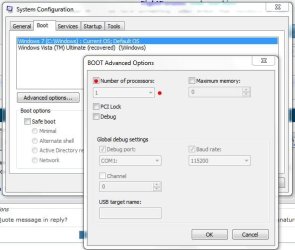
Correct me if I'm wrong but modifying the fallout ini file to a 2 core limit, only lets that game use 2 cores, it won't have any system wide effect, or limit your processor for anything else.
To be honest, I actually missed that. When I heard (read) about the core fix I imediately thought of this fix ....

MS Config.JPG

Obviously this isn't the fix you're advocating. Since you're only modifying the "games" inf file it wouldn't have no impact on the rest of the system. I missed that part :o
From that standpoint, it makes it an even better suggestion :thumbsup:
Thanks for getting me straight ;)
 

My Computer My Computer

Computer type
PC/Desktop
Computer Manufacturer/Model Number
Custom built by me.
OS
Windows 10 Pro
CPU
Intel Core i7-4770K (3.5Ghz)
Motherboard
Gigabyte G1 Sniper 5 (F10 Bios)
Memory
32 gig Corsair Dominator Platinum (4x8Gig)
Graphics Card(s)
Sapphire Tri-X R9 Fury
Sound Card
Soundblaster ZXR
Monitor(s) Displays
NEC PA242W 24" LCD Monitor
Screen Resolution
1920 x 1200
Hard Drives
Primary - Samsung 850 Pro (512gig), Samsung 840 Pro (256gig), 2TB WD Caviar Black.
PSU
EVGA Supernova 1000 G2
Case
Cooler Master HAF X
Cooling
Corsair H100i with Corsair Air Series SP120 Quiet Fans
Keyboard
Logitech Wireless Wave
Mouse
Logitech Performance MX
Internet Speed
High Speed Cable
Antivirus
Norton Security
Browser
IE11
Other Info
Memory Timings - 1866MHz @ 9-9-9-27-1T @ 1.5 volts
No problem. Yeah, it isn't that change from the boot tab, just isolated to the fallout game itself. Which makes it a good suggestion as you say. ;)
 

My Computer My Computer

Computer type
PC/Desktop
Computer Manufacturer/Model Number
Airbot 2.0
OS
Windows 7 Ultimate x64 SP1
CPU
Core i7 920 (D0) @ 4Ghz, *26c idle *65c full load on air
Motherboard
Asus P6X58D Premium - Sata 6Gb/s - USB 3.0
Memory
12GB DDR3 Corsair Dominator -CMD12GX3M6A1600C8 at 1600MHz
Graphics Card(s)
Zotac Geforce GTX 770
Sound Card
ASUS Xonar D2X
Monitor(s) Displays
1 LG 24" Flatron W2453V-PF 1 Samsung 24" P2450H both 2ms RT
Screen Resolution
1920x1080@60hz
Hard Drives
1 Samsung 250GB 840 Evo SSD
1 OCZ Vertex2 180GB SSD
1 TB Samsung Spinpoint F1 7200RPM 32MB cache
2 500GB WD Caviar Blacks 7200RPM 32MB cache (WD5001AALS)

Pioneer DVD Burner DVR-S18M
PSU
Corsair HX1000W
Case
Cooler Master HAF 932
Cooling
Case Fans *3 230mm, *1 140mm/CPU - *Tuniq Tower 120 Extreme
Keyboard
Logitech Wireless MK700
Mouse
Logitech Wireless MK700
Internet Speed
DL 15 Mbps UL 0.98 Mbps
Antivirus
None
Browser
Firefox Nightly
Other Info
Processor-7.7 *RAM- 7.9 *Graphics-7.9 *Gaming Graphics- 7.9 *SSD- 7.8 W.E.I final score= 7.7
*Phone- LG Nexus 5
You have a quad core, right? Have you tried the restricting to 2 core limit fix yet?

http://www.sevenforums.com/gaming/75577-fallout-3-windows-7-64-bit-premium.html#post661965

Yeah I tried that, it helped with some things, cuz I ALSO get the video freezes. But in my case the main thing is that the the video and sound freezes, then the windows 7 "Fallout3 Has stopped working" message comes up, then i have to click "End program" then run it again and sometimes it continuously crashes
 

My Computer My Computer

OS
Windows 7
hey, i've read through all these many many pages. None of the tips have worked, and i've noticed some other Laptop users have managed to get Fallout 3 working, with some difficulty. I've noticed that Fallout 3 also doesn't like intel graphic cards. i've got my system specs listed, so take a look and lemme know if your thinking the same thing i am at this point. i'm thinking i'm not able to play Fallout 3 with my current settings/whatever. i just got my laptop on march 25th or so, and it's an Acer, been running smoothly for almost everything i've done so far, but Fallout 3 is the biggest game i've tried so far. i'm thinking i might be able to run Fallout 3 with XP Home SP2. i assume that it'll update me to SP3 immediately, but i don't mind that. i'm just glad i was able to find my disc. i thought i had lost it.

anyways, if you know any fixes for running Fallout 3 on Win 7 with my current settings, please suggest them. however, keep in mind i've read through 33 pages of tips already. so, i've tried everything i've seen so far without it working.
if there is no fix, i'll be converting back to XP (not a fan of Vista :( ). i'm sure my problem is the graphics card, but running XP will allow things to run so much smoother and i'll have a better chance at getting Fallout 3 to run.
anyways, all suggestions are appreciated, Thanks,
Eric
 

My Computer My Computer

Computer Manufacturer/Model Number
Acer
OS
Windows 7 Home Premium 64-Bit (6.1, Build 7600
CPU
Intel Pentium T4400 2.2GHz 800MHz FSB
Motherboard
Aspire 5732Z
Memory
4GB DDR2
Graphics Card(s)
Intel GMA 4500M
Sound Card
Speakers (Realtex High Definition Audio)
Monitor(s) Displays
Generic PnP Monitor
Hard Drives
220GB Internal Hard Drive
Hi everyone,

This may be the ultimate fix for everyone out there with crashing issues.

I've heavily modded my version of Fallout 3 to the fullest, including all the best textures and most famous mods.

I noticed Fallout 3 always crashing at 1.5gig of ram usage.

After almost giving up, I found this little tool on nexus which makes Fallout3.exe use more than 2gig of ram.

(CFF Explorer Suite III)
FO3 RAM Boost at Fallout 3 Nexus - Fallout 3 mods and community

It's not a mod, but a free tool that edits .exe files, but contains instructions on how to enable Fallout 3 to use more than 2gig of ram.

I haven't crashed since and now Fallout 3 uses almost 2gig of ram just by itself. Total ram usage for the whole system is at 3.7gb.

I can't promise it'll work for you, but it's certainly working for me.:D
 

My Computer My Computer

OS
Windows 7 Enterprise
CPU
Intel S1155 Core i7 3770K 3.50Ghz Quad Core
Motherboard
Intel S1155 ATX DZ77RE-75K
Memory
Corsair 8GB CMD8GX3M2A1866C9 DDR3 1866MHz
Graphics Card(s)
Gigabyte GTX670 OC 2GB PN GV-N670OC-2GD
Sound Card
Creative SB X-Fi XG
PSU
Corsair TX 750W
Case
CoolerMaster HAF-922 Black
Hi everyone,

This may be the ultimate fix for everyone out there with crashing issues.

I've heavily modded my version of Fallout 3 to the fullest, including all the best textures and most famous mods.

I noticed Fallout 3 always crashing at 1.5gig of ram usage.

After almost giving up, I found this little tool on nexus which makes Fallout3.exe use more than 2gig of ram.

(CFF Explorer Suite III)
FO3 RAM Boost at Fallout 3 Nexus - Fallout 3 mods and community

It's not a mod, but a free tool that edits .exe files, but contains instructions on how to enable Fallout 3 to use more than 2gig of ram.

I haven't crashed since and now Fallout 3 uses almost 2gig of ram just by itself. Total ram usage for the whole system is at 3.7gb.

I can't promise it'll work for you, but it's certainly working for me.:D
got it a while ago and it works like a charm, thanks man!
 

My Computer My Computer

OS
Windows 7
Problem Solved (ish)

Launcher Loop - Solved

I sold my shitty old copy and bought the newer GOTY version. No idea how that helped, but it did.

Constant Crashing - Solved (ish)

(Fallout.ini)

bUseThreadedAI=1
(add)iNumHWThreads=1

Now, some sites say you should use =2, but that still resulted in crashes for me.

Be aware, if you use this fix, the game may be a little slow. I have to turn my graphics down to get it at 40-50fps. Which is lame. But it works.

So, thanks for your help guys. It took 44 pages of reading to get it going, but I am stoked. Cheers :)
 

My Computer My Computer

Computer Manufacturer/Model Number
ACER Aspire 5740G
OS
Windows 7 x64
CPU
Intel i5 430M 2.26ghz
Memory
6GB
Graphics Card(s)
ATi Mobility Radeon HD 5650 1GB Dedicated (3GB max)
Hard Drives
640GB
Step by Step: FO3 no issues with Win 7

First of all, my guess is that very few have the patience to read 44 pages, almost 2 years worth of similar issues when your game is paused in the background looking for a quick fix as your itching to play. I was one of the people who actually read the whole thing, not just this forum, but countless others.

One thing i noticed is that everyone is pointing fingers EVERYWHERE; the OS, the GPU, the RAM, FO3, overheating, lack of power from Power Supply, faulty this, faulty that... RELAX PEOPLE.

There are so many possibilities that people just don’t have the patience and give up. This is my advice to everyone that is experiencing any issues with FO3.

*** Note: The first 3 points are just eliminating the obvious. ***

1. Spare the forum and yourself the time and Google yourself the requirements that FO3 needs. If your PC can’t handle the game, or are just on the borderline, don’t even bother with it. Either upgrade your PC or settle with FO2.

2. If your Windows 7 is not an authentic version, you will ALWAYS have issues. If you don’t have issues now, you will have issues in the near future. There have been people on the forums saying, “…I had no issues for months and all of a sudden my game crashed..” well that’s because windows updated and realized something wasn’t up to par.

3. Same thing goes with FO3, if you don’t have a legit copy; you are looking into having most of the issues that are on these 44 pages.

*** Read the next part only if you are not one of the people in points 1-3 ***

4. As much of a pain that it is, the only way to break down the issue is to start from scratch. Remember, not everyone’s solution will be the same. Format and install a fresh new Win 7.

5. UPDATE EVERYTHING!! I can’t stress that enough. Why do you think updates exist? They are there for a reason, obviously something didn’t work or wasn’t compatible with something else therefore a patch had to be created. Put yourself in the FO3 developers shoes for a moment. They are told to fix an issue we found… how will they do it? They will come up with a patch that is compatible according to the most up to date patches available by the OS and the GPU. They will not create their game and tell windows or nvidia “Hey, change your setting to this so FO3 can work” no… they have to go according to the OS.
I’m not sure if the order in which you do it makes a difference but I like to start with what is being accessed first when I turn on my computer. BIOS would be the first thing followed by the CHIPSET, then everything else on the MB that’s integrated.
Followed by Windows 7, GPU, and FO3. This is pretty much all you need to run the game.

***At this point your game should work. Remember, this isn’t a new game anymore. At this point in time, the game has been around long enough for any vendor to come up with the patches necessary to make this work. So with you having everything up to date and your still having issues after this point. That’s when you can get into specifics***

6. POWER SUPPLY: Lets look at having the power to actually run the hardware you have before you start pointing fingers. If your power supply is less then 500W these days, please refer to point #1. There are some tools you can Google that will calculate the Wattage needed to run everything you have inside your computer. If your Power supply is producing less power than your calculation specifies. Buy a more powerful Power supply before you continue.

7. RAM: Run task manager or a similar tool of your choice that displays the performance of your PC during a transaction. Keep this in view as you run RO3 windowed, keeping an eye on your PF usage. Watch it increase as you load a game and start playing. If this is reaching the limit your PC can handle and FO3 crashes around the same time. This may be your issue. Try it a few times for consistency. You will most likely need to upgrade your RAM as I haven’t come across any memory leaks in the coding, also just as a precautionary run a RAM utility tool to make sure your RAM has no other issues.. If you are nowhere near the limit and still crashes, you can scratch RAM off your list.

8. OVERHEATING: Google and download a CPU Temperature Monitoring utility. It is good to have a temperature reading of both your CPU and GPU on the same window. I used Real Temp myself for this. With the same concept run the game in windowed state so you can see the temps increase. If your CPU reaches the 50 degrees mark you can start worrying. The GPU can reach temperatures beyond this but investigate your own vendor and find out what the limits are. I got an INTEL Core 2 Quad 2.66 and my CPU temp hardly goes beyond 42 degrees with FO3. My GPU NVIDIA GeForce 9600GT 1GB reached only 50 degrees at one point in a 2 hour session of FO3, even though I read somewhere that the limit is 90degrees. Like I said, find out your limits and if you are reaching these limits, get a better cooling system for it or get a utility to speed up your GPU fans. If you don’t have these issues lets continue.

9. At this point, your pretty much looking at the capabilities of your GPU. I found out during my investigation that my Nvidia control panel was contradicting the settings on the game options before launching. In my opinion, the game settings are the important ones as the game knows what its capabilities are… the control panel should be left at default and where applicable, set as “let the application decide” . if you start changing things everywhere you will never find out the cause. So lets focus on the game options with your GPU left at default settings. Run the game with the lowest settings and watch out for the following: how long it took to launch your game, smoothness of audio/video, basic functions in the game walking running jumping shooting. For me, the lower settings were worse for me then the high as with the lowest setting I would take two steps and then I would stop, not that the game froze I just stopped as if there was a wall in front of me and I had to go around it. It was choppy. I say this because it doesn’t really mean that the lowest setting is the best option to avoid issues with your GPU, if you have a high end GPU and you choose it to do something it wasn’t designed to do it will give you issues no matter how much memory it uses. Its like telling a professional Football player to go out and play Hockey, it just doesn’t work.
That’s how you troubleshoot once all other things are checked off. Try the medium setting and do the same and so on. Once you do that select the setting which you found out to be the best suitable for your card and click on the advance tab. Change one thing at a time and test it out. It’s a time consuming thing but it’s the only way to find out limits. Trust me I have been in Quality and testing for an I.T. company for 10 years.

*** At this point you should not have any issues with FO3. It was proven that FO3 works with Windows 7 64 and 32. If you are still having crashed after this, only THEN can you click on “send this to Microsoft” *** :sarc:

Eventually the issue I had was with Norton Anti Virus 2010. I had it enabled. That’s it, can you imagine the “D’OH” when I found this out. Norton 2010 works very good with Windows 7 and as a security feature gives Norton the go ahead to continually check processes to make sure they are within the “safeness” of what Norton considers safe. And it does this quite often. Norton 2010 has a neat feature where it asks you how long you want to disable it before it automatically turns on again. I disabled Norton for 15 minutes started my game and played. After 15 minutes FO3 crashed. Hmmmm… interesting, I disabled Norton for 1 hour played FO3 with “Ultra” settings and exactly after an hour on the DOT, FO3 crashes. At this point I left everything as it was, went out and got drunk with my friends. Since then I haven’t had any crashes at all.

Don’t give up… if it doesn’t work, test and test again. The solution is ALWAYS there, sometimes you are looking right at it.

Good Luck :cool:
 

My Computer My Computer

OS
Win7 Ult 64
Back
Top