(( Sorry, this topic should be in audio and sound forum. Admins please move it ))
Hi guys. This is an old, very ugly problem, still without clear solution. I'll start from the beginning, and sorry for my English.
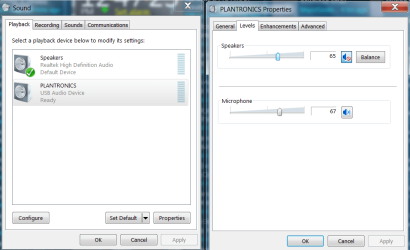
Two weeks ago, I had spanish Windows7 64 bit computer and my Gamecom 360 headset with microphone that was working really fine with 50 volume and 0db additional boost. Then, one beautiful evening, the lights in my house went off, and my HDD partition broke, so did Windows. I had to install a new copy from the different source, so this is when I faced this famous problem — my microphone was really, really low with 100% volume, something that cannot be. I did all this tricks people tell you to do in "sound" menu, but no results..
Also, I did everything you can do in Realtek software without any effect.
Drivers
My sound card is integrated, motherboard is ASUSTeK COMPUTER INC. P8H61-M LX (LGA1155). Sound card details are here:

I've tried 4 different versions of Realtek drivers. 1 - From motherboard website. 2 - Realtek website according to OS. 3 - Especial drivers for soundcard model from Realtek website. 4 - Ac97 drivers. None of them worked. No effect. Headphones work just fine, but mic only shows good green sound level in "Sound" config if I hit microphone "head" pretty hard with my finger.
I've tried other win7 64 bit package (different source), no effect. I looked into BIOS, searching for some power suply settings pointing especially to sound devices.
Today I've tested my headset on two different computers, mic was low on both. Well, I bought a simple stick mic for 5$ dollars, connected it and ... nothing.. The same low volume crap.
I am really desperate right now, because I just don't know what else I can do here. I even emailed to Realtek guys, but still got no reply. I don't know WHY it is happeng, where should I look. Before windows crashed, I could record perfectly with 50% volume, but now 100% is not enough at all.
A lot of people talk about "Microphone boost" option in "sound" menu but I don't have this feature, I guess that's because my hardware doesn't support it.
I am an youtuber and I really need my micro to work..
Obviously, I did a huge research about this topic, especially on this very site. Some of the threads have more than 60 000 views and surprisingly there is still no clear solution. Some people do random things in "sound" panel, marking or removing all the checkboxes they see there and some of them fix the problem going that way. I've tried everything without results. Everyone blame Win7 in those threads. I don't know really who can I blame.
I forgot to say, I've tried frontal and rear panel access.
Just now I have one possible solution: to buy an USB adapter, maybe this could solve the issue. But where the hell can I get that thing, living in Latvia, no freacking idea.
Windows Troubleshooting also identified "low recording sound" but is unable to fix it. I downloaded "Windows Fix audio recording" tool but this thing gave me "validating the integrity of the troubleshooter failed 0x800b0101" error. I am so lucky.
So that's all I wanted to post. I don't really expect some usefull tricks to resolve the issue, maybe some people will find this post interesting and it could help them.. I dunno.
If some of you guys can help, please do so. Have a nice day.
Hi guys. This is an old, very ugly problem, still without clear solution. I'll start from the beginning, and sorry for my English.
Two weeks ago, I had spanish Windows7 64 bit computer and my Gamecom 360 headset with microphone that was working really fine with 50 volume and 0db additional boost. Then, one beautiful evening, the lights in my house went off, and my HDD partition broke, so did Windows. I had to install a new copy from the different source, so this is when I faced this famous problem — my microphone was really, really low with 100% volume, something that cannot be. I did all this tricks people tell you to do in "sound" menu, but no results..
Also, I did everything you can do in Realtek software without any effect.
Drivers
My sound card is integrated, motherboard is ASUSTeK COMPUTER INC. P8H61-M LX (LGA1155). Sound card details are here:
I've tried 4 different versions of Realtek drivers. 1 - From motherboard website. 2 - Realtek website according to OS. 3 - Especial drivers for soundcard model from Realtek website. 4 - Ac97 drivers. None of them worked. No effect. Headphones work just fine, but mic only shows good green sound level in "Sound" config if I hit microphone "head" pretty hard with my finger.
I've tried other win7 64 bit package (different source), no effect. I looked into BIOS, searching for some power suply settings pointing especially to sound devices.
Today I've tested my headset on two different computers, mic was low on both. Well, I bought a simple stick mic for 5$ dollars, connected it and ... nothing.. The same low volume crap.
I am really desperate right now, because I just don't know what else I can do here. I even emailed to Realtek guys, but still got no reply. I don't know WHY it is happeng, where should I look. Before windows crashed, I could record perfectly with 50% volume, but now 100% is not enough at all.
A lot of people talk about "Microphone boost" option in "sound" menu but I don't have this feature, I guess that's because my hardware doesn't support it.
I am an youtuber and I really need my micro to work..
Obviously, I did a huge research about this topic, especially on this very site. Some of the threads have more than 60 000 views and surprisingly there is still no clear solution. Some people do random things in "sound" panel, marking or removing all the checkboxes they see there and some of them fix the problem going that way. I've tried everything without results. Everyone blame Win7 in those threads. I don't know really who can I blame.
I forgot to say, I've tried frontal and rear panel access.
Just now I have one possible solution: to buy an USB adapter, maybe this could solve the issue. But where the hell can I get that thing, living in Latvia, no freacking idea.
Windows Troubleshooting also identified "low recording sound" but is unable to fix it. I downloaded "Windows Fix audio recording" tool but this thing gave me "validating the integrity of the troubleshooter failed 0x800b0101" error. I am so lucky.
So that's all I wanted to post. I don't really expect some usefull tricks to resolve the issue, maybe some people will find this post interesting and it could help them.. I dunno.
If some of you guys can help, please do so. Have a nice day.
My Computer
At a glance
Windows 7 Professional x64i5-23208 gb ddr3Saphire Radeon HD6790
- Computer type
- PC/Desktop
- Computer Manufacturer/Model Number
- custom build
- OS
- Windows 7 Professional x64
- CPU
- i5-2320
- Motherboard
- ASUSTeK COMPUTER INC. P8H61-M LX (LGA1155)
- Memory
- 8 gb ddr3
- Graphics Card(s)
- Saphire Radeon HD6790