Solved Favicons: I Need To Find The File Path

Just a quick note to say that if you copy your places.sqlite file and save it somewhere it "should" restore your bookmarks (and bookmark folders) if copied into a new FF profile. Check with Anak though!

For now try opening the file with your text editor and inspect the contents.
 

My Computer My Computer

At a glance

Microsoft Windows 7 Home Premium 64-bit 7601 ...AMD C-60 APU with Radeon(tm) HD Graphics4.00 GBAMD Radeon HD 6290 Graphics
Computer type
Laptop
Computer Manufacturer/Model Number
ASUS
OS
Microsoft Windows 7 Home Premium 64-bit 7601 Multiprocessor Free Service Pack 1
CPU
AMD C-60 APU with Radeon(tm) HD Graphics
Motherboard
ASUSTeK COMPUTER INC. X501U
Memory
4.00 GB
Graphics Card(s)
AMD Radeon HD 6290 Graphics
Sound Card
(1) AMD High Definition Audio Device (2) Realtek High Defi
Screen Resolution
1366 x 768 x 32 bits (4294967296 colors) @ 60 Hz
Hard Drives
Hitachi HTS545050A7E380 SATA Disk Device
Antivirus
Comodo CIS & FW, SecureAplus App Whitelisting, Threatfire
Browser
Cyberfox 64bit, Opera 64bit, Airfox
Other Info
Spy-The-Spy, HitmanPro.Alert, Norton Connect Safe, MJRegWatcher, BitDefender TrafficLight, Voodoo Shield, Zemana AntiMalware
Forget that last post- it doesn't work!
 

My Computer My Computer

At a glance

Microsoft Windows 7 Home Premium 64-bit 7601 ...AMD C-60 APU with Radeon(tm) HD Graphics4.00 GBAMD Radeon HD 6290 Graphics
Computer type
Laptop
Computer Manufacturer/Model Number
ASUS
OS
Microsoft Windows 7 Home Premium 64-bit 7601 Multiprocessor Free Service Pack 1
CPU
AMD C-60 APU with Radeon(tm) HD Graphics
Motherboard
ASUSTeK COMPUTER INC. X501U
Memory
4.00 GB
Graphics Card(s)
AMD Radeon HD 6290 Graphics
Sound Card
(1) AMD High Definition Audio Device (2) Realtek High Defi
Screen Resolution
1366 x 768 x 32 bits (4294967296 colors) @ 60 Hz
Hard Drives
Hitachi HTS545050A7E380 SATA Disk Device
Antivirus
Comodo CIS & FW, SecureAplus App Whitelisting, Threatfire
Browser
Cyberfox 64bit, Opera 64bit, Airfox
Other Info
Spy-The-Spy, HitmanPro.Alert, Norton Connect Safe, MJRegWatcher, BitDefender TrafficLight, Voodoo Shield, Zemana AntiMalware
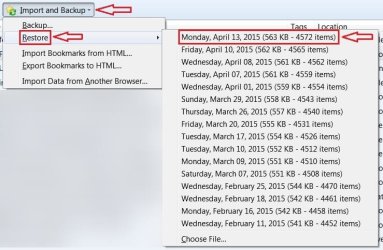
Backing up bookmarks to a .json file works for sure. I've just deleted all bookmarks and bookmark folders then restored them no problem. Personally I'd suggest malking a copy of your Profiles folder and Profiles.ini file before the fresh install. Wait for Anak to get back!
 

My Computer My Computer

At a glance

Microsoft Windows 7 Home Premium 64-bit 7601 ...AMD C-60 APU with Radeon(tm) HD Graphics4.00 GBAMD Radeon HD 6290 Graphics
Computer type
Laptop
Computer Manufacturer/Model Number
ASUS
OS
Microsoft Windows 7 Home Premium 64-bit 7601 Multiprocessor Free Service Pack 1
CPU
AMD C-60 APU with Radeon(tm) HD Graphics
Motherboard
ASUSTeK COMPUTER INC. X501U
Memory
4.00 GB
Graphics Card(s)
AMD Radeon HD 6290 Graphics
Sound Card
(1) AMD High Definition Audio Device (2) Realtek High Defi
Screen Resolution
1366 x 768 x 32 bits (4294967296 colors) @ 60 Hz
Hard Drives
Hitachi HTS545050A7E380 SATA Disk Device
Antivirus
Comodo CIS & FW, SecureAplus App Whitelisting, Threatfire
Browser
Cyberfox 64bit, Opera 64bit, Airfox
Other Info
Spy-The-Spy, HitmanPro.Alert, Norton Connect Safe, MJRegWatcher, BitDefender TrafficLight, Voodoo Shield, Zemana AntiMalware
Sounds like you are well prepared.

One thing I might suggest is to print out any parts of the uninstall and or reinstall that may sound complicated, remember, when you install Firefox you will not have Internet Explorer to fall back on because you need to make sure you have all other programs closed including Internet Explorer to ensure a good install.
Thank you for telling me this! I don't have a printer but I can get it done in a day or two. I forgot to ask two more things.

*Do I leave just as they are, all icons and favicons on desktop and folders?

*Of the two options available in Firefox Library for saving Bookmarks, I exported using both options and saved in 'My documents'. The option "Backup" made a .json file in notepad format. The option "Export Bookmarks to HTML" made an .html file with a Firefox icon. The latter shows full details clearly and includes my Bookmarks Folders with their names as well. If you remember, I asked you about Folders earlier. The former (.json) is not easy to read and does not show folders at all. Which of these should I use when importing Bookmarks after clean installing Firefox, if I want to see all my Bookmarks with their Folders exactly as they were in my old Firefox.

Thank you
You're welcome.

There is no hurry for the printing, but it will be invaluable during the uninstall/reinstall process. Once you have the print-out and before you start go over all the steps again so they are fresh in your mind even to the point of double checking your print-out against the web page you printed it from, I'm assuming from here: Uninstalling Firefox - MozillaZine Knowledge Base You may even want to print out this thread for reference, go to the top of your #1 post you'll see Thread Tools to the right and click on that to open then click on Printable Version.

This is an optional item, but I've gotten in the habit of restarting my machine after I uninstall a program then install a program especially if it's the same program, I feel it gives the new program a fresh canvas to work with, you could even do a restart after the reinstall, but that's entirely up to you.

I'm unsure what you mean here:
*Do I leave just as they are, all icons and favicons on desktop and folders?
  • Are they the bookmark backups/exports Folders?

  • Are they those hidden icons you asked about earlier?

  • Anything on your desktop during the uninstall/reinstall process will not be affected so anything there will be okay.

*Of the two options available in Firefox Library for saving Bookmarks, I exported using both options and saved in 'My documents'. The option "Backup" made a .json file in notepad format. The option "Export Bookmarks to HTML" made an .html file with a Firefox icon.The latter shows full details clearly and includes my Bookmarks Folders with their names as well. If you remember, I asked you about Folders earlier. The former (.json) is not easy to read and does not show folders at all. Which of these should I use when importing Bookmarks after clean installing Firefox, if I want to see all my Bookmarks with their Folders exactly as they were in my old Firefox.
It is prudent to have extra backups/exports but you will be working with the .json backup file. You will use the former, the .json file.

You could use either, but you will have better results with the .json file, the html works better if you're importing Firefox bookmarks into Internet Explorer.

And Callender has a point, It would also be prudent to make a copy of your Profiles folder and Profiles.ini file, if you don't remember how to get back there see my instructions in the beginning of my post #2. the .inf file is located at
Code:
C:\Users\your user name\AppData\Roaming\Mozilla\Firefox
Right below the Profiles Folder. It was helpful of you to mention those two Callender, Thank you!


Yes I remember, and if you recall I explained in my post#2
The majority of what you see will be in programming language, but you can see the links to your saved bookmarks.
Even though the .jason file doesn't have quite the programming language as the places.sqlite file, it is this programming language that creates and places the bookmarks back in the order you set before you saved them

When you're finished with the install open Firefox and go to the History menu open it and click on Show all History then Import and Backup. Point to Restore and click on the most recent version, let Firefox do its thing until its finished then check the layout of the bookmarks toolbar.

Melita.jpg
 

My Computer My Computer

At a glance

Originally Win 7 Hm Prem x64 Ver 6.1.7600 Bui...Intel i3 530 2.93GHz, 2933MHz 2 Cores 4 Logic...6GB of 1,333MHz DDR3 SDRAM32MB Intel Graphics Media Accelerator HD IGChip
Computer type
PC/Desktop
Computer Manufacturer/Model Number
Gateway DX4831-01e (Mid-Tower Desktop)
OS
Originally Win 7 Hm Prem x64 Ver 6.1.7600 Build 7601-SP1 | Upgraded to Windows 10 December 14, 2019
CPU
Intel i3 530 2.93GHz, 2933MHz 2 Cores 4 Logical Processors
Motherboard
Gateway H57M01 133 megahertz
Memory
6GB of 1,333MHz DDR3 SDRAM
Graphics Card(s)
32MB Intel Graphics Media Accelerator HD IGChip
Sound Card
Realtek High Definition Audio
Monitor(s) Displays
Gateway HX2000 20inch TFT active matrix TN
Screen Resolution
1600 x 900 x 59 hertz
Hard Drives
WDC WD10EADS-00M2B0 [HDD] (1000.20 GB) -- drive 0,
HL-DT-ST DVDRAM GH41N [CD-ROM dr]
Four card readers, and Four USB 2.0
PSU
300watts.
Case
Mid-Tower Desktop
Cooling
Stock from Gateway
Keyboard
Natural Ergonomic Keyboard 4000, see Other Info
Mouse
Orig. Gateway wore out now using Insignia USB wired optical
Internet Speed
Vz FIOS 10ms png 57.64Mbps down 65.53Mbps up Speedtest.org
Antivirus
Zamana Anti-logger with Anti-malware, MSE, Windows Firewall,
Browser
IE11.0.9600.19399-Upd ver11.0.135, Firefox 68.0.1 x64
Other Info
System Specs by Belarc.

BIOS: American Megatrends Inc. P01-A0 11/17/2009

Replaced the MS 'Natural' Standard PS/2 Enhanced 101-102 Keyboard with a new Natural Ergonomic Keyboard 4000 on August 1st 2014.

Canon Pixma MG3222 Printer.

Updated to IE11 on 12102015 | Fios Quantum Router g1100

Additional AV: SpywareBlaster, manual Mbam, SAS
Do I leave just as they are, all icons and favicons on desktop and folders?

I am not unsure what you mean here:
  • Are they the bookmark backups/exports Folders?

  • Are they those hidden icons you asked about earlier?

  • Anything on your desktop during the uninstall/reinstall process will not be affected so anything there will be okay.
I wasn't making myself clear :o I was asking what I should do with all the favicons made using Firefox, and files with Firefox icon (both of these are found on my Desktop and my personal Libraries and Folders). Do I leave all of them as they are?
And Callender has a point, It would also be prudent to make a copy of your Profiles folder and Profiles.ini file, if you don't remember how to get back there see my instructions in the beginning of my post #2. the .inf file is located at
Code:
C:\Users\your user name\AppData\Roaming\Mozilla\Firefox
Right below the Profiles Folder. It was helpful of you to mention those two Callender, Thank you!
  • Do I save these two files in external media using the right click context menu>'send to' option or is there a better method?
  • Where should I save them? If I save them in the wrong place in the computer, wouldn't the new Firefox use them, making the whole exercise futile?
  • I have made many new bookmarks since I backed up my Bookmarks a few days ago. If I want these new ones also in my new Firefox, I should make a new backup just before I un-install Firefox?
Regards,
 

My Computer My Computer

At a glance

Windows 7 Home Premium 64bitAMD Dual Core C-502GB DDR3/320GB HDDAMD Radeon HD 6250
Computer Manufacturer/Model Number
Laptop - Acer Aspire 5250-BZ479
OS
Windows 7 Home Premium 64bit
CPU
AMD Dual Core C-50
Memory
2GB DDR3/320GB HDD
Graphics Card(s)
AMD Radeon HD 6250
Monitor(s) Displays
15.6" HD LED LCD
Internet Speed
ADSL
I wasn't making myself clear :o I was asking what I should do with all the favicons made using Firefox, and files with Firefox icon (both of these are found on my Desktop and my personal Libraries and Folders). Do I leave all of them as they are?
  • Anything on your desktop and in your personal Libraries and Folders during the uninstall/reinstall process will not be affected so anything in those locations will be okay.

  • Do I save these two files in external media using the right click context menu>'send to' option or is there a better method?
  • Where should I save them? If I save them in the wrong place in the computer, wouldn't the new Firefox use them, making the whole exercise futile?
  • I have made many new bookmarks since I backed up my Bookmarks a few days ago. If I want these new ones also in my new Firefox, I should make a new backup just before I un-install Firefox?
Regards,
1.) You can save the profile and profile.inf anywhere you like, be it an external drive, on the desktop or a folder you have created, but not in any Mozilla or Firefox related folders.

2.) See the end of #1; but not in any Mozilla or Firefox related folders.

3.) Yes, you should.
 

My Computer My Computer

At a glance

Originally Win 7 Hm Prem x64 Ver 6.1.7600 Bui...Intel i3 530 2.93GHz, 2933MHz 2 Cores 4 Logic...6GB of 1,333MHz DDR3 SDRAM32MB Intel Graphics Media Accelerator HD IGChip
Computer type
PC/Desktop
Computer Manufacturer/Model Number
Gateway DX4831-01e (Mid-Tower Desktop)
OS
Originally Win 7 Hm Prem x64 Ver 6.1.7600 Build 7601-SP1 | Upgraded to Windows 10 December 14, 2019
CPU
Intel i3 530 2.93GHz, 2933MHz 2 Cores 4 Logical Processors
Motherboard
Gateway H57M01 133 megahertz
Memory
6GB of 1,333MHz DDR3 SDRAM
Graphics Card(s)
32MB Intel Graphics Media Accelerator HD IGChip
Sound Card
Realtek High Definition Audio
Monitor(s) Displays
Gateway HX2000 20inch TFT active matrix TN
Screen Resolution
1600 x 900 x 59 hertz
Hard Drives
WDC WD10EADS-00M2B0 [HDD] (1000.20 GB) -- drive 0,
HL-DT-ST DVDRAM GH41N [CD-ROM dr]
Four card readers, and Four USB 2.0
PSU
300watts.
Case
Mid-Tower Desktop
Cooling
Stock from Gateway
Keyboard
Natural Ergonomic Keyboard 4000, see Other Info
Mouse
Orig. Gateway wore out now using Insignia USB wired optical
Internet Speed
Vz FIOS 10ms png 57.64Mbps down 65.53Mbps up Speedtest.org
Antivirus
Zamana Anti-logger with Anti-malware, MSE, Windows Firewall,
Browser
IE11.0.9600.19399-Upd ver11.0.135, Firefox 68.0.1 x64
Other Info
System Specs by Belarc.

BIOS: American Megatrends Inc. P01-A0 11/17/2009

Replaced the MS 'Natural' Standard PS/2 Enhanced 101-102 Keyboard with a new Natural Ergonomic Keyboard 4000 on August 1st 2014.

Canon Pixma MG3222 Printer.

Updated to IE11 on 12102015 | Fios Quantum Router g1100

Additional AV: SpywareBlaster, manual Mbam, SAS
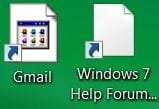
Very disappointing result! The clean install went off perfectly. After un-installing Firefox and deleting all the folders as specified in the MozillaZine link, computer was restarted, at which point all favicons, on the desk top and in every other place in the computer (Libraries Folders etc.), changed as shown in the first picture (Gmail) in the attachment 1 here:
Capture.JPG
All these favicons had the proper web page favicon before.

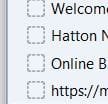
Firefox was re-installed and created the usual short cuts on the desk top and task bar with the usual Firefox favicon. Restarted the computer but all favicons that went wrong remained the same. Bookmarks were restored perfectly as they were before. More damage was done here. Every book mark lost it's favicon and now shows a blank box. Attachment 2 here:
bm favicons.JPG
New bookmarks get saved with the proper favicon. New web pages that are saved to the desktop comes with the blank white favicon (Windows 7..), as shown in the first attachment. This is exactly as it was before Firefox was un-installed.

Regards,
 

My Computer My Computer

At a glance

Windows 7 Home Premium 64bitAMD Dual Core C-502GB DDR3/320GB HDDAMD Radeon HD 6250
Computer Manufacturer/Model Number
Laptop - Acer Aspire 5250-BZ479
OS
Windows 7 Home Premium 64bit
CPU
AMD Dual Core C-50
Memory
2GB DDR3/320GB HDD
Graphics Card(s)
AMD Radeon HD 6250
Monitor(s) Displays
15.6" HD LED LCD
Internet Speed
ADSL
Well currently I use Cyberfox rather than Firefox and it's the same. If I drag a bookmark to the desktop it does't retain the favicon. I had limited success with an add on for changing favicons but it was hit and miss and didn't always work properly.

The problem seems to be the way in which Windows creates shortcuts. See here for an explanation.

How do I set a custom icon for a desktop URL shortcut?

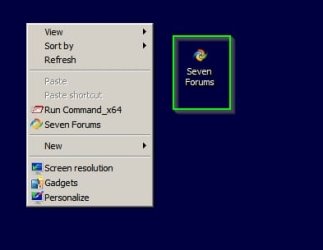
How many bookmarks do you need to keep "outside your browser" and stored elsewhere on your machine? If it's just a few you can create your own like this desktop shortcut:

Shortcut.jpg

The one highlighted in a green square opens Seven Forums URL in Cyberfox browser when clicked. The one in the right click context menu does the same thing.

How to:

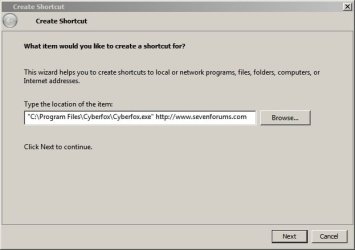
Right click on desktop and select New > Shortcut

In the window that opens type "Path to browser's executable" Desired URL

Wrap the path in quotes and leave a space before the URL like this:

Create Shortcut.jpg

So instead you'd need to replace the browser executable path with the one for Firefox.

Once you've done that get the webisite's favicon and download it to a folder for favicons.

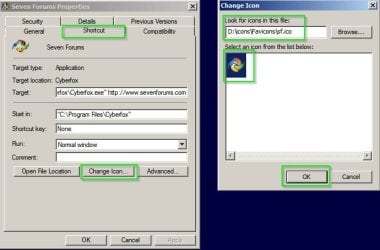
Then right click the shortcut and choose "properties" - on the shortcut tab choose "change icon" then browse to the one you downloaded.

Change Favicon.jpg

That's a lot of work if you have lots of shortcuts. Look on the bright side - at least you've got a fresh install of Firefox!

Personally I just open my browser and navigate to the bookmark when I want to visit a website. However I've also used software that can open any bookmark in your desired browser from a folder on your desktop. However it requires creating a text based list of boomarks in order to work.
 
Last edited:

My Computer My Computer

At a glance

Microsoft Windows 7 Home Premium 64-bit 7601 ...AMD C-60 APU with Radeon(tm) HD Graphics4.00 GBAMD Radeon HD 6290 Graphics
Computer type
Laptop
Computer Manufacturer/Model Number
ASUS
OS
Microsoft Windows 7 Home Premium 64-bit 7601 Multiprocessor Free Service Pack 1
CPU
AMD C-60 APU with Radeon(tm) HD Graphics
Motherboard
ASUSTeK COMPUTER INC. X501U
Memory
4.00 GB
Graphics Card(s)
AMD Radeon HD 6290 Graphics
Sound Card
(1) AMD High Definition Audio Device (2) Realtek High Defi
Screen Resolution
1366 x 768 x 32 bits (4294967296 colors) @ 60 Hz
Hard Drives
Hitachi HTS545050A7E380 SATA Disk Device
Antivirus
Comodo CIS & FW, SecureAplus App Whitelisting, Threatfire
Browser
Cyberfox 64bit, Opera 64bit, Airfox
Other Info
Spy-The-Spy, HitmanPro.Alert, Norton Connect Safe, MJRegWatcher, BitDefender TrafficLight, Voodoo Shield, Zemana AntiMalware
Hello Callender,

Thank you for this valuable information. What is daunting is that altogether I have about 700 Bookmarks and saved web pages.

The most frustrating thing is that I got in to this mess only after using the programme known as Temporary File Cleaner (TFC)

TFC - Temp File Cleaner by OldTimer Download - Geeks to Go Forum

Before I used this TFC, every web page was saved with it's own favicon as if it was the default behavior of Firefox. There was nothing I had to do. It all happened automatically without any input from me. I just dragged and dropped a web page and it automatically saved with the favicon of that web page. I didn't even know that it could be any different untill I used TFC and messed it all up.

If I can find out what action of the TFC caused this situation it might be possible to rectify this. Obviously it would have deleted some vital file or folder. I was hoping the re-installation of Firefox would undo the damage done by TFC. Unfortunately it has not happened.

The curious thing is, only Firefox favicons are affected. All other icons of downloaded programmes, windows files, folders etc. everywhere in the computer, remain just as they always were.

Thank you,
 
Last edited:

My Computer My Computer

At a glance

Windows 7 Home Premium 64bitAMD Dual Core C-502GB DDR3/320GB HDDAMD Radeon HD 6250
Computer Manufacturer/Model Number
Laptop - Acer Aspire 5250-BZ479
OS
Windows 7 Home Premium 64bit
CPU
AMD Dual Core C-50
Memory
2GB DDR3/320GB HDD
Graphics Card(s)
AMD Radeon HD 6250
Monitor(s) Displays
15.6" HD LED LCD
Internet Speed
ADSL
At the moment I'm using Firefox on a different machine and if I drag and drop a bookmark I get the same blank icon. One thought springs to mind. Maybe using an old version of FF temporarily will give different results. I'll try an old portable version when I'm at home.
 

My Computer My Computer

At a glance

Microsoft Windows 7 Home Premium 64-bit 7601 ...AMD C-60 APU with Radeon(tm) HD Graphics4.00 GBAMD Radeon HD 6290 Graphics
Computer type
Laptop
Computer Manufacturer/Model Number
ASUS
OS
Microsoft Windows 7 Home Premium 64-bit 7601 Multiprocessor Free Service Pack 1
CPU
AMD C-60 APU with Radeon(tm) HD Graphics
Motherboard
ASUSTeK COMPUTER INC. X501U
Memory
4.00 GB
Graphics Card(s)
AMD Radeon HD 6290 Graphics
Sound Card
(1) AMD High Definition Audio Device (2) Realtek High Defi
Screen Resolution
1366 x 768 x 32 bits (4294967296 colors) @ 60 Hz
Hard Drives
Hitachi HTS545050A7E380 SATA Disk Device
Antivirus
Comodo CIS & FW, SecureAplus App Whitelisting, Threatfire
Browser
Cyberfox 64bit, Opera 64bit, Airfox
Other Info
Spy-The-Spy, HitmanPro.Alert, Norton Connect Safe, MJRegWatcher, BitDefender TrafficLight, Voodoo Shield, Zemana AntiMalware
At the moment I'm using Firefox on a different machine and if I drag and drop a bookmark I get the same blank icon. One thought springs to mind. Maybe using an old version of FF temporarily will give different results. I'll try an old portable version when I'm at home.
The last time I got the favicons correctly when saving a web page to the desktop (just before I used TFC), I had the latest Firefox 37.0.1. I had a stroke of luck, at least with the bookmarks. Yesterday I restored the book marks using the 'Restore' option which restored from the exported .json file. Today I restored them once again using the 'Import Bookmarks from HTML' option which used the exported HTML file. This over wrote everything and restored all the favicons in all the bookmarks!
 
Last edited:

My Computer My Computer

At a glance

Windows 7 Home Premium 64bitAMD Dual Core C-502GB DDR3/320GB HDDAMD Radeon HD 6250
Computer Manufacturer/Model Number
Laptop - Acer Aspire 5250-BZ479
OS
Windows 7 Home Premium 64bit
CPU
AMD Dual Core C-50
Memory
2GB DDR3/320GB HDD
Graphics Card(s)
AMD Radeon HD 6250
Monitor(s) Displays
15.6" HD LED LCD
Internet Speed
ADSL
Melita, It sounds from your most recent post #31 that you're okay now?
 

My Computer My Computer

At a glance

Originally Win 7 Hm Prem x64 Ver 6.1.7600 Bui...Intel i3 530 2.93GHz, 2933MHz 2 Cores 4 Logic...6GB of 1,333MHz DDR3 SDRAM32MB Intel Graphics Media Accelerator HD IGChip
Computer type
PC/Desktop
Computer Manufacturer/Model Number
Gateway DX4831-01e (Mid-Tower Desktop)
OS
Originally Win 7 Hm Prem x64 Ver 6.1.7600 Build 7601-SP1 | Upgraded to Windows 10 December 14, 2019
CPU
Intel i3 530 2.93GHz, 2933MHz 2 Cores 4 Logical Processors
Motherboard
Gateway H57M01 133 megahertz
Memory
6GB of 1,333MHz DDR3 SDRAM
Graphics Card(s)
32MB Intel Graphics Media Accelerator HD IGChip
Sound Card
Realtek High Definition Audio
Monitor(s) Displays
Gateway HX2000 20inch TFT active matrix TN
Screen Resolution
1600 x 900 x 59 hertz
Hard Drives
WDC WD10EADS-00M2B0 [HDD] (1000.20 GB) -- drive 0,
HL-DT-ST DVDRAM GH41N [CD-ROM dr]
Four card readers, and Four USB 2.0
PSU
300watts.
Case
Mid-Tower Desktop
Cooling
Stock from Gateway
Keyboard
Natural Ergonomic Keyboard 4000, see Other Info
Mouse
Orig. Gateway wore out now using Insignia USB wired optical
Internet Speed
Vz FIOS 10ms png 57.64Mbps down 65.53Mbps up Speedtest.org
Antivirus
Zamana Anti-logger with Anti-malware, MSE, Windows Firewall,
Browser
IE11.0.9600.19399-Upd ver11.0.135, Firefox 68.0.1 x64
Other Info
System Specs by Belarc.

BIOS: American Megatrends Inc. P01-A0 11/17/2009

Replaced the MS 'Natural' Standard PS/2 Enhanced 101-102 Keyboard with a new Natural Ergonomic Keyboard 4000 on August 1st 2014.

Canon Pixma MG3222 Printer.

Updated to IE11 on 12102015 | Fios Quantum Router g1100

Additional AV: SpywareBlaster, manual Mbam, SAS
Well that's great. I can't get it to work. The only way I've found is to create the bookmark using IE and set FF as default browser.
 

My Computer My Computer

At a glance

Microsoft Windows 7 Home Premium 64-bit 7601 ...AMD C-60 APU with Radeon(tm) HD Graphics4.00 GBAMD Radeon HD 6290 Graphics
Computer type
Laptop
Computer Manufacturer/Model Number
ASUS
OS
Microsoft Windows 7 Home Premium 64-bit 7601 Multiprocessor Free Service Pack 1
CPU
AMD C-60 APU with Radeon(tm) HD Graphics
Motherboard
ASUSTeK COMPUTER INC. X501U
Memory
4.00 GB
Graphics Card(s)
AMD Radeon HD 6290 Graphics
Sound Card
(1) AMD High Definition Audio Device (2) Realtek High Defi
Screen Resolution
1366 x 768 x 32 bits (4294967296 colors) @ 60 Hz
Hard Drives
Hitachi HTS545050A7E380 SATA Disk Device
Antivirus
Comodo CIS & FW, SecureAplus App Whitelisting, Threatfire
Browser
Cyberfox 64bit, Opera 64bit, Airfox
Other Info
Spy-The-Spy, HitmanPro.Alert, Norton Connect Safe, MJRegWatcher, BitDefender TrafficLight, Voodoo Shield, Zemana AntiMalware
I am also having trouble here. I cannot separate the text in to paragraphs. I type them separately but the text comes together into one paragraph when the post is saved, as you can see below. Editing does not help.
Melita, It sounds from your most recent post #31 that you're okay now?
Not really. Even before the re-install of Firefox I had no trouble with Bookmarks. Something went wrong in restoring with the .json file but I rectified it by restoring again using the saved HTML file. At the time Firefox was un-installed only the new web pages I was saving were not getting the correct favicon. Web pages saved before this problem, retained all their respective favicons, everywhere in the computer. After I re-installed Firefox I lost all those old favicons everywhere in the computer, Desk top, Libraries Folders etc. All of them changed as shown in my post #27 (bookmarks are now OK). This morning they changed once again! I did a re-start of Firefox and all the favicons changed once again to the blank white one shown in post #27. Regards,
 

My Computer My Computer

At a glance

Windows 7 Home Premium 64bitAMD Dual Core C-502GB DDR3/320GB HDDAMD Radeon HD 6250
Computer Manufacturer/Model Number
Laptop - Acer Aspire 5250-BZ479
OS
Windows 7 Home Premium 64bit
CPU
AMD Dual Core C-50
Memory
2GB DDR3/320GB HDD
Graphics Card(s)
AMD Radeon HD 6250
Monitor(s) Displays
15.6" HD LED LCD
Internet Speed
ADSL

My Computer My Computer

At a glance

Microsoft Windows 7 Home Premium 64-bit 7601 ...AMD C-60 APU with Radeon(tm) HD Graphics4.00 GBAMD Radeon HD 6290 Graphics
Computer type
Laptop
Computer Manufacturer/Model Number
ASUS
OS
Microsoft Windows 7 Home Premium 64-bit 7601 Multiprocessor Free Service Pack 1
CPU
AMD C-60 APU with Radeon(tm) HD Graphics
Motherboard
ASUSTeK COMPUTER INC. X501U
Memory
4.00 GB
Graphics Card(s)
AMD Radeon HD 6290 Graphics
Sound Card
(1) AMD High Definition Audio Device (2) Realtek High Defi
Screen Resolution
1366 x 768 x 32 bits (4294967296 colors) @ 60 Hz
Hard Drives
Hitachi HTS545050A7E380 SATA Disk Device
Antivirus
Comodo CIS & FW, SecureAplus App Whitelisting, Threatfire
Browser
Cyberfox 64bit, Opera 64bit, Airfox
Other Info
Spy-The-Spy, HitmanPro.Alert, Norton Connect Safe, MJRegWatcher, BitDefender TrafficLight, Voodoo Shield, Zemana AntiMalware
I am also having trouble here. I cannot separate the text in to paragraphs. I type them separately but the text comes together into one paragraph when the post is saved, as you can see below. Editing does not help.
Melita, It sounds from your most recent post #31 that you're okay now?
Not really. Even before the re-install of Firefox I had no trouble with Bookmarks. Something went wrong in restoring with the .json file but I rectified it by restoring again using the saved HTML file. At the time Firefox was un-installed only the new web pages I was saving were not getting the correct favicon. Web pages saved before this problem, retained all their respective favicons, everywhere in the computer. After I re-installed Firefox I lost all those old favicons everywhere in the computer, Desk top, Libraries Folders etc. All of them changed as shown in my post #27 (bookmarks are now OK). This morning they changed once again! I did a re-start of Firefox and all the favicons changed once again to the blank white one shown in post #27. Regards,
My first thought is a virus or rogue toolbar.

  • Maybe I missed it, but have you ran any virus scans, what do you use? You don't show anything in your system specs.

  • What prompted you to run TFC?
I'm going to need a day maybe tonight to digest what's going on here, while I'm gone re-run what you have for virus, and malware, when done I'd like you to do a CHKDSK and after that a SFC /scannow. Report any results.

I also need you to upload a troubleshoot report from Firefox.

  • Go to Help on the FF menu bar, click to open.

  • About half way down you'll see Troubleshooting Information, click on that.

  • Click on Copy Text to Clipboard, open Notepad, Paste and Save.

  • Upload in your next reply.
 

My Computer My Computer

At a glance

Originally Win 7 Hm Prem x64 Ver 6.1.7600 Bui...Intel i3 530 2.93GHz, 2933MHz 2 Cores 4 Logic...6GB of 1,333MHz DDR3 SDRAM32MB Intel Graphics Media Accelerator HD IGChip
Computer type
PC/Desktop
Computer Manufacturer/Model Number
Gateway DX4831-01e (Mid-Tower Desktop)
OS
Originally Win 7 Hm Prem x64 Ver 6.1.7600 Build 7601-SP1 | Upgraded to Windows 10 December 14, 2019
CPU
Intel i3 530 2.93GHz, 2933MHz 2 Cores 4 Logical Processors
Motherboard
Gateway H57M01 133 megahertz
Memory
6GB of 1,333MHz DDR3 SDRAM
Graphics Card(s)
32MB Intel Graphics Media Accelerator HD IGChip
Sound Card
Realtek High Definition Audio
Monitor(s) Displays
Gateway HX2000 20inch TFT active matrix TN
Screen Resolution
1600 x 900 x 59 hertz
Hard Drives
WDC WD10EADS-00M2B0 [HDD] (1000.20 GB) -- drive 0,
HL-DT-ST DVDRAM GH41N [CD-ROM dr]
Four card readers, and Four USB 2.0
PSU
300watts.
Case
Mid-Tower Desktop
Cooling
Stock from Gateway
Keyboard
Natural Ergonomic Keyboard 4000, see Other Info
Mouse
Orig. Gateway wore out now using Insignia USB wired optical
Internet Speed
Vz FIOS 10ms png 57.64Mbps down 65.53Mbps up Speedtest.org
Antivirus
Zamana Anti-logger with Anti-malware, MSE, Windows Firewall,
Browser
IE11.0.9600.19399-Upd ver11.0.135, Firefox 68.0.1 x64
Other Info
System Specs by Belarc.

BIOS: American Megatrends Inc. P01-A0 11/17/2009

Replaced the MS 'Natural' Standard PS/2 Enhanced 101-102 Keyboard with a new Natural Ergonomic Keyboard 4000 on August 1st 2014.

Canon Pixma MG3222 Printer.

Updated to IE11 on 12102015 | Fios Quantum Router g1100

Additional AV: SpywareBlaster, manual Mbam, SAS
I will not be available at my computer for the next 4 to 5 months. I have to pursue this problem when I get back. Please tell me whether I post here in this thread when I return or do I start a new thread? Thank you for all the help so far. I owe you an explanation. Please see my private message.

Kind regards,
 

My Computer My Computer

At a glance

Windows 7 Home Premium 64bitAMD Dual Core C-502GB DDR3/320GB HDDAMD Radeon HD 6250
Computer Manufacturer/Model Number
Laptop - Acer Aspire 5250-BZ479
OS
Windows 7 Home Premium 64bit
CPU
AMD Dual Core C-50
Memory
2GB DDR3/320GB HDD
Graphics Card(s)
AMD Radeon HD 6250
Monitor(s) Displays
15.6" HD LED LCD
Internet Speed
ADSL
Last edited:

My Computer My Computer

At a glance

Windows 7 Home Premium 64bitAMD Dual Core C-502GB DDR3/320GB HDDAMD Radeon HD 6250
Computer Manufacturer/Model Number
Laptop - Acer Aspire 5250-BZ479
OS
Windows 7 Home Premium 64bit
CPU
AMD Dual Core C-50
Memory
2GB DDR3/320GB HDD
Graphics Card(s)
AMD Radeon HD 6250
Monitor(s) Displays
15.6" HD LED LCD
Internet Speed
ADSL
This thread will always be here, you may see a notice like this:
melita notice.JPG

But disregard it. You are picking up where you left off, and your explanation in post #37 is enough reason to place this discussion on hold.

You're welcome you have been a great student, I'll read your PM now.
 

My Computer My Computer

At a glance

Originally Win 7 Hm Prem x64 Ver 6.1.7600 Bui...Intel i3 530 2.93GHz, 2933MHz 2 Cores 4 Logic...6GB of 1,333MHz DDR3 SDRAM32MB Intel Graphics Media Accelerator HD IGChip
Computer type
PC/Desktop
Computer Manufacturer/Model Number
Gateway DX4831-01e (Mid-Tower Desktop)
OS
Originally Win 7 Hm Prem x64 Ver 6.1.7600 Build 7601-SP1 | Upgraded to Windows 10 December 14, 2019
CPU
Intel i3 530 2.93GHz, 2933MHz 2 Cores 4 Logical Processors
Motherboard
Gateway H57M01 133 megahertz
Memory
6GB of 1,333MHz DDR3 SDRAM
Graphics Card(s)
32MB Intel Graphics Media Accelerator HD IGChip
Sound Card
Realtek High Definition Audio
Monitor(s) Displays
Gateway HX2000 20inch TFT active matrix TN
Screen Resolution
1600 x 900 x 59 hertz
Hard Drives
WDC WD10EADS-00M2B0 [HDD] (1000.20 GB) -- drive 0,
HL-DT-ST DVDRAM GH41N [CD-ROM dr]
Four card readers, and Four USB 2.0
PSU
300watts.
Case
Mid-Tower Desktop
Cooling
Stock from Gateway
Keyboard
Natural Ergonomic Keyboard 4000, see Other Info
Mouse
Orig. Gateway wore out now using Insignia USB wired optical
Internet Speed
Vz FIOS 10ms png 57.64Mbps down 65.53Mbps up Speedtest.org
Antivirus
Zamana Anti-logger with Anti-malware, MSE, Windows Firewall,
Browser
IE11.0.9600.19399-Upd ver11.0.135, Firefox 68.0.1 x64
Other Info
System Specs by Belarc.

BIOS: American Megatrends Inc. P01-A0 11/17/2009

Replaced the MS 'Natural' Standard PS/2 Enhanced 101-102 Keyboard with a new Natural Ergonomic Keyboard 4000 on August 1st 2014.

Canon Pixma MG3222 Printer.

Updated to IE11 on 12102015 | Fios Quantum Router g1100

Additional AV: SpywareBlaster, manual Mbam, SAS
Hello Anak

I am back and a surprise was waiting for me. I got back the favicons! How, I am unable to even guess.

Here are the details for your analysis:

On the day before going on my holiday in April, I tried again to get back the favicons and failed. After my return, before getting back here, I opened my Hotmail. As an afterthought, I dragged the web page to the desktop and there it was, the Microsoft favicon! I got them all back but I had to do some tweaking.

Out of the two dozen web short cuts I have on my desktop:

About a third that I dragged in again (while their blank icons still remained on my desktop), came with the favicon. When I tried to rename any of these for convenience (as I usually do), the favicon vanished and the same blank white post card like icon returned. I got the favicon back when I renamed about three times at random. Some, I had to rename with the first word of the real name of the web page before I could get the favicon back - like the word 'Windows' of this page I am using now. Actually, the first part of the first word, just 'Win' was enough.

Another third came without the favicon as before. When I renamed the icon, the favicon came back as if by magic!

The remaining third came with the favicon and retained the favicon even when I renamed it.

Couple of web pages did not have a favicon and those took up Firefox emblem (the browser I use). See attachment.

Now, the situation is the same as before I had this problem. All web pages come with the favicon and stay that way regardless of what I do with their names.

The computer was used by others, sparingly, for four months during my absence - for e-mail and web browsing on a mild scale. None of them mess with the settings, system or do any other tweaking.

I didn't have to anything suggested in post #36.

My Desktop looks beautiful now. to anak.JPG

Kind regards,
 
Last edited:

My Computer My Computer

At a glance

Windows 7 Home Premium 64bitAMD Dual Core C-502GB DDR3/320GB HDDAMD Radeon HD 6250
Computer Manufacturer/Model Number
Laptop - Acer Aspire 5250-BZ479
OS
Windows 7 Home Premium 64bit
CPU
AMD Dual Core C-50
Memory
2GB DDR3/320GB HDD
Graphics Card(s)
AMD Radeon HD 6250
Monitor(s) Displays
15.6" HD LED LCD
Internet Speed
ADSL
Back
Top