

- Local time
- 9:27 AM
- Messages
- 715
I thought I was some what knowledgeable about adding to Favorites in the Edge Browser.

The first step is to click on the star at the top right of the website to be saved to Favorites as show in Fig 1.
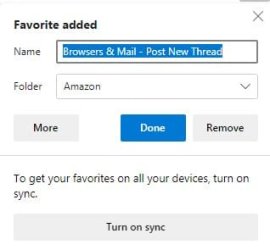
That opens up the second window for adding to favorites (image 2).
The web name is automatically added (can be changed).
You can select the folder or add a folder that you want the site to be saved in.
I am NOT sure if "turn on sync" should be done.
Now click on "Done" and it should be saved in the folder selected.
That did NOT happen with me. It was NOT in the selected folder and danged if I know where it was saved.
Any comments? Thanks in advance.
The first step is to click on the star at the top right of the website to be saved to Favorites as show in Fig 1.
That opens up the second window for adding to favorites (image 2).
The web name is automatically added (can be changed).
You can select the folder or add a folder that you want the site to be saved in.
I am NOT sure if "turn on sync" should be done.
Now click on "Done" and it should be saved in the folder selected.
That did NOT happen with me. It was NOT in the selected folder and danged if I know where it was saved.
Any comments? Thanks in advance.
My Computer
At a glance
Windows 7 ProIntel(R) Pentium(R) Duel CPU E2200 2.20 Ghz4 gb 2.96 UsableOnboard
- OS
- Windows 7 Pro
- CPU
- Intel(R) Pentium(R) Duel CPU E2200 2.20 Ghz
- Motherboard
- GA-G41M-ES2L
- Memory
- 4 gb 2.96 Usable
- Graphics Card(s)
- Onboard
- Sound Card
- Onboard
- Hard Drives
- 2 - 1TB WD Sata Drives
