

Hi guys  I'll post this in here because I don't think it really qualifies as a "problem" for Browsers and Mail.
Basically, I have recently got into Modding (The Sims 3 if your interested). and find myself downloading all sorts of stuff from all over the place for various things.
As you can imagine, with FF's default "Save everything to Downloads" policy, its getting to be a major organistational headache. Can anyone recommend a good extension that will allow me to choose the Save location when I download stuff? Like IE does by default.
I'll post this in here because I don't think it really qualifies as a "problem" for Browsers and Mail.Basically, I have recently got into Modding (The Sims 3 if your interested). and find myself downloading all sorts of stuff from all over the place for various things.
As you can imagine, with FF's default "Save everything to Downloads" policy, its getting to be a major organistational headache. Can anyone recommend a good extension that will allow me to choose the Save location when I download stuff? Like IE does by default.
My Computer
- Computer type
- PC/Desktop
- Computer Manufacturer/Model Number
- Medion Erazer (note to self: insert model number) - with custom additions
- OS
- Windows 10 Pro x64
- CPU
- Intel Core i5 7400 @ 3.00GHz
- Motherboard
- OEM supllied with PC
- Memory
- 8GB 2133Mhz DDR4 (OEM supplied)
- Graphics Card(s)
- Gygabyte Windforce GTX 1050Ti (Factory Overclocked)
- Sound Card
- Realtek
- Monitor(s) Displays
- Acer Al1980 + HKC
- Screen Resolution
- 1360*768(HKC) / 1280*1024(Acer)
- Hard Drives
- 1TB Toshiba
1TB WD Caviar Green
120GB Samsung Evo 840
- PSU
- OEM supplied (no power rating on case)
- Case
- OEM Supplied
- Cooling
- Stock
- Keyboard
- Logitech Wireless
- Mouse
- Logitect Wireless
- Internet Speed
- 40Mb/s Down 10Mb/s Up
- Antivirus
- Defender
- Browser
- Firefox

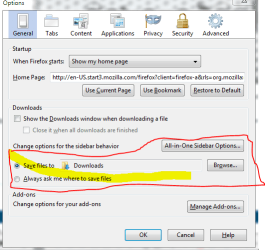
 Cheers Lomai.... being a bit of a muppet there
  Thanks.
