File Compression

seekermeister

Old School
Guru
Gold Member
VIP
Local time
11:33 PM
Messages
6,618
Location
Indian Territory
In looking for a means to backup my movies volume (~750GB), prior to sending that hard drive in for RMA, I decided to see if I could place them on a smaller drive (500GB), first by using True Image's Cloning feature (I was hoping that it would be able to compress the files enough), which failed. Not sure why, but when I attempted to set the path to the destination, it wouldn't accept that drive, nor any other location...maybe due to size requirements.

When I just formatted the 500GB drive, I selected the option to use file and folder compression. I wasn't certain if that was the thing to do, but I tossed a coin. Now, I'm wondering just how much it is able to compress a file...anyone know?
 

My Computer

Computer Manufacturer/Model Number
DIY
OS
W7x64 Pro, SuSe 12.1/** W7 x64 Pro, XP MCE
CPU
Phenom II 1090T w/Noctua NH-D14 /**4400+ X2 w/CM Hyper TX 3
Motherboard
ASRock 890FX Deluxe 4/**A8N-SLI
Memory
2 x 2GB Patriot PGS34g1600LLKA/**4x1GB Corsair VS
Graphics Card(s)
EVGA GTX460 SC/**EVGA 8800GTS
Sound Card
Asus Xonar D2X/**Xonar D1
Monitor(s) Displays
Acer X233H, Dell E152FPc /**LG M237-WD
Screen Resolution
1920x1080 & 1024x768/**1980x1080
Hard Drives
WDC 2TB, 1.5TB, 1TB, 500GB,Seagate 500GB , Maxtor 80GB /**500GB Seagate & WDC 1TB Black
PSU
CM RS600 w/ APC BX1000G/**Antec 500 TP w/ APC BX1000
Case
HAF922/**Antec 1040IIB
Cooling
3x200mm, 1x140 and 1x120mm/**5x80mm fans
Keyboard
Logitech Media USB/**Saitek Eclipse
Mouse
Cordless Trackman Wheel/**Ditto
Internet Speed
3.3Mbps
Other Info
SB 560 5.1 w/ Sennheiser RS140/**Creative T20 speakers, Dvico FusionHDTV7 Gold RT, Cisco E3000, HP 5510V AIO, Linksys E3000, Belkin F5U237 hub and **F5D8055 adapter
(** = 2nd rig)
Hi,

I'm not sure if the file and folder compression will give that much more compression capability, but I don't know much about that option.

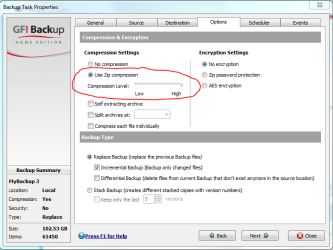
If you can't manage to get true image to work, perhaps you might consider GFI - its free but requires a registration. I use these for my backups and it also has in-built ZIP compression capability - I have shown a screen image below. It will also backup to other external/internal drives.

Good luck, and let us know how you go with that,
Golden
 

Attachments

  • Capture.PNG
    Capture.PNG
    28.4 KB · Views: 13

My Computer

Computer type
PC/Desktop
Computer Manufacturer/Model Number
Golden Mk. I.4
OS
Windows 10 Pro x64 ; Xubuntu x64
CPU
Intel i7 860 @ 2.80 GHz O/C'ed to 4.0GHz
Motherboard
Gigabyte P55A-UD3R Rev.1. Award BIOS F13
Memory
16GB Corsair Vengance DDR3 @ 661 MHz Dual Channel (9-9-9-24)
Graphics Card(s)
EVGA NVidia GTX 560 1024MB
Sound Card
Realtek Integrated
Monitor(s) Displays
Dual Samsung SyncMaster 2494HS
Screen Resolution
1920*1080 and 1920*1080
Hard Drives
1*Samsung 840 EVO 120GB SSD;
1*OCZ Vertex 2 60GB SSD;
2*Samsung F3 SpinPoint 1TB in RAID0;
1*Samsung F1 SpinPoint 1TB;
2*Western Digital 1TB External USB 3.0
1*Western Digital 500GB External USB 3.0
1*Seagate 500GB External USB 2.0
PSU
Thermaltake ToughPower QFan 750W
Case
Thermaltake Element S VK60001W2Z
Cooling
Corsair H60 Water Cooling, 2*230mm and 2*80mm case fans
Keyboard
Logitech G110
Mouse
Logitech MX518
I don't think that most movie formats lend themselves to much lossless compression.
 

My Computer

Computer type
Laptop
Computer Manufacturer/Model Number
Hewlett-Packard/G62-107SA Notebook
OS
Microsoft Windows 7 Home Premium 64-bit Service Pack 1
CPU
Intel(R) Core(TM) i3 CPU M 330 @ 2.13GHz
Motherboard
Hewlett-Packard 1425
Memory
8 GB DDR3
Graphics Card(s)
Intel(R) HD Graphics
Sound Card
Realtek High Definition Audio
Monitor(s) Displays
Builtin
Screen Resolution
1366 x 768 x 32 bits (4294967296 colors) @ 60 Hz
Hard Drives
250 GB SATA Hard Disk Drive 7200 rpm
2TB Seagate GoFlex USB 2 Drive
1TB Iomega Prestige USB 2 Drive
1.5TB Iomega Prestige USB 2 Drive (Samsung)
2TB WD MyBook Live NAS.
Mouse
Logitech Anywhere MX
Internet Speed
152 Mbs download 10 Mbs upload
Antivirus
Norton 360
Browser
Chrome
+1

they're very highly compressed already.

the good news is that hard drives are amazingly cheap these days. :)
 

My Computer

Computer Manufacturer/Model Number
mickey megabyte 1234
OS
ultimate 64 sp1
CPU
i5 2500K [email protected]
Motherboard
MSI P67A-GD53
Memory
8 gigs GSkill Ripjaws 1600
Graphics Card(s)
amd hd6950
Sound Card
creative x-fi gamer
Monitor(s) Displays
samsung 24"
Screen Resolution
1920x1080
Hard Drives
ocz vertex 2e 60 gig, samsung f3 1tb, buffalo 2tb ext
PSU
antec 550
Case
antec three hundred
Cooling
i'm a cooling fan
Keyboard
saitek eclipse ii
Mouse
logitech g3
Internet Speed
about 4 Mbps
Other Info
i love win7
+1

they're very highly compressed already.

the good news is that hard drives are amazingly cheap these days. :)

The hard drive that I would want to buy, is another of the same model that I have gotten 3 lemons in a row on, and it was not cheap. Does any of your cheap 1 TB drives have SATA III and a 64MB cache?
 

My Computer

Computer Manufacturer/Model Number
DIY
OS
W7x64 Pro, SuSe 12.1/** W7 x64 Pro, XP MCE
CPU
Phenom II 1090T w/Noctua NH-D14 /**4400+ X2 w/CM Hyper TX 3
Motherboard
ASRock 890FX Deluxe 4/**A8N-SLI
Memory
2 x 2GB Patriot PGS34g1600LLKA/**4x1GB Corsair VS
Graphics Card(s)
EVGA GTX460 SC/**EVGA 8800GTS
Sound Card
Asus Xonar D2X/**Xonar D1
Monitor(s) Displays
Acer X233H, Dell E152FPc /**LG M237-WD
Screen Resolution
1920x1080 & 1024x768/**1980x1080
Hard Drives
WDC 2TB, 1.5TB, 1TB, 500GB,Seagate 500GB , Maxtor 80GB /**500GB Seagate & WDC 1TB Black
PSU
CM RS600 w/ APC BX1000G/**Antec 500 TP w/ APC BX1000
Case
HAF922/**Antec 1040IIB
Cooling
3x200mm, 1x140 and 1x120mm/**5x80mm fans
Keyboard
Logitech Media USB/**Saitek Eclipse
Mouse
Cordless Trackman Wheel/**Ditto
Internet Speed
3.3Mbps
Other Info
SB 560 5.1 w/ Sennheiser RS140/**Creative T20 speakers, Dvico FusionHDTV7 Gold RT, Cisco E3000, HP 5510V AIO, Linksys E3000, Belkin F5U237 hub and **F5D8055 adapter
(** = 2nd rig)
I don't think that most movie formats lend themselves to much lossless compression.

The question is not about how well that the files would play from a compressed state, because it would only be a temporary means of storage. After getting an RMA, the files would be returned to their previous condition...that is assuming that they could?
 

My Computer

Computer Manufacturer/Model Number
DIY
OS
W7x64 Pro, SuSe 12.1/** W7 x64 Pro, XP MCE
CPU
Phenom II 1090T w/Noctua NH-D14 /**4400+ X2 w/CM Hyper TX 3
Motherboard
ASRock 890FX Deluxe 4/**A8N-SLI
Memory
2 x 2GB Patriot PGS34g1600LLKA/**4x1GB Corsair VS
Graphics Card(s)
EVGA GTX460 SC/**EVGA 8800GTS
Sound Card
Asus Xonar D2X/**Xonar D1
Monitor(s) Displays
Acer X233H, Dell E152FPc /**LG M237-WD
Screen Resolution
1920x1080 & 1024x768/**1980x1080
Hard Drives
WDC 2TB, 1.5TB, 1TB, 500GB,Seagate 500GB , Maxtor 80GB /**500GB Seagate & WDC 1TB Black
PSU
CM RS600 w/ APC BX1000G/**Antec 500 TP w/ APC BX1000
Case
HAF922/**Antec 1040IIB
Cooling
3x200mm, 1x140 and 1x120mm/**5x80mm fans
Keyboard
Logitech Media USB/**Saitek Eclipse
Mouse
Cordless Trackman Wheel/**Ditto
Internet Speed
3.3Mbps
Other Info
SB 560 5.1 w/ Sennheiser RS140/**Creative T20 speakers, Dvico FusionHDTV7 Gold RT, Cisco E3000, HP 5510V AIO, Linksys E3000, Belkin F5U237 hub and **F5D8055 adapter
(** = 2nd rig)
+1

they're very highly compressed already.

the good news is that hard drives are amazingly cheap these days. :)

The hard drive that I would want to buy, is another of the same model that I have gotten 3 lemons in a row on, and it was not cheap. Does any of your cheap 1 TB drives have SATA III and a 64MB cache?

why do you need sata iii and a big cache if you're just storing movies on them?
 

My Computer

Computer Manufacturer/Model Number
mickey megabyte 1234
OS
ultimate 64 sp1
CPU
i5 2500K [email protected]
Motherboard
MSI P67A-GD53
Memory
8 gigs GSkill Ripjaws 1600
Graphics Card(s)
amd hd6950
Sound Card
creative x-fi gamer
Monitor(s) Displays
samsung 24"
Screen Resolution
1920x1080
Hard Drives
ocz vertex 2e 60 gig, samsung f3 1tb, buffalo 2tb ext
PSU
antec 550
Case
antec three hundred
Cooling
i'm a cooling fan
Keyboard
saitek eclipse ii
Mouse
logitech g3
Internet Speed
about 4 Mbps
Other Info
i love win7
I don't think that most movie formats lend themselves to much lossless compression.

The question is not about how well that the files would play from a compressed state, because it would only be a temporary means of storage. After getting an RMA, the files would be returned to their previous condition...that is assuming that they could?

The problem is whether they would compress enough to fit on the temporary drive without loss of quality. The normal archive formats such as zip and lzh are all lossless compression methods which would extract to the original quality. These types of archive hardly compress videos at all. The only way you can really make a video smaller is to reduce its quality. Once you have done that you can't get it back again.
 

My Computer

Computer type
Laptop
Computer Manufacturer/Model Number
Hewlett-Packard/G62-107SA Notebook
OS
Microsoft Windows 7 Home Premium 64-bit Service Pack 1
CPU
Intel(R) Core(TM) i3 CPU M 330 @ 2.13GHz
Motherboard
Hewlett-Packard 1425
Memory
8 GB DDR3
Graphics Card(s)
Intel(R) HD Graphics
Sound Card
Realtek High Definition Audio
Monitor(s) Displays
Builtin
Screen Resolution
1366 x 768 x 32 bits (4294967296 colors) @ 60 Hz
Hard Drives
250 GB SATA Hard Disk Drive 7200 rpm
2TB Seagate GoFlex USB 2 Drive
1TB Iomega Prestige USB 2 Drive
1.5TB Iomega Prestige USB 2 Drive (Samsung)
2TB WD MyBook Live NAS.
Mouse
Logitech Anywhere MX
Internet Speed
152 Mbs download 10 Mbs upload
Antivirus
Norton 360
Browser
Chrome
mickey megabyte,

Nothing is written in stone. The fact that I have movies on one of them now, doesn't mean that will always be true. Also, I might be wrong, but I thought that if I connected these drives to a SATA III motherboard, or to a SATA III controller card, that it might speed up encoding time. In any case, I don't see the point in buying older technology, when it is being replaced by newer.
 

My Computer

Computer Manufacturer/Model Number
DIY
OS
W7x64 Pro, SuSe 12.1/** W7 x64 Pro, XP MCE
CPU
Phenom II 1090T w/Noctua NH-D14 /**4400+ X2 w/CM Hyper TX 3
Motherboard
ASRock 890FX Deluxe 4/**A8N-SLI
Memory
2 x 2GB Patriot PGS34g1600LLKA/**4x1GB Corsair VS
Graphics Card(s)
EVGA GTX460 SC/**EVGA 8800GTS
Sound Card
Asus Xonar D2X/**Xonar D1
Monitor(s) Displays
Acer X233H, Dell E152FPc /**LG M237-WD
Screen Resolution
1920x1080 & 1024x768/**1980x1080
Hard Drives
WDC 2TB, 1.5TB, 1TB, 500GB,Seagate 500GB , Maxtor 80GB /**500GB Seagate & WDC 1TB Black
PSU
CM RS600 w/ APC BX1000G/**Antec 500 TP w/ APC BX1000
Case
HAF922/**Antec 1040IIB
Cooling
3x200mm, 1x140 and 1x120mm/**5x80mm fans
Keyboard
Logitech Media USB/**Saitek Eclipse
Mouse
Cordless Trackman Wheel/**Ditto
Internet Speed
3.3Mbps
Other Info
SB 560 5.1 w/ Sennheiser RS140/**Creative T20 speakers, Dvico FusionHDTV7 Gold RT, Cisco E3000, HP 5510V AIO, Linksys E3000, Belkin F5U237 hub and **F5D8055 adapter
(** = 2nd rig)
The problem is whether they would compress enough to fit on the temporary drive without loss of quality. The normal archive formats such as zip and lzh are all lossless compression methods which would extract to the original quality. These types of archive hardly compress videos at all. The only way you can really make a video smaller is to reduce its quality. Once you have done that you can't get it back again.
I understand what you are saying, when it comes to the manner in which a video is originally wrapped. But I'm not talking about changing their original state, and not about using a zipper, but a compression method that is external to the files, such as I mentioned in formatting the drive, which is used by the OS, or a backup method used by something like True Image, which would also be external to the files. It is possible that neither of these methods would compress the files at all, if that is the case, then that is the answer to my question. If they would compress the files...as a group, rather than individually, would not the original quality be retained, after removing them from their compressed environment?
 

My Computer

Computer Manufacturer/Model Number
DIY
OS
W7x64 Pro, SuSe 12.1/** W7 x64 Pro, XP MCE
CPU
Phenom II 1090T w/Noctua NH-D14 /**4400+ X2 w/CM Hyper TX 3
Motherboard
ASRock 890FX Deluxe 4/**A8N-SLI
Memory
2 x 2GB Patriot PGS34g1600LLKA/**4x1GB Corsair VS
Graphics Card(s)
EVGA GTX460 SC/**EVGA 8800GTS
Sound Card
Asus Xonar D2X/**Xonar D1
Monitor(s) Displays
Acer X233H, Dell E152FPc /**LG M237-WD
Screen Resolution
1920x1080 & 1024x768/**1980x1080
Hard Drives
WDC 2TB, 1.5TB, 1TB, 500GB,Seagate 500GB , Maxtor 80GB /**500GB Seagate & WDC 1TB Black
PSU
CM RS600 w/ APC BX1000G/**Antec 500 TP w/ APC BX1000
Case
HAF922/**Antec 1040IIB
Cooling
3x200mm, 1x140 and 1x120mm/**5x80mm fans
Keyboard
Logitech Media USB/**Saitek Eclipse
Mouse
Cordless Trackman Wheel/**Ditto
Internet Speed
3.3Mbps
Other Info
SB 560 5.1 w/ Sennheiser RS140/**Creative T20 speakers, Dvico FusionHDTV7 Gold RT, Cisco E3000, HP 5510V AIO, Linksys E3000, Belkin F5U237 hub and **F5D8055 adapter
(** = 2nd rig)
When I just formatted the 500GB drive, I selected the option to use file and folder compression. I wasn't certain if that was the thing to do, but I tossed a coin. Now, I'm wondering just how much it is able to compress a file...anyone know?
Yes, but I'm not sure you understand just how technical a question you just asked ;). NTFS compression uses something called a "compression unit" to determine the alignment and size of compressed byte ranges in a data stream (aka, a file or file segment). The default NTFS cluster size (if Windows formatted your drive) is 4K, so the CU size on a disk using those cluster sizes is 64K (16 clusters x 4K) - note that a volume with a cluster size larger than 4K cannot use NTFS compression (it can still do sparse files, but not NTFS compression).

Anyway, NTFS takes the file and compresses it - this is the actual compression - and then divides the file up into the compression unit. If the compression of the file results in the compression unit (again, default of 64K) being one or more clusters smaller than it was originally, that compression unit is written to disk compressed. If that section of the file stream does not compress smaller than 1 or more cluster, it's written to disk as-is, uncompressed. This makes for retrieval faster (parts can be uncompressed, and only the compressed parts need to be decompressed if needed) in random segments, but of course does make sequential transfer slower because you are going to have to decompress the compressed file stream units to copy the file.

Remember that NTFS compression is actually done at the file system allocation unit, but the type of data in a file still does matter - uncompressable data is still uncompressable data. If you have a movie file that doesn't compress very much when run through the high compression modes of WinRAR or 7zip, for example, the filesystem compression isn't going to get you much further than that either. NTFS compression is actually tuned for speed, not efficiency - keep that in mind when deciding if compressing your data at the filesystem would be any better than using a compression utility.

Another hint - movie files make *bad* compressed files - meaning, you're not likely to get much compression, if any, from a standard movie file. Either it's lossless and has little "empty" data regions, or it is a lossed container and is quite compressed in the file already, and as such is also not very "empty" either. Also given that a movie generally doesn't have the same byte pattern over and over, it doesn't compress well. You'd be better buying a larger drive as temporary storage, or see if the vendor will "cross-ship" you the new drive - you can wait until you receive the new drive (and copy data to it) before you have to send the old one back.
 

My Computer

Computer type
PC/Desktop
Computer Manufacturer/Model Number
Custom
OS
Windows 10 Pro x64
CPU
Intel Core i7 4790K @ 4.5GHz
Motherboard
Asus Maximus Hero VII
Memory
32GB DDR3
Graphics Card(s)
Nvidia GeForce GTX970
Sound Card
Realtek HD Audio
Screen Resolution
1920x1200
Hard Drives
1x Samsung 250GB SSD
4x WD RE 2TB (RAIDZ)
PSU
Corsair AX760i
Case
Fractal Design Define R4
Cooling
Noctua NH-D15
The problem is whether they would compress enough to fit on the temporary drive without loss of quality. The normal archive formats such as zip and lzh are all lossless compression methods which would extract to the original quality. These types of archive hardly compress videos at all. The only way you can really make a video smaller is to reduce its quality. Once you have done that you can't get it back again.
I understand what you are saying, when it comes to the manner in which a video is originally wrapped. But I'm not talking about changing their original state, and not about using a zipper, but a compression method that is external to the files, such as I mentioned in formatting the drive, which is used by the OS, or a backup method used by something like True Image, which would also be external to the files. It is possible that neither of these methods would compress the files at all, if that is the case, then that is the answer to my question. If they would compress the files...as a group, rather than individually, would not the original quality be retained, after removing them from their compressed enviresonment?

I have to admit that I don't know how that compression works. I suspect the amount of compression would depend on how much disk space the NTFS file system wastes. I don't think it would be very much but you are correct in that you would not lose any quality.
 

My Computer

Computer type
Laptop
Computer Manufacturer/Model Number
Hewlett-Packard/G62-107SA Notebook
OS
Microsoft Windows 7 Home Premium 64-bit Service Pack 1
CPU
Intel(R) Core(TM) i3 CPU M 330 @ 2.13GHz
Motherboard
Hewlett-Packard 1425
Memory
8 GB DDR3
Graphics Card(s)
Intel(R) HD Graphics
Sound Card
Realtek High Definition Audio
Monitor(s) Displays
Builtin
Screen Resolution
1366 x 768 x 32 bits (4294967296 colors) @ 60 Hz
Hard Drives
250 GB SATA Hard Disk Drive 7200 rpm
2TB Seagate GoFlex USB 2 Drive
1TB Iomega Prestige USB 2 Drive
1.5TB Iomega Prestige USB 2 Drive (Samsung)
2TB WD MyBook Live NAS.
Mouse
Logitech Anywhere MX
Internet Speed
152 Mbs download 10 Mbs upload
Antivirus
Norton 360
Browser
Chrome
Correct, but the compression ratio would likely be less than 1%. See my previous post.
 

My Computer

Computer type
PC/Desktop
Computer Manufacturer/Model Number
Custom
OS
Windows 10 Pro x64
CPU
Intel Core i7 4790K @ 4.5GHz
Motherboard
Asus Maximus Hero VII
Memory
32GB DDR3
Graphics Card(s)
Nvidia GeForce GTX970
Sound Card
Realtek HD Audio
Screen Resolution
1920x1200
Hard Drives
1x Samsung 250GB SSD
4x WD RE 2TB (RAIDZ)
PSU
Corsair AX760i
Case
Fractal Design Define R4
Cooling
Noctua NH-D15
Correct, but the compression ratio would likely be less than 1%. See my previous post.

Our posts overlapped. That's about what I would have guessed.
 

My Computer

Computer type
Laptop
Computer Manufacturer/Model Number
Hewlett-Packard/G62-107SA Notebook
OS
Microsoft Windows 7 Home Premium 64-bit Service Pack 1
CPU
Intel(R) Core(TM) i3 CPU M 330 @ 2.13GHz
Motherboard
Hewlett-Packard 1425
Memory
8 GB DDR3
Graphics Card(s)
Intel(R) HD Graphics
Sound Card
Realtek High Definition Audio
Monitor(s) Displays
Builtin
Screen Resolution
1366 x 768 x 32 bits (4294967296 colors) @ 60 Hz
Hard Drives
250 GB SATA Hard Disk Drive 7200 rpm
2TB Seagate GoFlex USB 2 Drive
1TB Iomega Prestige USB 2 Drive
1.5TB Iomega Prestige USB 2 Drive (Samsung)
2TB WD MyBook Live NAS.
Mouse
Logitech Anywhere MX
Internet Speed
152 Mbs download 10 Mbs upload
Antivirus
Norton 360
Browser
Chrome
Yes, but I'm not sure you understand just how technical a question you just asked ;). NTFS compression uses something called a "compression unit" to determine the alignment and size of compressed byte ranges in a data stream (aka, a file or file segment). The default NTFS cluster size (if Windows formatted your drive) is 4K, so the CU size on a disk using those cluster sizes is 64K (16 clusters x 4K) - note that a volume with a cluster size larger than 4K cannot use NTFS compression (it can still do sparse files, but not NTFS compression).

Anyway, NTFS takes the file and compresses it - this is the actual compression - and then divides the file up into the compression unit. If the compression of the file results in the compression unit (again, default of 64K) being one or more clusters smaller than it was originally, that compression unit is written to disk compressed. If that section of the file stream does not compress smaller than 1 or more cluster, it's written to disk as-is, uncompressed. This makes for retrieval faster (parts can be uncompressed, and only the compressed parts need to be decompressed if needed) in random segments, but of course does make sequential transfer slower because you are going to have to decompress the compressed file stream units to copy the file.

Remember that NTFS compression is actually done at the file system allocation unit, but the type of data in a file still does matter - uncompressable data is still uncompressable data. If you have a movie file that doesn't compress very much when run through the high compression modes of WinRAR or 7zip, for example, the filesystem compression isn't going to get you much further than that either. NTFS compression is actually tuned for speed, not efficiency - keep that in mind when deciding if compressing your data at the filesystem would be any better than using a compression utility.

Another hint - movie files make *bad* compressed files - meaning, you're not likely to get much compression, if any, from a standard movie file. Either it's lossless and has little "empty" data regions, or it is a lossed container and is quite compressed in the file already, and as such is also not very "empty" either. Also given that a movie generally doesn't have the same byte pattern over and over, it doesn't compress well. You'd be better buying a larger drive as temporary storage, or see if the vendor will "cross-ship" you the new drive - you can wait until you receive the new drive (and copy data to it) before you have to send the old one back.
The issue is not how technical of a question that I asked, but how technical of an answer that it receives. Your's seems to do well on this account. If the compression ratio is only 1%, as you said in your followup post, then it is obvious that I'm beating a dead horse, and need to find a new mount.

Since I doubt that WDC will cross-ship drives, I would need a new one, and the choices are extremely limited meeting my criteria. I have found only two, another like I have, which I'm not very enthusiastic about, or a Seagate twice the size, and twice the price. I would still consider that, if I had confidence that their drive was reliable, but with my recent experience with their 7200.11 drives, I don't have that confidence.

My only other options are to either format the drive that W7 resides in on my secondary computer, for a backup, or divide the videos into smaller directories for storing in multiple locations...I don't like any of my options.
 

My Computer

Computer Manufacturer/Model Number
DIY
OS
W7x64 Pro, SuSe 12.1/** W7 x64 Pro, XP MCE
CPU
Phenom II 1090T w/Noctua NH-D14 /**4400+ X2 w/CM Hyper TX 3
Motherboard
ASRock 890FX Deluxe 4/**A8N-SLI
Memory
2 x 2GB Patriot PGS34g1600LLKA/**4x1GB Corsair VS
Graphics Card(s)
EVGA GTX460 SC/**EVGA 8800GTS
Sound Card
Asus Xonar D2X/**Xonar D1
Monitor(s) Displays
Acer X233H, Dell E152FPc /**LG M237-WD
Screen Resolution
1920x1080 & 1024x768/**1980x1080
Hard Drives
WDC 2TB, 1.5TB, 1TB, 500GB,Seagate 500GB , Maxtor 80GB /**500GB Seagate & WDC 1TB Black
PSU
CM RS600 w/ APC BX1000G/**Antec 500 TP w/ APC BX1000
Case
HAF922/**Antec 1040IIB
Cooling
3x200mm, 1x140 and 1x120mm/**5x80mm fans
Keyboard
Logitech Media USB/**Saitek Eclipse
Mouse
Cordless Trackman Wheel/**Ditto
Internet Speed
3.3Mbps
Other Info
SB 560 5.1 w/ Sennheiser RS140/**Creative T20 speakers, Dvico FusionHDTV7 Gold RT, Cisco E3000, HP 5510V AIO, Linksys E3000, Belkin F5U237 hub and **F5D8055 adapter
(** = 2nd rig)
I take it that these videos are not backed up then.
 

My Computer

Computer type
Laptop
Computer Manufacturer/Model Number
Hewlett-Packard/G62-107SA Notebook
OS
Microsoft Windows 7 Home Premium 64-bit Service Pack 1
CPU
Intel(R) Core(TM) i3 CPU M 330 @ 2.13GHz
Motherboard
Hewlett-Packard 1425
Memory
8 GB DDR3
Graphics Card(s)
Intel(R) HD Graphics
Sound Card
Realtek High Definition Audio
Monitor(s) Displays
Builtin
Screen Resolution
1366 x 768 x 32 bits (4294967296 colors) @ 60 Hz
Hard Drives
250 GB SATA Hard Disk Drive 7200 rpm
2TB Seagate GoFlex USB 2 Drive
1TB Iomega Prestige USB 2 Drive
1.5TB Iomega Prestige USB 2 Drive (Samsung)
2TB WD MyBook Live NAS.
Mouse
Logitech Anywhere MX
Internet Speed
152 Mbs download 10 Mbs upload
Antivirus
Norton 360
Browser
Chrome
Not yet, that is what I'm trying to accomplish. Since I don't have a readily available HD large enough to back them up, the only other ways that I know of is to back them up to DVDs, but that would require ~150 disks for the job, or to use an online storage, but that would take an eternity to upload/download, and I don't know that any would be large enough for 750GBs of data.

EDIT: At the moment, I wish my Blu Ray player could write, but it doesn't. I guess a person could get some 50GB BD disks and write the videos on them. However, with the price of BD writers and media, I'm not going to do that.
 

My Computer

Computer Manufacturer/Model Number
DIY
OS
W7x64 Pro, SuSe 12.1/** W7 x64 Pro, XP MCE
CPU
Phenom II 1090T w/Noctua NH-D14 /**4400+ X2 w/CM Hyper TX 3
Motherboard
ASRock 890FX Deluxe 4/**A8N-SLI
Memory
2 x 2GB Patriot PGS34g1600LLKA/**4x1GB Corsair VS
Graphics Card(s)
EVGA GTX460 SC/**EVGA 8800GTS
Sound Card
Asus Xonar D2X/**Xonar D1
Monitor(s) Displays
Acer X233H, Dell E152FPc /**LG M237-WD
Screen Resolution
1920x1080 & 1024x768/**1980x1080
Hard Drives
WDC 2TB, 1.5TB, 1TB, 500GB,Seagate 500GB , Maxtor 80GB /**500GB Seagate & WDC 1TB Black
PSU
CM RS600 w/ APC BX1000G/**Antec 500 TP w/ APC BX1000
Case
HAF922/**Antec 1040IIB
Cooling
3x200mm, 1x140 and 1x120mm/**5x80mm fans
Keyboard
Logitech Media USB/**Saitek Eclipse
Mouse
Cordless Trackman Wheel/**Ditto
Internet Speed
3.3Mbps
Other Info
SB 560 5.1 w/ Sennheiser RS140/**Creative T20 speakers, Dvico FusionHDTV7 Gold RT, Cisco E3000, HP 5510V AIO, Linksys E3000, Belkin F5U237 hub and **F5D8055 adapter
(** = 2nd rig)
Not yet, that is what I'm trying to accomplish. Since I don't have a readily available HD large enough to back them up, the only other ways that I know of is to back them up to DVDs, but that would require ~150 disks for the job, or to use an online storage, but that would take an eternity to upload, and I don't know that any would be large enough for 750GBs of data.

EDIT: At the moment, I wish my Blu Ray player could write, but it doesn't. I guess a person could get some 50GB BD disks and write the videos on them. However, with the price of BD writers and media, I'm not going to do that.

Tricky but then I am paranoid about backups. I suppose that disks are more reliable than the used to be but...
 

My Computer

Computer type
Laptop
Computer Manufacturer/Model Number
Hewlett-Packard/G62-107SA Notebook
OS
Microsoft Windows 7 Home Premium 64-bit Service Pack 1
CPU
Intel(R) Core(TM) i3 CPU M 330 @ 2.13GHz
Motherboard
Hewlett-Packard 1425
Memory
8 GB DDR3
Graphics Card(s)
Intel(R) HD Graphics
Sound Card
Realtek High Definition Audio
Monitor(s) Displays
Builtin
Screen Resolution
1366 x 768 x 32 bits (4294967296 colors) @ 60 Hz
Hard Drives
250 GB SATA Hard Disk Drive 7200 rpm
2TB Seagate GoFlex USB 2 Drive
1TB Iomega Prestige USB 2 Drive
1.5TB Iomega Prestige USB 2 Drive (Samsung)
2TB WD MyBook Live NAS.
Mouse
Logitech Anywhere MX
Internet Speed
152 Mbs download 10 Mbs upload
Antivirus
Norton 360
Browser
Chrome
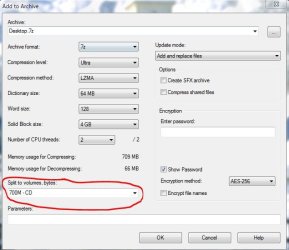
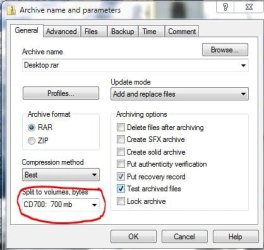
Every Packer/Archiver allows you to split up bigger files into several small archives (which after extraction turn back into one large untainted file) But unlike on the pics you would want to set the compression to low/store when it's about precompressed material the few % of gain wouldn't justify the time used.

7-Zip
Capture.JPG
WinRAR
Capture1.JPG

WinRar has even another helpful feature: it can add some sort of a checksum (recovery record) to the archives which helps you to repair the ones that might have gotten corrupted during file transfer

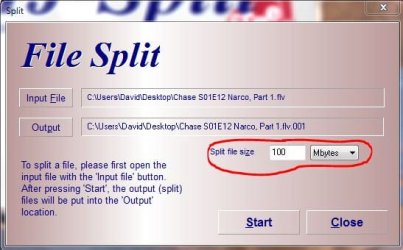
Alternatively you could try HJSplit which doesn't compress at all but splits every file into a number of smaller chunks
Capture2.JPG


Edit Nah...forget this...750 GB it's not a size my recommendations are ideal for :D
 

My Computer

Computer Manufacturer/Model Number
HP m8000n
OS
Windows 7 Ultimate x86
CPU
DualCore AMD Athlon 64 X2, 2600 MHz 5200+
Motherboard
Asus M2N68-LA (Narra)
Memory
Samsung 2GB DDR2
Graphics Card(s)
Onboard NVIDIA GeForce 6150SE nForce 430
Sound Card
Onboard nVIDIA nForce 6100-430 (MCP61P)
Monitor(s) Displays
Westinghouse 19" LED
Screen Resolution
1280x1024
Hard Drives
SATA II Seagate Barracuda 500GB
USB II WD Elements 500GB
USB II WD My Book 1TB
USB II WD My Book 2TB
PSU
Stock (HP)
Case
Stock (HP)
Cooling
Stock
Keyboard
Logitech Classic KB 200
Mouse
Standard HP opticle USB mouse
Tricky but then I am paranoid about backups. I suppose that disks are more reliable than the used to be but...
I don't know that disks are any more reliable. Even though you can verify the writes, I still have had some that didn't work, and also you have to consider the possibility of a disk getting damaged. I prefer the idea of backing up to a hard drive. The hard drive could go bad, but the odds aren't too great of two drives going bad at the same time (unless you have my luck).

EDIT: I just thought of another possibility...I have another Seagate 500GB 7200.11 in the closet, that needs to be RMAed, but since I received a series of bad replacements from Seagate, I had resigned it to the closet instead. I suppose that even if I got another bad replacement, it might last long enough so that I could split the video archive in half between two drives, and the only cost would be the shipping...I don't know.
 

My Computer

Computer Manufacturer/Model Number
DIY
OS
W7x64 Pro, SuSe 12.1/** W7 x64 Pro, XP MCE
CPU
Phenom II 1090T w/Noctua NH-D14 /**4400+ X2 w/CM Hyper TX 3
Motherboard
ASRock 890FX Deluxe 4/**A8N-SLI
Memory
2 x 2GB Patriot PGS34g1600LLKA/**4x1GB Corsair VS
Graphics Card(s)
EVGA GTX460 SC/**EVGA 8800GTS
Sound Card
Asus Xonar D2X/**Xonar D1
Monitor(s) Displays
Acer X233H, Dell E152FPc /**LG M237-WD
Screen Resolution
1920x1080 & 1024x768/**1980x1080
Hard Drives
WDC 2TB, 1.5TB, 1TB, 500GB,Seagate 500GB , Maxtor 80GB /**500GB Seagate & WDC 1TB Black
PSU
CM RS600 w/ APC BX1000G/**Antec 500 TP w/ APC BX1000
Case
HAF922/**Antec 1040IIB
Cooling
3x200mm, 1x140 and 1x120mm/**5x80mm fans
Keyboard
Logitech Media USB/**Saitek Eclipse
Mouse
Cordless Trackman Wheel/**Ditto
Internet Speed
3.3Mbps
Other Info
SB 560 5.1 w/ Sennheiser RS140/**Creative T20 speakers, Dvico FusionHDTV7 Gold RT, Cisco E3000, HP 5510V AIO, Linksys E3000, Belkin F5U237 hub and **F5D8055 adapter
(** = 2nd rig)
Back
Top