File Extensions - Hide or Show

How to Hide or Show Known File Type Extensions in Windows 7


   Information
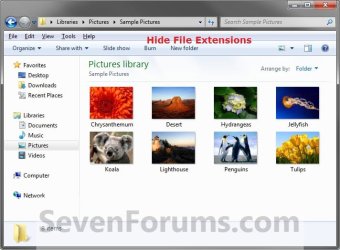
A file name extension is a set of characters added to the end of a file name that identifies the file type or format that determines what default program should open it. This will show you how to have Windows 7 hide or show known file type extensions. By default in Windows 7, known file types are set to hide.

EXAMPLE: Files Type Extensions Set to Show and Hide
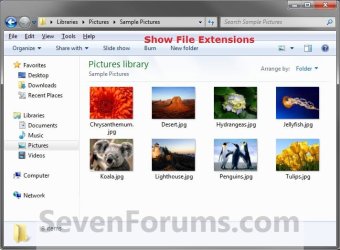
Show.jpg

Hide.jpg


OPTION ONE

Hide or Show Known File Extensions in Folder Options


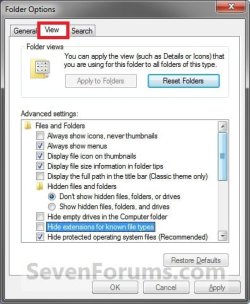
1. Open Folder Options, and click on the View tab. (See screenshot below)
Folder_Options.jpg
2. To Hide Known File Type Extensions
A) Check the Hide extensions for known file types box, then click on OK. (see screenshot above)
NOTE: This is the default setting.
3. To Show Known File Type Extensions
A) Uncheck the Hide extensions for known file types box, then click on OK. (see screenshot above)


OPTION TWO

Hide or Show Known File Extensions using a REG file


1. To Show Known File Type Extensions
A) Click on the Download button below to download the file below.
Show_Known_File_Extensions.reg

Download


B) Go to step 3.
2. To Hide Known File Type Extensions
A) Click on the Download button below to download the file below.
NOTE: This is the default setting.
Hide_Known_File_Extensions.reg

Download


3. Click on Save, and save the .reg file to the desktop.

4. Right click on the downloaded .reg file and click on Merge.

5. Click on Run, Yes, Yes, and OK when prompted.

6. Refresh (F5) Window Explorer or Desktop to see the changes.

7. When done, you can delete the downloaded .reg file if you like.


OPTION THREE

Hide or Show Known File Extensions in Registry Editor


1. Open the Start Menu, then type regedit in the search box and press Enter.

2. If prompted by UAC, then click on Yes.

3. In regedit, navigate to the location below. (see screenshot below)
HKEY_CURRENT_USER\Software\Microsoft\Windows\CurrentVersion\Explorer\Advanced
REG-1.jpg
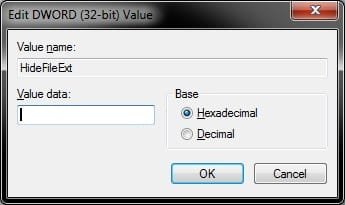
4. In the right pane of Advanced, right click on HideFileExt and click on Modify. (see screenshot above)

5. To Hide Known File Type Extensions
A) Type 1 (number zero), and click on OK. (see screenshot below)
NOTE: This is the default setting.
REG-2.jpg
B) Go to step 7.
6. To Show Known File Type Extensions
A) Type 0, and click on OK. (see screenshot above)
7. Close regedit.

8. Refresh (F5) Window Explorer or Desktop to see the changes.
That's it,
Shawn


Attachments

Last edited:
Unable to hide file extension.

Hello, the HideFileExt variable of my system is set to 0 (zero) but the file extension is still shown.

If I change it through Folder Options it's only temporarily hidden. After reboot file extensions are shown again.

What now, anyone?
 

My Computer

OS
Windows 7 Professional 64 bits, SP1
Hello nlijkje, and welcome to Seven Forums.

You might also check the same registry location as above in Option Three, but start at the HKEY_LOCAL_MACHINE locationinstead to see if you may have an entry there as well.

If not, then use the Find and Find Next feature in regedit to search for the HideFileExt DWORD to see if there may a stray entry in the registry set to 1.

Hope this helps, :)
Shawn
 

My Computer

Computer type
PC/Desktop
Computer Manufacturer/Model Number
Self built custom
OS
64-bit Windows 11 Pro for Workstations
CPU
Intel i7-8700K OC'd to 5 GHz
Motherboard
ASUS ROG Maximus XI Formula Z390
Memory
64 GB (4x16GB) G.SKILL TridentZ RGB DDR4 3600 MHz
Graphics Card(s)
ASUS ROG-STRIX-GTX1080TI-O11G-GAMING
Sound Card
Integrated
Monitor(s) Displays
2 x Samsung Odyssey G7 27"
Screen Resolution
2560x1440
Hard Drives
1TB Samsung 990 PRO M.2,
4TB Samsung 990 PRO PRO M.2,
TerraMaster F8 SSD Plus NAS
PSU
Seasonic Prime Titanium 850W
Case
Thermaltake Core P3
Cooling
Corsair Hydro H115i
Keyboard
Logitech wireless K800
Mouse
Logitech MX Master 4
Internet Speed
2 Gb/s Download and 100 Mb/s Upload
Antivirus
Malwarebyte Anti-Malware Premium
Browser
Google Chrome
Other Info
Logitech Z625 speaker system,
Logitech BRIO 4K Pro webcam,
HP Color LaserJet Pro MFP M477fdn,
APC SMART-UPS RT 1000 XL - SURT1000XLI,
Galaxy S23 Plus phone
Hi Shawn, thanx for your speedy reply.
I already searched for another HideFileExt entry in the register and found non as a DWORD value (only as folder or data entry).
It's my work PC so it might have to do with policies?
 

My Computer

OS
Windows 7 Professional 64 bits, SP1
Ah, yep most likely a policy set up on a domain. Only the domain administrator could change that policy. :(
 

My Computer

Computer type
PC/Desktop
Computer Manufacturer/Model Number
Self built custom
OS
64-bit Windows 11 Pro for Workstations
CPU
Intel i7-8700K OC'd to 5 GHz
Motherboard
ASUS ROG Maximus XI Formula Z390
Memory
64 GB (4x16GB) G.SKILL TridentZ RGB DDR4 3600 MHz
Graphics Card(s)
ASUS ROG-STRIX-GTX1080TI-O11G-GAMING
Sound Card
Integrated
Monitor(s) Displays
2 x Samsung Odyssey G7 27"
Screen Resolution
2560x1440
Hard Drives
1TB Samsung 990 PRO M.2,
4TB Samsung 990 PRO PRO M.2,
TerraMaster F8 SSD Plus NAS
PSU
Seasonic Prime Titanium 850W
Case
Thermaltake Core P3
Cooling
Corsair Hydro H115i
Keyboard
Logitech wireless K800
Mouse
Logitech MX Master 4
Internet Speed
2 Gb/s Download and 100 Mb/s Upload
Antivirus
Malwarebyte Anti-Malware Premium
Browser
Google Chrome
Other Info
Logitech Z625 speaker system,
Logitech BRIO 4K Pro webcam,
HP Color LaserJet Pro MFP M477fdn,
APC SMART-UPS RT 1000 XL - SURT1000XLI,
Galaxy S23 Plus phone
the first option is the easiest to follow for a novice like me
 

My Computer

Computer type
PC/Desktop
Computer Manufacturer/Model Number
custom build
OS
Windows 7 Professional 32bit
Brink... lol

hello again :)

The reg entries are only for local user. is there anyway to add this to all users?
i tried going to HKEY_LOCAL_MACHINE\SOFTWARE\Microsoft\Windows\CurrentVersion\Explorer\Advanced and add the HideFileExt and set it to 0, but nothing happened.

do u know if it is possible?
I'm making an MDT image and i would like to all computers ill make to have this settings to all users.

thanks again
 

My Computer

OS
7
I personally feel one should have file extensions showing so malware with a file name like cutephoto.jpg.exe is harder to sneak past someone. On a computer with the file extensions hidden, the sample filename I showed would appear as a harmless .jpg file. A savvy user should still pick up on it (the .jpg showing on a computer with file extensions showing should be the giveaway) but the chances of it slipping past are still increased, especially if the file is an email attachment or link, depending on what email program is being used.
 

My Computer

Computer type
PC/Desktop
Computer Manufacturer/Model Number
Custom Build
OS
Win 7 Ultimate 64 bit
CPU
Intel i7-3930K
Motherboard
ASUS P9X79 WS
Memory
Kingston HyperX Genesis 32GB Kit (8x4GB Modules) 1600MHz DDR
Graphics Card(s)
MSI R7850 Twin Frozr 2GD5/OC Radeon HD 7850 2GB 256-bit GDDR
Sound Card
Asus Xonar Essence STX
Monitor(s) Displays
3x Asus VG248QE 24", Vizio 32" TV
Screen Resolution
1920 x 1080, ?
Hard Drives
Samsung 128GB 840 Pro SSD (1),
Samsung 4TB 850 EVO SSDs (4)
Samsung 4TB 850 EVO SSDs (16) external backup drives used in 2.5" hot swap bays in the computer.
PSU
Corsair HX750w
Case
Antec Two Hundred v2 (modified)
Cooling
Cooler Master GeminII S524 120mm (fan replaced with a 140mm)
Keyboard
Logitech G510s
Mouse
Logitech M525 (two in use)
Internet Speed
=< 32Mbps down, 8Mbps up
Antivirus
AVAST!, MBAM, SAS, Spybot S&D (all but MBAM free) Glary Util
Browser
IE11
Other Info
LSI 9211-8i HBA card (8 SATA III ports), 2.5" & 3.5" Hot Swap Bays, HooToo HT-CR001 PCI-E to USB 3.0 Internal Hub + 6 Slot Card Reader, and LG Model CH12LS28 BD-ROM Optical Drive. Also, ScanSnap S1500 ADF duplexing scanner, Canon 9000F flat bed scanner, Corsair SP2500 2.1 speakers, Samsung CLP 415nw laser color printer, Cyberpower PP2200SW UPS
Brink... lol

hello again :)

The reg entries are only for local user. is there anyway to add this to all users?
i tried going to HKEY_LOCAL_MACHINE\SOFTWARE\Microsoft\Windows\CurrentVersion\Explorer\Advanced and add the HideFileExt and set it to 0, but nothing happened.

do u know if it is possible?
I'm making an MDT image and i would like to all computers ill make to have this settings to all users.

thanks again

Hello Tasuooooo, and welcome to Seven Forums.

You got the right idea, but it should have been under HKEY_CURRENT_USER instead of HKEY_LOCAL_MACHINE. :)
 

My Computer

Computer type
PC/Desktop
Computer Manufacturer/Model Number
Self built custom
OS
64-bit Windows 11 Pro for Workstations
CPU
Intel i7-8700K OC'd to 5 GHz
Motherboard
ASUS ROG Maximus XI Formula Z390
Memory
64 GB (4x16GB) G.SKILL TridentZ RGB DDR4 3600 MHz
Graphics Card(s)
ASUS ROG-STRIX-GTX1080TI-O11G-GAMING
Sound Card
Integrated
Monitor(s) Displays
2 x Samsung Odyssey G7 27"
Screen Resolution
2560x1440
Hard Drives
1TB Samsung 990 PRO M.2,
4TB Samsung 990 PRO PRO M.2,
TerraMaster F8 SSD Plus NAS
PSU
Seasonic Prime Titanium 850W
Case
Thermaltake Core P3
Cooling
Corsair Hydro H115i
Keyboard
Logitech wireless K800
Mouse
Logitech MX Master 4
Internet Speed
2 Gb/s Download and 100 Mb/s Upload
Antivirus
Malwarebyte Anti-Malware Premium
Browser
Google Chrome
Other Info
Logitech Z625 speaker system,
Logitech BRIO 4K Pro webcam,
HP Color LaserJet Pro MFP M477fdn,
APC SMART-UPS RT 1000 XL - SURT1000XLI,
Galaxy S23 Plus phone
Hi,
just a little add-on with a strange problem:

I used "Folder Options > View" to show the known file extensions.
That worked fine, except for ".url" ... :(

I checked the well-known registry entries, all ok. I checked with NirSoft's wonderful
"FileTypesMan","Always show this file extension" was selected. :confused:

I did a little Inet research and stumbled across that post :
Favorites Bar shows .url extension after name. - Microsoft Community

This user had the opposite problem, ".url" was always displayed. The answer from
Robert Aldwinckle, MVP, was a little cryptic (compared to the Tutorials in this forum),
but it led my attention to another Registry entry:

[ HKEY_CLASSES_ROOT \ IE.AssocFile.URL ]

( In an abbreviated tutorial style:
( Start RegEdit, navigate to "HKEY_CLASSES_ROOT\IE.AssocFile.URL"
( In the left pane click on "IE.AssocFile.URL"
( Check now in the right pane the entries

To my surprise in "IE.AssocFile.URL" I found two related entries,
both "AlwaysShowExt" and "NeverShowExt" were present ...
And, ofc, if Windows has the choice, it selects at 100% the one
the user didn't want (Murphy's Law). :mad:

I deleted "NeverShowExt" and finally my ".url" is visible. :D
Wondering who made this stupid entry, maybe my Avant Browser (set as default).

Sorry for the long post ...

Regards,
Tom

Btw, NirSoft's "FileTypesMan" is my number one choice to change the icons associated
with file extensions. It's lean, it's portable and I don't have to install whatsoever
additional stuff like especially versions of MS dotNET, which other tools desperately need.
 

My Computer

Computer type
PC/Desktop
Computer Manufacturer/Model Number
Custom Build
OS
Windows 7 Ultimate x64
CPU
Intel Sandy Bridge i5 2500K
Motherboard
ASUS P8 H67-M Pro Rev. 3
Memory
16 GB
Graphics Card(s)
Intel internal HD 3000
Sound Card
Realtek internal High Def Audio
Monitor(s) Displays
ViewSonic 24"
Case
Cooler Master - HAF 932 (Big Tower)
Cooling
CPU: EKL AG "Alpenfohn Brocken"
Mouse
SteelSeries Sensei
Antivirus
Kaspersky Internet Security
Browser
Avant (Tri-Core: IE, FireFox & Chrome Engine)
Thank you for the addition Tom. :)
 

My Computer

Computer type
PC/Desktop
Computer Manufacturer/Model Number
Self built custom
OS
64-bit Windows 11 Pro for Workstations
CPU
Intel i7-8700K OC'd to 5 GHz
Motherboard
ASUS ROG Maximus XI Formula Z390
Memory
64 GB (4x16GB) G.SKILL TridentZ RGB DDR4 3600 MHz
Graphics Card(s)
ASUS ROG-STRIX-GTX1080TI-O11G-GAMING
Sound Card
Integrated
Monitor(s) Displays
2 x Samsung Odyssey G7 27"
Screen Resolution
2560x1440
Hard Drives
1TB Samsung 990 PRO M.2,
4TB Samsung 990 PRO PRO M.2,
TerraMaster F8 SSD Plus NAS
PSU
Seasonic Prime Titanium 850W
Case
Thermaltake Core P3
Cooling
Corsair Hydro H115i
Keyboard
Logitech wireless K800
Mouse
Logitech MX Master 4
Internet Speed
2 Gb/s Download and 100 Mb/s Upload
Antivirus
Malwarebyte Anti-Malware Premium
Browser
Google Chrome
Other Info
Logitech Z625 speaker system,
Logitech BRIO 4K Pro webcam,
HP Color LaserJet Pro MFP M477fdn,
APC SMART-UPS RT 1000 XL - SURT1000XLI,
Galaxy S23 Plus phone
Addition:

A little disadvantage of show the ".url" extension shouldn't be witheld :
Internet Explorer now shows the extension in his Favorites Bar and
in the drop-down Favorites list, and that didn't look good.
(That was the problem in the Microsoft Community post)

I tried to fix it with deleting
"AlwaysShowExt" in "HKEY_CLASSES_ROOT\IE.AssocFile.URL",
and disabling "Always show this file extension" with "FileTypesMan",
what means, that the visibility of ".url" now strictly follows the system setting
made by "Folder Options > View".

And Internet Explorer makes exactly that, still showing ".url" ... :(
Note: This behaviour is not affected by setting IE as default browser or not.

Other browsers like Firefox or my Avant Browser are able to ignore
the system settings and hide the ".url" extension, even if "AlwaysShowExt" is set,
what in this case is a wanted behaviour. :)


Regards,
Tom
 

My Computer

Computer type
PC/Desktop
Computer Manufacturer/Model Number
Custom Build
OS
Windows 7 Ultimate x64
CPU
Intel Sandy Bridge i5 2500K
Motherboard
ASUS P8 H67-M Pro Rev. 3
Memory
16 GB
Graphics Card(s)
Intel internal HD 3000
Sound Card
Realtek internal High Def Audio
Monitor(s) Displays
ViewSonic 24"
Case
Cooler Master - HAF 932 (Big Tower)
Cooling
CPU: EKL AG "Alpenfohn Brocken"
Mouse
SteelSeries Sensei
Antivirus
Kaspersky Internet Security
Browser
Avant (Tri-Core: IE, FireFox & Chrome Engine)
Hello Tom,

The [HKEY_CLASSES_ROOT\IE.AssocFile.URL] key is used exclusively by Internet Explorer, so setting it there instead, would only affect Internet Explorer.
 

My Computer

Computer type
PC/Desktop
Computer Manufacturer/Model Number
Self built custom
OS
64-bit Windows 11 Pro for Workstations
CPU
Intel i7-8700K OC'd to 5 GHz
Motherboard
ASUS ROG Maximus XI Formula Z390
Memory
64 GB (4x16GB) G.SKILL TridentZ RGB DDR4 3600 MHz
Graphics Card(s)
ASUS ROG-STRIX-GTX1080TI-O11G-GAMING
Sound Card
Integrated
Monitor(s) Displays
2 x Samsung Odyssey G7 27"
Screen Resolution
2560x1440
Hard Drives
1TB Samsung 990 PRO M.2,
4TB Samsung 990 PRO PRO M.2,
TerraMaster F8 SSD Plus NAS
PSU
Seasonic Prime Titanium 850W
Case
Thermaltake Core P3
Cooling
Corsair Hydro H115i
Keyboard
Logitech wireless K800
Mouse
Logitech MX Master 4
Internet Speed
2 Gb/s Download and 100 Mb/s Upload
Antivirus
Malwarebyte Anti-Malware Premium
Browser
Google Chrome
Other Info
Logitech Z625 speaker system,
Logitech BRIO 4K Pro webcam,
HP Color LaserJet Pro MFP M477fdn,
APC SMART-UPS RT 1000 XL - SURT1000XLI,
Galaxy S23 Plus phone
Hi Brink,
thanks for that info.
It's always good to know, for what a Registry entry is used.

So "NeverShowExt" was set by IE to get rid of ".url" in his Favorites Bar,
and someone other (I presume "FileTypesMan") added "AlwaysShowExt",
whicht caused the problem.

IMHO, hiding ".url" inside the browser like Firefox or my Avant Browser
do is a better way to get a nice view.

Regards,
Tom
 

My Computer

Computer type
PC/Desktop
Computer Manufacturer/Model Number
Custom Build
OS
Windows 7 Ultimate x64
CPU
Intel Sandy Bridge i5 2500K
Motherboard
ASUS P8 H67-M Pro Rev. 3
Memory
16 GB
Graphics Card(s)
Intel internal HD 3000
Sound Card
Realtek internal High Def Audio
Monitor(s) Displays
ViewSonic 24"
Case
Cooler Master - HAF 932 (Big Tower)
Cooling
CPU: EKL AG "Alpenfohn Brocken"
Mouse
SteelSeries Sensei
Antivirus
Kaspersky Internet Security
Browser
Avant (Tri-Core: IE, FireFox & Chrome Engine)
Cooee

when I go to the registry to change the value, I get an error editing value - Cannot edit HideFileExt: Error writing the value's new contents.

I had trouble with my file extensions not hiding last year but it was fixed with this thread, now I am stumped

any help would be appreciated

cheers
 

My Computer

Computer type
PC/Desktop
Computer Manufacturer/Model Number
custom build
OS
Windows 7 x64 Ultimate
CPU
i5 [email protected]
Motherboard
Asus P8Z68-V Pro/Gen 3
Memory
2x4GB Low profile Corsair Vengence
Graphics Card(s)
Sapphire 7970 OC v2@1180/1480
Sound Card
ASUS Zonar DSX
Monitor(s) Displays
27" Black Tune by Crossover & 22" Viewsonic
Screen Resolution
2560x1440 & 1680x1050
Hard Drives
1x 128GB Samsung 840 Pro
1x 640GB WD Black
3x 3TB Seagate Barracuda
PSU
XFX 850W Black Edition
Case
NZXT Phantom 820
Cooling
Noctua NH-D15
Keyboard
Razor Tarantula
Mouse
Logitech G500s
Internet Speed
5.5Mb/s down via satellite
Antivirus
Bitdefender Total Security 2014
Browser
Firefox
Hello beardrinksbeer,

Are you able to use one of the other options to set this with? :)
 

My Computer

Computer type
PC/Desktop
Computer Manufacturer/Model Number
Self built custom
OS
64-bit Windows 11 Pro for Workstations
CPU
Intel i7-8700K OC'd to 5 GHz
Motherboard
ASUS ROG Maximus XI Formula Z390
Memory
64 GB (4x16GB) G.SKILL TridentZ RGB DDR4 3600 MHz
Graphics Card(s)
ASUS ROG-STRIX-GTX1080TI-O11G-GAMING
Sound Card
Integrated
Monitor(s) Displays
2 x Samsung Odyssey G7 27"
Screen Resolution
2560x1440
Hard Drives
1TB Samsung 990 PRO M.2,
4TB Samsung 990 PRO PRO M.2,
TerraMaster F8 SSD Plus NAS
PSU
Seasonic Prime Titanium 850W
Case
Thermaltake Core P3
Cooling
Corsair Hydro H115i
Keyboard
Logitech wireless K800
Mouse
Logitech MX Master 4
Internet Speed
2 Gb/s Download and 100 Mb/s Upload
Antivirus
Malwarebyte Anti-Malware Premium
Browser
Google Chrome
Other Info
Logitech Z625 speaker system,
Logitech BRIO 4K Pro webcam,
HP Color LaserJet Pro MFP M477fdn,
APC SMART-UPS RT 1000 XL - SURT1000XLI,
Galaxy S23 Plus phone
no Brink

I still get the same error using the .reg file or going into the registry & doing it manually. going into folder options I can tick the option to hide file extensions, but when I click OK, it does not hide them; when I go back into folder options, it is unticked

it is a head scratcher this one

I don't mind not hiding file options, but it would be nice to have the option

thank you for your help

cheers
 

My Computer

Computer type
PC/Desktop
Computer Manufacturer/Model Number
custom build
OS
Windows 7 x64 Ultimate
CPU
i5 [email protected]
Motherboard
Asus P8Z68-V Pro/Gen 3
Memory
2x4GB Low profile Corsair Vengence
Graphics Card(s)
Sapphire 7970 OC v2@1180/1480
Sound Card
ASUS Zonar DSX
Monitor(s) Displays
27" Black Tune by Crossover & 22" Viewsonic
Screen Resolution
2560x1440 & 1680x1050
Hard Drives
1x 128GB Samsung 840 Pro
1x 640GB WD Black
3x 3TB Seagate Barracuda
PSU
XFX 850W Black Edition
Case
NZXT Phantom 820
Cooling
Noctua NH-D15
Keyboard
Razor Tarantula
Mouse
Logitech G500s
Internet Speed
5.5Mb/s down via satellite
Antivirus
Bitdefender Total Security 2014
Browser
Firefox
update

I rebooted the comp & used the .reg file; it said it was added to the registry, but it was still showing file extensions. so I went into folder options & it worked when I ticked hide file extensions

so all fixed now :)

imagine that, a weird comp problem fixed :) comps never have weird problems ever? do they :)

thank you for your help Brink

cheers
 

My Computer

Computer type
PC/Desktop
Computer Manufacturer/Model Number
custom build
OS
Windows 7 x64 Ultimate
CPU
i5 [email protected]
Motherboard
Asus P8Z68-V Pro/Gen 3
Memory
2x4GB Low profile Corsair Vengence
Graphics Card(s)
Sapphire 7970 OC v2@1180/1480
Sound Card
ASUS Zonar DSX
Monitor(s) Displays
27" Black Tune by Crossover & 22" Viewsonic
Screen Resolution
2560x1440 & 1680x1050
Hard Drives
1x 128GB Samsung 840 Pro
1x 640GB WD Black
3x 3TB Seagate Barracuda
PSU
XFX 850W Black Edition
Case
NZXT Phantom 820
Cooling
Noctua NH-D15
Keyboard
Razor Tarantula
Mouse
Logitech G500s
Internet Speed
5.5Mb/s down via satellite
Antivirus
Bitdefender Total Security 2014
Browser
Firefox
In that case, see if using step 3 in OPTION THREE of the tutorial below to take ownership of the Advanced registry key below, and set permissions to allow your account "Full Control" of it.

HKEY_CURRENT_USER\Software\Microsoft\Windows\CurrentVersion\Explorer\Advanced

Take Ownership of file

EDIT:
Great news. :party:
 

My Computer

Computer type
PC/Desktop
Computer Manufacturer/Model Number
Self built custom
OS
64-bit Windows 11 Pro for Workstations
CPU
Intel i7-8700K OC'd to 5 GHz
Motherboard
ASUS ROG Maximus XI Formula Z390
Memory
64 GB (4x16GB) G.SKILL TridentZ RGB DDR4 3600 MHz
Graphics Card(s)
ASUS ROG-STRIX-GTX1080TI-O11G-GAMING
Sound Card
Integrated
Monitor(s) Displays
2 x Samsung Odyssey G7 27"
Screen Resolution
2560x1440
Hard Drives
1TB Samsung 990 PRO M.2,
4TB Samsung 990 PRO PRO M.2,
TerraMaster F8 SSD Plus NAS
PSU
Seasonic Prime Titanium 850W
Case
Thermaltake Core P3
Cooling
Corsair Hydro H115i
Keyboard
Logitech wireless K800
Mouse
Logitech MX Master 4
Internet Speed
2 Gb/s Download and 100 Mb/s Upload
Antivirus
Malwarebyte Anti-Malware Premium
Browser
Google Chrome
Other Info
Logitech Z625 speaker system,
Logitech BRIO 4K Pro webcam,
HP Color LaserJet Pro MFP M477fdn,
APC SMART-UPS RT 1000 XL - SURT1000XLI,
Galaxy S23 Plus phone
thank you for your help Brink

I have bookmarked the "Take Ownership of file" link, as it will come in handy for other things

now the scroll wheel on my G400 mouse is not working; another mouse works fine. so it is time to dismantle the mouse & have a look. if I can't fix it, I shall give it to George my cat to play with :)

have a grouse evening Brink

cheers
 

My Computer

Computer type
PC/Desktop
Computer Manufacturer/Model Number
custom build
OS
Windows 7 x64 Ultimate
CPU
i5 [email protected]
Motherboard
Asus P8Z68-V Pro/Gen 3
Memory
2x4GB Low profile Corsair Vengence
Graphics Card(s)
Sapphire 7970 OC v2@1180/1480
Sound Card
ASUS Zonar DSX
Monitor(s) Displays
27" Black Tune by Crossover & 22" Viewsonic
Screen Resolution
2560x1440 & 1680x1050
Hard Drives
1x 128GB Samsung 840 Pro
1x 640GB WD Black
3x 3TB Seagate Barracuda
PSU
XFX 850W Black Edition
Case
NZXT Phantom 820
Cooling
Noctua NH-D15
Keyboard
Razor Tarantula
Mouse
Logitech G500s
Internet Speed
5.5Mb/s down via satellite
Antivirus
Bitdefender Total Security 2014
Browser
Firefox
Back
Top