File Sharing Between Windows 7 and Windows XP Mode.

sm921

New member
Local time
11:16 AM
Messages
2
Hi Everyone,
I hope someone can help me. I have a fairly new computer with windows 7. I recently downloaded Windows Virtual PC with Windows XP Mode 64bit. I then installed an old autocad program which I still use and it is up and running with no issues save one. My problem is that I can't seem to load my drawing documents directly from windows 7 into the autocad program that's in virtual XP. I would like to be able to click on a document and have it open directly in autocad. I would also like to save my drawings to windows 7, rather than saving them in Virtual PC. I have been reading all kinds of posts on this and trying different things but nothing has worked. It seems like it shouldn't be this hard. Please help!
 

My Computer My Computer

At a glance

windows 7 professional 64 bit4 G ramnvidia3000m
Computer type
Laptop
Computer Manufacturer/Model Number
HP
OS
windows 7 professional 64 bit
Memory
4 G ram
Graphics Card(s)
nvidia3000m
Antivirus
norton 360
Browser
google
Hi Sm921, welcome to the Seven Forums.

First, check that the integration features are installed on XP Mode. See this tutorial for installing and enabling integration features on XP Mode and other Virtual PC virtual machines: http://www.sevenforums.com/tutorial...egration-features-install-enable-disable.html.

For sharing between XP Mode and your host system, see this thread: http://www.sevenforums.com/virtualization/127889-xp-mode-sharing-files-guest-machine.html. At the end of the post #2 in said thread you'll find a solution for saving XP Mode documents directly to Windows 7 host.

Kari
 

My Computer My Computer

At a glance

Windows 10 Pro x64 EN-GB1.6 GHz Intel Core i7-720QM Processor6 GBATI Mobility Radeon HD 5850 Graphics
Computer type
Laptop
Computer Manufacturer/Model Number
HP ENVY 17-1150eg
OS
Windows 10 Pro x64 EN-GB
CPU
1.6 GHz Intel Core i7-720QM Processor
Memory
6 GB
Graphics Card(s)
ATI Mobility Radeon HD 5850 Graphics
Sound Card
Beats sound system with integrated subwoofer
Monitor(s) Displays
17" laptop display, 22" LED and 32" Full HD TV through HDMI
Screen Resolution
1600*900 (1), 1920*1080 (2&3)
Hard Drives
Internal: 2 x 500 GB SATA Hard Disk Drive 7200 rpm
External: 2TB for backups, 3TB USB3 network drive for media
Cooling
As Envy runs a bit warm, I have it on a Cooler Master pad
Keyboard
Logitech diNovo Media Desktop Laser (bluetooth)
Mouse
Logitech Performance Mouse MX
Internet Speed
50/10 Mbps VDSL
Antivirus
Windows Defender 4.3.9431.0
Browser
Maxthon 3.5.2., IE11
Hi Kari,

I think the integration feature is already enabled in XP Mode, since when I click on tools it only gives the choice of disabling it.

I am having trouble with following sharing thread. First, I am not sure which of the options in the drop down list is the host network controller. Can you tell me where that information is located in win 7?

The next thing I had trouble with was finding the shared documents folder in win 7. I see in your screen shot that your SharedDocs folder is in the XPMODE-1 folder within the Network folder. I only have my computer folder and my printer folder in the Network folder. It doesn't give me a choice for XP Mode.

Finally, I really liked the practical tip you gave and tried to implement it, but when I tried to select the destination folder for My Documents folder I could only get as far as the Workgroup folder. The folder would not give me the next subfolder choice.

Thanks
 

My Computer My Computer

At a glance

windows 7 professional 64 bit4 G ramnvidia3000m
Computer type
Laptop
Computer Manufacturer/Model Number
HP
OS
windows 7 professional 64 bit
Memory
4 G ram
Graphics Card(s)
nvidia3000m
Antivirus
norton 360
Browser
google
I think the integration feature is already enabled in XP Mode, since when I click on tools it only gives the choice of disabling it.

Integration is by default installed and enabled if not changed by user so that's OK.

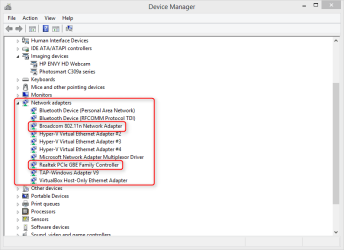
I am having trouble with following sharing thread. First, I am not sure which of the options in the drop down list is the host network controller. Can you tell me where that information is located in win 7?

Open the Device Manager > Network Adapters. It can as in this example from my PC show quite a many entries, but if you exclude all Bluetooth and Virtual adapters, what's left is your network adapters. In my case here the Broadcom is my WiFi adapter, Realtek the LAN (Ethernet) adapter:

2014-06-28_17h12_03.png

The next thing I had trouble with was finding the shared documents folder in win 7. I see in your screen shot that your SharedDocs folder is in the XPMODE-1 folder within the Network folder. I only have my computer folder and my printer folder in the Network folder. It doesn't give me a choice for XP Mode.
The XPMODE-1 is not a folder, it is the name of my XP Mode virtual machine as seen in the host (Windows 7) My Computer > Network which shows a list of networked computers.

Finally, I really liked the practical tip you gave and tried to implement it, but when I tried to select the destination folder for My Documents folder I could only get as far as the Workgroup folder. The folder would not give me the next subfolder choice.
I have manually created the folder in host (Windows 7). I later redirected XP Mode documents folder to this folder on host. If networking and sharing is set properly, you can browse the host folder structure from here and select any folder.

Read these tutorials for more information:
 

My Computer My Computer

At a glance

Windows 10 Pro x64 EN-GB1.6 GHz Intel Core i7-720QM Processor6 GBATI Mobility Radeon HD 5850 Graphics
Computer type
Laptop
Computer Manufacturer/Model Number
HP ENVY 17-1150eg
OS
Windows 10 Pro x64 EN-GB
CPU
1.6 GHz Intel Core i7-720QM Processor
Memory
6 GB
Graphics Card(s)
ATI Mobility Radeon HD 5850 Graphics
Sound Card
Beats sound system with integrated subwoofer
Monitor(s) Displays
17" laptop display, 22" LED and 32" Full HD TV through HDMI
Screen Resolution
1600*900 (1), 1920*1080 (2&3)
Hard Drives
Internal: 2 x 500 GB SATA Hard Disk Drive 7200 rpm
External: 2TB for backups, 3TB USB3 network drive for media
Cooling
As Envy runs a bit warm, I have it on a Cooler Master pad
Keyboard
Logitech diNovo Media Desktop Laser (bluetooth)
Mouse
Logitech Performance Mouse MX
Internet Speed
50/10 Mbps VDSL
Antivirus
Windows Defender 4.3.9431.0
Browser
Maxthon 3.5.2., IE11
Back
Top