

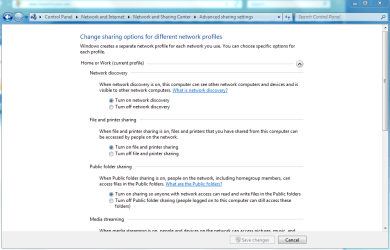
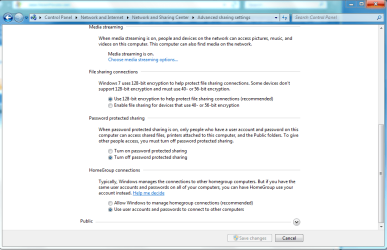
You probably just havn't enabled all the sharing options in Win7 yet. There are quite a few options there and they all need to be enabled. It's all about security layers with Win 7.
Just go to network and sharing center then look left and click on "change advanced sharing settings". Scroll down and enable all options until it works.
You want the sharing center to look like this.
Just go to network and sharing center then look left and click on "change advanced sharing settings". Scroll down and enable all options until it works.
You want the sharing center to look like this.
Attachments
My Computer
At a glance
Windows 7 Ult, Windows 8.1 Pro,Q9650-4.275GHz, E8600 4.5GHz, E6750-3.8GHzG.Skill PC2 9600 1200Mhz 5 5 5 15 2TGTX480
- Computer type
- PC/Desktop
- Computer Manufacturer/Model Number
- Home built
- OS
- Windows 7 Ult, Windows 8.1 Pro,
- CPU
- Q9650-4.275GHz, E8600 4.5GHz, E6750-3.8GHz
- Motherboard
- Evga 780i FTW
- Memory
- G.Skill PC2 9600 1200Mhz 5 5 5 15 2T
- Graphics Card(s)
- GTX480
- Sound Card
- Asus Xonar D2
- Monitor(s) Displays
- HannsG
- Screen Resolution
- 1680X1050
- Hard Drives
- GSkill Phoenix Pro 120GB SSD
- PSU
- ThermalTake Toughpower 1000Watt modular
- Case
- ThermalTake XaserV
- Cooling
- Xigmatek S1283
- Keyboard
- Logitech G15
- Mouse
- Logitech G9
- Internet Speed
- T1
 I set the HomeGroup connection settings to "Use user accounts and passwords to connect to other computers." Everything worked fine last night, I shut the computer off and went to bed. This morning its telling me there is an error with my user name and password. No settings were changed that I know of. Does anyone have a clue what happened?


