
File System Acting Odd When Moving Files

AJC

New member
Local time
2:15 PM
Messages
8
Location
Canada
I have been having some space problems lately on my computer. I have a lot of games on Steam and they have been eating up my space, so I tryed moving the 72GB folder over to my 1TB hard drive and it's just stuck at 1 day remaining. I really don't know what to do. If I cancel it I'm sure it will take forever to bump it back down. :(

stuck.jpg
 

My Computer My Computer

At a glance

Windows 7 Professional 32-bitIntel ore 2 Quade Q6600 @ 2.40GHz4GB DDR2 Corsair Dominator RAMATI Radeon HD 4890
Computer Manufacturer/Model Number
Self Made
OS
Windows 7 Professional 32-bit
CPU
Intel ore 2 Quade Q6600 @ 2.40GHz
Motherboard
Asus P5Q SE Plus
Memory
4GB DDR2 Corsair Dominator RAM
Graphics Card(s)
ATI Radeon HD 4890
Sound Card
None (USB zCinima)
Monitor(s) Displays
BenQ G2220HD
Hard Drives
250GB WD (WinXP), 250GB WD (Win7), 1TB (extraspace), 500GB (external backup)
I have been having some space problems lately on my computer. I have a lot of games on Steam and they have been eating up my space, so I tryed moving the 72GB folder over to my 1TB hard drive and it's just stuck at 1 day remaining. I really don't know what to do. If I cancel it I'm sure it will take forever to bump it back down. :(
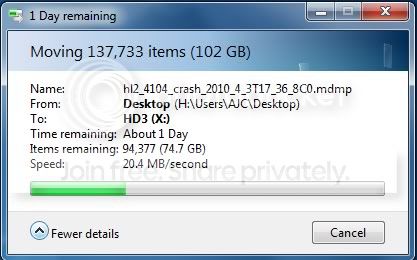
stuck.jpg
\


You have 2 choices. Stop it or wait till tomorrow. They may not even work when moved. 74 gigs is a lot of stuff to move.


Let us know if we can be of help

Ken
 

My Computer My Computer

At a glance

Win 8 Release candidate 8400[email protected]4 gigsNvidia 9600M
Computer Manufacturer/Model Number
HP Pavillion dv-7 1005 Tx
OS
Win 8 Release candidate 8400
CPU
[email protected]
Memory
4 gigs
Graphics Card(s)
Nvidia 9600M
Sound Card
HD built-in
Monitor(s) Displays
17" Wxga
Screen Resolution
1440x900
Cooling
none
Internet Speed
45Mb down 5Mb up
  • Like
Reactions: AJC
What I have done is move the sub folder into the hard drive as well, this seems to work but the other folder that is moving is still stuck at an ETA of one day left. Hopefully when the sub folders are one the other move should be complete. Next time I o this I might use an application of some sort since this way seems to be more of a pain then a help. I remember Microsoft had a powertoy I think that moved large files but I don't think it woul work on Windows 7. :huh: If anyone knows of any good large file moving free application that work on Windows 7 I would greatly applicate it :D
 

My Computer My Computer

At a glance

Windows 7 Professional 32-bitIntel ore 2 Quade Q6600 @ 2.40GHz4GB DDR2 Corsair Dominator RAMATI Radeon HD 4890
Computer Manufacturer/Model Number
Self Made
OS
Windows 7 Professional 32-bit
CPU
Intel ore 2 Quade Q6600 @ 2.40GHz
Motherboard
Asus P5Q SE Plus
Memory
4GB DDR2 Corsair Dominator RAM
Graphics Card(s)
ATI Radeon HD 4890
Sound Card
None (USB zCinima)
Monitor(s) Displays
BenQ G2220HD
Hard Drives
250GB WD (WinXP), 250GB WD (Win7), 1TB (extraspace), 500GB (external backup)

My Computer My Computer

At a glance

Windows 7 x64 pro/ Windows 7 x86 Pro/ XP SP3 x86
Computer Manufacturer/Model Number
Too many to describe...
OS
Windows 7 x64 pro/ Windows 7 x86 Pro/ XP SP3 x86
  • Like
Reactions: AJC

Thanks, it working great so far! I'll use that app for all of my big files now :D

Also, windows explorer said it would take a day, the app says 8 mins. THANK YOU!
 

My Computer My Computer

At a glance

Windows 7 Professional 32-bitIntel ore 2 Quade Q6600 @ 2.40GHz4GB DDR2 Corsair Dominator RAMATI Radeon HD 4890
Computer Manufacturer/Model Number
Self Made
OS
Windows 7 Professional 32-bit
CPU
Intel ore 2 Quade Q6600 @ 2.40GHz
Motherboard
Asus P5Q SE Plus
Memory
4GB DDR2 Corsair Dominator RAM
Graphics Card(s)
ATI Radeon HD 4890
Sound Card
None (USB zCinima)
Monitor(s) Displays
BenQ G2220HD
Hard Drives
250GB WD (WinXP), 250GB WD (Win7), 1TB (extraspace), 500GB (external backup)
I just tried TeraCopy. When I select files then right click and pick TeraCopy, I end up with a window with nothing showing in it, yet if I move my pointer over various areas of the window, the window title changes, from File Operation to Switch to Move mode, Permanently delete files from disk, etc.

Anyone else see this? Any idea how to fix it? I registered at the site but have not received my E-mail yet.

Edit: Never mind, I rebooted and now it works. Very weird.
 

My Computer My Computer

At a glance

Windows 10 Pro X64Intel Quad Core i7-4770 @ 3.4Ghz16.0GB PC3-12800 DDR3 SDRAM 1600 MHzIntel Integrated HD Graphics
Computer type
PC/Desktop
Computer Manufacturer/Model Number
Lenovo IdeaCenter 450
OS
Windows 10 Pro X64
CPU
Intel Quad Core i7-4770 @ 3.4Ghz
Memory
16.0GB PC3-12800 DDR3 SDRAM 1600 MHz
Graphics Card(s)
Intel Integrated HD Graphics
Sound Card
Realtek HD Audio
Monitor(s) Displays
HP 22" LCD
Screen Resolution
1680 x 1050
Hard Drives
250GB Samsung EVO SATA-3 SSD
2TB Seagate ST2000DM001 SATA-2
1.5TB Seagate ST3150041AS SATA
Keyboard
Dell USB
Mouse
Lenovo USB
Internet Speed
Cable via Road Runner 3MB Upload, 30MB Download
Antivirus
Windows Defender, MBAM Pro, MBAE
Browser
Seamonkey
Other Info
UEFI/GPT
PLDS DVD-RW DH16AERSH
  • Like
Reactions: AJC
I just tried TeraCopy. When I select files then right click and pick TeraCopy, I end up with a window with nothing showing in it, yet if I move my pointer over various areas of the window, the window title changes, from File Operation to Switch to Move mode, Permanently delete files from disk, etc.

Anyone else see this? Any idea how to fix it? I registered at the site but have not received my E-mail yet.

Edit: Never mind, I rebooted and now it works. Very weird.
ya sometimes it acts a little odd, but I guess that's why there is a pro version ;)
 

My Computer My Computer

At a glance

Windows 7 Professional 32-bitIntel ore 2 Quade Q6600 @ 2.40GHz4GB DDR2 Corsair Dominator RAMATI Radeon HD 4890
Computer Manufacturer/Model Number
Self Made
OS
Windows 7 Professional 32-bit
CPU
Intel ore 2 Quade Q6600 @ 2.40GHz
Motherboard
Asus P5Q SE Plus
Memory
4GB DDR2 Corsair Dominator RAM
Graphics Card(s)
ATI Radeon HD 4890
Sound Card
None (USB zCinima)
Monitor(s) Displays
BenQ G2220HD
Hard Drives
250GB WD (WinXP), 250GB WD (Win7), 1TB (extraspace), 500GB (external backup)
Back
Top