
Filehippo

I'm wondering if something isn't preventing it from starting. Perhaps a firewall or antivirus? When you open the application manually, do you get a prompt from UAC to allow that action? You have the checker installed correct? Not the stand alone exe that doesn't install, but just runs when you click on it? When you installed it, did you right click on the installer and click on run as administrator?
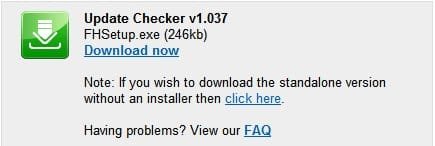
standalone.jpg

Stand Alone

It may be if you try the stand alone it will work by either the start with windows method, or the startup folder method.

A Guy
 

My Computer My Computer

At a glance

Windows 10 Home x64INTEL Core i5-750 Quad-Core 3.37GHzHyperX Fury Black Series 8GB (2 x 4GB) 1866MhzEVGA GeForce GTX 750 Superclocked 1GB 128-Bit...
Computer type
PC/Desktop
OS
Windows 10 Home x64
CPU
INTEL Core i5-750 Quad-Core 3.37GHz
Motherboard
ASUS P7P55D
Memory
HyperX Fury Black Series 8GB (2 x 4GB) 1866Mhz
Graphics Card(s)
EVGA GeForce GTX 750 Superclocked 1GB 128-Bit GDDR5
Monitor(s) Displays
LG 32MA68HY 32" IPS
Screen Resolution
1920 x 1080
Hard Drives
Samsung 840 Evo 120GB, SEAGATE 500GB Barracuda® 7200.12, SATA 3 Gb/s, 7200 RPM, 16MB cache
PSU
ANTEC TruePower New TP-550, 80 PLUS, 550W
Case
ANTEC Three Hundred Illusion
Cooling
COOLER MASTER Hyper 212 Plus, 4 x 120mm 1 x 140mm Noctua's
Internet Speed
85 + Mbps
Antivirus
Avast
Browser
Vivaldi
I looked at the Windows Firewall and update checker was not listed as an allowed program. I added it. It is still not listed in Task Manager nor does the hippo appear in the notification area.

When I open Filehippo manually a get a UAC prompt.

I mentioned previously that in XP Filehippo worked well. But that was with F Secure as antivirus. With Windows 7 I have installed AVG Free, Is there a way of temporarily disabling AVG or do I have to uninstall it to see if therein lies the problem?
 

My Computer My Computer

At a glance

windows 7
OS
windows 7
It's possible this is a UAC issue...I'm unsure whether a program that requires UAC to start, will ask for permission when set to start with windows (unlike some others, I have other active protection and have UAC off, which I don't reccommend to others not similarly protected). It may be that installing the checker as run as admin might help. To turn off AVG, just right click the AVG tray icon... then select Quit AVG. Restart to turn it back on again. A Guy
 

My Computer My Computer

At a glance

Windows 10 Home x64INTEL Core i5-750 Quad-Core 3.37GHzHyperX Fury Black Series 8GB (2 x 4GB) 1866MhzEVGA GeForce GTX 750 Superclocked 1GB 128-Bit...
Computer type
PC/Desktop
OS
Windows 10 Home x64
CPU
INTEL Core i5-750 Quad-Core 3.37GHz
Motherboard
ASUS P7P55D
Memory
HyperX Fury Black Series 8GB (2 x 4GB) 1866Mhz
Graphics Card(s)
EVGA GeForce GTX 750 Superclocked 1GB 128-Bit GDDR5
Monitor(s) Displays
LG 32MA68HY 32" IPS
Screen Resolution
1920 x 1080
Hard Drives
Samsung 840 Evo 120GB, SEAGATE 500GB Barracuda® 7200.12, SATA 3 Gb/s, 7200 RPM, 16MB cache
PSU
ANTEC TruePower New TP-550, 80 PLUS, 550W
Case
ANTEC Three Hundred Illusion
Cooling
COOLER MASTER Hyper 212 Plus, 4 x 120mm 1 x 140mm Noctua's
Internet Speed
85 + Mbps
Antivirus
Avast
Browser
Vivaldi
If you want to protect your system, get rid of AVG asap. It does not work. We used to have it on 6 systems and all got heavily infected. Install MSE instead.
 

My Computer My Computer

At a glance

Vista, Windows7, Mint Mate, Zorin, Windows 8from 1.6GHz Duo to i7
Computer Manufacturer/Model Number
HP, Dell, Gateway, Toshiba - 4 laptops and 2 desktops
OS
Vista, Windows7, Mint Mate, Zorin, Windows 8
CPU
from 1.6GHz Duo to i7
Monitor(s) Displays
2x HP w2207
Hard Drives
5x HDD, 7x SSD, 12x Externals
Keyboard
with trackball - no mices
Mouse
Trackball mice
Internet Speed
DSL 6000
If you want to protect your system, get rid of AVG asap. It does not work. We used to have it on 6 systems and all got heavily infected. Install MSE instead.

Never used AVG myself, so this sounds like great advice from experience :)

A Guy
 

My Computer My Computer

At a glance

Windows 10 Home x64INTEL Core i5-750 Quad-Core 3.37GHzHyperX Fury Black Series 8GB (2 x 4GB) 1866MhzEVGA GeForce GTX 750 Superclocked 1GB 128-Bit...
Computer type
PC/Desktop
OS
Windows 10 Home x64
CPU
INTEL Core i5-750 Quad-Core 3.37GHz
Motherboard
ASUS P7P55D
Memory
HyperX Fury Black Series 8GB (2 x 4GB) 1866Mhz
Graphics Card(s)
EVGA GeForce GTX 750 Superclocked 1GB 128-Bit GDDR5
Monitor(s) Displays
LG 32MA68HY 32" IPS
Screen Resolution
1920 x 1080
Hard Drives
Samsung 840 Evo 120GB, SEAGATE 500GB Barracuda® 7200.12, SATA 3 Gb/s, 7200 RPM, 16MB cache
PSU
ANTEC TruePower New TP-550, 80 PLUS, 550W
Case
ANTEC Three Hundred Illusion
Cooling
COOLER MASTER Hyper 212 Plus, 4 x 120mm 1 x 140mm Noctua's
Internet Speed
85 + Mbps
Antivirus
Avast
Browser
Vivaldi
I have removed AVG and re-installed F Secure - recommended by IT staff at my old employment. Thanks for that advice whs.

You may be right A Guy about UAC. I altered the slider on the user account settings to the lowest setting and Filehippo ran at start up. Obviously I returned the setting to the default one as I need protection. The hippo icon did not appear in the notification area though.

Although I appreciate your help, you have all spent far too much time on this. I'll just run Filehippo manually once a week.

One last thing. F Secure has its own Firewall. Should I leave the Windows 7 Firewall on or turn it off. I seem to remember reading once that having two firewalls on led to conflict
 

My Computer My Computer

At a glance

windows 7
OS
windows 7
Yeah, keep only one firewall. Usually an OEM AV program shuts the Windows firewall off. But you may want to check that. I am not familiar with F-Secure and how it does it. I would think that either firewall is ok - especially if you work thru a router which usually has the best firewall protection on top of the software firewalls.
 

My Computer My Computer

At a glance

Vista, Windows7, Mint Mate, Zorin, Windows 8from 1.6GHz Duo to i7
Computer Manufacturer/Model Number
HP, Dell, Gateway, Toshiba - 4 laptops and 2 desktops
OS
Vista, Windows7, Mint Mate, Zorin, Windows 8
CPU
from 1.6GHz Duo to i7
Monitor(s) Displays
2x HP w2207
Hard Drives
5x HDD, 7x SSD, 12x Externals
Keyboard
with trackball - no mices
Mouse
Trackball mice
Internet Speed
DSL 6000

My Computer My Computer

At a glance

Windows 10 Pro x64Intel Core i5 7400 @ 3.00GHz8GB 2133Mhz DDR4 (OEM supplied)Gygabyte Windforce GTX 1050Ti (Factory Overcl...
Computer type
PC/Desktop
Computer Manufacturer/Model Number
Medion Erazer (note to self: insert model number) - with custom additions
OS
Windows 10 Pro x64
CPU
Intel Core i5 7400 @ 3.00GHz
Motherboard
OEM supllied with PC
Memory
8GB 2133Mhz DDR4 (OEM supplied)
Graphics Card(s)
Gygabyte Windforce GTX 1050Ti (Factory Overclocked)
Sound Card
Realtek
Monitor(s) Displays
Acer Al1980 + HKC
Screen Resolution
1360*768(HKC) / 1280*1024(Acer)
Hard Drives
1TB Toshiba
1TB WD Caviar Green
120GB Samsung Evo 840
PSU
OEM supplied (no power rating on case)
Case
OEM Supplied
Cooling
Stock
Keyboard
Logitech Wireless
Mouse
Logitect Wireless
Internet Speed
40Mb/s Down 10Mb/s Up
Antivirus
Defender
Browser
Firefox
Many thanks severedsolo
I'll try it later today and post back
thanks too for firewall comment whs
 

My Computer My Computer

At a glance

windows 7
OS
windows 7
That is not a bad idea. Just make sure you run Secunia either manually or as a scheduled task as Sympatico suggests. Else it can be somewhat a pain in the neck.
To each their own, as they say. Seeing as how I have very few actual installed progs that will need updating (once bought, door locked), and the ones I do have soon shout up and let me know when updates are available, PSI suits me. But I have used FH in the past, and may well do in the future, just all depends on what s'ware I have installed.
Would be nice if someone came up with a catch-all. But that'll never happen. Look how integrated M$ and Adobe are!! Its like conjoined twins who hate each other!!
 

My Computer My Computer

At a glance

Windows 7 Ultimatum
OS
Windows 7 Ultimatum
Well if it is a UAC issue, there is a very easy fix,

Go Start>Programs
Right click Startup and then Click "Open" or "Explore"
In the window that opens, make a shortcut to override UAC: http://www.sevenforums.com/tutorials/11949-elevated-program-shortcut-without-uac-prompt-create.html

I had exactly the same problem myself with Peerblock, it just refused to run at startup. (Im guessing its a security feature, as alot of Malware tries to run on Startup before your AV has kicked in)
That's one helpful tip Severed. Bookmarked n copied into my "things to know" folder. I've always wondered though why 7 (and Vista? never owned it so don't know) make setting up a scheduled task a convoluted affair.
 

My Computer My Computer

At a glance

Windows 7 Ultimatum
OS
Windows 7 Ultimatum
I have done as you suggested severedsolo. The problem remains.

I am going to suggest we say over and out on this one. You have all given so much time to help an old newbie and I am grateful.
However, having to run Filehippo manually is not too onerous.

And you have all taught me so much about Windows that I did not know before.

Best to all
Cestode
 

My Computer My Computer

At a glance

windows 7
OS
windows 7
did you remove the old shortcut from the shell startup folder? the one you set up when trying out whs's idea?
 

My Computer My Computer

At a glance

Windows 10 Pro x64Intel Core i5 7400 @ 3.00GHz8GB 2133Mhz DDR4 (OEM supplied)Gygabyte Windforce GTX 1050Ti (Factory Overcl...
Computer type
PC/Desktop
Computer Manufacturer/Model Number
Medion Erazer (note to self: insert model number) - with custom additions
OS
Windows 10 Pro x64
CPU
Intel Core i5 7400 @ 3.00GHz
Motherboard
OEM supllied with PC
Memory
8GB 2133Mhz DDR4 (OEM supplied)
Graphics Card(s)
Gygabyte Windforce GTX 1050Ti (Factory Overclocked)
Sound Card
Realtek
Monitor(s) Displays
Acer Al1980 + HKC
Screen Resolution
1360*768(HKC) / 1280*1024(Acer)
Hard Drives
1TB Toshiba
1TB WD Caviar Green
120GB Samsung Evo 840
PSU
OEM supplied (no power rating on case)
Case
OEM Supplied
Cooling
Stock
Keyboard
Logitech Wireless
Mouse
Logitect Wireless
Internet Speed
40Mb/s Down 10Mb/s Up
Antivirus
Defender
Browser
Firefox
I have done as you suggested severedsolo. The problem remains.

I am going to suggest we say over and out on this one. You have all given so much time to help an old newbie and I am grateful.
However, having to run Filehippo manually is not too onerous.

And you have all taught me so much about Windows that I did not know before.

Best to all
Cestode

cestode, if you'd rather not continue, we understand, but no one here is being imposed on, this is what we do :) I know I speak for the others when I say we are happy to help. Seldom do we throw up our hands and give up. Nor do we feel obliged to continue helping. We all know there is another real person on the other end requesting help. That said, I also understand "you know , forget it, it's not worth the aggrivation", lol. Either way, your call. I see us down to it is indeed UAC related, and probably fixable, but if you are happy, so are we :D

A Guy
 

My Computer My Computer

At a glance

Windows 10 Home x64INTEL Core i5-750 Quad-Core 3.37GHzHyperX Fury Black Series 8GB (2 x 4GB) 1866MhzEVGA GeForce GTX 750 Superclocked 1GB 128-Bit...
Computer type
PC/Desktop
OS
Windows 10 Home x64
CPU
INTEL Core i5-750 Quad-Core 3.37GHz
Motherboard
ASUS P7P55D
Memory
HyperX Fury Black Series 8GB (2 x 4GB) 1866Mhz
Graphics Card(s)
EVGA GeForce GTX 750 Superclocked 1GB 128-Bit GDDR5
Monitor(s) Displays
LG 32MA68HY 32" IPS
Screen Resolution
1920 x 1080
Hard Drives
Samsung 840 Evo 120GB, SEAGATE 500GB Barracuda® 7200.12, SATA 3 Gb/s, 7200 RPM, 16MB cache
PSU
ANTEC TruePower New TP-550, 80 PLUS, 550W
Case
ANTEC Three Hundred Illusion
Cooling
COOLER MASTER Hyper 212 Plus, 4 x 120mm 1 x 140mm Noctua's
Internet Speed
85 + Mbps
Antivirus
Avast
Browser
Vivaldi
yes I removed the old short cut severedsolo
Thanks for your kind words A Guy. It is a feeling of guilt that induced me to say what I said. I am taking everyone's time and there is no way I can give anything back in repayment.

The fact that others get Filehippo to work in Windows 7 suggests to me that in my ignorance I have altered a setting somewhere without knowing it. I do play around a lot trying to discover things - a foolish pass- time I think!
 

My Computer My Computer

At a glance

windows 7
OS
windows 7
Sorry , just got on. No worries cestode, as I say, we are glad to help, and generally, we don't like to see a problem not fixed. Of the problems you could have unfixable, at least this is a minor inconvenience. As a test, I put the stand alone Update Checker in my startup folder, and as expected, it opened a browser window with my update choices on startup. Not quite what you desired, but I don't install the checker, just run it manually. A Guy
 

My Computer My Computer

At a glance

Windows 10 Home x64INTEL Core i5-750 Quad-Core 3.37GHzHyperX Fury Black Series 8GB (2 x 4GB) 1866MhzEVGA GeForce GTX 750 Superclocked 1GB 128-Bit...
Computer type
PC/Desktop
OS
Windows 10 Home x64
CPU
INTEL Core i5-750 Quad-Core 3.37GHz
Motherboard
ASUS P7P55D
Memory
HyperX Fury Black Series 8GB (2 x 4GB) 1866Mhz
Graphics Card(s)
EVGA GeForce GTX 750 Superclocked 1GB 128-Bit GDDR5
Monitor(s) Displays
LG 32MA68HY 32" IPS
Screen Resolution
1920 x 1080
Hard Drives
Samsung 840 Evo 120GB, SEAGATE 500GB Barracuda® 7200.12, SATA 3 Gb/s, 7200 RPM, 16MB cache
PSU
ANTEC TruePower New TP-550, 80 PLUS, 550W
Case
ANTEC Three Hundred Illusion
Cooling
COOLER MASTER Hyper 212 Plus, 4 x 120mm 1 x 140mm Noctua's
Internet Speed
85 + Mbps
Antivirus
Avast
Browser
Vivaldi
Hi, I have a problem with FH. It keeps telling me I have to update one program. the point is that I have already downloaded and updated it (no beta versions) win rar x64. F.H. keeps notifing. Any ideas? Ty
 

My Computer My Computer

At a glance

w7x64
OS
w7x64

My Computer My Computer

At a glance

Windows 10 Home x64INTEL Core i5-750 Quad-Core 3.37GHzHyperX Fury Black Series 8GB (2 x 4GB) 1866MhzEVGA GeForce GTX 750 Superclocked 1GB 128-Bit...
Computer type
PC/Desktop
OS
Windows 10 Home x64
CPU
INTEL Core i5-750 Quad-Core 3.37GHz
Motherboard
ASUS P7P55D
Memory
HyperX Fury Black Series 8GB (2 x 4GB) 1866Mhz
Graphics Card(s)
EVGA GeForce GTX 750 Superclocked 1GB 128-Bit GDDR5
Monitor(s) Displays
LG 32MA68HY 32" IPS
Screen Resolution
1920 x 1080
Hard Drives
Samsung 840 Evo 120GB, SEAGATE 500GB Barracuda® 7200.12, SATA 3 Gb/s, 7200 RPM, 16MB cache
PSU
ANTEC TruePower New TP-550, 80 PLUS, 550W
Case
ANTEC Three Hundred Illusion
Cooling
COOLER MASTER Hyper 212 Plus, 4 x 120mm 1 x 140mm Noctua's
Internet Speed
85 + Mbps
Antivirus
Avast
Browser
Vivaldi
fixed: unistalled and reinstalled FH and it works 100% right
 

My Computer My Computer

At a glance

w7x64
OS
w7x64
Great :thumbsup:

A Guy
 

My Computer My Computer

At a glance

Windows 10 Home x64INTEL Core i5-750 Quad-Core 3.37GHzHyperX Fury Black Series 8GB (2 x 4GB) 1866MhzEVGA GeForce GTX 750 Superclocked 1GB 128-Bit...
Computer type
PC/Desktop
OS
Windows 10 Home x64
CPU
INTEL Core i5-750 Quad-Core 3.37GHz
Motherboard
ASUS P7P55D
Memory
HyperX Fury Black Series 8GB (2 x 4GB) 1866Mhz
Graphics Card(s)
EVGA GeForce GTX 750 Superclocked 1GB 128-Bit GDDR5
Monitor(s) Displays
LG 32MA68HY 32" IPS
Screen Resolution
1920 x 1080
Hard Drives
Samsung 840 Evo 120GB, SEAGATE 500GB Barracuda® 7200.12, SATA 3 Gb/s, 7200 RPM, 16MB cache
PSU
ANTEC TruePower New TP-550, 80 PLUS, 550W
Case
ANTEC Three Hundred Illusion
Cooling
COOLER MASTER Hyper 212 Plus, 4 x 120mm 1 x 140mm Noctua's
Internet Speed
85 + Mbps
Antivirus
Avast
Browser
Vivaldi
Back
Top