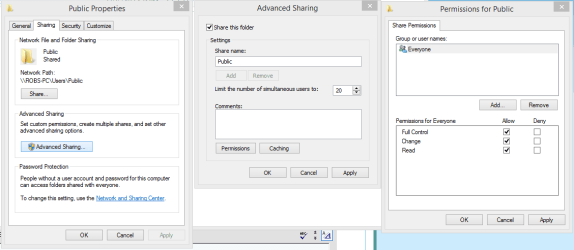
I have my Public Desktop folder set to share for everyone, so it can be accessed from other pc's on the home network. But when I move a file from my user desktop to the public desktop it suddenly adds the lock icon over it and can't be accessed from another pc, even though the public desktop still can. I have to change the permissions on the file every time, although this never used to be the case. I used to be able to move a file to the public desktop without having to manually "share" it each time.
All settings look correct: Sharing is enabled for the folder and set for full control "everyone", and public folder sharing is turned on.
Again, this just started and was working fine before. Would one of the recent security patches have changed something?
All settings look correct: Sharing is enabled for the folder and set for full control "everyone", and public folder sharing is turned on.
Again, this just started and was working fine before. Would one of the recent security patches have changed something?
My Computer
At a glance
Microsoft Windows 7 Home Premium 32-bit 7601 ...Intel(R) Core(TM)2 Quad CPU Q9400 @ 2.66GHz4.00 GBNVIDIA GeForce 9800 GT
- Computer Manufacturer/Model Number
- ASUSTeK Computer INC.
- OS
- Microsoft Windows 7 Home Premium 32-bit 7601 Multiprocessor Free Service Pack 1
- CPU
- Intel(R) Core(TM)2 Quad CPU Q9400 @ 2.66GHz
- Motherboard
- ASUSTeK Computer INC. P5N-D
- Memory
- 4.00 GB
- Graphics Card(s)
- NVIDIA GeForce 9800 GT
- Sound Card
- (1) Creative Audigy Audio Processor (WDM)
- Screen Resolution
- 1280 x 1024 x 32 bits (4294967296 colors) @ 60 Hz
- Hard Drives
- (1) ST332062 0AS SCSI Disk Device (2) WDC WD32 00AAKS-00L9A SCSI Disk Device
- Keyboard
- Dell Media Keyboard (USB)
- Mouse
- MS Comfort Optical Mouse 3000 (USB)