Files without extensions

Hrant

New member
Local time
1:11 AM
Messages
36
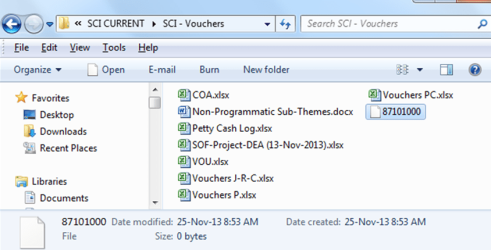
When I save a word document or an excel spreadsheet some files with strange names and without type/extension appear in the folder where the original file is located and every time I have to refresh to remove them. My Office is 2010.
Please help to fix this.
 

My Computer

Computer type
PC/Desktop
Computer Manufacturer/Model Number
Dell
OS
Win 7 Pro 64-bit
CPU
Intel i5

My Computer

Computer type
Laptop
Computer Manufacturer/Model Number
Employer provided Dell Latitude
OS
W7 Pro SP1 64bit
CPU
i7
Memory
8GB
Graphics Card(s)
Intel HD Graphics
Hard Drives
crappy SSD
Antivirus
Employer mandated Symantec Endpoint Protection
Browser
Pale Moon 64bit, IE11 64bit & Chrome 64bit
Here is the screenshot:
 

Attachments

  • Capture.PNG
    Capture.PNG
    59.7 KB · Views: 1

My Computer

Computer type
PC/Desktop
Computer Manufacturer/Model Number
Dell
OS
Win 7 Pro 64-bit
CPU
Intel i5
Thanks for the screenshot.

Do these files go away if you restart the computer?

What antivirus tool is installed?
 

My Computer

Computer type
Laptop
Computer Manufacturer/Model Number
Employer provided Dell Latitude
OS
W7 Pro SP1 64bit
CPU
i7
Memory
8GB
Graphics Card(s)
Intel HD Graphics
Hard Drives
crappy SSD
Antivirus
Employer mandated Symantec Endpoint Protection
Browser
Pale Moon 64bit, IE11 64bit & Chrome 64bit
Yes, these files go away when I restart the computer. I have Kaspersky antivirus.
 

My Computer

Computer type
PC/Desktop
Computer Manufacturer/Model Number
Dell
OS
Win 7 Pro 64-bit
CPU
Intel i5
Silly me - I should have also asked if these files go away once you exit all MS Office apps. You might have to check Task Manager to make sure that the Office apps are not in RAM.

If you want to see what is creating/accessing those files, Process Monitor might help.

Here is a post that talks about using Process Monitor - albeit to watch the Skype app:
http://www.sevenforums.com/browsers...ff-ok-after-windows-update-3.html#post2602159

In your case, you could change the filter to only show info about one of those files.
Where that image shows Process Name - change that to Path.
Where that image shows "Is" - change that to Contains.
Where that image shows Skype.exe - change that to the name of one of those temp files.
 

My Computer

Computer type
Laptop
Computer Manufacturer/Model Number
Employer provided Dell Latitude
OS
W7 Pro SP1 64bit
CPU
i7
Memory
8GB
Graphics Card(s)
Intel HD Graphics
Hard Drives
crappy SSD
Antivirus
Employer mandated Symantec Endpoint Protection
Browser
Pale Moon 64bit, IE11 64bit & Chrome 64bit
Back
Top