Find cover art shown in windows explorer

iamgregor

New member
Local time
6:17 PM
Messages
11
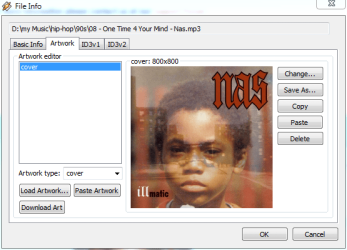
Windows is showing me a thumbnail of one of my MP3s that I have to assume is the album cover art it thinks that song is from. The problem is that I can't find that album anywhere that has that art. I'd like to find more about that artist, but I have nothing to go on but a thumbnail. Any clues how I can track down how Windows decided that was the art for that file?
 

My Computer My Computer

Computer Manufacturer/Model Number
Toshiba Qosmio 500 860
OS
Windows 7
CPU
Intel i5
Memory
4 GB DDR 3
Graphics Card(s)
GeForce 360M
Screen Resolution
1600 x 900 something
Hard Drives
500 GB
Internet Speed
Fast (when Verizon works)
the image is sometimes actually stored in the mp3 file itself.

many media players/file managers will show the same thing.

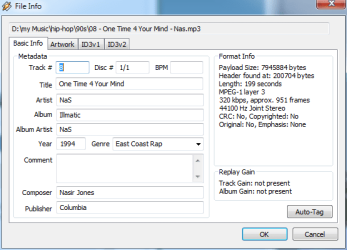
winamp (my media player of choice) has an auto-tag feature, which searches an online database and offers to fill in all sorts of mp3 info, such as artist, album name, year of release, composer, publisher and more importantly in your case, album art.

try loading your mp3 in winamp and do -file info >> auto-tag
 

Attachments

  • nas.PNG
    nas.PNG
    41.4 KB · Views: 6
  • basic.PNG
    basic.PNG
    13.3 KB · Views: 4

My Computer My Computer

Computer Manufacturer/Model Number
mickey megabyte 1234
OS
ultimate 64 sp1
CPU
i5 2500K [email protected]
Motherboard
MSI P67A-GD53
Memory
8 gigs GSkill Ripjaws 1600
Graphics Card(s)
amd hd6950
Sound Card
creative x-fi gamer
Monitor(s) Displays
samsung 24"
Screen Resolution
1920x1080
Hard Drives
ocz vertex 2e 60 gig, samsung f3 1tb, buffalo 2tb ext
PSU
antec 550
Case
antec three hundred
Cooling
i'm a cooling fan
Keyboard
saitek eclipse ii
Mouse
logitech g3
Internet Speed
about 4 Mbps
Other Info
i love win7
the image is sometimes actually stored in the mp3 file itself.

many media players/file managers will show the same thing.

winamp (my media player of choice) has an auto-tag feature, which searches an online database and offers to fill in all sorts of mp3 info, such as artist, album name, year of release, composer, publisher and more importantly in your case, album art.

try loading your mp3 in winamp and do -file info >> auto-tag


Auto tag didn't do much, but I was able to view and save the cover art at least :)

In the short-term, that solves my problem, thanks!
 

My Computer My Computer

Computer Manufacturer/Model Number
Toshiba Qosmio 500 860
OS
Windows 7
CPU
Intel i5
Memory
4 GB DDR 3
Graphics Card(s)
GeForce 360M
Screen Resolution
1600 x 900 something
Hard Drives
500 GB
Internet Speed
Fast (when Verizon works)
Back
Top