Solved finding temp internet files

therealsimpsons

New member
Member
Local time
1:14 PM
Messages
49
Location
Illinois
When my virus scan is running I see it looking at this path: C:Users/me/appdata/local/microsoft/windows/temporaryinternetfiles

I had the idea that I should be able to just delete those from my pc before the scan, and then it wouldn't take so long. I followed the path, but temp int files is not at the end. Where do I look for them?

Is my idea correct? I can just delete them so the antivirus won't have to look at them?

Thanks in advance.
 

My Computer

Computer type
PC/Desktop
Computer Manufacturer/Model Number
custom build
OS
Win 7 Home Premium 64
CPU
Intel Core i5 3570K @ 3.40GHZ 3.80 GHZ
Motherboard
Gigabyte GA-B75M-HD3
Memory
16GB
Graphics Card(s)
EVGA Nvidia GeForce GTX 750Ti
Sound Card
Creative Sound Blaster Audigy FX
Monitor(s) Displays
Dell 2407WFP-HC
Screen Resolution
1920 x 1200
Hard Drives
1TB Toshiba DT01ACA100 ATA Device
PSU
Inland Silver Series ILS 500R2
Case
Thermaltake V3 Black
Cooling
some fans that are inside :)
Keyboard
ONN wireless
Mouse
Logitech wireless laser
Internet Speed
4.89 avg dl speed 3.67 avg ul speed
Antivirus
Microsoft Security Essentials
Browser
Mozilla
Try this path
C:\Users\Default\AppData\Local\Microsoft\Windows\Temporary Internet Files
 

My Computer

Computer Manufacturer/Model Number
HP Media Center
OS
Windows 7 32 bit
CPU
AMD 5200+ dual core
Memory
2 GB
Graphics Card(s)
NVidia GeForce 6150SE 128 MB
Monitor(s) Displays
CRT
Screen Resolution
1280x1024
Hard Drives
500 GB Sata internal :

SIIG USB 3.0 docking stations w/WD Caviar Black 6 Gb/s drives
Keyboard
PS/2
Mouse
PS/2 Wheel Mouse
Other Info
SIIG USB 3.0 PCIexpress card.
You can delete the browsing history files from Internet Explorer, Tools, Internet Options.

Or use CCleaner to delete even more unnecessary files before doing a scan.
 

My Computer

Computer type
Laptop
Computer Manufacturer/Model Number
HP Elitebook 8540p
OS
Windows 7 Pro 32
CPU
Intel(R) Core(TM) i5 CPU M 540 @ 2.53GHz
Motherboard
Hewlett-Packard 1521
Memory
4,00 GB (Usable 2,98)
Graphics Card(s)
NVIDIA NVS 5100M
Sound Card
NVIDIA High Definition Audio
Screen Resolution
1600x900
Hard Drives
INTEL SSDSA2CW120G3
Antivirus
F-Secure Internet Security
Browser
IE, Firefox, Opera
Other Info
Sandboxie,
SRP (Software Restriction Policy),
EMET (Enhanced Mitigation Experience Toolkit),
WFC (Windows Firewall Control by BiniSoft),
Malwarebytes Premium
Try this path
C:\Users\Default\AppData\Local\Microsoft\Windows\Temporary Internet Files

Thank you, that worked.

I don't use IE...
 

My Computer

Computer type
PC/Desktop
Computer Manufacturer/Model Number
custom build
OS
Win 7 Home Premium 64
CPU
Intel Core i5 3570K @ 3.40GHZ 3.80 GHZ
Motherboard
Gigabyte GA-B75M-HD3
Memory
16GB
Graphics Card(s)
EVGA Nvidia GeForce GTX 750Ti
Sound Card
Creative Sound Blaster Audigy FX
Monitor(s) Displays
Dell 2407WFP-HC
Screen Resolution
1920 x 1200
Hard Drives
1TB Toshiba DT01ACA100 ATA Device
PSU
Inland Silver Series ILS 500R2
Case
Thermaltake V3 Black
Cooling
some fans that are inside :)
Keyboard
ONN wireless
Mouse
Logitech wireless laser
Internet Speed
4.89 avg dl speed 3.67 avg ul speed
Antivirus
Microsoft Security Essentials
Browser
Mozilla
Cool. :cool:
 

My Computer

Computer Manufacturer/Model Number
HP Media Center
OS
Windows 7 32 bit
CPU
AMD 5200+ dual core
Memory
2 GB
Graphics Card(s)
NVidia GeForce 6150SE 128 MB
Monitor(s) Displays
CRT
Screen Resolution
1280x1024
Hard Drives
500 GB Sata internal :

SIIG USB 3.0 docking stations w/WD Caviar Black 6 Gb/s drives
Keyboard
PS/2
Mouse
PS/2 Wheel Mouse
Other Info
SIIG USB 3.0 PCIexpress card.
MIles,
Your link "C:\Users\Default\AppData\Local\Microsoft\Windows\Temporary Internet Files" does not work in my dummy computer.
After ...Windows.. have only GameExplorer.
Any other idea please?
Regards
 

My Computer

OS
Windows 7
They are probably hidden system files. You need to show all files in File Explorer Folder Options, View tab.
 

My Computer

Computer type
PC/Desktop
Computer Manufacturer/Model Number
Lenovo IdeaCenter 450
OS
Windows 10 Pro X64
CPU
Intel Quad Core i7-4770 @ 3.4Ghz
Memory
16.0GB PC3-12800 DDR3 SDRAM 1600 MHz
Graphics Card(s)
Intel Integrated HD Graphics
Sound Card
Realtek HD Audio
Monitor(s) Displays
HP 22" LCD
Screen Resolution
1680 x 1050
Hard Drives
250GB Samsung EVO SATA-3 SSD
2TB Seagate ST2000DM001 SATA-2
1.5TB Seagate ST3150041AS SATA
Keyboard
Dell USB
Mouse
Lenovo USB
Internet Speed
Cable via Road Runner 3MB Upload, 30MB Download
Antivirus
Windows Defender, MBAM Pro, MBAE
Browser
Seamonkey
Other Info
UEFI/GPT
PLDS DVD-RW DH16AERSH
How would temp files get into the Default folder?

C:\Users\Default\AppData\Local\Microsoft\Windows\Temporary Internet Files

Maybe an infection would place files in there, but normally, that folder should be empty.


stasioau,
Like Ztruker said, the folder is normally hidden from users.
It sounds like you have already opted to show hidden folders/files:

359d1226066077-hidden-files-folders-show-hide-folder_options-1.jpg


Now you just need to remove the check that hides System folders/files:

360d1226066085-hidden-files-folders-show-hide-folder_options-2.jpg


If you need help finding the Folder Options dialog, see this tutorial:
http://www.sevenforums.com/tutorials/394-hidden-files-folders-show-hide.html


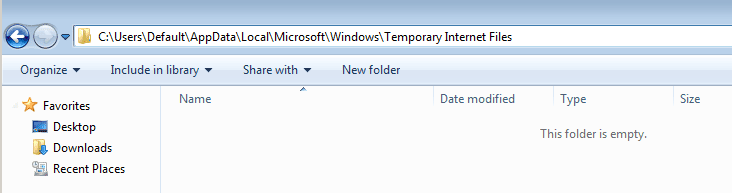
Another option would be to just copy/paste the path into Windows Explorer.
That should show you the folder of interest without changing your folder options.

Capture.PNG
 

My Computer

Computer type
Laptop
Computer Manufacturer/Model Number
Employer provided Dell Latitude
OS
W7 Pro SP1 64bit
CPU
i7
Memory
8GB
Graphics Card(s)
Intel HD Graphics
Hard Drives
crappy SSD
Antivirus
Employer mandated Symantec Endpoint Protection
Browser
Pale Moon 64bit, IE11 64bit & Chrome 64bit
Back
Top