Firefox leaking cookies?

msalton1

New member
Member
VIP
Local time
7:31 PM
Messages
325
I'm using FF 47. I refuse all cookies except for those I add to the FF whitelist. I also use the self-destructing cookies add on. I also use the Better Privacy add on and destroy all LSO cookies on exit (except for FP settings).

This has always worked well, but lately, CCleaner has been showing cookies that aren't whitelisted. In fact, I can go into the FF whitelist and specifically blacklist these cookies and they still appear. And they don't get removed when I close the browser.This doesn't seem to confine itself to any particular site. Cookies from some some sites not on the whitelist are accepted and some are not.

It's very inconsistent. Has anyone had these type of issues?

Thanks!

Edit: These coolies show up in CCleaner after FF closes, but they don't show up in the FF's 'Show Cookies' list. So maybe it's CCleaner?
 
Last edited:

My Computer

Computer type
PC/Desktop
Computer Manufacturer/Model Number
custom
OS
windows 7 Pro 64 Bit
CPU
i5 4670K
Motherboard
Asus Max Hero 1150 socket
Memory
16GB DDR3@933mhz
Graphics Card(s)
Radeon R9 390 8192mb
Monitor(s) Displays
Dell U2415 x3
Screen Resolution
1920 (5760) x 1200 x3
Hard Drives
System: Kingston 128GB SSD

Installing to Samsung 860 EVO 500GB
WD Black 2 TB & 1 TB
PSU
Corsair CX750M
Cooling
Hyper 312
Internet Speed
50mbps
I use Self Destructing Cookies and was using Better Privacy but unless you've got the latest version of Better Privacy - it dowsn't work. Anyway I ditched Better Privacy and now use this for LSO cookies:

Click&Clean | Add-on for Firefox

Plus DOM Storage is disabled and cookie settings are set to reject third party cookies and clear when browser closes.
 

My Computer

Computer type
Laptop
Computer Manufacturer/Model Number
ASUS
OS
Microsoft Windows 7 Home Premium 64-bit 7601 Multiprocessor Free Service Pack 1
CPU
AMD C-60 APU with Radeon(tm) HD Graphics
Motherboard
ASUSTeK COMPUTER INC. X501U
Memory
4.00 GB
Graphics Card(s)
AMD Radeon HD 6290 Graphics
Sound Card
(1) AMD High Definition Audio Device (2) Realtek High Defi
Screen Resolution
1366 x 768 x 32 bits (4294967296 colors) @ 60 Hz
Hard Drives
Hitachi HTS545050A7E380 SATA Disk Device
Antivirus
Comodo CIS & FW, SecureAplus App Whitelisting, Threatfire
Browser
Cyberfox 64bit, Opera 64bit, Airfox
Other Info
Spy-The-Spy, HitmanPro.Alert, Norton Connect Safe, MJRegWatcher, BitDefender TrafficLight, Voodoo Shield, Zemana AntiMalware
Thanks for your comments.
I am running the latest version of BP, but I have FF setting to accept cookies turned off, and whitelist the cookies I choose.

I'm not seeing non-whitelisted cookies in FF\options\privacy|show cookies, so maybe it's CCleaner showing cookies that asked to be set? It shows these non whitelisted cookies in the 'Cookies on Computer' list under options\cookies.
 

My Computer

Computer type
PC/Desktop
Computer Manufacturer/Model Number
custom
OS
windows 7 Pro 64 Bit
CPU
i5 4670K
Motherboard
Asus Max Hero 1150 socket
Memory
16GB DDR3@933mhz
Graphics Card(s)
Radeon R9 390 8192mb
Monitor(s) Displays
Dell U2415 x3
Screen Resolution
1920 (5760) x 1200 x3
Hard Drives
System: Kingston 128GB SSD

Installing to Samsung 860 EVO 500GB
WD Black 2 TB & 1 TB
PSU
Corsair CX750M
Cooling
Hyper 312
Internet Speed
50mbps

My Computer

Computer type
Laptop
Computer Manufacturer/Model Number
ASUS
OS
Microsoft Windows 7 Home Premium 64-bit 7601 Multiprocessor Free Service Pack 1
CPU
AMD C-60 APU with Radeon(tm) HD Graphics
Motherboard
ASUSTeK COMPUTER INC. X501U
Memory
4.00 GB
Graphics Card(s)
AMD Radeon HD 6290 Graphics
Sound Card
(1) AMD High Definition Audio Device (2) Realtek High Defi
Screen Resolution
1366 x 768 x 32 bits (4294967296 colors) @ 60 Hz
Hard Drives
Hitachi HTS545050A7E380 SATA Disk Device
Antivirus
Comodo CIS & FW, SecureAplus App Whitelisting, Threatfire
Browser
Cyberfox 64bit, Opera 64bit, Airfox
Other Info
Spy-The-Spy, HitmanPro.Alert, Norton Connect Safe, MJRegWatcher, BitDefender TrafficLight, Voodoo Shield, Zemana AntiMalware
The cookies don't show up in CCleaner until after I close FF. One cookie that showed up was from safelitedotcom (I was pricing windshields a few days ago). They are not in my whitelist, so I've been using that site to try to track down the problem.

I used SQLite Manager to view cookies.sqlite. The cookies showing up in CCleaner aren't listed there. So I used Windows Search to search for safelite. It comes up with 3 files (profile name and partition redacted):

FFCookies.JPG

So it seems that they are a part of FF, but probably not readable by sites? I don't remember seeing this before. Can you tell me anything about why FF stores non-white liesed (and even black listed) cookie information in these files?

Using CCleaner to delete them removes all the found files (in W Search) except for previous.js, which falls off the list when I restart FF. So I guess it's some sort of FF recovery process? But why with black listed cookies?
Again, thanks.
 

My Computer

Computer type
PC/Desktop
Computer Manufacturer/Model Number
custom
OS
windows 7 Pro 64 Bit
CPU
i5 4670K
Motherboard
Asus Max Hero 1150 socket
Memory
16GB DDR3@933mhz
Graphics Card(s)
Radeon R9 390 8192mb
Monitor(s) Displays
Dell U2415 x3
Screen Resolution
1920 (5760) x 1200 x3
Hard Drives
System: Kingston 128GB SSD

Installing to Samsung 860 EVO 500GB
WD Black 2 TB & 1 TB
PSU
Corsair CX750M
Cooling
Hyper 312
Internet Speed
50mbps
RE: recovery.js previous.js and SiteSecurityServiceState.txt

recovery.js: remembers the windows and tabs in your currently live Firefox session. (or, if Firefox is closed, your last session)

previous.js: remembers the windows and tabs in your last Firefox session.

SiteSecurityServiceState.txt see here: How to prevent HSTS tracking in Firefox - gHacks Tech News

On my machine the first two files listed do not exist. The third one "SiteSecurityServiceState.txt"exists but remains empty. I'll see if I can work out why. I know that I've always tried to configure Firefox for maximum privacy where possible and have applied many tweaks over the years.

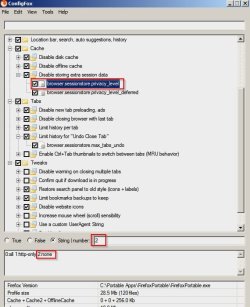
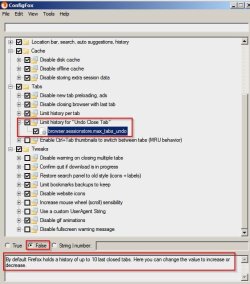
You can try tweaking the preferences shown in the following screenshots but make a note of your current settings so that you can restore them.

ConfigFox 1.jpg

ConfigFox 2.jpg
 

My Computer

Computer type
Laptop
Computer Manufacturer/Model Number
ASUS
OS
Microsoft Windows 7 Home Premium 64-bit 7601 Multiprocessor Free Service Pack 1
CPU
AMD C-60 APU with Radeon(tm) HD Graphics
Motherboard
ASUSTeK COMPUTER INC. X501U
Memory
4.00 GB
Graphics Card(s)
AMD Radeon HD 6290 Graphics
Sound Card
(1) AMD High Definition Audio Device (2) Realtek High Defi
Screen Resolution
1366 x 768 x 32 bits (4294967296 colors) @ 60 Hz
Hard Drives
Hitachi HTS545050A7E380 SATA Disk Device
Antivirus
Comodo CIS & FW, SecureAplus App Whitelisting, Threatfire
Browser
Cyberfox 64bit, Opera 64bit, Airfox
Other Info
Spy-The-Spy, HitmanPro.Alert, Norton Connect Safe, MJRegWatcher, BitDefender TrafficLight, Voodoo Shield, Zemana AntiMalware
Back
Top