Firefox not connecting to https websites after update

Anthopower

New member
Local time
3:26 PM
Messages
4
Firefox updated and now I can't view ANY https sites, including Facebook and Google. I have emptied the chache and cookies, reset Firefox and re-installed. The error message comes up: "The connection was reset." I can view http websites fine.
 

My Computer

Computer type
PC/Desktop
Computer Manufacturer/Model Number
Dell
OS
Windows 7 home Premium 64bit
No I have updated my Security Software (McAfee), removed Firefox from the list of trusted programs and then re-added it, nothing has changed.

I have read the entire Firefox "support" site and tried everything they suggested to no avail...
 

My Computer

Computer type
PC/Desktop
Computer Manufacturer/Model Number
Dell
OS
Windows 7 home Premium 64bit

My Computer

Computer type
PC/Desktop
Computer Manufacturer/Model Number
Intel(R) Core(TM) i5-2320 CPU @ 3.00GHz (Gateway computer)
OS
Microsoft Windows 7 Home Premium 64-bit 7601 Multiprocessor Free Service Pack 1
CPU
Intel(R) Core(TM) i5-2320 CPU @ 3.00GHz
Motherboard
Gateway IPISB-VR
Memory
8.00 GB
Graphics Card(s)
Intel(R) HD Graphics
Sound Card
(1) Realtek High Definition Audio (2) Intel(R) Display Aud
Monitor(s) Displays
ViewSonic 2250 Series
Screen Resolution
1920 x 1080 x 32 bits (4294967296 colors) @ 60 Hz
Hard Drives
(1) WDC WD10EADX-22TDHB0 (2) Generic Mini SD Reader USB Device (3) Generic USB CF Reader USB Device (4) Generic USB MS Reader USB Device (5) Generic USB SD Reader USB Device (6) Generic USB xD/SM Reader USB Device (7) Seagate FreeAgent Go
Keyboard
Gateway
Mouse
Logitech
Internet Speed
20 Mbps (Theoretical.)
Antivirus
Avast
Browser
Firefox
Try this in FF:

Tools > Options > Advanced > Network (tab) > Connection Settings

and change to no proxy. Restart FF and see if it works.
 

My Computer

Computer type
PC/Desktop
OS
Windows 7 Pro
I tried that, setting is already on "No proxy." :(

I also went in and reset my DNS settings, still no change.
 

My Computer

Computer type
PC/Desktop
Computer Manufacturer/Model Number
Dell
OS
Windows 7 home Premium 64bit
Are you using a firewall? Make sure port 443 is open
 

My Computer

Computer type
PC/Desktop
OS
Windows 7 Pro
Firefox connection to https problem

What's your Antivirus? Some problems have been reported where SSL scanning is enabled if using Kaspersky or BitDefender.

Also would you install the following Firefox addons:

SSleuth :: Add-ons for Firefox

Calomel SSL Validation :: Add-ons for Firefox

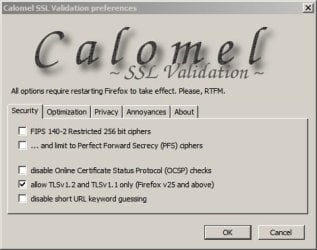
Once added - in FF Addons window Click Calomel SSL Validation "Options" and check the following:

Calomel SSL Validation preferences.jpg

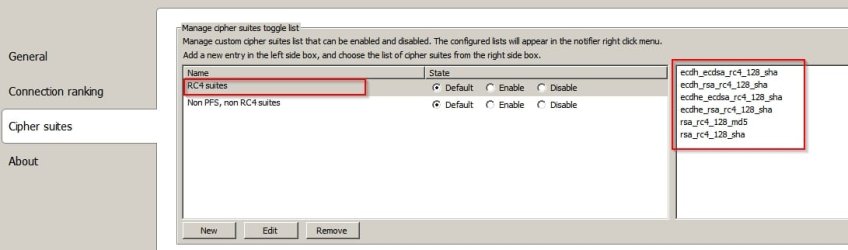
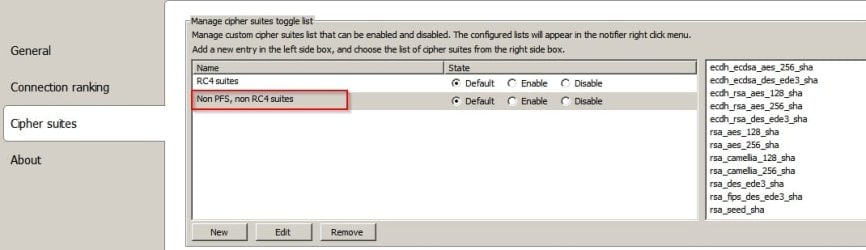
Then in FF Addons window click SSLeuth "Options" and post screenshots of detected cypher suites:

SSleuth RC4.jpg

SSleuth Non RC4.jpg

Also try posting the following Registry Keys:

Code:
[HKEY_LOCAL_MACHINE\SYSTEM\CurrentControlSet\Control\SecurityProviders\SCHANNEL]
"EventLogging"=dword:00000001

[HKEY_LOCAL_MACHINE\SYSTEM\CurrentControlSet\Control\SecurityProviders\SCHANNEL\Ciphers]

[HKEY_LOCAL_MACHINE\SYSTEM\CurrentControlSet\Control\SecurityProviders\SCHANNEL\CipherSuites]

[HKEY_LOCAL_MACHINE\SYSTEM\CurrentControlSet\Control\SecurityProviders\SCHANNEL\Hashes]

[HKEY_LOCAL_MACHINE\SYSTEM\CurrentControlSet\Control\SecurityProviders\SCHANNEL\KeyExchangeAlgorithms]

[HKEY_LOCAL_MACHINE\SYSTEM\CurrentControlSet\Control\SecurityProviders\SCHANNEL\Protocols]

[HKEY_LOCAL_MACHINE\SYSTEM\CurrentControlSet\Control\SecurityProviders\SCHANNEL\Protocols\SSL 2.0]

[HKEY_LOCAL_MACHINE\SYSTEM\CurrentControlSet\Control\SecurityProviders\SCHANNEL\Protocols\SSL 2.0\Client]

and

Code:
[HKEY_LOCAL_MACHINE\SOFTWARE\Policies\Microsoft\Cryptography\Configuration\SSL\00010002]
 
Last edited:

My Computer

Computer type
Laptop
Computer Manufacturer/Model Number
ASUS
OS
Microsoft Windows 7 Home Premium 64-bit 7601 Multiprocessor Free Service Pack 1
CPU
AMD C-60 APU with Radeon(tm) HD Graphics
Motherboard
ASUSTeK COMPUTER INC. X501U
Memory
4.00 GB
Graphics Card(s)
AMD Radeon HD 6290 Graphics
Sound Card
(1) AMD High Definition Audio Device (2) Realtek High Defi
Screen Resolution
1366 x 768 x 32 bits (4294967296 colors) @ 60 Hz
Hard Drives
Hitachi HTS545050A7E380 SATA Disk Device
Antivirus
Comodo CIS & FW, SecureAplus App Whitelisting, Threatfire
Browser
Cyberfox 64bit, Opera 64bit, Airfox
Other Info
Spy-The-Spy, HitmanPro.Alert, Norton Connect Safe, MJRegWatcher, BitDefender TrafficLight, Voodoo Shield, Zemana AntiMalware
I'm using McAfee, and I reset the FF settings (including firewall) for it.

I was able to download an older version of FF (30.1) and it works perfectly! I would like to know what the actual problem is in case this happens again, but as long as FF doesn't update I should be good. Thanks everyone for trying to help!
 

My Computer

Computer type
PC/Desktop
Computer Manufacturer/Model Number
Dell
OS
Windows 7 home Premium 64bit
Back
Top