Firefox - Reset to Default

How to Reset Firefox to Default

   Information
This tutorial will show you how to completely reset Firefox to default, or reset Firefox while saving your bookmarks, browsing history, passwords, cookies, and Web form auto-fill information.


EXAMPLE: Firefox reset to default
NOTE: This is how Firefox will open after being reset.
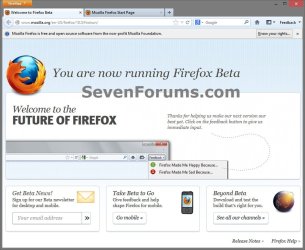
Firefox-complete-reset-2.jpg


OPTION ONE

To Completely Reset Firefox to Default using a BAT File Download


NOTE: This option will completely reset Firefox to default like when you first installed Firefox. Nothing will be preserved.
1. If you have not already, you will need to close all Firefox browser windows/tabs first.

2. Click/tap on the download button below to download the file below, and go to step 3 below.
Reset_Firefox_Completely.bat

Download


3. Save the .bat file to your desktop, and run it.

4. If prompted, click/tap on Run.
NOTE: If you like, you can stop getting the Run prompt by unblocking the downloaded .bat file.

5. You will now notice a command prompt quickly open and close as Firefox is reset.
   Note
The .bat file deletes the two hidden folders below.

C:\Users\(user-name)\AppData\Local\Mozilla\Firefox\Profiles

C:\Users\(user-name)\AppData\Roaming\Mozilla\Firefox


6. When finished, you can delete the downloaded .bat file if you like.

7. The next time you run Firefox, it will be reset back to default, and you will see this below before Firefox opens.
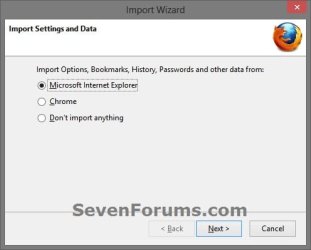
Firefox-complete-reset-1.jpg


OPTION TWO

To Completely Reset Firefox to Default using Profile Manager


NOTE: This option will completely reset Firefox to default like when you first installed Firefox. Nothing will be preserved. Thanks to our member lehnerus2000 (Peter) for pointing this option out.
1. If you have not already, you will need to close all Firefox browser windows/tabs first.

2. Press the Windows + R keys to open the Run dialog, type firefox.exe -p, and press Enter.

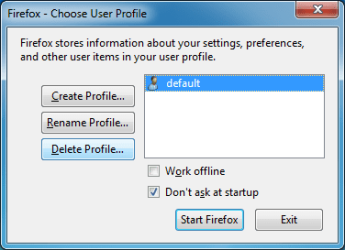
3. In the profile manager, select the default profile, and click/tap on Delete Profile. (see screenshot below)
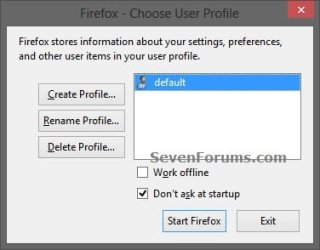
Profile-1.jpg
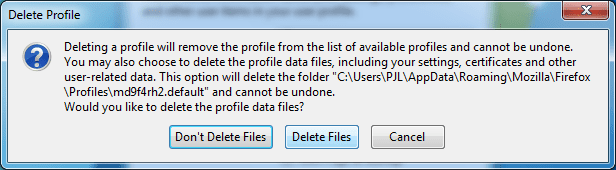
4. Click/tap on Delete Files. (see screenshot below)
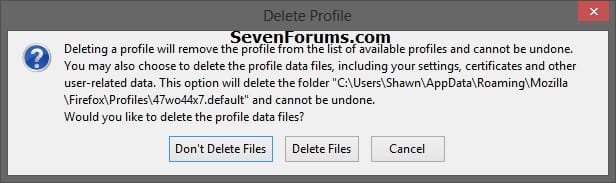
Profile-2.jpg
5. Click/tap on Exit. (see screenshot below)
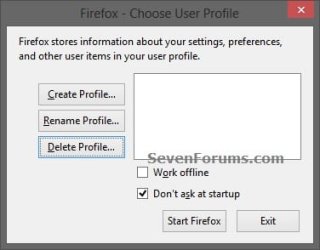
Profile-3.jpg
6. The next time you run Firefox, it will be reset back to default, and you will see this below before Firefox opens.
Firefox-complete-reset-1.jpg


OPTION THREE

To Reset Firefox to Default while Saving your Essential Information


NOTE: This option will reset Firefox to default, but will keep your bookmarks, browsing history, passwords, cookies, and Web form auto-fill information.
1. Open Firefox, and do step 2, 3, or 4 below.

2. Click/tap on the Firefox button (top left corner), Help, Troubleshooting Information, and go to step 5 below. (see screenshot below)
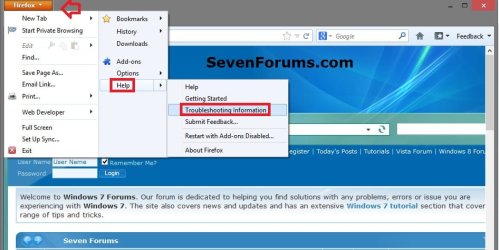
Firefox-reset-1.jpg
3. Click/tap on Help (Menu bar), Troubleshooting Information, and go to step 5 below. (see screenshot below)
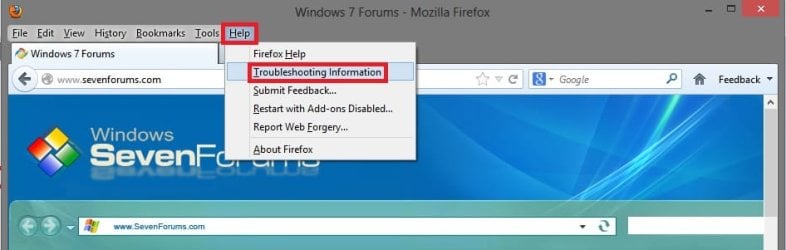
Firefox-reset-2.jpg
4. Type about:support in the address bar, press Enter, and go to step 5 below. (see screenshot below step 5)

5. In the Troubleshooting Information tab, click/tap on Reset Firefox button. (see screenshot below)
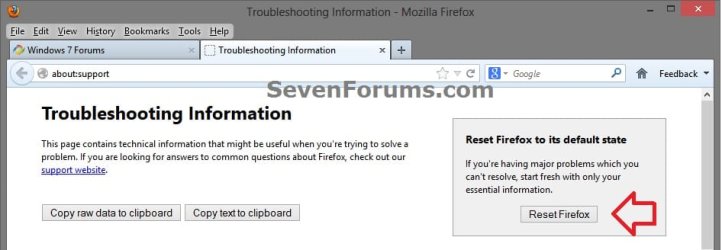
Firefox-reset-3.jpg
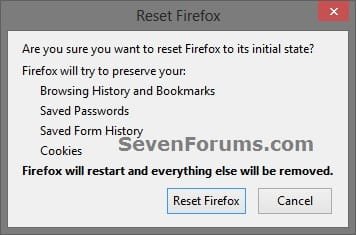
6. Click/tap on Reset Firefox button. (see screenshot below)

7. Firefox will now close, reset, and restart. You will see this below for a few seconds before Firefox opens automatically or you could click/tap on Finish. (see screenshot below)
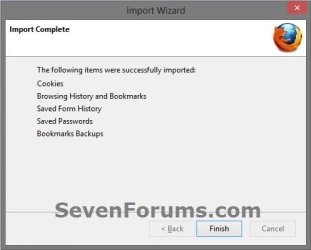
Firefox-reset-5.jpg
8. After the reset is finished, your old Firefox profile information will be placed on your desktop in a folder named Old Firefox Data. If the reset didn't fix your problem you can restore some of the information not saved by copying files to the new profile that was created. See Copying files between profile folders for instructions. If you don't need this folder any longer, then you should delete it as it contains your sensitive information.
That's it,
Shawn


Attachments
Last edited:
Good tutorial shawn, maybe next one on how to back up and restore your firefox profile also.
 

My Computer

Computer Manufacturer/Model Number
Hewlett packard/p6512uk
OS
Microsoft Windows 7 Home Premium 64-bit 7600
CPU
IIx4 amd athelon 635 processor
Motherboard
FOXCONN 2AA9
Memory
2x2gb
Graphics Card(s)
ati radeon HD 5450
Sound Card
(1) Realtek High Definition Audio (2) AMD High Definition
Monitor(s) Displays
samsung lcd tv 32"
Screen Resolution
1360x 768
Hard Drives
(1) WDC WD10 01FAES-60Z2A0 SATA Disk Device (2) Maxtor OneTouch USB Device (3) ST310003 33AS USB Device (4) WD My Book 1111 USB Device
PSU
?
Cooling
air!
Keyboard
wireless hp
Mouse
wireless Hp,optical
Internet Speed
1.10mb/s
Antivirus
MSE
Browser
Firefox
Old Fashioned Way

Good tutorial shawn, maybe next one on how to back up and restore your firefox profile also.

You should be able to do that the "old fashioned way".

  • Select the Profiles folder (inside C:\Users\<User Name>\AppData\Roaming\Mozilla\Firefox\Profiles)
  • Copy it to your backup location

Additional

I noticed something interesting on my PC.

I have multiple profiles (only one is in the default location, the others are on another partition).
Only the profile in the default location has a folder inside C:\Users\<User Name>\AppData\Local\Mozilla\Firefox\Profiles

If I create a new profile:

  • In the default location, a folder is also created in ... AppData\Local\ ...
  • In another location, a folder isn't also created in ... AppData\Local\ ...
 
Last edited:

My Computer

Computer type
PC/Desktop
Computer Manufacturer/Model Number
n/a
OS
W7 Ultimate SP1, LM19.2 MATE, W10 Home 1703, W10 Pro 1703 VM, #All 64 bit
CPU
AMD Phenom II x6 1100T, 3.3 GHz
Motherboard
ASUS M4A88T-M/USB3 (AM3)
Memory
12GB DDR3 1333 G-Skill (4GB x 2), G-Skill (2GB x 2)
Graphics Card(s)
NVIDIA GeForce GTX 660
Sound Card
Realtek?
Monitor(s) Displays
Samsung S23B350
Screen Resolution
1920x1080
Hard Drives
WD Green 2TB (SATA), WD Green 3TB (SATA), WD Blue 4TB (SATA), WD Blue 6TB (SATA)
PSU
Cooler Master
Case
Antec GX300 Tower
Cooling
3x Antec TRICOOL 120mm Fans
Mouse
Wired Optical
Internet Speed
DSL
Antivirus
Avast
Browser
Pale Moon (64 bit)
Other Info
2018-12-27 Upgraded HDDs
2015-12-10 Upgraded case, graphics card, storage
2015-08-15 Upgraded motherboard & RAM
2015-07-15 Upgraded LM17.1 to LM17.2
Another way to reset Firefox

Another way to reset Firefox is to use the Profile Manager.1 - Open the Start Menu
2 - Type "firefox.exe -P" (in the Search box, without quotes, remember the space)
Reset FF 01.png3 - In the Profile Manager ("Firefox - Choose User Profile" window), select the "default" profile
4 - Click on the "Delete Profile" button
Reset FF 02.png5 - In the "Delete Files" window, choose "Delete Files" to purge ALL existing user files.
Reset FF 03.png6 - In the Profile Manager, click on the "Exit" button
When you restart Firefox, it will create a new profile and you should see the window that asks you, if you wish to import data from Internet Explorer.
 
Last edited:

My Computer

Computer type
PC/Desktop
Computer Manufacturer/Model Number
n/a
OS
W7 Ultimate SP1, LM19.2 MATE, W10 Home 1703, W10 Pro 1703 VM, #All 64 bit
CPU
AMD Phenom II x6 1100T, 3.3 GHz
Motherboard
ASUS M4A88T-M/USB3 (AM3)
Memory
12GB DDR3 1333 G-Skill (4GB x 2), G-Skill (2GB x 2)
Graphics Card(s)
NVIDIA GeForce GTX 660
Sound Card
Realtek?
Monitor(s) Displays
Samsung S23B350
Screen Resolution
1920x1080
Hard Drives
WD Green 2TB (SATA), WD Green 3TB (SATA), WD Blue 4TB (SATA), WD Blue 6TB (SATA)
PSU
Cooler Master
Case
Antec GX300 Tower
Cooling
3x Antec TRICOOL 120mm Fans
Mouse
Wired Optical
Internet Speed
DSL
Antivirus
Avast
Browser
Pale Moon (64 bit)
Other Info
2018-12-27 Upgraded HDDs
2015-12-10 Upgraded case, graphics card, storage
2015-08-15 Upgraded motherboard & RAM
2015-07-15 Upgraded LM17.1 to LM17.2
Thank you Peter. Added to tutorial as OPTION TWO. :)
 

My Computer

Computer type
PC/Desktop
Computer Manufacturer/Model Number
Self built custom
OS
64-bit Windows 11 Pro for Workstations
CPU
Intel i7-8700K OC'd to 5 GHz
Motherboard
ASUS ROG Maximus XI Formula Z390
Memory
64 GB (4x16GB) G.SKILL TridentZ RGB DDR4 3600 MHz
Graphics Card(s)
ASUS ROG-STRIX-GTX1080TI-O11G-GAMING
Sound Card
Integrated
Monitor(s) Displays
2 x Samsung Odyssey G7 27"
Screen Resolution
2560x1440
Hard Drives
1TB Samsung 990 PRO M.2,
4TB Samsung 990 PRO PRO M.2,
TerraMaster F8 SSD Plus NAS
PSU
Seasonic Prime Titanium 850W
Case
Thermaltake Core P3
Cooling
Corsair Hydro H115i
Keyboard
Logitech wireless K800
Mouse
Logitech MX Master 4
Internet Speed
2 Gb/s Download and 100 Mb/s Upload
Antivirus
Malwarebyte Anti-Malware Premium
Browser
Google Chrome
Other Info
Logitech Z625 speaker system,
Logitech BRIO 4K Pro webcam,
HP Color LaserJet Pro MFP M477fdn,
APC SMART-UPS RT 1000 XL - SURT1000XLI,
Galaxy S23 Plus phone
No problems

Thank you Peter. Added to tutorial as OPTION TWO. :)

No problems (and thanks for the credit). :)

The other option in the "Delete Files" window, "Don't Delete Files" removes the profile from the "Firefox - Choose User Profile" window, but it leaves all of the files on your HDD.
 

My Computer

Computer type
PC/Desktop
Computer Manufacturer/Model Number
n/a
OS
W7 Ultimate SP1, LM19.2 MATE, W10 Home 1703, W10 Pro 1703 VM, #All 64 bit
CPU
AMD Phenom II x6 1100T, 3.3 GHz
Motherboard
ASUS M4A88T-M/USB3 (AM3)
Memory
12GB DDR3 1333 G-Skill (4GB x 2), G-Skill (2GB x 2)
Graphics Card(s)
NVIDIA GeForce GTX 660
Sound Card
Realtek?
Monitor(s) Displays
Samsung S23B350
Screen Resolution
1920x1080
Hard Drives
WD Green 2TB (SATA), WD Green 3TB (SATA), WD Blue 4TB (SATA), WD Blue 6TB (SATA)
PSU
Cooler Master
Case
Antec GX300 Tower
Cooling
3x Antec TRICOOL 120mm Fans
Mouse
Wired Optical
Internet Speed
DSL
Antivirus
Avast
Browser
Pale Moon (64 bit)
Other Info
2018-12-27 Upgraded HDDs
2015-12-10 Upgraded case, graphics card, storage
2015-08-15 Upgraded motherboard & RAM
2015-07-15 Upgraded LM17.1 to LM17.2
Yet another way to reset Firefox

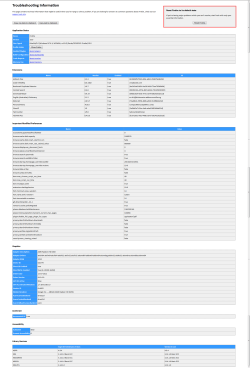
You can also type "about:support" (in the Address bar) to see more information (like config changes).

You can reset Firefox from that page.Troubleshooter.png
You'll need to click the picture several times to see it at full size. :)
 

My Computer

Computer type
PC/Desktop
Computer Manufacturer/Model Number
n/a
OS
W7 Ultimate SP1, LM19.2 MATE, W10 Home 1703, W10 Pro 1703 VM, #All 64 bit
CPU
AMD Phenom II x6 1100T, 3.3 GHz
Motherboard
ASUS M4A88T-M/USB3 (AM3)
Memory
12GB DDR3 1333 G-Skill (4GB x 2), G-Skill (2GB x 2)
Graphics Card(s)
NVIDIA GeForce GTX 660
Sound Card
Realtek?
Monitor(s) Displays
Samsung S23B350
Screen Resolution
1920x1080
Hard Drives
WD Green 2TB (SATA), WD Green 3TB (SATA), WD Blue 4TB (SATA), WD Blue 6TB (SATA)
PSU
Cooler Master
Case
Antec GX300 Tower
Cooling
3x Antec TRICOOL 120mm Fans
Mouse
Wired Optical
Internet Speed
DSL
Antivirus
Avast
Browser
Pale Moon (64 bit)
Other Info
2018-12-27 Upgraded HDDs
2015-12-10 Upgraded case, graphics card, storage
2015-08-15 Upgraded motherboard & RAM
2015-07-15 Upgraded LM17.1 to LM17.2
Back
Top