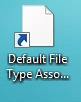
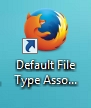
Solved firefox shortcut icons on my desktop all went blank

Drift

New member
Local time
1:46 PM
Messages
9
my problem happened when I deleted firefox. right as the program delete was occuring, I watched as the firefox shortcut icons on my desktop all went blank.
well I was only uninstalling to start a fresh firefox install, which I did.
but the icons didn't rebuild.
even the new ones I drag to my desktop, are blank.

i've tried deleting the iconcache.db, and that didn't work.

I tried the popular windows repair tool for this, and that didn't help.

and i've rebooted multiple times along the way.

is there something I could try to fix this?
 

My Computer My Computer

At a glance

windows 7 ultimate
Computer type
PC/Desktop
OS
windows 7 ultimate
Hello Drift, and welcome to Seven Forums. :)

Are these website shortcuts that are suppose to open with Firefox?

If so, check in Default Programs to make sure that Firefox is set as the default program with all of it's associations.

http://www.sevenforums.com/tutorials/2630-default-programs-set-program-s-default-associations.html

If these are shortcuts to open Firefox instead, then see if creating a new shortcut directly from the .exe file of Firefox may help.

32-bit Windows = "C:\Program Files\Mozilla Firefox\firefox.exe"

64-bit Windows = "C:\Program Files (x86)\Mozilla Firefox\firefox.exe"
 

My Computer My Computer

At a glance

64-bit Windows 11 Pro for WorkstationsIntel i7-8700K OC'd to 5 GHz64 GB (4x16GB) G.SKILL TridentZ RGB DDR4 3600...ASUS ROG-STRIX-GTX1080TI-O11G-GAMING
Computer type
PC/Desktop
Computer Manufacturer/Model Number
Self built custom
OS
64-bit Windows 11 Pro for Workstations
CPU
Intel i7-8700K OC'd to 5 GHz
Motherboard
ASUS ROG Maximus XI Formula Z390
Memory
64 GB (4x16GB) G.SKILL TridentZ RGB DDR4 3600 MHz
Graphics Card(s)
ASUS ROG-STRIX-GTX1080TI-O11G-GAMING
Sound Card
Integrated
Monitor(s) Displays
2 x Samsung Odyssey G7 27"
Screen Resolution
2560x1440
Hard Drives
1TB Samsung 990 PRO M.2,
4TB Samsung 990 PRO PRO M.2,
TerraMaster F8 SSD Plus NAS
PSU
Seasonic Prime Titanium 850W
Case
Thermaltake Core P3
Cooling
Corsair Hydro H115i
Keyboard
Logitech wireless K800
Mouse
Logitech MX Master 4
Internet Speed
2 Gb/s Download and 100 Mb/s Upload
Antivirus
Malwarebyte Anti-Malware Premium
Browser
Google Chrome
Other Info
Logitech Z625 speaker system,
Logitech BRIO 4K Pro webcam,
HP Color LaserJet Pro MFP M477fdn,
APC SMART-UPS RT 1000 XL - SURT1000XLI,
Galaxy S23 Plus phone
Hi, and thanks, Brink.

I selected Firefox as the default browser during the reinstall that I mentioned, and it shows up as default for all the extensions in the corresponding list of "choose defaults for this program".

I'm not sure what you mean by creating a new shortcut directly from the .exe file of Firefox.
Would that be the same as dragging a link from the browser to my desktop? I've done that, and it was still blank.
 

My Computer My Computer

At a glance

windows 7 ultimate
Computer type
PC/Desktop
OS
windows 7 ultimate

My Computer My Computer

At a glance

64-bit Windows 11 Pro for WorkstationsIntel i7-8700K OC'd to 5 GHz64 GB (4x16GB) G.SKILL TridentZ RGB DDR4 3600...ASUS ROG-STRIX-GTX1080TI-O11G-GAMING
Computer type
PC/Desktop
Computer Manufacturer/Model Number
Self built custom
OS
64-bit Windows 11 Pro for Workstations
CPU
Intel i7-8700K OC'd to 5 GHz
Motherboard
ASUS ROG Maximus XI Formula Z390
Memory
64 GB (4x16GB) G.SKILL TridentZ RGB DDR4 3600 MHz
Graphics Card(s)
ASUS ROG-STRIX-GTX1080TI-O11G-GAMING
Sound Card
Integrated
Monitor(s) Displays
2 x Samsung Odyssey G7 27"
Screen Resolution
2560x1440
Hard Drives
1TB Samsung 990 PRO M.2,
4TB Samsung 990 PRO PRO M.2,
TerraMaster F8 SSD Plus NAS
PSU
Seasonic Prime Titanium 850W
Case
Thermaltake Core P3
Cooling
Corsair Hydro H115i
Keyboard
Logitech wireless K800
Mouse
Logitech MX Master 4
Internet Speed
2 Gb/s Download and 100 Mb/s Upload
Antivirus
Malwarebyte Anti-Malware Premium
Browser
Google Chrome
Other Info
Logitech Z625 speaker system,
Logitech BRIO 4K Pro webcam,
HP Color LaserJet Pro MFP M477fdn,
APC SMART-UPS RT 1000 XL - SURT1000XLI,
Galaxy S23 Plus phone
I'm not sure what you call that.

I have a web page open and drag the url to the desktop, and it creates an internet shortcut. And since firefox is my default browser, every time I click on that icon from then out, it will open up with firefox.
Those icons are currently white.
They used to have the firefox image.
 

My Computer My Computer

At a glance

windows 7 ultimate
Computer type
PC/Desktop
OS
windows 7 ultimate
I just found a help file that is related to this.


"If you right-click one of those desktop icons, then
Properties > Web Document tab > "Change Icons" button
Does the dialog show that it is using icons from the firefox.exe file:
C:\Program Files (x86)\Mozilla Firefox\firefox.exe"

I did that, and it worked. But only on that one icon.
And when I dragged another shortcut to the desktop, it was still whited out.
 

My Computer My Computer

At a glance

windows 7 ultimate
Computer type
PC/Desktop
OS
windows 7 ultimate
Ok. Thank you.

The firefox.exe is just a shortcut to open Firefox itself.

The others are website/internet shortcuts that open a website with Firefox. When you click on these shortcuts, do they work and open the website in Firefox?
 

My Computer My Computer

At a glance

64-bit Windows 11 Pro for WorkstationsIntel i7-8700K OC'd to 5 GHz64 GB (4x16GB) G.SKILL TridentZ RGB DDR4 3600...ASUS ROG-STRIX-GTX1080TI-O11G-GAMING
Computer type
PC/Desktop
Computer Manufacturer/Model Number
Self built custom
OS
64-bit Windows 11 Pro for Workstations
CPU
Intel i7-8700K OC'd to 5 GHz
Motherboard
ASUS ROG Maximus XI Formula Z390
Memory
64 GB (4x16GB) G.SKILL TridentZ RGB DDR4 3600 MHz
Graphics Card(s)
ASUS ROG-STRIX-GTX1080TI-O11G-GAMING
Sound Card
Integrated
Monitor(s) Displays
2 x Samsung Odyssey G7 27"
Screen Resolution
2560x1440
Hard Drives
1TB Samsung 990 PRO M.2,
4TB Samsung 990 PRO PRO M.2,
TerraMaster F8 SSD Plus NAS
PSU
Seasonic Prime Titanium 850W
Case
Thermaltake Core P3
Cooling
Corsair Hydro H115i
Keyboard
Logitech wireless K800
Mouse
Logitech MX Master 4
Internet Speed
2 Gb/s Download and 100 Mb/s Upload
Antivirus
Malwarebyte Anti-Malware Premium
Browser
Google Chrome
Other Info
Logitech Z625 speaker system,
Logitech BRIO 4K Pro webcam,
HP Color LaserJet Pro MFP M477fdn,
APC SMART-UPS RT 1000 XL - SURT1000XLI,
Galaxy S23 Plus phone
yes, the only thing that has changed at all is the icons.

this happened during the uninstall of firefox.

and it wasn't fixed by a reinstall.

I have probably 50 firefox internet shortcuts that have all been dragged to the desktop from web pages that I visited.

every single one still works.

the issue is that they no longer have the firefox icon, now they are a generic white icon.


PFm2QnU.jpg


that is the screen cap of the web page shortcut on my desktop for this thread we are posting in.
 

My Computer My Computer

At a glance

windows 7 ultimate
Computer type
PC/Desktop
OS
windows 7 ultimate
You might see if setting IE as the default program and setting Firefox back as the default may toggle them back.
 

My Computer My Computer

At a glance

64-bit Windows 11 Pro for WorkstationsIntel i7-8700K OC'd to 5 GHz64 GB (4x16GB) G.SKILL TridentZ RGB DDR4 3600...ASUS ROG-STRIX-GTX1080TI-O11G-GAMING
Computer type
PC/Desktop
Computer Manufacturer/Model Number
Self built custom
OS
64-bit Windows 11 Pro for Workstations
CPU
Intel i7-8700K OC'd to 5 GHz
Motherboard
ASUS ROG Maximus XI Formula Z390
Memory
64 GB (4x16GB) G.SKILL TridentZ RGB DDR4 3600 MHz
Graphics Card(s)
ASUS ROG-STRIX-GTX1080TI-O11G-GAMING
Sound Card
Integrated
Monitor(s) Displays
2 x Samsung Odyssey G7 27"
Screen Resolution
2560x1440
Hard Drives
1TB Samsung 990 PRO M.2,
4TB Samsung 990 PRO PRO M.2,
TerraMaster F8 SSD Plus NAS
PSU
Seasonic Prime Titanium 850W
Case
Thermaltake Core P3
Cooling
Corsair Hydro H115i
Keyboard
Logitech wireless K800
Mouse
Logitech MX Master 4
Internet Speed
2 Gb/s Download and 100 Mb/s Upload
Antivirus
Malwarebyte Anti-Malware Premium
Browser
Google Chrome
Other Info
Logitech Z625 speaker system,
Logitech BRIO 4K Pro webcam,
HP Color LaserJet Pro MFP M477fdn,
APC SMART-UPS RT 1000 XL - SURT1000XLI,
Galaxy S23 Plus phone
and now I just went into properties on that same web page shortcut, and using that walkthrough I found, i've changed it to the original firefox icon.

tUcpkAX.jpg


and again, it only changed that one icon. and when I drag another web page shortcut to my desktop, it will have that white icon that I just posted above.
 

My Computer My Computer

At a glance

windows 7 ultimate
Computer type
PC/Desktop
OS
windows 7 ultimate
and now I just went into properties on that same web page shortcut, and using that walkthrough I found, i've changed it to the original firefox icon.

tUcpkAX.jpg


and again, it only changed that one icon. and when I drag another web page shortcut to my desktop, it will have that white icon that I just posted above.


You might see if setting IE as the default program and setting Firefox back as the default may toggle them back.
I tried that, and it didn't work.

I even rebooted in between each step.
 

My Computer My Computer

At a glance

windows 7 ultimate
Computer type
PC/Desktop
OS
windows 7 ultimate
ok this is interesting.

I just realized that the notepad icons have changed to a similarly blank white icon...

and by notepad icon, I mean documents that I have created with various text, and saved as a notepad file. all those icons are whited out too.
 

My Computer My Computer

At a glance

windows 7 ultimate
Computer type
PC/Desktop
OS
windows 7 ultimate
got it. that was an easy fix.

right click notepad in programs, change icon. fixed it for all of them.

right clicked firefox in programs, did the same thing, and now all the new icons are correct. didn't change the old ones, but I can live with that.
 

My Computer My Computer

At a glance

windows 7 ultimate
Computer type
PC/Desktop
OS
windows 7 ultimate
Great news. :)
 

My Computer My Computer

At a glance

64-bit Windows 11 Pro for WorkstationsIntel i7-8700K OC'd to 5 GHz64 GB (4x16GB) G.SKILL TridentZ RGB DDR4 3600...ASUS ROG-STRIX-GTX1080TI-O11G-GAMING
Computer type
PC/Desktop
Computer Manufacturer/Model Number
Self built custom
OS
64-bit Windows 11 Pro for Workstations
CPU
Intel i7-8700K OC'd to 5 GHz
Motherboard
ASUS ROG Maximus XI Formula Z390
Memory
64 GB (4x16GB) G.SKILL TridentZ RGB DDR4 3600 MHz
Graphics Card(s)
ASUS ROG-STRIX-GTX1080TI-O11G-GAMING
Sound Card
Integrated
Monitor(s) Displays
2 x Samsung Odyssey G7 27"
Screen Resolution
2560x1440
Hard Drives
1TB Samsung 990 PRO M.2,
4TB Samsung 990 PRO PRO M.2,
TerraMaster F8 SSD Plus NAS
PSU
Seasonic Prime Titanium 850W
Case
Thermaltake Core P3
Cooling
Corsair Hydro H115i
Keyboard
Logitech wireless K800
Mouse
Logitech MX Master 4
Internet Speed
2 Gb/s Download and 100 Mb/s Upload
Antivirus
Malwarebyte Anti-Malware Premium
Browser
Google Chrome
Other Info
Logitech Z625 speaker system,
Logitech BRIO 4K Pro webcam,
HP Color LaserJet Pro MFP M477fdn,
APC SMART-UPS RT 1000 XL - SURT1000XLI,
Galaxy S23 Plus phone
I am having the exact same problem, which started after I refreshed firefox's settings. I have tried all the solutions in this thread (delete iconcache.db, change firefox icon) except changing the default browser because I only have one browser.

Are there any other possible solutions I can try? No matter what I do a .url file on the desktop created from firefox always has a blank icon. :(

Edit: I fixed it WOOHOO!! :)

I went to control panel: Control Panel\Programs\Default Programs\Set Associations

and from there changed the .url file default from "Web browser" to "Firefox". All the icons on my desktop changed as well as any new I create.

Untitled.png
 

My Computer My Computer

At a glance

Windows 7 Ultimate x64 SP1AMD FX-8320 @ 4.5 GHz (4.3 Volts)2 X 4 GB G Skill Ares 1600 @ 8-8-8-24Gigabyte G1 Gaming GTX 970
Computer type
PC/Desktop
Computer Manufacturer/Model Number
Custom Build
OS
Windows 7 Ultimate x64 SP1
CPU
AMD FX-8320 @ 4.5 GHz (4.3 Volts)
Motherboard
ASUS M5A99X EVO R2.0 AM3+
Memory
2 X 4 GB G Skill Ares 1600 @ 8-8-8-24
Graphics Card(s)
Gigabyte G1 Gaming GTX 970
Sound Card
On Board
Monitor(s) Displays
Asus 24" @ 144 Hz
Screen Resolution
1920 X 1080
Hard Drives
Samsung 840 EVO 120 GB SSD + WD Black Series 1 TB 7200 RPM
PSU
Corsair CXM 600 Watt
Case
NZXT Phantom 410
Cooling
3x 120 mm + 3x 140 mm + Corsair H80i Push/Pull
Keyboard
CM Storm QuickFire Rapid (mechanical)
Mouse
Anker 4000 DPI Gaming Mouse
Internet Speed
90 DL & 90 UL
Antivirus
MSE
Browser
Firefox
Other Info
Logitech Z-906 Speakers
Thanks Ocman76! Worked for me on Windows 10.
 

My Computer My Computer

At a glance

Windows 7 Home Premium x64Intel Core 2 Quad 95504 Gigs Mushkin Enhanced Redline PC28000 / DDR...Radeon HD3870
Computer Manufacturer/Model Number
Self Built
OS
Windows 7 Home Premium x64
CPU
Intel Core 2 Quad 9550
Motherboard
Asus P5B
Memory
4 Gigs Mushkin Enhanced Redline PC28000 / DDR2 1000
Graphics Card(s)
Radeon HD3870
Monitor(s) Displays
Westinghouse 25.5 LCD
Screen Resolution
1920 x 1200
Hard Drives
HHD #1 Seagate 500G
HHD #2 Western Digital 500G
HHD #3 Western Digtial 500G
PSU
OCZ 750W xTreme Gamer
Case
Thermaltake Tsunami Dream
I know you have it fixed now but this maybe of some use to somebody else...

Shark codecs likes to do that to your Internet shortcuts if Firefox is set to be the default browser, if you copy and paste the code below into notepad and save it with a .reg extension and then run it that will fix all the Firefox related icons... it is just not Shark that does this a few other programs do also so this fix is not specific to that one program.

Code:
Windows Registry Editor Version 5.00

[-HKEY_CLASSES_ROOT\FirefoxHTML\ShellEx\IconHandler]


[HKEY_CLASSES_ROOT\FirefoxHTML\DefaultIcon]
@="C:\\Program Files (x86)\\Mozilla Firefox\\firefox.exe,1"


[HKEY_CURRENT_USER\Software\Classes\FirefoxHTML\DefaultIcon]
@="C:\\Program Files (x86)\\Mozilla Firefox\\firefox.exe,1"

At times they can be really stubborn so like Brink said change IE to default and then change back to Firefox and run this little script above, that has fixed the problem every time for me on every system I have encountered...
 

My Computer My Computer

At a glance

Windows 7 x64 SP1Intel4gbNvidia
Computer type
Laptop
Computer Manufacturer/Model Number
Sony
OS
Windows 7 x64 SP1
CPU
Intel
Motherboard
Sony
Memory
4gb
Graphics Card(s)
Nvidia
Hard Drives
WD
Internet Speed
Dial up wasn't as bad as this !
Antivirus
Avast
Browser
Firefox
Back
Top