Firefox Struggling to Play Streaming Video, Stuttering

dannerino

New member
Local time
5:19 PM
Messages
9
HP Elitebook 9430, i7 processor, 16 GB Ram. ISP is Xfinity, quite fast.

Love this laptop. Fast, and handles everything. Until recently.

Streaming videos suddenly not smooth. On YouTube, I get bad stalling problems. It begins to play, then stops with a black screen for a fraction of a second, then continues. The actual video will play from a tenth of a second to a couple of seconds then stall on black screen again.

For Facebook embedded videos, there's no black screen, but they pause as well.

Can't think of any changes I've made for this to suddenly occur.
 

My Computer My Computer

At a glance

Windows 7 Professional 64 Biti716GB
Computer type
Laptop
Computer Manufacturer/Model Number
HP
OS
Windows 7 Professional 64 Bit
CPU
i7
Memory
16GB
Browser
Firefox 53
Check the download speed your getting from your ISP.
 

My Computer My Computer

At a glance

Win7 H.Prem. 32bit+SP1
Computer Manufacturer/Model Number
Look in my Signature.
OS
Win7 H.Prem. 32bit+SP1
My connection is plenty fast

I'm getting 22 Mbps DL speed, and not that it matters for streaming, 6 Mbps for UL. These figures come from speedtest.net. I've checked my internet there many times, and these readings are a little slow.

Also, the stalling of streaming videos just suddenly stopped last night. I hadn't made any changes. The problem returned again today, and again, I made no changes.

I've run various virus, adware and malware checks--I'm clean.
 

My Computer My Computer

At a glance

Windows 7 Professional 64 Biti716GB
Computer type
Laptop
Computer Manufacturer/Model Number
HP
OS
Windows 7 Professional 64 Bit
CPU
i7
Memory
16GB
Browser
Firefox 53
Have you checked your display drivers?

RR.png
 

My Computer My Computer

At a glance

Win7 H.Prem. 32bit+SP1
Computer Manufacturer/Model Number
Look in my Signature.
OS
Win7 H.Prem. 32bit+SP1
Drivers OK

My display adapter driver for my Intel HD Graphics 4000 are recent, and working properly.

I should also mention that using VLC to view a network stream of a YouTube video works without stuttering. It does seem to be a firefox issue.
 

My Computer My Computer

At a glance

Windows 7 Professional 64 Biti716GB
Computer type
Laptop
Computer Manufacturer/Model Number
HP
OS
Windows 7 Professional 64 Bit
CPU
i7
Memory
16GB
Browser
Firefox 53
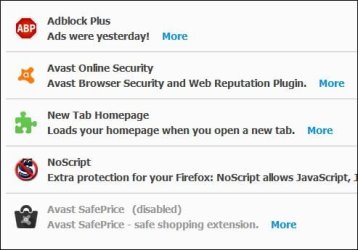
What addons do you use in Firefox? I only use FF Portable main browser is Chrome.

RR.JPG
 

My Computer My Computer

At a glance

Win7 H.Prem. 32bit+SP1
Computer Manufacturer/Model Number
Look in my Signature.
OS
Win7 H.Prem. 32bit+SP1
I use Flash and UBlock. I bet UBlock might be causing it. I'll check.
 

My Computer My Computer

At a glance

Windows 7 Professional 64 Biti716GB
Computer type
Laptop
Computer Manufacturer/Model Number
HP
OS
Windows 7 Professional 64 Bit
CPU
i7
Memory
16GB
Browser
Firefox 53
I use Flash and UBlock. I bet UBlock might be causing it. I'll check. Ok, I disabled UBlock and restarted Firefox, but it is still happening. Also, I have Flash set to Ask First, so that shouldn't be enabled while on YouTube.
 

My Computer My Computer

At a glance

Windows 7 Professional 64 Biti716GB
Computer type
Laptop
Computer Manufacturer/Model Number
HP
OS
Windows 7 Professional 64 Bit
CPU
i7
Memory
16GB
Browser
Firefox 53
Try this:-
-
To clear your DNS cache, perform the following steps:
Click Start.
Enter cmd in the Start menu search text box.
Right-click Command Prompt and select Run as Administrator.
Run the following command:
ipconfig /flushdns
If the command succeeds, the system returns the following message:
Windows IP configuration successfully flushed the DNS Resolver Cache.
 

My Computer My Computer

At a glance

Win7 H.Prem. 32bit+SP1
Computer Manufacturer/Model Number
Look in my Signature.
OS
Win7 H.Prem. 32bit+SP1
I cleared the DNS cache, or flushed it. Still getting the same result. I noticed a new symptom today. In attempting to watch a long YouTube video, one with multiple ads, it would play the ads consecutively and never got to the content.
 

My Computer My Computer

At a glance

Windows 7 Professional 64 Biti716GB
Computer type
Laptop
Computer Manufacturer/Model Number
HP
OS
Windows 7 Professional 64 Bit
CPU
i7
Memory
16GB
Browser
Firefox 53
That is how YouTube works. Try this with FF to watch your videos.

RR.png
 

My Computer My Computer

At a glance

Win7 H.Prem. 32bit+SP1
Computer Manufacturer/Model Number
Look in my Signature.
OS
Win7 H.Prem. 32bit+SP1
So I Guess We're Done?

Maybe I introduced too many issues to my issue. Maybe I'm in the wrong forum. Or is everyone taking a couple days R n R?

Anyway, I do appreciate the ideas. Looking forward to more.
 

My Computer My Computer

At a glance

Windows 7 Professional 64 Biti716GB
Computer type
Laptop
Computer Manufacturer/Model Number
HP
OS
Windows 7 Professional 64 Bit
CPU
i7
Memory
16GB
Browser
Firefox 53
I tried the new private window option, with no luck. I saw an ad, a fraction of a second of the video, a second ad, then the video with bad stuttering.
 

My Computer My Computer

At a glance

Windows 7 Professional 64 Biti716GB
Computer type
Laptop
Computer Manufacturer/Model Number
HP
OS
Windows 7 Professional 64 Bit
CPU
i7
Memory
16GB
Browser
Firefox 53
Suggest: Backup Firefox Profile elements to include bookmarks, addons and extensions then fresh install it. Fresh install means full removal of program and profile data (other than backed up profile data)

Backup, Remove and Clean Install:
a problem with firefox - Page 2 - Windows 7 Help Forums

Clean install Flash player:
Can't Watch Online Video or any Flash pages - Windows 7 Help Forums

However before going to all that trouble you could consider grabbing a copy of Cyberfox Portable:

Cyberfox Portable Edition - Browse Files at SourceForge.net

It uses it's own profile so run it and see if you get exactly the same problem watching videos. If you get the same problem then you can most likely rule out a problem with Firefox. However if videos play fine in Cyberfox then do the fresh install of Firefox.
 

My Computer My Computer

At a glance

Microsoft Windows 7 Home Premium 64-bit 7601 ...AMD C-60 APU with Radeon(tm) HD Graphics4.00 GBAMD Radeon HD 6290 Graphics
Computer type
Laptop
Computer Manufacturer/Model Number
ASUS
OS
Microsoft Windows 7 Home Premium 64-bit 7601 Multiprocessor Free Service Pack 1
CPU
AMD C-60 APU with Radeon(tm) HD Graphics
Motherboard
ASUSTeK COMPUTER INC. X501U
Memory
4.00 GB
Graphics Card(s)
AMD Radeon HD 6290 Graphics
Sound Card
(1) AMD High Definition Audio Device (2) Realtek High Defi
Screen Resolution
1366 x 768 x 32 bits (4294967296 colors) @ 60 Hz
Hard Drives
Hitachi HTS545050A7E380 SATA Disk Device
Antivirus
Comodo CIS & FW, SecureAplus App Whitelisting, Threatfire
Browser
Cyberfox 64bit, Opera 64bit, Airfox
Other Info
Spy-The-Spy, HitmanPro.Alert, Norton Connect Safe, MJRegWatcher, BitDefender TrafficLight, Voodoo Shield, Zemana AntiMalware
I copied my profile info as suggested, and did a clean fresh install of Firefox. The problem persisted. I downloaded Chrome which worked fine.

However, before we automatically blame Firefox, embedded videos in Facebook have a similar problem--a problem which started at the same time. The only difference is that Firefox YouTube videos stutter, and during the stall period display a black screen instead of a frozen frame of the video. The Facebook videos simply display a frozen frame. The number of stutters and duration of each seems about the same however.
 

My Computer My Computer

At a glance

Windows 7 Professional 64 Biti716GB
Computer type
Laptop
Computer Manufacturer/Model Number
HP
OS
Windows 7 Professional 64 Bit
CPU
i7
Memory
16GB
Browser
Firefox 53
Did you try Cyberfox and get the same problem?

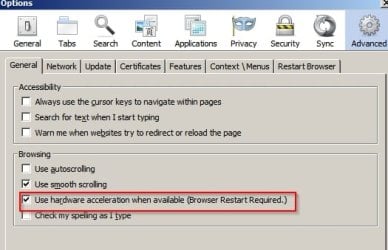
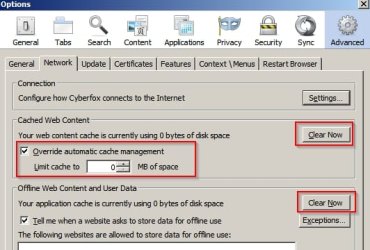
Try setting these options. Screenshot is from Cyberfox with old style preferences enabled so it might look different in Firefox.

Options 1.jpg

Options 2.jpg

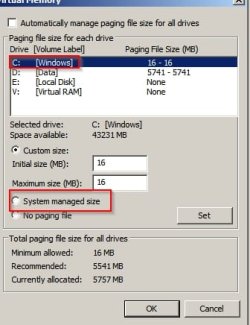
Also check your pagefile. If you haven't deliberately changed settings set it to "System Managed"

Start > Run then type sysdm.cpl press Enter. Advanced Tab > Performace > Settings > Advance Tab > Virtual Memory > Change

Pagefile.jpg

Ignore my settings and use the settings in Red. You would need a reboot for settings to take effect.

Other than that -it could be a problem with your graphics driver but I'm not expert on updating graphics drivers. Perhaps you could check for updates?

Also it might be worth changing DNS.
 

My Computer My Computer

At a glance

Microsoft Windows 7 Home Premium 64-bit 7601 ...AMD C-60 APU with Radeon(tm) HD Graphics4.00 GBAMD Radeon HD 6290 Graphics
Computer type
Laptop
Computer Manufacturer/Model Number
ASUS
OS
Microsoft Windows 7 Home Premium 64-bit 7601 Multiprocessor Free Service Pack 1
CPU
AMD C-60 APU with Radeon(tm) HD Graphics
Motherboard
ASUSTeK COMPUTER INC. X501U
Memory
4.00 GB
Graphics Card(s)
AMD Radeon HD 6290 Graphics
Sound Card
(1) AMD High Definition Audio Device (2) Realtek High Defi
Screen Resolution
1366 x 768 x 32 bits (4294967296 colors) @ 60 Hz
Hard Drives
Hitachi HTS545050A7E380 SATA Disk Device
Antivirus
Comodo CIS & FW, SecureAplus App Whitelisting, Threatfire
Browser
Cyberfox 64bit, Opera 64bit, Airfox
Other Info
Spy-The-Spy, HitmanPro.Alert, Norton Connect Safe, MJRegWatcher, BitDefender TrafficLight, Voodoo Shield, Zemana AntiMalware
Also type about:support in FF address bar and post the results (text)
 

My Computer My Computer

At a glance

Microsoft Windows 7 Home Premium 64-bit 7601 ...AMD C-60 APU with Radeon(tm) HD Graphics4.00 GBAMD Radeon HD 6290 Graphics
Computer type
Laptop
Computer Manufacturer/Model Number
ASUS
OS
Microsoft Windows 7 Home Premium 64-bit 7601 Multiprocessor Free Service Pack 1
CPU
AMD C-60 APU with Radeon(tm) HD Graphics
Motherboard
ASUSTeK COMPUTER INC. X501U
Memory
4.00 GB
Graphics Card(s)
AMD Radeon HD 6290 Graphics
Sound Card
(1) AMD High Definition Audio Device (2) Realtek High Defi
Screen Resolution
1366 x 768 x 32 bits (4294967296 colors) @ 60 Hz
Hard Drives
Hitachi HTS545050A7E380 SATA Disk Device
Antivirus
Comodo CIS & FW, SecureAplus App Whitelisting, Threatfire
Browser
Cyberfox 64bit, Opera 64bit, Airfox
Other Info
Spy-The-Spy, HitmanPro.Alert, Norton Connect Safe, MJRegWatcher, BitDefender TrafficLight, Voodoo Shield, Zemana AntiMalware
Back
Top