FireFox Taskbar Icon, Makes Duplicate Taskbar Icon's

SupermaNn

New member
Member
Local time
7:54 AM
Messages
53
For some reason FireFox doesnt want me to use my own icon for it in the taskbar. ill change the icon, pin it to the taskbar, click the new icon and itll open up a new firefox default icon on the taskbar so there will be 2.

anyway around this?
 

My Computer

Computer Manufacturer/Model Number
Acer Aspire 7551-7422
OS
Windows Home Premium 64bit
CPU
AMD Phenom II N970 Quad-core processor 2.20 GHz
Memory
4GB
Graphics Card(s)
ATI Mobility Radeon HD 4250
Sound Card
RealTek high definition audio/ATI high definition audio devi
Monitor(s) Displays
Generic PnP Monitor (1600x900)
Hard Drives
500GB
Let's fix the duplicate icon first, open Firefox from the pinned icon you have already after the second one opens up unpin the first one and pin the second one that should stop the duplicate icon.

Now the icon go to C:\Users\YOUR USER NAME\AppData\Roaming\Microsoft\Internet Explorer\Quick Launch\User Pinned\TaskBar then right-click on the Firefox shortcut click on properties make sure you're in the Shortcut tab and click on the Change Icon Button. After you open up Firefox again icon will revert back to the default icon because it opens up Firefox.exe you would have to change the icon in the .exe for a permanent change.
AppData is hidden is this tutorial Step #3 to unhide it http://www.sevenforums.com/tutorials/56005-file-folder-hide-unhide.html

Jerry
 

My Computer

Computer type
Laptop
Computer Manufacturer/Model Number
Sager NP9170
OS
Win 7 Pro x64 / Win 10 Pro
CPU
Intel(R) Core(TM) i7-3630QM CPU @ 2.40GHz
Motherboard
CLEVO P170EM
Memory
12 GB
Graphics Card(s)
(1) Intel(R) HD Graphics 4000 (2) NVIDIA GeForce GTX 675M
Sound Card
(1) Realtek High Definition Audio (2) Intel(R) Display Aud
Monitor(s) Displays
17.3
Screen Resolution
1920x1080
Hard Drives
(1) Samsung 860 EVO 500GB(OS) (1) Samsung 860 EVO 500GB(Data)
Keyboard
Backlite
Antivirus
MSE, Malwarebytes Pro
Browser
Firefox
Other Info
DESKTOP: Custom-built.
OS: Win 10 Pro x64.
CASE: Rosewill R5.
CPU: Intel I5 4670K CPU @ 3.40GHz.
CPU COOLER: Cool Master Hyper 212 EVO.
MOTHERBOARD: Asus Z87-A.
MEMORY: Kingston HyperX 2x4 GB.
GPU: Nvidia Geforce 650 TI.
PSU: Corsair TX750.
DRIVES: (1) Samsung 840 120 GB SSD (2) Western Digital blue 500 GB 7200 RPM.
did all that, right clicked firefox.exe in C:\Program Files (x86)\Mozilla Firefox\ and there is no way to change the icon there, all i see is this

j5e52r.jpg
 

My Computer

Computer Manufacturer/Model Number
Acer Aspire 7551-7422
OS
Windows Home Premium 64bit
CPU
AMD Phenom II N970 Quad-core processor 2.20 GHz
Memory
4GB
Graphics Card(s)
ATI Mobility Radeon HD 4250
Sound Card
RealTek high definition audio/ATI high definition audio devi
Monitor(s) Displays
Generic PnP Monitor (1600x900)
Hard Drives
500GB
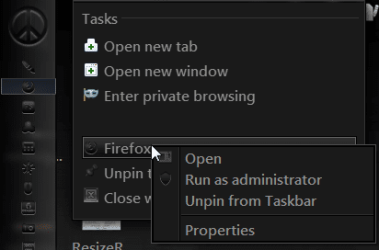
You can only change it on the pinned shortcut on the taskbar shown above in the C:\Users\YOUR USER NAME\AppData\Roaming\Microsoft\Internet Explorer\Quick Launch\User Pinned\TaskBar folder. Or right click the taskbar icon then right click on firefox then go to properties make sure you're in the Shortcut tab and click on the Change Icon Button.
Screenshot - 8_29_2012 , 1_51_01 PM.png

If you want to change it in the .exe you need a resource editor to do it.

Jerry
 

My Computer

Computer type
Laptop
Computer Manufacturer/Model Number
Sager NP9170
OS
Win 7 Pro x64 / Win 10 Pro
CPU
Intel(R) Core(TM) i7-3630QM CPU @ 2.40GHz
Motherboard
CLEVO P170EM
Memory
12 GB
Graphics Card(s)
(1) Intel(R) HD Graphics 4000 (2) NVIDIA GeForce GTX 675M
Sound Card
(1) Realtek High Definition Audio (2) Intel(R) Display Aud
Monitor(s) Displays
17.3
Screen Resolution
1920x1080
Hard Drives
(1) Samsung 860 EVO 500GB(OS) (1) Samsung 860 EVO 500GB(Data)
Keyboard
Backlite
Antivirus
MSE, Malwarebytes Pro
Browser
Firefox
Other Info
DESKTOP: Custom-built.
OS: Win 10 Pro x64.
CASE: Rosewill R5.
CPU: Intel I5 4670K CPU @ 3.40GHz.
CPU COOLER: Cool Master Hyper 212 EVO.
MOTHERBOARD: Asus Z87-A.
MEMORY: Kingston HyperX 2x4 GB.
GPU: Nvidia Geforce 650 TI.
PSU: Corsair TX750.
DRIVES: (1) Samsung 840 120 GB SSD (2) Western Digital blue 500 GB 7200 RPM.
Back
Top