Firefox updates

Davy

Member
Member
Local time
5:26 AM
Messages
70
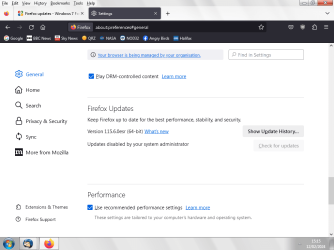
Doing the registry 'hack' for stopping updates should result in updates being stopped, in the General setting's window I have 'Updates disabled by your administrator ' Ok so far?

Question. I still get updates 'waiting' to be installed in the Data window which is a hidden folder and what happens when a new one comes along, is the old one replaced or do they just mount up, can I just ignore them..... to be sure I've been deleting them?

Thanks, Dave
 

My Computer My Computer

At a glance

win7 x64Trinity A6-5600K8GbAPU
Computer type
PC/Desktop
Computer Manufacturer/Model Number
custom build
OS
win7 x64
CPU
Trinity A6-5600K
Motherboard
Gigabyte GA-F2A88X-D3H
Memory
8Gb
Graphics Card(s)
APU
Hard Drives
Western Digital
Antivirus
NoD32
Browser
Firefox
Describe this "data window."

I use the registry to block updates and in Firefox it obeys and says updates are handled by your organization I think it is.
 

My Computer My Computer

At a glance

Windows 7 Ultimate x64
Computer type
PC/Desktop
OS
Windows 7 Ultimate x64
Hi, thanks F22 Simpilot.
Says 'Updates disabled by your administrator', just double checked.... but do you still get the up date file in the 'hidden' 'Data' folder what I wanted to know? To see them we need to 'show hidden files' in folder options.

Dave
 

My Computer My Computer

At a glance

win7 x64Trinity A6-5600K8GbAPU
Computer type
PC/Desktop
Computer Manufacturer/Model Number
custom build
OS
win7 x64
CPU
Trinity A6-5600K
Motherboard
Gigabyte GA-F2A88X-D3H
Memory
8Gb
Graphics Card(s)
APU
Hard Drives
Western Digital
Antivirus
NoD32
Browser
Firefox
I have no idea because I use the portable version of Firefox.
 

My Computer My Computer

At a glance

Windows 7 Ultimate x64
Computer type
PC/Desktop
OS
Windows 7 Ultimate x64
Ah yes I've been looking at that portable version, remember now I tried that a while back. Many thanks for your help.
Good luck, Dave
 

My Computer My Computer

At a glance

win7 x64Trinity A6-5600K8GbAPU
Computer type
PC/Desktop
Computer Manufacturer/Model Number
custom build
OS
win7 x64
CPU
Trinity A6-5600K
Motherboard
Gigabyte GA-F2A88X-D3H
Memory
8Gb
Graphics Card(s)
APU
Hard Drives
Western Digital
Antivirus
NoD32
Browser
Firefox
Try deleting the pending update.
 

My Computers My Computers

  • At a glance

    Windows 7 pro/Windows 10 ProIntel i7 860 Quad core 2.8 ghz8 gbATI Radeon HD 5770 1 gb ram
    Computer type
    PC/Desktop
    Computer Manufacturer/Model Number
    HP Pavillion Elite HPE-250f
    OS
    Windows 7 pro/Windows 10 Pro
    CPU
    Intel i7 860 Quad core 2.8 ghz
    Memory
    8 gb
    Graphics Card(s)
    ATI Radeon HD 5770 1 gb ram
    Monitor(s) Displays
    Alienware 25 AW2521HF & Viewsonic
    Screen Resolution
    1920 x1080 & 1680x1050
    Hard Drives
    WD blue 1 tb & 500 gb.
    Browser
    FF of course.
    Other Info
    https://www.bestbuy.com/site/hp-pavilion-elite-desktop-intel-core-i7-processor-8gb-memory-1tb-hard-drive/9921493.p?skuId=9921493
  • At a glance

    Windows 2012 R2 Data center/Linux Minti3 9100 3.6GHz, 8M cache, 4C/4T8GB 2666MT/s DDR4 ECC UDIMM
    Computer type
    PC/Desktop
    System Manufacturer/Model Number
    Dell Poweredge T140
    OS
    Windows 2012 R2 Data center/Linux Mint
    CPU
    i3 9100 3.6GHz, 8M cache, 4C/4T
    Memory
    8GB 2666MT/s DDR4 ECC UDIMM
    Monitor(s) Displays
    Viewsonic
    Screen Resolution
    1680x1050
    Hard Drives
    1 TB & 750 GB
    Other Info
    https://www.dell.com/en-us/work/shop/productdetailstxn/poweredge-t140?~ck=bt
Sorry I don't follow you....

To Stop Firefox updating I do delete the update files in the hidden Data folder. I since applied the registry hack as I was telling F22..... In the update gui I get 'Updates blocked by your administrator'.... or something to that effect in the Firefox settings window.

What I was asking and trying to find out, now that I have updates disabled can I simply ignore the updates in the 'hidden' Data folder? Now that updates are blocked will the hack stop them being applied - since it certainly not stopping me getting the updates, just that I don't wanna be finding a load of pending updates, just trying find out what happens to them thats all?

Dave
 

My Computer My Computer

At a glance

win7 x64Trinity A6-5600K8GbAPU
Computer type
PC/Desktop
Computer Manufacturer/Model Number
custom build
OS
win7 x64
CPU
Trinity A6-5600K
Motherboard
Gigabyte GA-F2A88X-D3H
Memory
8Gb
Graphics Card(s)
APU
Hard Drives
Western Digital
Antivirus
NoD32
Browser
Firefox
Once you disable updates you don't get any and the end user has to remove the restriction before updating. That can be done by either the registry, the file policy.json and group policy editor (if you have 7 pro or ultimate). I use group policy editor. If you are being prompted to install an update perhaps it downloaded one before you implemented the policy.
 

My Computers My Computers

  • At a glance

    Windows 7 pro/Windows 10 ProIntel i7 860 Quad core 2.8 ghz8 gbATI Radeon HD 5770 1 gb ram
    Computer type
    PC/Desktop
    Computer Manufacturer/Model Number
    HP Pavillion Elite HPE-250f
    OS
    Windows 7 pro/Windows 10 Pro
    CPU
    Intel i7 860 Quad core 2.8 ghz
    Memory
    8 gb
    Graphics Card(s)
    ATI Radeon HD 5770 1 gb ram
    Monitor(s) Displays
    Alienware 25 AW2521HF & Viewsonic
    Screen Resolution
    1920 x1080 & 1680x1050
    Hard Drives
    WD blue 1 tb & 500 gb.
    Browser
    FF of course.
    Other Info
    https://www.bestbuy.com/site/hp-pavilion-elite-desktop-intel-core-i7-processor-8gb-memory-1tb-hard-drive/9921493.p?skuId=9921493
  • At a glance

    Windows 2012 R2 Data center/Linux Minti3 9100 3.6GHz, 8M cache, 4C/4T8GB 2666MT/s DDR4 ECC UDIMM
    Computer type
    PC/Desktop
    System Manufacturer/Model Number
    Dell Poweredge T140
    OS
    Windows 2012 R2 Data center/Linux Mint
    CPU
    i3 9100 3.6GHz, 8M cache, 4C/4T
    Memory
    8GB 2666MT/s DDR4 ECC UDIMM
    Monitor(s) Displays
    Viewsonic
    Screen Resolution
    1680x1050
    Hard Drives
    1 TB & 750 GB
    Other Info
    https://www.dell.com/en-us/work/shop/productdetailstxn/poweredge-t140?~ck=bt
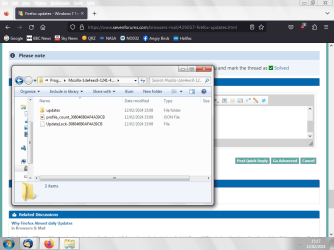
image.png

image.png

Hope that explains it, as you see I have updates disabled in registry, yet I still get updates..... do I ignore them, I delete just to be sure I don't get updated. Time to ditch Firefox I think.

Dave
 

My Computer My Computer

At a glance

win7 x64Trinity A6-5600K8GbAPU
Computer type
PC/Desktop
Computer Manufacturer/Model Number
custom build
OS
win7 x64
CPU
Trinity A6-5600K
Motherboard
Gigabyte GA-F2A88X-D3H
Memory
8Gb
Graphics Card(s)
APU
Hard Drives
Western Digital
Antivirus
NoD32
Browser
Firefox
I don't know what that file is but it doesn't look like an update to me. Is there anything in the updates folder shown? Are you being prompted to update firefox?
 

My Computers My Computers

  • At a glance

    Windows 7 pro/Windows 10 ProIntel i7 860 Quad core 2.8 ghz8 gbATI Radeon HD 5770 1 gb ram
    Computer type
    PC/Desktop
    Computer Manufacturer/Model Number
    HP Pavillion Elite HPE-250f
    OS
    Windows 7 pro/Windows 10 Pro
    CPU
    Intel i7 860 Quad core 2.8 ghz
    Memory
    8 gb
    Graphics Card(s)
    ATI Radeon HD 5770 1 gb ram
    Monitor(s) Displays
    Alienware 25 AW2521HF & Viewsonic
    Screen Resolution
    1920 x1080 & 1680x1050
    Hard Drives
    WD blue 1 tb & 500 gb.
    Browser
    FF of course.
    Other Info
    https://www.bestbuy.com/site/hp-pavilion-elite-desktop-intel-core-i7-processor-8gb-memory-1tb-hard-drive/9921493.p?skuId=9921493
  • At a glance

    Windows 2012 R2 Data center/Linux Minti3 9100 3.6GHz, 8M cache, 4C/4T8GB 2666MT/s DDR4 ECC UDIMM
    Computer type
    PC/Desktop
    System Manufacturer/Model Number
    Dell Poweredge T140
    OS
    Windows 2012 R2 Data center/Linux Mint
    CPU
    i3 9100 3.6GHz, 8M cache, 4C/4T
    Memory
    8GB 2666MT/s DDR4 ECC UDIMM
    Monitor(s) Displays
    Viewsonic
    Screen Resolution
    1680x1050
    Hard Drives
    1 TB & 750 GB
    Other Info
    https://www.dell.com/en-us/work/shop/productdetailstxn/poweredge-t140?~ck=bt
It's just gotta be, if I don't delete the update lock first the update folder or the entire file with the folder in will not delete, I got to delete the update lock First..... or I could delete the entire folders shown - that update lock has to be included in the delete or deleted first.

If I don't delete that Update folder I get updated at the next 'boot up', which I am trying to avoid.

Dave
 

My Computer My Computer

At a glance

win7 x64Trinity A6-5600K8GbAPU
Computer type
PC/Desktop
Computer Manufacturer/Model Number
custom build
OS
win7 x64
CPU
Trinity A6-5600K
Motherboard
Gigabyte GA-F2A88X-D3H
Memory
8Gb
Graphics Card(s)
APU
Hard Drives
Western Digital
Antivirus
NoD32
Browser
Firefox
Don't delete the entire update folder. Just the installers.
 

My Computers My Computers

  • At a glance

    Windows 7 pro/Windows 10 ProIntel i7 860 Quad core 2.8 ghz8 gbATI Radeon HD 5770 1 gb ram
    Computer type
    PC/Desktop
    Computer Manufacturer/Model Number
    HP Pavillion Elite HPE-250f
    OS
    Windows 7 pro/Windows 10 Pro
    CPU
    Intel i7 860 Quad core 2.8 ghz
    Memory
    8 gb
    Graphics Card(s)
    ATI Radeon HD 5770 1 gb ram
    Monitor(s) Displays
    Alienware 25 AW2521HF & Viewsonic
    Screen Resolution
    1920 x1080 & 1680x1050
    Hard Drives
    WD blue 1 tb & 500 gb.
    Browser
    FF of course.
    Other Info
    https://www.bestbuy.com/site/hp-pavilion-elite-desktop-intel-core-i7-processor-8gb-memory-1tb-hard-drive/9921493.p?skuId=9921493
  • At a glance

    Windows 2012 R2 Data center/Linux Minti3 9100 3.6GHz, 8M cache, 4C/4T8GB 2666MT/s DDR4 ECC UDIMM
    Computer type
    PC/Desktop
    System Manufacturer/Model Number
    Dell Poweredge T140
    OS
    Windows 2012 R2 Data center/Linux Mint
    CPU
    i3 9100 3.6GHz, 8M cache, 4C/4T
    Memory
    8GB 2666MT/s DDR4 ECC UDIMM
    Monitor(s) Displays
    Viewsonic
    Screen Resolution
    1680x1050
    Hard Drives
    1 TB & 750 GB
    Other Info
    https://www.dell.com/en-us/work/shop/productdetailstxn/poweredge-t140?~ck=bt
Just to be clear, these folders at the bottom is in a Firefox folder in the hidden Data file, I open the Firefox folder and here's these files.... the update file will not delete if I don't delete the Uninstall lock, I have to delete the update lock file first before I can delete the update file (or as said I can delete all the files at the same time - the update lock MUST be included).... this then leaves the Firefox folder empty.

I looked high and low for firefox update files and can only see these, an hidden file in the data folder...... where are these file supposed to be?? It is clear to me the 'update lock' prevent's deletion of the update folder, can't say about any other installation AND it's the same on a laptop 32bit installation, behaves exactly the same way.

Dave
 

My Computer My Computer

At a glance

win7 x64Trinity A6-5600K8GbAPU
Computer type
PC/Desktop
Computer Manufacturer/Model Number
custom build
OS
win7 x64
CPU
Trinity A6-5600K
Motherboard
Gigabyte GA-F2A88X-D3H
Memory
8Gb
Graphics Card(s)
APU
Hard Drives
Western Digital
Antivirus
NoD32
Browser
Firefox
Back
Top