firewall keeps turning off

dysertmv

New member
Local time
3:44 AM
Messages
9
Every time I start my computer the fire wall is off. I have reset default settings numerous times and it still does it. Malwarebytes and virus scans come back clean, any help would be greatly appreciated, thank you.....mv
 

My Computer My Computer

Computer Manufacturer/Model Number
Toshiba Satellite L305-5968
OS
Windows 7 Home Premium 32bit.
CPU
Intel® Pentium® Processor T4200
Memory
3GB DDR2 800MHz memory
Graphics Card(s)
Mobile Intel® Graphics Media Accelerator 4500M
Hard Drives
320GB HDD (5400rpm)
What AV are you using?
 

My Computer My Computer

OS
Windows 7 Professional x64 Backtrack 4 R2
CPU
Intel Core i5-650
Motherboard
Gigabyte P55-UD3
Memory
4 GB Geil PC3 12800
Graphics Card(s)
HIS HD 4870 X2
Sound Card
Sound Blaster X-Fi Titanium Fatal1ty Champion
Monitor(s) Displays
BenQ 22" G2220HD
Hard Drives
Seagate Barracuda 7200.12 500GB
PSU
Antec High Current Gamer 620W Power Supply
Case
Thermaltake Armor+ MX
Keyboard
Microsoft SideWinder X6
Mouse
Razer Abyssus
Hi,

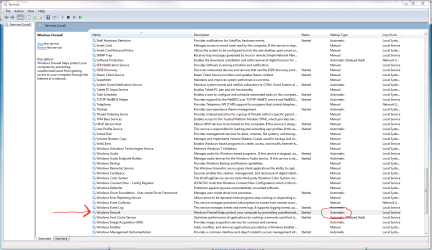
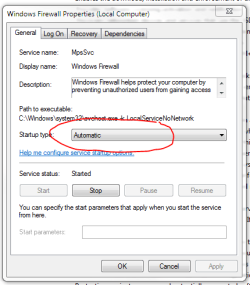
Check to see that your current anti-virus isn't using its firewall in preference to Windows Firewall. If not, then check SERVICES to see that Windows Firewall is set to startup automatically, as shown below. Right-click on it and then choose properties to check its startup configuration.

Regards,
Golden
 

Attachments

  • Capture.PNG
    Capture.PNG
    66.7 KB · Views: 692
  • Capture1.PNG
    Capture1.PNG
    15.8 KB · Views: 232

My Computer My Computer

Computer type
PC/Desktop
Computer Manufacturer/Model Number
Golden Mk. I.4
OS
Windows 10 Pro x64 ; Xubuntu x64
CPU
Intel i7 860 @ 2.80 GHz O/C'ed to 4.0GHz
Motherboard
Gigabyte P55A-UD3R Rev.1. Award BIOS F13
Memory
16GB Corsair Vengance DDR3 @ 661 MHz Dual Channel (9-9-9-24)
Graphics Card(s)
EVGA NVidia GTX 560 1024MB
Sound Card
Realtek Integrated
Monitor(s) Displays
Dual Samsung SyncMaster 2494HS
Screen Resolution
1920*1080 and 1920*1080
Hard Drives
1*Samsung 840 EVO 120GB SSD;
1*OCZ Vertex 2 60GB SSD;
2*Samsung F3 SpinPoint 1TB in RAID0;
1*Samsung F1 SpinPoint 1TB;
2*Western Digital 1TB External USB 3.0
1*Western Digital 500GB External USB 3.0
1*Seagate 500GB External USB 2.0
PSU
Thermaltake ToughPower QFan 750W
Case
Thermaltake Element S VK60001W2Z
Cooling
Corsair H60 Water Cooling, 2*230mm and 2*80mm case fans
Keyboard
Logitech G110
Mouse
Logitech MX518
Every time I start my computer the fire wall is off. I have reset default settings numerous times and it still does it. Malwarebytes and virus scans come back clean, any help would be greatly appreciated, thank you.....mv
Malware can disable services and not be detected by virus scans or MBam.

What Anti-Virus program are you using?

Have you noticed any other 'funny/strange' sort of stuff going on?
 

My Computer My Computer

Computer type
PC/Desktop
Computer Manufacturer/Model Number
Bruce ... somewhere in his 40's
OS
Windows 7 Ultimate 32bit SP1
CPU
Intel(R) Core(TM)2 Quad CPU @ 2.40GHz, 2400 MHz
Motherboard
INTEL/D975XBX2
Memory
4 GB
Graphics Card(s)
ATI Radeon HD 2600 Pro
Monitor(s) Displays
Samsung SyncMaster 914v
Screen Resolution
1280 x 1024
Hard Drives
2/500GB each ... ST3500630AS ATA Device.
One is not connected
PSU
Rocketfish 700 W
Case
G.Skill Gigabyte Chassis
Keyboard
Standard PS/2 Keyboard
Mouse
Microsoft PS/2 Mouse
Internet Speed
DSL
Antivirus
Avira Internet Security
Browser
IE 11
Other Info
ATI HDMI Audio
Every time I start my computer the fire wall is off. I have reset default settings numerous times and it still does it. Malwarebytes and virus scans come back clean, any help would be greatly appreciated, thank you.....mv

Just in case it's not clear from the previous posts security solutions that include a firewall almost always turn off the Windows Firewall to prevent problems. For instance I use Norton Internet Security, and if I turned on the Windows Firewall NIS would turn it off during the next reboot.
 

My Computer My Computer

Computer type
PC/Desktop
OS
Windows 7 x64
CPU
Intel Core2 Extreme Q6850 3.00GHz
Motherboard
EVGA 132-CK-NF79
Memory
8 GB
Graphics Card(s)
Radeon R7 260X
Sound Card
Xonar DS
Hard Drives
Hitachi Deskstar 1 tb
Also check Base Filtering Engine.

Untitled.png
 

My Computer My Computer

Computer Manufacturer/Model Number
Averatec 6130HS-20
OS
Windows 7 Professional 32-bit (6.1, Build 7600)
CPU
Intel(R) Pentium(R) 4 3.00 GHz HT
Memory
2.0 GB
Graphics Card(s)
ATI Mobility Radeon 9600 64MB
Sound Card
Realtek AC'97 Audio
Screen Resolution
1280 x 800
Hard Drives
Seagate 96023A 60GB 7200RPM -
Seagate FreeAgentDesktop 250GB
Cooling
20 Inch Box Fan
Mouse
Targus PAWM10 Wireless Optical Laptop Mouse
Hi,

Check to see that your current anti-virus isn't using its firewall in preference to Windows Firewall. If not, then check SERVICES to see that Windows Firewall is set to startup automatically, as shown below. Right-click on it and then choose properties to check its startup configuration.

Regards,
Golden

All that is correct as you showed, I am using Centurylink F-Secure AV, its firewall is on, maybe it disables the windows firewall and uses it, I just hope its ok. not really having any issues, just wandering why its off. thanx
 

My Computer My Computer

Computer Manufacturer/Model Number
Toshiba Satellite L305-5968
OS
Windows 7 Home Premium 32bit.
CPU
Intel® Pentium® Processor T4200
Memory
3GB DDR2 800MHz memory
Graphics Card(s)
Mobile Intel® Graphics Media Accelerator 4500M
Hard Drives
320GB HDD (5400rpm)
I am using Centurylink F-Secure AV, its firewall is on, maybe it disables the windows firewall and uses it, I just hope its ok. not really having any issues, just wandering why its off. thanx

Yep. When you use another softwares firewall it turns off the Windows one, unless you choose to change it.

Your system sounds fine to me.

Regards,
Golden
 

My Computer My Computer

Computer type
PC/Desktop
Computer Manufacturer/Model Number
Golden Mk. I.4
OS
Windows 10 Pro x64 ; Xubuntu x64
CPU
Intel i7 860 @ 2.80 GHz O/C'ed to 4.0GHz
Motherboard
Gigabyte P55A-UD3R Rev.1. Award BIOS F13
Memory
16GB Corsair Vengance DDR3 @ 661 MHz Dual Channel (9-9-9-24)
Graphics Card(s)
EVGA NVidia GTX 560 1024MB
Sound Card
Realtek Integrated
Monitor(s) Displays
Dual Samsung SyncMaster 2494HS
Screen Resolution
1920*1080 and 1920*1080
Hard Drives
1*Samsung 840 EVO 120GB SSD;
1*OCZ Vertex 2 60GB SSD;
2*Samsung F3 SpinPoint 1TB in RAID0;
1*Samsung F1 SpinPoint 1TB;
2*Western Digital 1TB External USB 3.0
1*Western Digital 500GB External USB 3.0
1*Seagate 500GB External USB 2.0
PSU
Thermaltake ToughPower QFan 750W
Case
Thermaltake Element S VK60001W2Z
Cooling
Corsair H60 Water Cooling, 2*230mm and 2*80mm case fans
Keyboard
Logitech G110
Mouse
Logitech MX518
Thank you very much, I appreciate your time.....:)
 

My Computer My Computer

Computer Manufacturer/Model Number
Toshiba Satellite L305-5968
OS
Windows 7 Home Premium 32bit.
CPU
Intel® Pentium® Processor T4200
Memory
3GB DDR2 800MHz memory
Graphics Card(s)
Mobile Intel® Graphics Media Accelerator 4500M
Hard Drives
320GB HDD (5400rpm)
No worries.
 

My Computer My Computer

Computer type
PC/Desktop
Computer Manufacturer/Model Number
Golden Mk. I.4
OS
Windows 10 Pro x64 ; Xubuntu x64
CPU
Intel i7 860 @ 2.80 GHz O/C'ed to 4.0GHz
Motherboard
Gigabyte P55A-UD3R Rev.1. Award BIOS F13
Memory
16GB Corsair Vengance DDR3 @ 661 MHz Dual Channel (9-9-9-24)
Graphics Card(s)
EVGA NVidia GTX 560 1024MB
Sound Card
Realtek Integrated
Monitor(s) Displays
Dual Samsung SyncMaster 2494HS
Screen Resolution
1920*1080 and 1920*1080
Hard Drives
1*Samsung 840 EVO 120GB SSD;
1*OCZ Vertex 2 60GB SSD;
2*Samsung F3 SpinPoint 1TB in RAID0;
1*Samsung F1 SpinPoint 1TB;
2*Western Digital 1TB External USB 3.0
1*Western Digital 500GB External USB 3.0
1*Seagate 500GB External USB 2.0
PSU
Thermaltake ToughPower QFan 750W
Case
Thermaltake Element S VK60001W2Z
Cooling
Corsair H60 Water Cooling, 2*230mm and 2*80mm case fans
Keyboard
Logitech G110
Mouse
Logitech MX518
Back
Top