
First Build (AMD)

MagusMagnus

New member
Power User
VIP
Local time
1:36 AM
Messages
168
Location
Cyberspace.
Already bought (from Amazon, except the case):

Gigabyte Sumo Omega
Corsair RM 750W
Asus M5A99FX Pro R2.0
AMD FX-8350
Noctua NH-D14
Corsair Vengeance LP DDR3 1600
EVGA GTX760 SC 2GB
WD1003FZEX 1TB
Asus DRW-24B1ST

Er... so basically, I'm a total n00b in the actual assembly procedures. Well, not quite but on the cabling and such (fans etc.), I'm about next to clueless. Otherwise I've been doing my homework since 2006 (this has been a very, very long time coming) so I think I'm alright on everything else (maybe not on the TIM/HSF...) so just please bear with me.

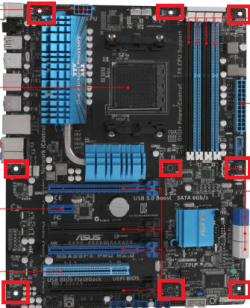
Anyways, I’ve just run into a snag this morning. The board takes 9 standoffs but the case only included 7 and 0 included elsewhere. I’m hoping to be able to get two more of them (probably the fastening screws as well just to be extra safe) from a local shop for <$5 or so but if they’re obscenely priced (Jesus, I’ve seen them listed at like $12! WTF?!) which configuration of those 7 standoffs could I get away with on this board and that NH-D14 (obviously the four closest to the cutout are foremost but otherwise, which are the least important)? I’d rather not skimp on those however I might have to, I just want to check it won’t damage the board whichever way I’d have to go about it. I don't have an old system to salvage them from or I would lol.

I already know not to use the paper board washers so we're good there... or are we?

I’m also planning to just put everything into the case first WITHOUT the CPU and HSF for a dry-fire POST test to at least ensure the RAM isn't DOA before I go about the NH-D14, which would be a huge hassle to have to take off and put back on if the RAM is DOA (this is sufficient testing for that yes?). I'd rather not have to deal with it and the TIM more than once. I also don’t like the thought of doing the rudimentary POST test outside of the case either... I want the board grounded to the case for even just that.

I *will* be using a ground strap and I know better than to build on carpet so we're also good there.

Oh right and, PSU, ODD and I/O shield are officially already mounted (yay).

And yup, about covers where I'm at.
 

My Computer

Computer type
PC/Desktop
Computer Manufacturer/Model Number
Custom [03/21/2014]
OS
7 Ultimate SP1 x64
CPU
AMD FX-8350 4.0GHz
Motherboard
Asus M5A99FX Pro R2.0
Memory
8GB Corsair Vengeance LP DDR3 1600
Graphics Card(s)
EVGA GTX760 SC 2GB GDDR5
Sound Card
Realtek ALC892
Monitor(s) Displays
23" Syncmaster P2370HD
Screen Resolution
1920 x 1080
Hard Drives
Scorpio Black WD1003FZEX 1TB
PSU
Corsair RM 750W
Case
Gigabyte Sumo Omega
Cooling
Noctua NH-D14 | 6 120mm case.
Keyboard
Tt eSPORTS Poesidon Z - Blue Switch
Mouse
Logitech M510
Internet Speed
FiOS 100/100
Antivirus
MBAM
Browser
WaterFox & Chrome
Other Info
NETWORKING:
FiOS G1100 (v1.03)
Netgear WNDR37AV
Actiontec MI424WR (Rev. I)
PRINTER:
Canon MX340
You are only missing 2 standoffs you can get some for a $1 at like a Microcenter or Frys electronics

if you can't get any Standoffs you can install the board with 2 missing but the trick is to make sure the edges of the board and the middle is secure even if you didn't put one on the either sides of the board it will not pose a issue as long as the others are around the key points to make sure it is grounded

Pretty much the key is making sure it is secure and grounded even with missing 2 standoffs hope this helped you
 

My Computer

Computer type
PC/Desktop
Computer Manufacturer/Model Number
CoreI7-6700K MrFingerIII Special Builds
OS
Windows 10 Home Premium 64bit sp1
CPU
Intel I7-6700K @ 4.6 Ghz 1.344 volts everyday OC
Motherboard
Asrock Fatality K6 Z170 Socket 1151
Memory
32GB G-Skill TridentZ 3200mhz 16-18-18-38 DDR4
Graphics Card(s)
Sli Gigabyte Windforce GTX 980 G1
Sound Card
AC97 Creative Rage Tactic 3D Headphones Bluetooth
Monitor(s) Displays
27" Asus ROG Swift PG278Q G-Sync 48" Vizio Smart HD TV
Screen Resolution
2560x1440p 27"- 48" Currently Gaming at 2560x1440p Res 2K
Hard Drives
250GB Samsung Evo840SSD Seagate baracuda 500 GB WD Mybook 500Gb 1TB Seagate Barracuda
PSU
HX1050w Corsair Silver 80plus certified crosfire/sli
Case
Enthod Pro Full Tower
Cooling
Corsair H110i GT 280 mm High Performance WaterBlock
Keyboard
Logitech wireless keyboard
Mouse
Logitech wireless mouse
Internet Speed
Cox Cable 100+ mb
Antivirus
WebRoot Spysweeper with Antivirus
Browser
IE-10, Chrome, Opera
Other Info
My Other Rig is a AMD FX8320E @4.6Ghz 16GB Ballistic Sport Ram
Mobo Asrock Fatality 990FX 120GB OCZ SSD 1TB Seagate Barracuda Corsair H75 Cooling PSU Corsair CX750
GPU GTX Gigabyte 970G1
I think you should go pick up more standoffs
 

Attachments

  • mobo.PNG
    mobo.PNG
    95.6 KB · Views: 67

My Computers

System One System Two

  • Computer type
    PC/Desktop
    Computer Manufacturer/Model Number
    HP Pavilion 6751c
    OS
    Win7, Win10, Win11
    Internet Speed
    100 Mbps
    Antivirus
    Norton 360
    Browser
    IE 11
  • Computer type
    PC/Desktop
    System Manufacturer/Model Number
    HP ENVY 750-514 & Dell XPS 8960
    OS
    Win7, Win10, Win11
    Antivirus
    Norton 360
MagnusMagnus,
You've got a killer rig coming together and please take some pictures for us and you yourself, they come in very handy !
You're right to go get the stand off's but as mentioned as long as the stand off's you have are in the correct position you'll likely get good support but all things being equal just go and get them. If you purchase maybe some other custom items like a braided cable kit or other the computer shop may just sport you the stand off's for free. Good luck and enjoy the process....it's addicting and you've just been bitten by the bug !
 

My Computer

Computer type
PC/Desktop
Computer Manufacturer/Model Number
A blend of brains, brawn and dumb luck.
OS
Windows 7 Ultimate 64
CPU
i7 3770k OC'd 4.6 @ 1.17v, also FX 8120 & i5 miniITX
Motherboard
MSI P67A-GD80 b3
Memory
32 gb G.Skill Sniper DDR3 10-12-12-31 @ 2133
Graphics Card(s)
XFX Radeon 7870 2GB DDR5
Sound Card
Sound Blaster Z Series Card
Monitor(s) Displays
(2) LG LED 23" 1920 x 1080 2ms Monitors via mini d-port
Screen Resolution
1680 X 1050 p
Hard Drives
Samsung 256 gb 830 SSD sata III
(1) 1 tb WD Black
(2) 1 tb Hitachi deskmates/sata II
(2) 1 tb WD green/sata II
(2) 3 tb Seagate Barracuda
(1) 120 gb OCZ Vertex SS
(1) Drobo 5N w/5 Seagate 3tb
PSU
EVGA modular 1000G2 80% gold rating & APC 1200 RS
Case
CoolerMaster Storm Styker
Cooling
7 case fans 140mm & 120mm, NZXT Kraken X60
Keyboard
(2) Logitech Illuminated Keyboards (1) usb (1) wireless
Mouse
Logitech G700 & T-BC21 - nano nx for the laptop
Internet Speed
Basic 120mbps down
Antivirus
Trend Micro Titanium Max Security & Malwarebytes Premium
Browser
Chrome and IE 10
Other Info
5 Noctua case fans + 3 Noctua in p/p on NZXT cooler
Integrated hot swap drive bays for 2.5" Drives
(2) Lite-on dvd/cd/Blu Ray optical 22X
Integrated fan controller and led on/off
HP Officejet Pro 8630 all-n-one
Hot-swappable 3.5" hard drive bay
Netgear Nighthawk router
Asus USB 3 & sata 6 PCIe card
Vantec IDE to sata adptr./Ultra sata adptr
Lenovo L420 i5 lappy with m sata
Drobo 5N advanced NAS
Thanks guys. I just got back from the local a bit ago and he graciously let me pick through the spares and I found three. I offered to pay, but he told me to forget it "I have screws up the *cough*" haha. Awesome, know where I'll be going if I get really stumped somewhere. So yeah, one was slightly larger as just barely not to fit in my CompUSA hex tool, and I'm a little concerned even that hair's amount larger might short the board out but you know, I don't think so. The threads are real small and it fit into the board tray just fine (they're both the identical height and everything that actually matters to others) so I don't think there will be a problem. I gave them a 70% alcohol bath though, were a bit grimy but hey, they work and now they're clean.

So I just opened up the mobo, took the stock mounts off and installed the Noctua ones (yes, facing in) and didn't screw too tight, also put the RAM in as well. But, when I went to 'drop' it into the case (using its VRM and NB sinks, can't get a good hold on it anywhere else... its fine), the damned I/O shield "blocks" the ports from going through it, there's a bunch of tabs. Do I have to bend those back by hand or "force" the board through? I have that installed the right way, with the audio towards the bottom and the labeling to the outside. I'd really rather not force the board through them... probably why those things "up and stop working" actually lol. Manuals are absolutely silent on this one so... help?

Thanks again everyone, really appreciate your input.


Oh yeah, I'm definitely bit. This is WAY better than Kinex and Legos lmao. Unfortunately, our stupid camera is ancient and doesn't seem to want to stop zooming in and out so... I can't really take pictures right now (I know, I wanted to... I really wanted to, especially the labels. Grrr!).


EDIT: I/O is not perfectly aligned but I can at least plug the stuff into it, so Mobo is installed and so is the HDD.

Thinking about just skipping the prelim test to finish it faster too lol. Hmm...
 
Last edited:

My Computer

Computer type
PC/Desktop
Computer Manufacturer/Model Number
Custom [03/21/2014]
OS
7 Ultimate SP1 x64
CPU
AMD FX-8350 4.0GHz
Motherboard
Asus M5A99FX Pro R2.0
Memory
8GB Corsair Vengeance LP DDR3 1600
Graphics Card(s)
EVGA GTX760 SC 2GB GDDR5
Sound Card
Realtek ALC892
Monitor(s) Displays
23" Syncmaster P2370HD
Screen Resolution
1920 x 1080
Hard Drives
Scorpio Black WD1003FZEX 1TB
PSU
Corsair RM 750W
Case
Gigabyte Sumo Omega
Cooling
Noctua NH-D14 | 6 120mm case.
Keyboard
Tt eSPORTS Poesidon Z - Blue Switch
Mouse
Logitech M510
Internet Speed
FiOS 100/100
Antivirus
MBAM
Browser
WaterFox & Chrome
Other Info
NETWORKING:
FiOS G1100 (v1.03)
Netgear WNDR37AV
Actiontec MI424WR (Rev. I)
PRINTER:
Canon MX340
Yes just bend those tabs back.
 

My Computer

Computer type
PC/Desktop
Computer Manufacturer/Model Number
A blend of brains, brawn and dumb luck.
OS
Windows 7 Ultimate 64
CPU
i7 3770k OC'd 4.6 @ 1.17v, also FX 8120 & i5 miniITX
Motherboard
MSI P67A-GD80 b3
Memory
32 gb G.Skill Sniper DDR3 10-12-12-31 @ 2133
Graphics Card(s)
XFX Radeon 7870 2GB DDR5
Sound Card
Sound Blaster Z Series Card
Monitor(s) Displays
(2) LG LED 23" 1920 x 1080 2ms Monitors via mini d-port
Screen Resolution
1680 X 1050 p
Hard Drives
Samsung 256 gb 830 SSD sata III
(1) 1 tb WD Black
(2) 1 tb Hitachi deskmates/sata II
(2) 1 tb WD green/sata II
(2) 3 tb Seagate Barracuda
(1) 120 gb OCZ Vertex SS
(1) Drobo 5N w/5 Seagate 3tb
PSU
EVGA modular 1000G2 80% gold rating & APC 1200 RS
Case
CoolerMaster Storm Styker
Cooling
7 case fans 140mm & 120mm, NZXT Kraken X60
Keyboard
(2) Logitech Illuminated Keyboards (1) usb (1) wireless
Mouse
Logitech G700 & T-BC21 - nano nx for the laptop
Internet Speed
Basic 120mbps down
Antivirus
Trend Micro Titanium Max Security & Malwarebytes Premium
Browser
Chrome and IE 10
Other Info
5 Noctua case fans + 3 Noctua in p/p on NZXT cooler
Integrated hot swap drive bays for 2.5" Drives
(2) Lite-on dvd/cd/Blu Ray optical 22X
Integrated fan controller and led on/off
HP Officejet Pro 8630 all-n-one
Hot-swappable 3.5" hard drive bay
Netgear Nighthawk router
Asus USB 3 & sata 6 PCIe card
Vantec IDE to sata adptr./Ultra sata adptr
Lenovo L420 i5 lappy with m sata
Drobo 5N advanced NAS
I just kind of mushed them down. They weren't blocking the port entrances, but they were pushing the board backward too much, taking it out of alignment with its standoffs. So I did that then I aligned the standoffs into the center of the board holes. Its now installed. :)
 

My Computer

Computer type
PC/Desktop
Computer Manufacturer/Model Number
Custom [03/21/2014]
OS
7 Ultimate SP1 x64
CPU
AMD FX-8350 4.0GHz
Motherboard
Asus M5A99FX Pro R2.0
Memory
8GB Corsair Vengeance LP DDR3 1600
Graphics Card(s)
EVGA GTX760 SC 2GB GDDR5
Sound Card
Realtek ALC892
Monitor(s) Displays
23" Syncmaster P2370HD
Screen Resolution
1920 x 1080
Hard Drives
Scorpio Black WD1003FZEX 1TB
PSU
Corsair RM 750W
Case
Gigabyte Sumo Omega
Cooling
Noctua NH-D14 | 6 120mm case.
Keyboard
Tt eSPORTS Poesidon Z - Blue Switch
Mouse
Logitech M510
Internet Speed
FiOS 100/100
Antivirus
MBAM
Browser
WaterFox & Chrome
Other Info
NETWORKING:
FiOS G1100 (v1.03)
Netgear WNDR37AV
Actiontec MI424WR (Rev. I)
PRINTER:
Canon MX340
Good job! :party:
 

My Computers

System One System Two

  • Computer type
    PC/Desktop
    Computer Manufacturer/Model Number
    HP Pavilion 6751c
    OS
    Win7, Win10, Win11
    Internet Speed
    100 Mbps
    Antivirus
    Norton 360
    Browser
    IE 11
  • Computer type
    PC/Desktop
    System Manufacturer/Model Number
    HP ENVY 750-514 & Dell XPS 8960
    OS
    Win7, Win10, Win11
    Antivirus
    Norton 360
Yup, gonna skip the prelim test and just fully assemble and hope for the best (I really don't anticipate issues). So I'm now at the stage of the TIM. I have never done it before and this is the most nerve-wracking of the whole thing. CPU installed without a hitch (why do so many view that as the most anxiety-inducing? lol) but this part really makes me nervous... I know about 4-5mm is the mentioned amount or the pea or the rice grain but which for AMD 8-core? I'm going to use the Noctua stuff.

Also should I do the blob in the center or something else (spread)?
 

My Computer

Computer type
PC/Desktop
Computer Manufacturer/Model Number
Custom [03/21/2014]
OS
7 Ultimate SP1 x64
CPU
AMD FX-8350 4.0GHz
Motherboard
Asus M5A99FX Pro R2.0
Memory
8GB Corsair Vengeance LP DDR3 1600
Graphics Card(s)
EVGA GTX760 SC 2GB GDDR5
Sound Card
Realtek ALC892
Monitor(s) Displays
23" Syncmaster P2370HD
Screen Resolution
1920 x 1080
Hard Drives
Scorpio Black WD1003FZEX 1TB
PSU
Corsair RM 750W
Case
Gigabyte Sumo Omega
Cooling
Noctua NH-D14 | 6 120mm case.
Keyboard
Tt eSPORTS Poesidon Z - Blue Switch
Mouse
Logitech M510
Internet Speed
FiOS 100/100
Antivirus
MBAM
Browser
WaterFox & Chrome
Other Info
NETWORKING:
FiOS G1100 (v1.03)
Netgear WNDR37AV
Actiontec MI424WR (Rev. I)
PRINTER:
Canon MX340
I like the 5 dot method one center and four in a square around it. All five should be about the volume of a puffed grain of rice or less. Then set the cooler down and give it a little wiggle and then tighten it down. Then after some time for curing via heat and cool cycles then you'll begin to get slightly lower temps. Remember with thermal compound less is more.

You can also use a single thin line about the size of puffed grain of rice or the thin spread method where you take a credit card and spread an extremely thin layer on the cpu or the heatsink and set it down. Just remember the actual CPU is dead center under the lid and is a slight rectangle from top to bottom along the case lines.
 

My Computer

Computer type
PC/Desktop
Computer Manufacturer/Model Number
A blend of brains, brawn and dumb luck.
OS
Windows 7 Ultimate 64
CPU
i7 3770k OC'd 4.6 @ 1.17v, also FX 8120 & i5 miniITX
Motherboard
MSI P67A-GD80 b3
Memory
32 gb G.Skill Sniper DDR3 10-12-12-31 @ 2133
Graphics Card(s)
XFX Radeon 7870 2GB DDR5
Sound Card
Sound Blaster Z Series Card
Monitor(s) Displays
(2) LG LED 23" 1920 x 1080 2ms Monitors via mini d-port
Screen Resolution
1680 X 1050 p
Hard Drives
Samsung 256 gb 830 SSD sata III
(1) 1 tb WD Black
(2) 1 tb Hitachi deskmates/sata II
(2) 1 tb WD green/sata II
(2) 3 tb Seagate Barracuda
(1) 120 gb OCZ Vertex SS
(1) Drobo 5N w/5 Seagate 3tb
PSU
EVGA modular 1000G2 80% gold rating & APC 1200 RS
Case
CoolerMaster Storm Styker
Cooling
7 case fans 140mm & 120mm, NZXT Kraken X60
Keyboard
(2) Logitech Illuminated Keyboards (1) usb (1) wireless
Mouse
Logitech G700 & T-BC21 - nano nx for the laptop
Internet Speed
Basic 120mbps down
Antivirus
Trend Micro Titanium Max Security & Malwarebytes Premium
Browser
Chrome and IE 10
Other Info
5 Noctua case fans + 3 Noctua in p/p on NZXT cooler
Integrated hot swap drive bays for 2.5" Drives
(2) Lite-on dvd/cd/Blu Ray optical 22X
Integrated fan controller and led on/off
HP Officejet Pro 8630 all-n-one
Hot-swappable 3.5" hard drive bay
Netgear Nighthawk router
Asus USB 3 & sata 6 PCIe card
Vantec IDE to sata adptr./Ultra sata adptr
Lenovo L420 i5 lappy with m sata
Drobo 5N advanced NAS

My Computers

System One System Two

  • Computer type
    PC/Desktop
    Computer Manufacturer/Model Number
    HP Pavilion 6751c
    OS
    Win7, Win10, Win11
    Internet Speed
    100 Mbps
    Antivirus
    Norton 360
    Browser
    IE 11
  • Computer type
    PC/Desktop
    System Manufacturer/Model Number
    HP ENVY 750-514 & Dell XPS 8960
    OS
    Win7, Win10, Win11
    Antivirus
    Norton 360
Think I will try the "X" method... How Thermal Compound Spreads - YouTube

I'm really more worried about far too little than I am too much at this juncture.

Just in case I have to do it again for some reason, is 70% alcohol pure enough for cleaning the CPU/HSF?
 

My Computer

Computer type
PC/Desktop
Computer Manufacturer/Model Number
Custom [03/21/2014]
OS
7 Ultimate SP1 x64
CPU
AMD FX-8350 4.0GHz
Motherboard
Asus M5A99FX Pro R2.0
Memory
8GB Corsair Vengeance LP DDR3 1600
Graphics Card(s)
EVGA GTX760 SC 2GB GDDR5
Sound Card
Realtek ALC892
Monitor(s) Displays
23" Syncmaster P2370HD
Screen Resolution
1920 x 1080
Hard Drives
Scorpio Black WD1003FZEX 1TB
PSU
Corsair RM 750W
Case
Gigabyte Sumo Omega
Cooling
Noctua NH-D14 | 6 120mm case.
Keyboard
Tt eSPORTS Poesidon Z - Blue Switch
Mouse
Logitech M510
Internet Speed
FiOS 100/100
Antivirus
MBAM
Browser
WaterFox & Chrome
Other Info
NETWORKING:
FiOS G1100 (v1.03)
Netgear WNDR37AV
Actiontec MI424WR (Rev. I)
PRINTER:
Canon MX340
Correct for cleaning and you can try x method then lift gently up and see what kind of spread you're getting.
 

My Computer

Computer type
PC/Desktop
Computer Manufacturer/Model Number
A blend of brains, brawn and dumb luck.
OS
Windows 7 Ultimate 64
CPU
i7 3770k OC'd 4.6 @ 1.17v, also FX 8120 & i5 miniITX
Motherboard
MSI P67A-GD80 b3
Memory
32 gb G.Skill Sniper DDR3 10-12-12-31 @ 2133
Graphics Card(s)
XFX Radeon 7870 2GB DDR5
Sound Card
Sound Blaster Z Series Card
Monitor(s) Displays
(2) LG LED 23" 1920 x 1080 2ms Monitors via mini d-port
Screen Resolution
1680 X 1050 p
Hard Drives
Samsung 256 gb 830 SSD sata III
(1) 1 tb WD Black
(2) 1 tb Hitachi deskmates/sata II
(2) 1 tb WD green/sata II
(2) 3 tb Seagate Barracuda
(1) 120 gb OCZ Vertex SS
(1) Drobo 5N w/5 Seagate 3tb
PSU
EVGA modular 1000G2 80% gold rating & APC 1200 RS
Case
CoolerMaster Storm Styker
Cooling
7 case fans 140mm & 120mm, NZXT Kraken X60
Keyboard
(2) Logitech Illuminated Keyboards (1) usb (1) wireless
Mouse
Logitech G700 & T-BC21 - nano nx for the laptop
Internet Speed
Basic 120mbps down
Antivirus
Trend Micro Titanium Max Security & Malwarebytes Premium
Browser
Chrome and IE 10
Other Info
5 Noctua case fans + 3 Noctua in p/p on NZXT cooler
Integrated hot swap drive bays for 2.5" Drives
(2) Lite-on dvd/cd/Blu Ray optical 22X
Integrated fan controller and led on/off
HP Officejet Pro 8630 all-n-one
Hot-swappable 3.5" hard drive bay
Netgear Nighthawk router
Asus USB 3 & sata 6 PCIe card
Vantec IDE to sata adptr./Ultra sata adptr
Lenovo L420 i5 lappy with m sata
Drobo 5N advanced NAS
To much is as bad as not enough. I put a pea size in the center and haven't had any issues.
 

My Computer

Computer type
PC/Desktop
Computer Manufacturer/Model Number
Custom Build
OS
Microsoft Windows 7 Home Premium 64-bit 7601 Multiprocessor Free Service Pack 1
CPU
AMD Phenom(tm) II X4 965 Processor
Motherboard
ASUSTeK Computer INC. M4A785-M
Memory
8.0 GB
Graphics Card(s)
NVIDIA GeForce GTX 560 Ti
Sound Card
(1) NVIDIA High Definition Audio (2) NVIDIA High Definitio
Monitor(s) Displays
Samsung SyncMaster T220G
Screen Resolution
1680 x 1050 x 32 bits (4294967296 colors) @ 59 Hz
Hard Drives
WDC WD7500AADS-00M2B0
PSU
650 Watt
Case
Cooler Master HAF XM
Cooling
Air
Keyboard
CompUSA SK-6200
Mouse
Logitech M-510
Internet Speed
Comcast
Antivirus
MSE
Browser
Firefox 27.0 IE 11
Other Info
Belkin Hub To Go F5U706
That's about what I put, chickened out last minute on the x lol... did the blob. Noctua is a pain to get to bite, though. Wow. And huge bummer... the 200mm fan had to go off the side panel. It was only JUST too thick to close over this HSF (why in the heck did they have to leave the heat pipes sticking so far out?). So now, eventually, I need to try and go find another that I can use (thankfully, there are other mounting configurations), but that's a long while from now... hopefully the cooling especially to the GPU won't suffer too much without it. Gigabyte also really should have designed it with that fan mounted on the outside like the dust filter is, dang it. :cry:

This basically just leaves the GPU and the wiring to the PSU... I'll start with the GPU.
 

My Computer

Computer type
PC/Desktop
Computer Manufacturer/Model Number
Custom [03/21/2014]
OS
7 Ultimate SP1 x64
CPU
AMD FX-8350 4.0GHz
Motherboard
Asus M5A99FX Pro R2.0
Memory
8GB Corsair Vengeance LP DDR3 1600
Graphics Card(s)
EVGA GTX760 SC 2GB GDDR5
Sound Card
Realtek ALC892
Monitor(s) Displays
23" Syncmaster P2370HD
Screen Resolution
1920 x 1080
Hard Drives
Scorpio Black WD1003FZEX 1TB
PSU
Corsair RM 750W
Case
Gigabyte Sumo Omega
Cooling
Noctua NH-D14 | 6 120mm case.
Keyboard
Tt eSPORTS Poesidon Z - Blue Switch
Mouse
Logitech M510
Internet Speed
FiOS 100/100
Antivirus
MBAM
Browser
WaterFox & Chrome
Other Info
NETWORKING:
FiOS G1100 (v1.03)
Netgear WNDR37AV
Actiontec MI424WR (Rev. I)
PRINTER:
Canon MX340
And damn, just realized I can't reach to plug in the CPU fan either. So I have to do it all again. :confused:
 

My Computer

Computer type
PC/Desktop
Computer Manufacturer/Model Number
Custom [03/21/2014]
OS
7 Ultimate SP1 x64
CPU
AMD FX-8350 4.0GHz
Motherboard
Asus M5A99FX Pro R2.0
Memory
8GB Corsair Vengeance LP DDR3 1600
Graphics Card(s)
EVGA GTX760 SC 2GB GDDR5
Sound Card
Realtek ALC892
Monitor(s) Displays
23" Syncmaster P2370HD
Screen Resolution
1920 x 1080
Hard Drives
Scorpio Black WD1003FZEX 1TB
PSU
Corsair RM 750W
Case
Gigabyte Sumo Omega
Cooling
Noctua NH-D14 | 6 120mm case.
Keyboard
Tt eSPORTS Poesidon Z - Blue Switch
Mouse
Logitech M510
Internet Speed
FiOS 100/100
Antivirus
MBAM
Browser
WaterFox & Chrome
Other Info
NETWORKING:
FiOS G1100 (v1.03)
Netgear WNDR37AV
Actiontec MI424WR (Rev. I)
PRINTER:
Canon MX340
You're learning and it's all good as they say !
 

My Computer

Computer type
PC/Desktop
Computer Manufacturer/Model Number
A blend of brains, brawn and dumb luck.
OS
Windows 7 Ultimate 64
CPU
i7 3770k OC'd 4.6 @ 1.17v, also FX 8120 & i5 miniITX
Motherboard
MSI P67A-GD80 b3
Memory
32 gb G.Skill Sniper DDR3 10-12-12-31 @ 2133
Graphics Card(s)
XFX Radeon 7870 2GB DDR5
Sound Card
Sound Blaster Z Series Card
Monitor(s) Displays
(2) LG LED 23" 1920 x 1080 2ms Monitors via mini d-port
Screen Resolution
1680 X 1050 p
Hard Drives
Samsung 256 gb 830 SSD sata III
(1) 1 tb WD Black
(2) 1 tb Hitachi deskmates/sata II
(2) 1 tb WD green/sata II
(2) 3 tb Seagate Barracuda
(1) 120 gb OCZ Vertex SS
(1) Drobo 5N w/5 Seagate 3tb
PSU
EVGA modular 1000G2 80% gold rating & APC 1200 RS
Case
CoolerMaster Storm Styker
Cooling
7 case fans 140mm & 120mm, NZXT Kraken X60
Keyboard
(2) Logitech Illuminated Keyboards (1) usb (1) wireless
Mouse
Logitech G700 & T-BC21 - nano nx for the laptop
Internet Speed
Basic 120mbps down
Antivirus
Trend Micro Titanium Max Security & Malwarebytes Premium
Browser
Chrome and IE 10
Other Info
5 Noctua case fans + 3 Noctua in p/p on NZXT cooler
Integrated hot swap drive bays for 2.5" Drives
(2) Lite-on dvd/cd/Blu Ray optical 22X
Integrated fan controller and led on/off
HP Officejet Pro 8630 all-n-one
Hot-swappable 3.5" hard drive bay
Netgear Nighthawk router
Asus USB 3 & sata 6 PCIe card
Vantec IDE to sata adptr./Ultra sata adptr
Lenovo L420 i5 lappy with m sata
Drobo 5N advanced NAS
A bit of the damned TIM got onto a couple of pins... its not conductive but now I have no idea what is going to happen. I dipped it in the alcohol and I also used a alcohol pad to very gently get it off. This sucks. I don't know how it happened... just did. This is why I didn't want to have to do it twice. I had the correct amount on there. It was perfect.
 

My Computer

Computer type
PC/Desktop
Computer Manufacturer/Model Number
Custom [03/21/2014]
OS
7 Ultimate SP1 x64
CPU
AMD FX-8350 4.0GHz
Motherboard
Asus M5A99FX Pro R2.0
Memory
8GB Corsair Vengeance LP DDR3 1600
Graphics Card(s)
EVGA GTX760 SC 2GB GDDR5
Sound Card
Realtek ALC892
Monitor(s) Displays
23" Syncmaster P2370HD
Screen Resolution
1920 x 1080
Hard Drives
Scorpio Black WD1003FZEX 1TB
PSU
Corsair RM 750W
Case
Gigabyte Sumo Omega
Cooling
Noctua NH-D14 | 6 120mm case.
Keyboard
Tt eSPORTS Poesidon Z - Blue Switch
Mouse
Logitech M510
Internet Speed
FiOS 100/100
Antivirus
MBAM
Browser
WaterFox & Chrome
Other Info
NETWORKING:
FiOS G1100 (v1.03)
Netgear WNDR37AV
Actiontec MI424WR (Rev. I)
PRINTER:
Canon MX340
Keep breathing.....just clean the paste off as best you can you can even try a tooth pick in the alcohol to gently get between pins but use your best light and reading glasses if possible and just go slow and steady.
 

My Computer

Computer type
PC/Desktop
Computer Manufacturer/Model Number
A blend of brains, brawn and dumb luck.
OS
Windows 7 Ultimate 64
CPU
i7 3770k OC'd 4.6 @ 1.17v, also FX 8120 & i5 miniITX
Motherboard
MSI P67A-GD80 b3
Memory
32 gb G.Skill Sniper DDR3 10-12-12-31 @ 2133
Graphics Card(s)
XFX Radeon 7870 2GB DDR5
Sound Card
Sound Blaster Z Series Card
Monitor(s) Displays
(2) LG LED 23" 1920 x 1080 2ms Monitors via mini d-port
Screen Resolution
1680 X 1050 p
Hard Drives
Samsung 256 gb 830 SSD sata III
(1) 1 tb WD Black
(2) 1 tb Hitachi deskmates/sata II
(2) 1 tb WD green/sata II
(2) 3 tb Seagate Barracuda
(1) 120 gb OCZ Vertex SS
(1) Drobo 5N w/5 Seagate 3tb
PSU
EVGA modular 1000G2 80% gold rating & APC 1200 RS
Case
CoolerMaster Storm Styker
Cooling
7 case fans 140mm & 120mm, NZXT Kraken X60
Keyboard
(2) Logitech Illuminated Keyboards (1) usb (1) wireless
Mouse
Logitech G700 & T-BC21 - nano nx for the laptop
Internet Speed
Basic 120mbps down
Antivirus
Trend Micro Titanium Max Security & Malwarebytes Premium
Browser
Chrome and IE 10
Other Info
5 Noctua case fans + 3 Noctua in p/p on NZXT cooler
Integrated hot swap drive bays for 2.5" Drives
(2) Lite-on dvd/cd/Blu Ray optical 22X
Integrated fan controller and led on/off
HP Officejet Pro 8630 all-n-one
Hot-swappable 3.5" hard drive bay
Netgear Nighthawk router
Asus USB 3 & sata 6 PCIe card
Vantec IDE to sata adptr./Ultra sata adptr
Lenovo L420 i5 lappy with m sata
Drobo 5N advanced NAS
I did... even though it was very little, I'm pretty sure its all in vain after that point. I'm still trying anyway. I only hope this won't short out the entire thing or I'm totally screwed. I had one shot at this, financially speaking. I'm trying to wire it up now... Yeah... trying to keep breathing but all I honestly want to do is have a panic attack.
 

My Computer

Computer type
PC/Desktop
Computer Manufacturer/Model Number
Custom [03/21/2014]
OS
7 Ultimate SP1 x64
CPU
AMD FX-8350 4.0GHz
Motherboard
Asus M5A99FX Pro R2.0
Memory
8GB Corsair Vengeance LP DDR3 1600
Graphics Card(s)
EVGA GTX760 SC 2GB GDDR5
Sound Card
Realtek ALC892
Monitor(s) Displays
23" Syncmaster P2370HD
Screen Resolution
1920 x 1080
Hard Drives
Scorpio Black WD1003FZEX 1TB
PSU
Corsair RM 750W
Case
Gigabyte Sumo Omega
Cooling
Noctua NH-D14 | 6 120mm case.
Keyboard
Tt eSPORTS Poesidon Z - Blue Switch
Mouse
Logitech M510
Internet Speed
FiOS 100/100
Antivirus
MBAM
Browser
WaterFox & Chrome
Other Info
NETWORKING:
FiOS G1100 (v1.03)
Netgear WNDR37AV
Actiontec MI424WR (Rev. I)
PRINTER:
Canon MX340
Back
Top