First Build (AMD)

No this is all good....I remember my first build and pushing the button and hoping I didn't see and smell smoke, I envy you it's a great on the edge moment !
 

My Computer

Computer type
PC/Desktop
Computer Manufacturer/Model Number
A blend of brains, brawn and dumb luck.
OS
Windows 7 Ultimate 64
CPU
i7 3770k OC'd 4.6 @ 1.17v, also FX 8120 & i5 miniITX
Motherboard
MSI P67A-GD80 b3
Memory
32 gb G.Skill Sniper DDR3 10-12-12-31 @ 2133
Graphics Card(s)
XFX Radeon 7870 2GB DDR5
Sound Card
Sound Blaster Z Series Card
Monitor(s) Displays
(2) LG LED 23" 1920 x 1080 2ms Monitors via mini d-port
Screen Resolution
1680 X 1050 p
Hard Drives
Samsung 256 gb 830 SSD sata III
(1) 1 tb WD Black
(2) 1 tb Hitachi deskmates/sata II
(2) 1 tb WD green/sata II
(2) 3 tb Seagate Barracuda
(1) 120 gb OCZ Vertex SS
(1) Drobo 5N w/5 Seagate 3tb
PSU
EVGA modular 1000G2 80% gold rating & APC 1200 RS
Case
CoolerMaster Storm Styker
Cooling
7 case fans 140mm & 120mm, NZXT Kraken X60
Keyboard
(2) Logitech Illuminated Keyboards (1) usb (1) wireless
Mouse
Logitech G700 & T-BC21 - nano nx for the laptop
Internet Speed
Basic 120mbps down
Antivirus
Trend Micro Titanium Max Security & Malwarebytes Premium
Browser
Chrome and IE 10
Other Info
5 Noctua case fans + 3 Noctua in p/p on NZXT cooler
Integrated hot swap drive bays for 2.5" Drives
(2) Lite-on dvd/cd/Blu Ray optical 22X
Integrated fan controller and led on/off
HP Officejet Pro 8630 all-n-one
Hot-swappable 3.5" hard drive bay
Netgear Nighthawk router
Asus USB 3 & sata 6 PCIe card
Vantec IDE to sata adptr./Ultra sata adptr
Lenovo L420 i5 lappy with m sata
Drobo 5N advanced NAS
I dunno I still want to just freak out. Just found a 4-pin molex with a red wire out on the case too... perfect. I didn't do that one. Better not blow the whole case or I'll truly be SOL twice over. PSU doesn't even have a connection for it so I'm assuming and praying like mad, that it isn't necessary and also will not affect the case at all.

Going to be mad as heck if I have to take this all apart again for return/RMA... seriously.
 

My Computer

Computer type
PC/Desktop
Computer Manufacturer/Model Number
Custom [03/21/2014]
OS
7 Ultimate SP1 x64
CPU
AMD FX-8350 4.0GHz
Motherboard
Asus M5A99FX Pro R2.0
Memory
8GB Corsair Vengeance LP DDR3 1600
Graphics Card(s)
EVGA GTX760 SC 2GB GDDR5
Sound Card
Realtek ALC892
Monitor(s) Displays
23" Syncmaster P2370HD
Screen Resolution
1920 x 1080
Hard Drives
Scorpio Black WD1003FZEX 1TB
PSU
Corsair RM 750W
Case
Gigabyte Sumo Omega
Cooling
Noctua NH-D14 | 6 120mm case.
Keyboard
Tt eSPORTS Poesidon Z - Blue Switch
Mouse
Logitech M510
Internet Speed
FiOS 100/100
Antivirus
MBAM
Browser
WaterFox & Chrome
Other Info
NETWORKING:
FiOS G1100 (v1.03)
Netgear WNDR37AV
Actiontec MI424WR (Rev. I)
PRINTER:
Canon MX340
You are going to love that AMD FX-8350 ;)

The 4-pin Molex with the red wire out may be for connecting a case fan or case led lights.
If your PSU noes not have molex connections, conversion adapters are available on eBay, NewEgg, etc.

Can you post any pics of your progress so far ?

How many Gigs of Ram Memory ?
 

My Computer

Computer type
PC/Desktop
Computer Manufacturer/Model Number
Built them myself, Science Experiments !
OS
Win7 Enterprise, Win7 x86 (Ult 7600), Win7 x64 Ult 7600, TechNet RTM on AMD x64 (2.8Ghz)
CPU
AMD fx8350 4ghz, AMD-32 2400mhz, AMD-64 3200mhz, AMDx64 2.8G
Motherboard
SIS 755, ECS-K8M890M-M (Ult 7600), GigaByte & others
Memory
2gb, 4gb on the Ult 7600, 4gb on Technet RTM, 32gb on FX8350
Graphics Card(s)
Draw my own Graphics, several nVidia cards
Sound Card
on motherboard
Monitor(s) Displays
19" flat scr, 28" I-Inc widescr,22" Emprex Widescr, 23" Acer
Screen Resolution
1280 x 1024, 1440 x 900, 1920 x 1080
Hard Drives
6 pata Ide HD's & 2 Sata HD's
added 80gb external on Ult 7600 computer,
numerous extra 1tb, 2TB, 3Tb SATA HD's
A collection of ext HD Docks w/ HDs
PSU
430w, 550w, 600w, 700, 800, etc
Case
All Generic Full Towers
Cooling
Open Air & a few fans, some w/ colored LEDs
Keyboard
Compaq & Dell recycled from GoodWill
Mouse
Made in China Optical Wired Mouse
Internet Speed
Fast Cable InterNet
Antivirus
AVG Free on 24 different Desktops, NO Problems!
Browser
IE 8 is preferred, but use FireFox sometimes
Other Info
Linksys Routers, switches, & Hubs
Too Many USB Flash Drives to count, Biggest is 64GB !
Eight computers in my home network.
Sixteen computers at my business network.
Linked via TeamViewer !
Lots of old used spare computer parts everywhere!
Highly suggest taking a break and even sleeping on it unless you are just on a roll. You're gonna be fine the CPU will be fine and the little red wire just pushes back in the molex connector......this happens all the time. Likely this molex powers a fan controller on the case or maybe led lighting or both. If you get nervous please post a picture. Channel this my friend believe me when I tell you when you get it all going the feeling you'll have will be so worth it ! What doesn't kill you will make you stronger.......here's to your growing strengths !
 

My Computer

Computer type
PC/Desktop
Computer Manufacturer/Model Number
A blend of brains, brawn and dumb luck.
OS
Windows 7 Ultimate 64
CPU
i7 3770k OC'd 4.6 @ 1.17v, also FX 8120 & i5 miniITX
Motherboard
MSI P67A-GD80 b3
Memory
32 gb G.Skill Sniper DDR3 10-12-12-31 @ 2133
Graphics Card(s)
XFX Radeon 7870 2GB DDR5
Sound Card
Sound Blaster Z Series Card
Monitor(s) Displays
(2) LG LED 23" 1920 x 1080 2ms Monitors via mini d-port
Screen Resolution
1680 X 1050 p
Hard Drives
Samsung 256 gb 830 SSD sata III
(1) 1 tb WD Black
(2) 1 tb Hitachi deskmates/sata II
(2) 1 tb WD green/sata II
(2) 3 tb Seagate Barracuda
(1) 120 gb OCZ Vertex SS
(1) Drobo 5N w/5 Seagate 3tb
PSU
EVGA modular 1000G2 80% gold rating & APC 1200 RS
Case
CoolerMaster Storm Styker
Cooling
7 case fans 140mm & 120mm, NZXT Kraken X60
Keyboard
(2) Logitech Illuminated Keyboards (1) usb (1) wireless
Mouse
Logitech G700 & T-BC21 - nano nx for the laptop
Internet Speed
Basic 120mbps down
Antivirus
Trend Micro Titanium Max Security & Malwarebytes Premium
Browser
Chrome and IE 10
Other Info
5 Noctua case fans + 3 Noctua in p/p on NZXT cooler
Integrated hot swap drive bays for 2.5" Drives
(2) Lite-on dvd/cd/Blu Ray optical 22X
Integrated fan controller and led on/off
HP Officejet Pro 8630 all-n-one
Hot-swappable 3.5" hard drive bay
Netgear Nighthawk router
Asus USB 3 & sata 6 PCIe card
Vantec IDE to sata adptr./Ultra sata adptr
Lenovo L420 i5 lappy with m sata
Drobo 5N advanced NAS
Maybe... but I think I made a big mistake by using alcohol. I overfilled the bowl and it did submerge for a bit. Some say its dead to rights, others that its just fine to do (old and recent postings on the internet elsewhere). I don't know yet. I might take a break. Nervous wreck and I haven't even eaten all day (probably still won't...). This is not how I had dreamed it would happen. Sorry to be a downer, thank you all for your help. Just can't freaking believe this happened.
 

My Computer

Computer type
PC/Desktop
Computer Manufacturer/Model Number
Custom [03/21/2014]
OS
7 Ultimate SP1 x64
CPU
AMD FX-8350 4.0GHz
Motherboard
Asus M5A99FX Pro R2.0
Memory
8GB Corsair Vengeance LP DDR3 1600
Graphics Card(s)
EVGA GTX760 SC 2GB GDDR5
Sound Card
Realtek ALC892
Monitor(s) Displays
23" Syncmaster P2370HD
Screen Resolution
1920 x 1080
Hard Drives
Scorpio Black WD1003FZEX 1TB
PSU
Corsair RM 750W
Case
Gigabyte Sumo Omega
Cooling
Noctua NH-D14 | 6 120mm case.
Keyboard
Tt eSPORTS Poesidon Z - Blue Switch
Mouse
Logitech M510
Internet Speed
FiOS 100/100
Antivirus
MBAM
Browser
WaterFox & Chrome
Other Info
NETWORKING:
FiOS G1100 (v1.03)
Netgear WNDR37AV
Actiontec MI424WR (Rev. I)
PRINTER:
Canon MX340
Upon further reflection, I'm going to disassemble and exchange the board and chip. I'm sure Amazon would rather I do that instead of trying to finish... and then have one or both short and fry all of the rest of it. I genuinely do feel bad but the far more likely scenario of the aforesaid would be worse for them and me both. It's not worth trying to finish it after that happened. The other hardware is, right now, entirely unaffected and I'd just be even a larger idiot for not doing this. And this, I thought then, remote possibility is why I chose them for the retailer... they legitimately have a no-BS exchange and return policy.

And... as much as I am deeply ashamed to say this... I'm not cut out for this side of tech/IT. At least not the entirety of it... I can do the basics and intermediate things but from 0-100% is just too advanced for me. I tried, I failed. Yes, they've almost all but idiot-proofed it now, but I still can't do it. Damn I hate admitting it, but the truth is the truth.

So, I'm going to go back to the local and ask how much they will charge for assembly (and I guess repair for that pulled 4-pin molex) and have them do it when the exchanged board and chip get here. Otherwise, I'm really totally screwed. I really can't afford to make another gigantic mistake and I clearly would. Amazon's got stellar CS, but it has limits and I respect those limits. Not willing to risk my inexperience on this high-end system again.

I'm really sorry for wasting your time. I honestly thought it would be a cinch. Live and learn. :shock:
 

My Computer

Computer type
PC/Desktop
Computer Manufacturer/Model Number
Custom [03/21/2014]
OS
7 Ultimate SP1 x64
CPU
AMD FX-8350 4.0GHz
Motherboard
Asus M5A99FX Pro R2.0
Memory
8GB Corsair Vengeance LP DDR3 1600
Graphics Card(s)
EVGA GTX760 SC 2GB GDDR5
Sound Card
Realtek ALC892
Monitor(s) Displays
23" Syncmaster P2370HD
Screen Resolution
1920 x 1080
Hard Drives
Scorpio Black WD1003FZEX 1TB
PSU
Corsair RM 750W
Case
Gigabyte Sumo Omega
Cooling
Noctua NH-D14 | 6 120mm case.
Keyboard
Tt eSPORTS Poesidon Z - Blue Switch
Mouse
Logitech M510
Internet Speed
FiOS 100/100
Antivirus
MBAM
Browser
WaterFox & Chrome
Other Info
NETWORKING:
FiOS G1100 (v1.03)
Netgear WNDR37AV
Actiontec MI424WR (Rev. I)
PRINTER:
Canon MX340
Hey don't apologize we all have limits and it sounds like you hit yours. Honestly just a little thermal past on those two pins I didn't see as a huge problem but submerging the CPU in alcohol wasn't the method I would have tried to clean those two pin. Hang in there and if you decide to give it a second try then let us know. I'll just finish and tell you I reflected on these very same thoughts as I questioned my first build but when the the button was pushed and it's mobo lights and speaker glowed and squawked It was .............well I'm here now and I seriously doubt I ever would have 9000 posts on a tech site !
 

My Computer

Computer type
PC/Desktop
Computer Manufacturer/Model Number
A blend of brains, brawn and dumb luck.
OS
Windows 7 Ultimate 64
CPU
i7 3770k OC'd 4.6 @ 1.17v, also FX 8120 & i5 miniITX
Motherboard
MSI P67A-GD80 b3
Memory
32 gb G.Skill Sniper DDR3 10-12-12-31 @ 2133
Graphics Card(s)
XFX Radeon 7870 2GB DDR5
Sound Card
Sound Blaster Z Series Card
Monitor(s) Displays
(2) LG LED 23" 1920 x 1080 2ms Monitors via mini d-port
Screen Resolution
1680 X 1050 p
Hard Drives
Samsung 256 gb 830 SSD sata III
(1) 1 tb WD Black
(2) 1 tb Hitachi deskmates/sata II
(2) 1 tb WD green/sata II
(2) 3 tb Seagate Barracuda
(1) 120 gb OCZ Vertex SS
(1) Drobo 5N w/5 Seagate 3tb
PSU
EVGA modular 1000G2 80% gold rating & APC 1200 RS
Case
CoolerMaster Storm Styker
Cooling
7 case fans 140mm & 120mm, NZXT Kraken X60
Keyboard
(2) Logitech Illuminated Keyboards (1) usb (1) wireless
Mouse
Logitech G700 & T-BC21 - nano nx for the laptop
Internet Speed
Basic 120mbps down
Antivirus
Trend Micro Titanium Max Security & Malwarebytes Premium
Browser
Chrome and IE 10
Other Info
5 Noctua case fans + 3 Noctua in p/p on NZXT cooler
Integrated hot swap drive bays for 2.5" Drives
(2) Lite-on dvd/cd/Blu Ray optical 22X
Integrated fan controller and led on/off
HP Officejet Pro 8630 all-n-one
Hot-swappable 3.5" hard drive bay
Netgear Nighthawk router
Asus USB 3 & sata 6 PCIe card
Vantec IDE to sata adptr./Ultra sata adptr
Lenovo L420 i5 lappy with m sata
Drobo 5N advanced NAS
You're really too kind, thank you. I know, that really was stupid but I figured that was better than trying to use a toothpick or something else and physically damaging the pins too. I don't have the steadiest of hands. It was a huge mistake to unseat it but that was an accident, the cloth kind of unlatched it as I was wiping it off (I had it properly seated before that, I double-checked) and I knew better than to try and put it back without re-seating but that, I am sure, is how the TIM got in there... it was just a tiny little bit but it didn't stay that way, it spread out and down. So the intention was to just get the pins in the alcohol but I didn't notice until it was too late it was a little higher than those, otherwise I'd never have submerged and it was only for a moment. I just have bad luck. But now I know there's real potential for an even worse, extensive disaster to try and power it up with it. I've seen elsewhere from others that they've done it (full submersion in 70% alc) and it was just fine after but... still, I think it is just for the best I circumvent the absolute worse case scenario there while I'm still ahead of that by just exchanging the board and chip because I still can (I really do feel terrible about having to do that but I have too).

I'd have had to remove the board anyway too because of the I/O shield so, its really no big deal with that considered. I think its just the wrong kind of standoffs for this particular MB with that I/O on (that or perhaps the standoffs aren't supposed to be fastened all the way down on the MB tray? I stopped tightening them a quarter turn after it started getting resistance... hmm) so... when I do get the exchange I'll just have the I/O left off to avoid that happening again. I'm fairly sure the expansion slots line up so that shouldn't be a problem. I'm worried about removing the PSU cables now though... the ones with the RM750 are absolutely terrible to work with. It isn't even that they are stiff and flat, its actually their connecting ends... those are exceptionally unyielding. It's ridiculous and the other half of why this is just too much for me to be able to really do in my inexperience. In all the videos I've watched on this, these are just impossible... the others I saw being worked with don't require half of the effort to fasten and remove.

I'm scrambling now to try and see if we know anyone more experienced than me who could help but I don't know, I'd trust a friend of the family or whatnot more than a shop (both more than me though). I just aimed too high here. I hope something will work out and I'll at least end up with a functional system in the end or I'll have blown all my foreseeable money on nothing. It's a terrible feeling.


And just for the benefit of those finding this because they want to try it too... DIY really is not for everybody, its not as easy as Youtube makes it look by a mile. It really does take more experience than brains to get it done and right. Start with junker systems to gain experience on and then work your way up. That's what I'd have done if I could have. Not saying don't go for it, but don't expect it to go off without a hitch either.
 

My Computer

Computer type
PC/Desktop
Computer Manufacturer/Model Number
Custom [03/21/2014]
OS
7 Ultimate SP1 x64
CPU
AMD FX-8350 4.0GHz
Motherboard
Asus M5A99FX Pro R2.0
Memory
8GB Corsair Vengeance LP DDR3 1600
Graphics Card(s)
EVGA GTX760 SC 2GB GDDR5
Sound Card
Realtek ALC892
Monitor(s) Displays
23" Syncmaster P2370HD
Screen Resolution
1920 x 1080
Hard Drives
Scorpio Black WD1003FZEX 1TB
PSU
Corsair RM 750W
Case
Gigabyte Sumo Omega
Cooling
Noctua NH-D14 | 6 120mm case.
Keyboard
Tt eSPORTS Poesidon Z - Blue Switch
Mouse
Logitech M510
Internet Speed
FiOS 100/100
Antivirus
MBAM
Browser
WaterFox & Chrome
Other Info
NETWORKING:
FiOS G1100 (v1.03)
Netgear WNDR37AV
Actiontec MI424WR (Rev. I)
PRINTER:
Canon MX340
Alright, I've calmed down some. Getting the sense it may just all work out in the end.

I found a local store-front shop and was quoted $25 for help. I'm sure they're legit, they've been in business around here for as long as we've lived here and I'm sure if they were hacks they wouldn't still be in business. Still a little worried about it but you know, I'm sure in the end it'll get done and function. That's all I care about now. This guy's clearly better at it than I am at least and so there we go.

I'm going to still be able to assist (wire management I can and want to do), so it'll be a 50-50 build. I just don't want to touch the motherboard install at all (damn you, I/O shield!) or especially the aftermarket HSF install either; I'm clearly just not experienced enough to handle those two and get them right. Otherwise I know I can get the others done, already done them and those really are easy.

On the other hand, the built-in case fan controller is a headscratcher. I know it goes to the PSU 4-pin molex accessory cable but it didn't seem to want to fit (the fan controller one has both a female and a male end) and there was also another one with white plastic ends on it that I have no idea what it was or where that goes either, but clearly it isn't just there just to be there... the case manual is absolutely 100% silent on those (lovely). I'm thinking they probably all connect together but God forbid I do it wrong and it fries something.

To top it off, there was a "Rear Fan 2" hiding unplugged in the cable management thing and I'm assuming it to be the actual rear exhaust fan... supposed to go directly to the motherboard, I presume? The manual "instructions" seriously just suck.

Its further a very good thing I noticed that red wire not being soldered in on that main black 4-pin molex with the female and male end on it because that could have really screwed the whole thing up if I'd chanced it and powered it on like that anyway. It was not like the white-plastic ended types that you just simply stick back in... nope, this was not even soldered or anything, bare wire. Its kind of cheaply made on that one part but otherwise the rest of it is totally solid and worth $109.99 (although close, it even fit my NH-D14 without the 200mm side fan... that kind of stings but you know, I'm sure its fine without that and if I find another 120mm or 140mm fan I can install that lower-down instead but it will have to be later... I definitely won't be able to spend $20 on just a fan now.

Motherboard and CPU already on the way, just the case I'm waiting on (RMA approved today; shouldn't be too long now to get the replacement) and then its straight to the shop we go.


Wish I could have just afforded Micro Center. Next time that's exactly what I'll do; it's worth their additional hardware markups and the $100 to build it too... piece of mind and no hassle is absolutely worth that. I'm reasonably sure I won't be trying 100% DIY again. Just not for me.
 

My Computer

Computer type
PC/Desktop
Computer Manufacturer/Model Number
Custom [03/21/2014]
OS
7 Ultimate SP1 x64
CPU
AMD FX-8350 4.0GHz
Motherboard
Asus M5A99FX Pro R2.0
Memory
8GB Corsair Vengeance LP DDR3 1600
Graphics Card(s)
EVGA GTX760 SC 2GB GDDR5
Sound Card
Realtek ALC892
Monitor(s) Displays
23" Syncmaster P2370HD
Screen Resolution
1920 x 1080
Hard Drives
Scorpio Black WD1003FZEX 1TB
PSU
Corsair RM 750W
Case
Gigabyte Sumo Omega
Cooling
Noctua NH-D14 | 6 120mm case.
Keyboard
Tt eSPORTS Poesidon Z - Blue Switch
Mouse
Logitech M510
Internet Speed
FiOS 100/100
Antivirus
MBAM
Browser
WaterFox & Chrome
Other Info
NETWORKING:
FiOS G1100 (v1.03)
Netgear WNDR37AV
Actiontec MI424WR (Rev. I)
PRINTER:
Canon MX340
Items all now back in-hand and I'm going to the shop early tomorrow, please pray for success guys.

Oh and I now know exactly what the issue with the case really was. I was accidentally shipped a used one. I know this because the packaging on the replacement is totally different and this one wasn't shortchanged by 2 standoffs either, so I now have 3 extra (awesome). I had actually suspected as much because it shipped out from the same place the returns/exchanges are sent and further, because it was also taped up excessively. So this one actually is brand new and so all should go smooth from here on out. It's still a bummer its 200mm side fan won't clear the Noctua but that's just splitting hairs and I'm still very happy I chose it otherwise... I'll just need to source a 120 or 140 to put there instead.

In hindsight, I would have chosen a different PSU. The Corsair RM750 cables are absolutely terrible. I could forgive them for being stiff as steel... but what I can't forgive is the fact that they also require what is truly excessive force to actually connect them both to the PSU itself and, worse, also to the hardware. I mean you've no idea, these are not good cables at a all. They just won't "click" in place so now I'm really a nervous wreck over that, hopefully they'll work... I don't have time to resolve that through Corsair now (they damn sure should but yeah, they just don't. Maybe they're not supposed too but... well no, yes they sure are supposed too). I'm going to be really mad if, especially, the CPU cable won't seat just right on the first go at it because that's a massive PITA to have to remove the aftermarket NH-D14 to do that (this case is a bit snug up top in that area. NO WAY it could be done with the HSF already installed). But I guess that's why it was $114. If I had enough in my budget, and enough time, I'd head this headache off right now and get different ones but I can't. =/

Steer clear of the RM750 unless you have different cables. Seriously.
 

My Computer

Computer type
PC/Desktop
Computer Manufacturer/Model Number
Custom [03/21/2014]
OS
7 Ultimate SP1 x64
CPU
AMD FX-8350 4.0GHz
Motherboard
Asus M5A99FX Pro R2.0
Memory
8GB Corsair Vengeance LP DDR3 1600
Graphics Card(s)
EVGA GTX760 SC 2GB GDDR5
Sound Card
Realtek ALC892
Monitor(s) Displays
23" Syncmaster P2370HD
Screen Resolution
1920 x 1080
Hard Drives
Scorpio Black WD1003FZEX 1TB
PSU
Corsair RM 750W
Case
Gigabyte Sumo Omega
Cooling
Noctua NH-D14 | 6 120mm case.
Keyboard
Tt eSPORTS Poesidon Z - Blue Switch
Mouse
Logitech M510
Internet Speed
FiOS 100/100
Antivirus
MBAM
Browser
WaterFox & Chrome
Other Info
NETWORKING:
FiOS G1100 (v1.03)
Netgear WNDR37AV
Actiontec MI424WR (Rev. I)
PRINTER:
Canon MX340
Sounds like you'll be back in business soon and that the $25 for help will also be money well spent. The Corsair is a great PSU really second only to Seasonic in my humble opinion but also many other great PSU's out there. In the end the Corsair may fit tight but it will mount and run like a champ. Please take some pictures if you can and post when it's altogether.
 

My Computer

Computer type
PC/Desktop
Computer Manufacturer/Model Number
A blend of brains, brawn and dumb luck.
OS
Windows 7 Ultimate 64
CPU
i7 3770k OC'd 4.6 @ 1.17v, also FX 8120 & i5 miniITX
Motherboard
MSI P67A-GD80 b3
Memory
32 gb G.Skill Sniper DDR3 10-12-12-31 @ 2133
Graphics Card(s)
XFX Radeon 7870 2GB DDR5
Sound Card
Sound Blaster Z Series Card
Monitor(s) Displays
(2) LG LED 23" 1920 x 1080 2ms Monitors via mini d-port
Screen Resolution
1680 X 1050 p
Hard Drives
Samsung 256 gb 830 SSD sata III
(1) 1 tb WD Black
(2) 1 tb Hitachi deskmates/sata II
(2) 1 tb WD green/sata II
(2) 3 tb Seagate Barracuda
(1) 120 gb OCZ Vertex SS
(1) Drobo 5N w/5 Seagate 3tb
PSU
EVGA modular 1000G2 80% gold rating & APC 1200 RS
Case
CoolerMaster Storm Styker
Cooling
7 case fans 140mm & 120mm, NZXT Kraken X60
Keyboard
(2) Logitech Illuminated Keyboards (1) usb (1) wireless
Mouse
Logitech G700 & T-BC21 - nano nx for the laptop
Internet Speed
Basic 120mbps down
Antivirus
Trend Micro Titanium Max Security & Malwarebytes Premium
Browser
Chrome and IE 10
Other Info
5 Noctua case fans + 3 Noctua in p/p on NZXT cooler
Integrated hot swap drive bays for 2.5" Drives
(2) Lite-on dvd/cd/Blu Ray optical 22X
Integrated fan controller and led on/off
HP Officejet Pro 8630 all-n-one
Hot-swappable 3.5" hard drive bay
Netgear Nighthawk router
Asus USB 3 & sata 6 PCIe card
Vantec IDE to sata adptr./Ultra sata adptr
Lenovo L420 i5 lappy with m sata
Drobo 5N advanced NAS
Post some photos when its up! Thats going to be a machine!
 

My Computer

Computer type
PC/Desktop
Computer Manufacturer/Model Number
Custom Build
OS
Windows 7 Ultimate 64-bit
CPU
Intel G3420 3.2GHZ Dual Core
Motherboard
Gigabyte H87-HD3
Memory
Kingson 8GB 1600mhz
Graphics Card(s)
MSI R7970 TF 3GD5/OC BE
Monitor(s) Displays
21" LG & "19 Vertical Samsung
Hard Drives
120GB SSD - Boot
1TB WD
350GB External
2TB External (Wireless)
PSU
Corsair CX 500 modular
Case
Zalman Z11 Plus (modified)
Cooling
Corsair H55, 2x 120mm SP Corsair, 1x 140 Coolermaster
Keyboard
Corsair K50
Mouse
CSL Gaming
Internet Speed
164Mbps
Antivirus
Avast, Malwarebytes
Browser
Google Chrome, IE, Firefox
Unfortunately I still do not have pictures; the "zoom" on the camera keeps glitching so it will only take blurred pictures. We've had it since 2002 so I'm sure its just toast and we won't be able to buy another probably until Christmas so... ugh. I really did want to document this but well, it just wasn't meant to be. I'll get to it soon as I have a functional camera (we don't do "smart" phones).

Otherwise, I installed everything except for the board and HSF and it all went smoothly. It already had BIOS 2201 so we didn't have to change anything else there except for correcting RAM at 1333 to 1600. I am not overclocking until or unless it begins lagging and that shouldn't happen for a good, long while from now. My cable management needs some work but I'm really not worried about it as the case has no visibility to the guts and its only pooled down there between the PSU and HDD age (not even a whole lot and none of it obstructs air flow either).

I haven't really done much on the software side yet. Right now the temperatures are throwing me for a bit of a loop. I understand there are some issues with AMD sensors but... this is very confusing. The NH-D14's are really good, but they cannot be this good: 8C (Package) in both Core Temp and HWMonitor (28C socket). On the other hand, BIOS had it at 33C (27C socket) and at 23.8C ambient but then on the other hand again, AMD's Overdrive had it at 62C (and if that one actually is accurate I'm in trouble because that was on Windows idle). I watched the tech apply only a pea sized blob (the correct amount for this size of CPU; I know the new size is a "rice grain" for the Intel's and yatta yatta) in the direct center of this chip with my NT-H1 so it cannot be the TIM. It can't be ambient either because its been between 21.1-23.8C.

I'm feeling nothing but brisk, cold air being exhausted (hence I dubbed it "Iceberg" lol) so... any ideas on which is the accurate temp? Or rather, which monitoring program works best for AMD?

Edit:
"Starting with AMD OverDrive Ver 4.3.1.0690 instead of displaying CPU temperature, AOD will report Thermal Margin. Thermal Margin indicates how far the current operating temperature is below the maximum operating temperature of the processor". http://sites.amd.com/us/Documents/AMD_OverDrive_Utility_AMD.COM_Release_Notes.pdf

But then that surely must mean the chip's sensor isn't functional... because 61C is this one's max safe operating temperature, right? See, extremely confusing. Or are the NH-D14's really just that good?

If this helps any, the GPU is around 30C and we're still at 21.1C ambient.
 
Last edited:

My Computer

Computer type
PC/Desktop
Computer Manufacturer/Model Number
Custom [03/21/2014]
OS
7 Ultimate SP1 x64
CPU
AMD FX-8350 4.0GHz
Motherboard
Asus M5A99FX Pro R2.0
Memory
8GB Corsair Vengeance LP DDR3 1600
Graphics Card(s)
EVGA GTX760 SC 2GB GDDR5
Sound Card
Realtek ALC892
Monitor(s) Displays
23" Syncmaster P2370HD
Screen Resolution
1920 x 1080
Hard Drives
Scorpio Black WD1003FZEX 1TB
PSU
Corsair RM 750W
Case
Gigabyte Sumo Omega
Cooling
Noctua NH-D14 | 6 120mm case.
Keyboard
Tt eSPORTS Poesidon Z - Blue Switch
Mouse
Logitech M510
Internet Speed
FiOS 100/100
Antivirus
MBAM
Browser
WaterFox & Chrome
Other Info
NETWORKING:
FiOS G1100 (v1.03)
Netgear WNDR37AV
Actiontec MI424WR (Rev. I)
PRINTER:
Canon MX340
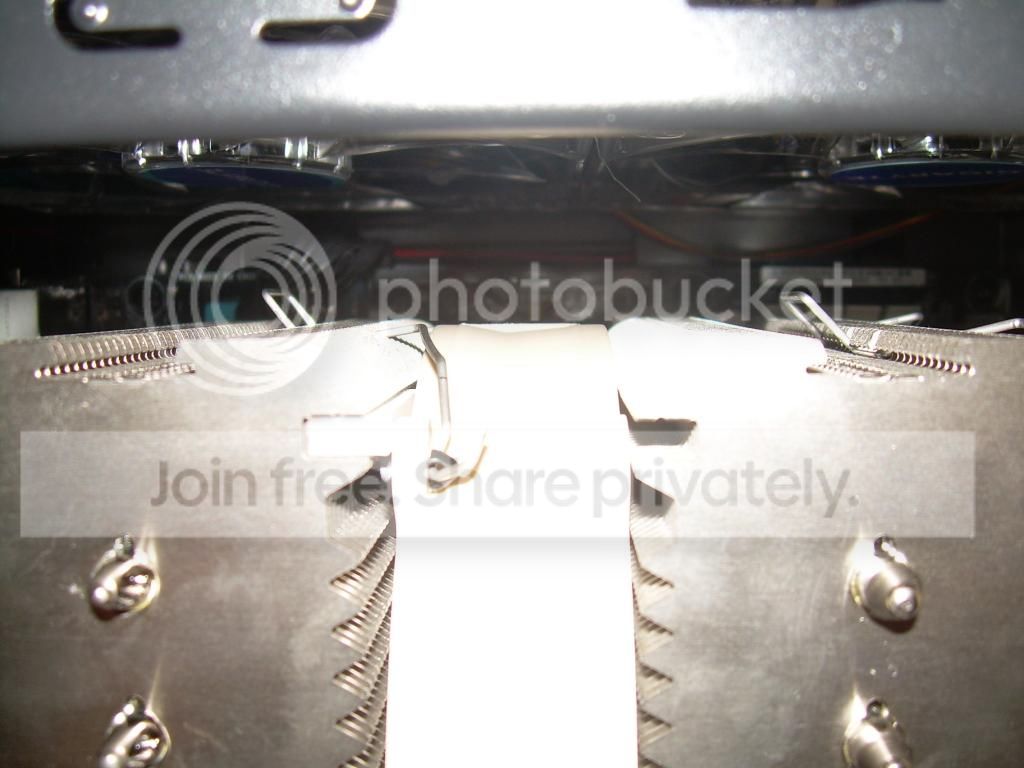
I managed to get the camera to minimally cooperate for a few pictures...

DSCN0878_zpse3a79b33.jpg

DSCN0886_zps3a643102.jpg

DSCN0880_zps9d4d5c38.jpg

DSCN0884_zps1327410a.jpg

DSCN0882_zps90409dcd.jpg

* Still not quite clear on if I was supposed to connect that one also to the PSU or not... ???
DSCN0889_zpsac9d8063.jpg

DSCN0891_zpsd0f7b619.jpg


Alright now I admit... the cable management is worse than I first assessed. I *MIGHT* go back and attempt to clean it up but... well, *MAYBE*... God forbid I break it after getting it going and only for aesthetic reasons; that would be terrible indeed.
 

My Computer

Computer type
PC/Desktop
Computer Manufacturer/Model Number
Custom [03/21/2014]
OS
7 Ultimate SP1 x64
CPU
AMD FX-8350 4.0GHz
Motherboard
Asus M5A99FX Pro R2.0
Memory
8GB Corsair Vengeance LP DDR3 1600
Graphics Card(s)
EVGA GTX760 SC 2GB GDDR5
Sound Card
Realtek ALC892
Monitor(s) Displays
23" Syncmaster P2370HD
Screen Resolution
1920 x 1080
Hard Drives
Scorpio Black WD1003FZEX 1TB
PSU
Corsair RM 750W
Case
Gigabyte Sumo Omega
Cooling
Noctua NH-D14 | 6 120mm case.
Keyboard
Tt eSPORTS Poesidon Z - Blue Switch
Mouse
Logitech M510
Internet Speed
FiOS 100/100
Antivirus
MBAM
Browser
WaterFox & Chrome
Other Info
NETWORKING:
FiOS G1100 (v1.03)
Netgear WNDR37AV
Actiontec MI424WR (Rev. I)
PRINTER:
Canon MX340
That extra molex connector is a pass thru which allows for another device to also get power which you don't need so just leave it. Everything looks great !
 

My Computer

Computer type
PC/Desktop
Computer Manufacturer/Model Number
A blend of brains, brawn and dumb luck.
OS
Windows 7 Ultimate 64
CPU
i7 3770k OC'd 4.6 @ 1.17v, also FX 8120 & i5 miniITX
Motherboard
MSI P67A-GD80 b3
Memory
32 gb G.Skill Sniper DDR3 10-12-12-31 @ 2133
Graphics Card(s)
XFX Radeon 7870 2GB DDR5
Sound Card
Sound Blaster Z Series Card
Monitor(s) Displays
(2) LG LED 23" 1920 x 1080 2ms Monitors via mini d-port
Screen Resolution
1680 X 1050 p
Hard Drives
Samsung 256 gb 830 SSD sata III
(1) 1 tb WD Black
(2) 1 tb Hitachi deskmates/sata II
(2) 1 tb WD green/sata II
(2) 3 tb Seagate Barracuda
(1) 120 gb OCZ Vertex SS
(1) Drobo 5N w/5 Seagate 3tb
PSU
EVGA modular 1000G2 80% gold rating & APC 1200 RS
Case
CoolerMaster Storm Styker
Cooling
7 case fans 140mm & 120mm, NZXT Kraken X60
Keyboard
(2) Logitech Illuminated Keyboards (1) usb (1) wireless
Mouse
Logitech G700 & T-BC21 - nano nx for the laptop
Internet Speed
Basic 120mbps down
Antivirus
Trend Micro Titanium Max Security & Malwarebytes Premium
Browser
Chrome and IE 10
Other Info
5 Noctua case fans + 3 Noctua in p/p on NZXT cooler
Integrated hot swap drive bays for 2.5" Drives
(2) Lite-on dvd/cd/Blu Ray optical 22X
Integrated fan controller and led on/off
HP Officejet Pro 8630 all-n-one
Hot-swappable 3.5" hard drive bay
Netgear Nighthawk router
Asus USB 3 & sata 6 PCIe card
Vantec IDE to sata adptr./Ultra sata adptr
Lenovo L420 i5 lappy with m sata
Drobo 5N advanced NAS
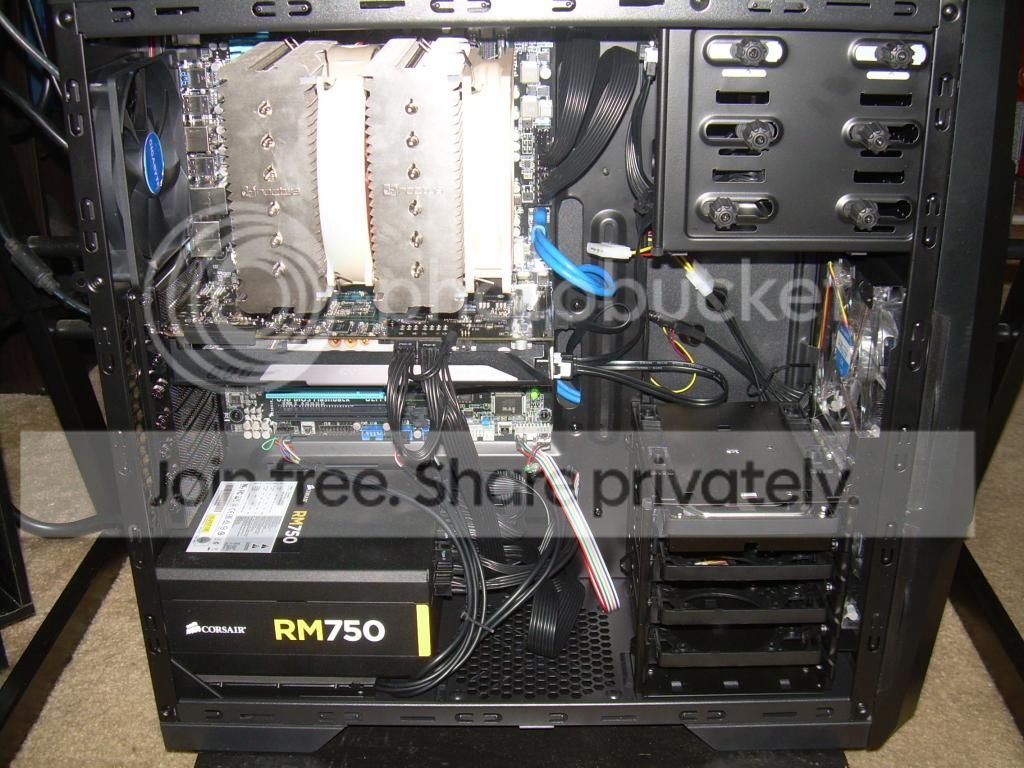
Ah good to know, thank you. Just one other thing about the fans... how "strong" would you say they should be? I know they probably are not the best being that they were included with the case, but I honestly expected them to do more than they are. I have them set to "high" on all of the control switches and I can definitely feel them by hand but they don't seem as "strong" as they should be to me, or perhaps its just because I'm used to the ancient 80mm's and not the new 120mm's? They don't really specify what the CFM is either, kind of bothers me. They are silent but I'm wondering if that's not just because they are very low CFM or something. I'd rather have good CFM and trade it for more noise (my ceiling fan is louder than everything else so I really don't care about noise). I'm hesitant to put a load on this until I know they're actually good enough. Basically, if they're on the 4-Pin molex to PSU that's as high as they'll ever go right? No magic BIOS tweaking possible?

That's the other thing, to be able to actually see and even play with them in BIOS would I need a special converter for that? My PSU did come with some 4-pin to fan headers but I think that would be a very bad idea... right, 5 120mm on a controller and using one of those for one fan header is bad for the board?

I've also decided I do in fact need an SSD, that is the sole bottleneck in this system. I never would have believed it otherwise but I expected more of a WEI on this drive with this one than 5.9... it would be a 7.8 if it weren't for that. It's not even just the WEI either, I notice it holding it up in actual performance by sight. I'm thinking that's what I'll be getting for birthday and/or Christmas.

Lastly, I'm deciding on whether or not I want the 7-year warranty extension on my GPU... opinions?
 

My Computer

Computer type
PC/Desktop
Computer Manufacturer/Model Number
Custom [03/21/2014]
OS
7 Ultimate SP1 x64
CPU
AMD FX-8350 4.0GHz
Motherboard
Asus M5A99FX Pro R2.0
Memory
8GB Corsair Vengeance LP DDR3 1600
Graphics Card(s)
EVGA GTX760 SC 2GB GDDR5
Sound Card
Realtek ALC892
Monitor(s) Displays
23" Syncmaster P2370HD
Screen Resolution
1920 x 1080
Hard Drives
Scorpio Black WD1003FZEX 1TB
PSU
Corsair RM 750W
Case
Gigabyte Sumo Omega
Cooling
Noctua NH-D14 | 6 120mm case.
Keyboard
Tt eSPORTS Poesidon Z - Blue Switch
Mouse
Logitech M510
Internet Speed
FiOS 100/100
Antivirus
MBAM
Browser
WaterFox & Chrome
Other Info
NETWORKING:
FiOS G1100 (v1.03)
Netgear WNDR37AV
Actiontec MI424WR (Rev. I)
PRINTER:
Canon MX340
If you can feel the fans and not hear them then you're good for now, save for the ssd then as many premium fans as the case will fit later when you have money to blow. I don't speed control fans for me with premium fans that are quiet it's just a waste. Order Noctua's later and run them wide open at 12v. Regarding the 7 year warranty it depends on the cost and is it transferable?
 

My Computer

Computer type
PC/Desktop
Computer Manufacturer/Model Number
A blend of brains, brawn and dumb luck.
OS
Windows 7 Ultimate 64
CPU
i7 3770k OC'd 4.6 @ 1.17v, also FX 8120 & i5 miniITX
Motherboard
MSI P67A-GD80 b3
Memory
32 gb G.Skill Sniper DDR3 10-12-12-31 @ 2133
Graphics Card(s)
XFX Radeon 7870 2GB DDR5
Sound Card
Sound Blaster Z Series Card
Monitor(s) Displays
(2) LG LED 23" 1920 x 1080 2ms Monitors via mini d-port
Screen Resolution
1680 X 1050 p
Hard Drives
Samsung 256 gb 830 SSD sata III
(1) 1 tb WD Black
(2) 1 tb Hitachi deskmates/sata II
(2) 1 tb WD green/sata II
(2) 3 tb Seagate Barracuda
(1) 120 gb OCZ Vertex SS
(1) Drobo 5N w/5 Seagate 3tb
PSU
EVGA modular 1000G2 80% gold rating & APC 1200 RS
Case
CoolerMaster Storm Styker
Cooling
7 case fans 140mm & 120mm, NZXT Kraken X60
Keyboard
(2) Logitech Illuminated Keyboards (1) usb (1) wireless
Mouse
Logitech G700 & T-BC21 - nano nx for the laptop
Internet Speed
Basic 120mbps down
Antivirus
Trend Micro Titanium Max Security & Malwarebytes Premium
Browser
Chrome and IE 10
Other Info
5 Noctua case fans + 3 Noctua in p/p on NZXT cooler
Integrated hot swap drive bays for 2.5" Drives
(2) Lite-on dvd/cd/Blu Ray optical 22X
Integrated fan controller and led on/off
HP Officejet Pro 8630 all-n-one
Hot-swappable 3.5" hard drive bay
Netgear Nighthawk router
Asus USB 3 & sata 6 PCIe card
Vantec IDE to sata adptr./Ultra sata adptr
Lenovo L420 i5 lappy with m sata
Drobo 5N advanced NAS
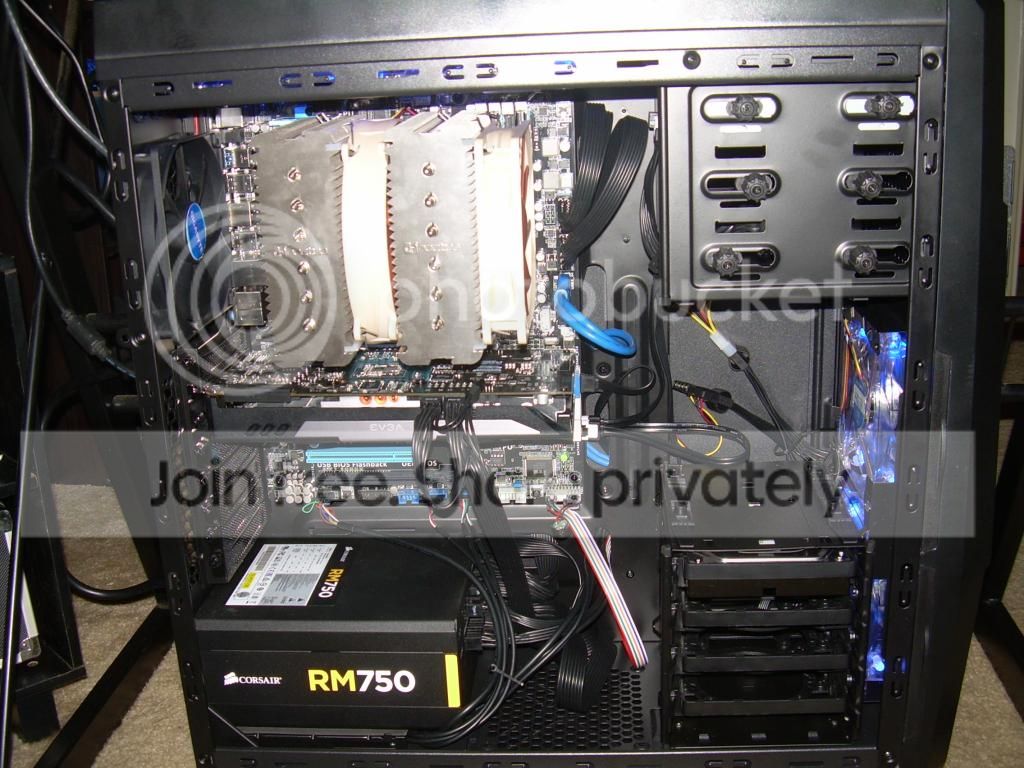
I can get the extra 2 years (5 total) for $15 or the extra 7 years (10 total) for $30. I believe it is transferable but we really don't need to worry about that as I don't plan to sell it and I'll also never be able to afford to spend $500 on one GPU (for the same reason I'll also never be able to afford Intel again as a matter of fact); at best I'll be able to grab a second one of these for SLI and that would be about it and only if/when they drop to $150 in a couple of years.

And as I discovered with the 3DMark testing, this is exactly what it sounds like for me too: My GTX 760 SC coil whine? - YouTube

Is this a problem to indicate it will fail? It isn't constant but it happens often enough and now I am concerned about the actual integrity of this card. I can't afford for it to fail or the have to keep RMAing either. I still have a week to return it so it's now or never to make that decision. It's not about the noise, it's about what that noise really means... so harmful defect, or a harmless something-else?
 

My Computer

Computer type
PC/Desktop
Computer Manufacturer/Model Number
Custom [03/21/2014]
OS
7 Ultimate SP1 x64
CPU
AMD FX-8350 4.0GHz
Motherboard
Asus M5A99FX Pro R2.0
Memory
8GB Corsair Vengeance LP DDR3 1600
Graphics Card(s)
EVGA GTX760 SC 2GB GDDR5
Sound Card
Realtek ALC892
Monitor(s) Displays
23" Syncmaster P2370HD
Screen Resolution
1920 x 1080
Hard Drives
Scorpio Black WD1003FZEX 1TB
PSU
Corsair RM 750W
Case
Gigabyte Sumo Omega
Cooling
Noctua NH-D14 | 6 120mm case.
Keyboard
Tt eSPORTS Poesidon Z - Blue Switch
Mouse
Logitech M510
Internet Speed
FiOS 100/100
Antivirus
MBAM
Browser
WaterFox & Chrome
Other Info
NETWORKING:
FiOS G1100 (v1.03)
Netgear WNDR37AV
Actiontec MI424WR (Rev. I)
PRINTER:
Canon MX340
Two years for $15.00 sounds good but another 15 for two more that's your call. I think if it's gone 5 years it will go seven.
 

My Computer

Computer type
PC/Desktop
Computer Manufacturer/Model Number
A blend of brains, brawn and dumb luck.
OS
Windows 7 Ultimate 64
CPU
i7 3770k OC'd 4.6 @ 1.17v, also FX 8120 & i5 miniITX
Motherboard
MSI P67A-GD80 b3
Memory
32 gb G.Skill Sniper DDR3 10-12-12-31 @ 2133
Graphics Card(s)
XFX Radeon 7870 2GB DDR5
Sound Card
Sound Blaster Z Series Card
Monitor(s) Displays
(2) LG LED 23" 1920 x 1080 2ms Monitors via mini d-port
Screen Resolution
1680 X 1050 p
Hard Drives
Samsung 256 gb 830 SSD sata III
(1) 1 tb WD Black
(2) 1 tb Hitachi deskmates/sata II
(2) 1 tb WD green/sata II
(2) 3 tb Seagate Barracuda
(1) 120 gb OCZ Vertex SS
(1) Drobo 5N w/5 Seagate 3tb
PSU
EVGA modular 1000G2 80% gold rating & APC 1200 RS
Case
CoolerMaster Storm Styker
Cooling
7 case fans 140mm & 120mm, NZXT Kraken X60
Keyboard
(2) Logitech Illuminated Keyboards (1) usb (1) wireless
Mouse
Logitech G700 & T-BC21 - nano nx for the laptop
Internet Speed
Basic 120mbps down
Antivirus
Trend Micro Titanium Max Security & Malwarebytes Premium
Browser
Chrome and IE 10
Other Info
5 Noctua case fans + 3 Noctua in p/p on NZXT cooler
Integrated hot swap drive bays for 2.5" Drives
(2) Lite-on dvd/cd/Blu Ray optical 22X
Integrated fan controller and led on/off
HP Officejet Pro 8630 all-n-one
Hot-swappable 3.5" hard drive bay
Netgear Nighthawk router
Asus USB 3 & sata 6 PCIe card
Vantec IDE to sata adptr./Ultra sata adptr
Lenovo L420 i5 lappy with m sata
Drobo 5N advanced NAS
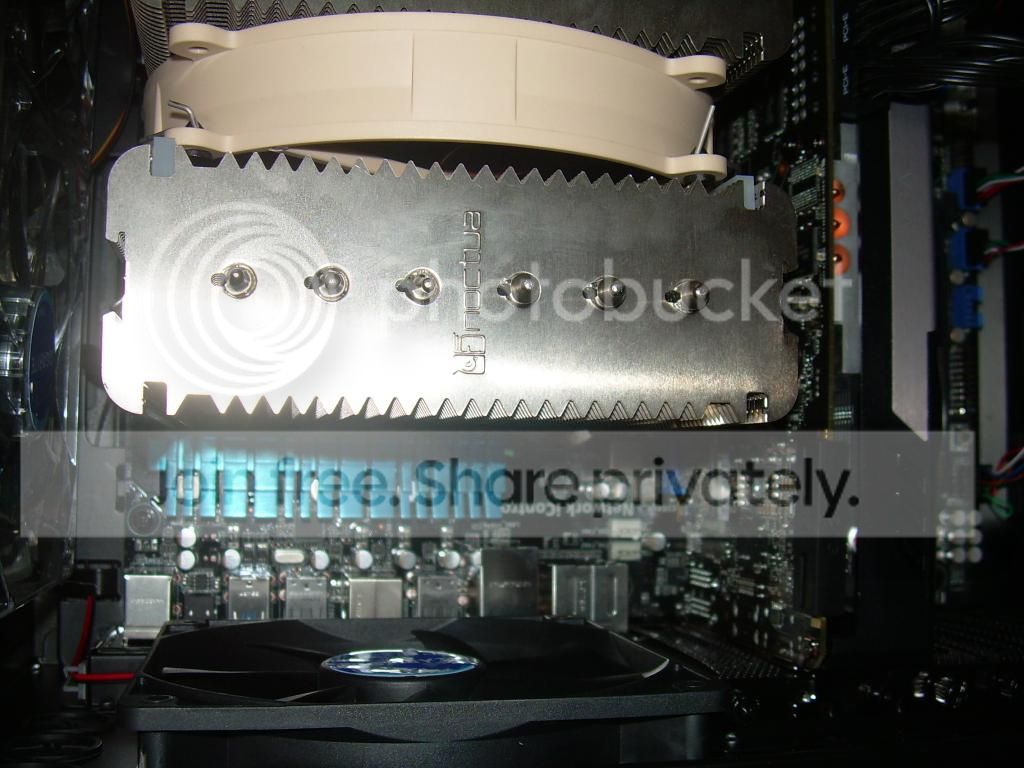
True. I still have time to mull it over... it really does suck that they don't let you ride it out for a year because after just dropping a grand and some change its really not ideal to then have to decide so quickly to spend even more. If I weren't already over-budget this would be a no-brainer but I have to be careful, basically $130 is all I have left for the foreseeable year unless someone has an odd job to toss my way and yeah, I just have to be careful. Of course I want the 10-year but I guess 7-year is better than only 3 years and I'd be a fool not to extend it at all.

Well anyway... is it normal for the case speaker to no longer beep once at POST? I noticed it did that every time for the first couple of days and now it doesn't. Did the speaker die, or is it not supposed to beep once at POST beyond the initial few starts? I'd rather it remain functional just in case. I'll try re-seating it but otherwise, what else could that indicate? Everything else is still running like a dream (other than the GPU squealing on, it appears, excessively high frame rates).
 

My Computer

Computer type
PC/Desktop
Computer Manufacturer/Model Number
Custom [03/21/2014]
OS
7 Ultimate SP1 x64
CPU
AMD FX-8350 4.0GHz
Motherboard
Asus M5A99FX Pro R2.0
Memory
8GB Corsair Vengeance LP DDR3 1600
Graphics Card(s)
EVGA GTX760 SC 2GB GDDR5
Sound Card
Realtek ALC892
Monitor(s) Displays
23" Syncmaster P2370HD
Screen Resolution
1920 x 1080
Hard Drives
Scorpio Black WD1003FZEX 1TB
PSU
Corsair RM 750W
Case
Gigabyte Sumo Omega
Cooling
Noctua NH-D14 | 6 120mm case.
Keyboard
Tt eSPORTS Poesidon Z - Blue Switch
Mouse
Logitech M510
Internet Speed
FiOS 100/100
Antivirus
MBAM
Browser
WaterFox & Chrome
Other Info
NETWORKING:
FiOS G1100 (v1.03)
Netgear WNDR37AV
Actiontec MI424WR (Rev. I)
PRINTER:
Canon MX340
Back
Top