First custom PC build (Q's)

...So should I worry about the case fans just now? Might it be slow now, and speed up later?
 

My Computer My Computer

Computer type
PC/Desktop
OS
10 Home x64
CPU
Intel Core i5 4670K
Motherboard
Gigabyte GA-Z87-D3HP
Memory
Corsair XMS3 8GB DDr3 1600MHz
Graphics Card(s)
Sapphire NITRO Radeon R9 Fury
Sound Card
Asus Xonar DX
Monitor(s) Displays
Acer H236HLbmjd
Screen Resolution
1920x1080
Hard Drives
Force GS 128GB - Seagate 320GB - WD Caviar Black 1TB - WD Caviar Blue 500GB
PSU
EVGA SuperNOVA 650 P2
Case
Silverstone Raven 3 RV03B-W
Keyboard
Topre Realforce 104UG-HiPro
Mouse
Mionix Naos 7000
Internet Speed
76/4 On a good day
Antivirus
SmartScreen
Browser
Internet Explorer 11
I would not worry just yet about the case fans, How about the Power Supply fan, is it spinning good.

I run a lot of my computers with the side panel off while checking & working on them.
 

My Computer My Computer

Computer type
PC/Desktop
Computer Manufacturer/Model Number
Built them myself, Science Experiments !
OS
Win7 Enterprise, Win7 x86 (Ult 7600), Win7 x64 Ult 7600, TechNet RTM on AMD x64 (2.8Ghz)
CPU
AMD fx8350 4ghz, AMD-32 2400mhz, AMD-64 3200mhz, AMDx64 2.8G
Motherboard
SIS 755, ECS-K8M890M-M (Ult 7600), GigaByte & others
Memory
2gb, 4gb on the Ult 7600, 4gb on Technet RTM, 32gb on FX8350
Graphics Card(s)
Draw my own Graphics, several nVidia cards
Sound Card
on motherboard
Monitor(s) Displays
19" flat scr, 28" I-Inc widescr,22" Emprex Widescr, 23" Acer
Screen Resolution
1280 x 1024, 1440 x 900, 1920 x 1080
Hard Drives
6 pata Ide HD's & 2 Sata HD's
added 80gb external on Ult 7600 computer,
numerous extra 1tb, 2TB, 3Tb SATA HD's
A collection of ext HD Docks w/ HDs
PSU
430w, 550w, 600w, 700, 800, etc
Case
All Generic Full Towers
Cooling
Open Air & a few fans, some w/ colored LEDs
Keyboard
Compaq & Dell recycled from GoodWill
Mouse
Made in China Optical Wired Mouse
Internet Speed
Fast Cable InterNet
Antivirus
AVG Free on 24 different Desktops, NO Problems!
Browser
IE 8 is preferred, but use FireFox sometimes
Other Info
Linksys Routers, switches, & Hubs
Too Many USB Flash Drives to count, Biggest is 64GB !
Eight computers in my home network.
Sixteen computers at my business network.
Linked via TeamViewer !
Lots of old used spare computer parts everywhere!
Yeah, ignore case fans for the moment. Other than those fans, what are the problems, if any??

As Doc said, leave the side of the case for the time being so you can see and hear what it going on in there.

Have you looked in the BIOS and confirmed that your hard drive and memory are recognized as expected?

What's next, load Windows?
 

My Computer My Computer

Computer type
PC/Desktop
Computer Manufacturer/Model Number
Ignatz Special; 4 speed manual gearbox; factory air conditioning; one of one
OS
Windows 7 Home Premium SP1, 64-bit
CPU
Intel Skylake i5-6600K, not overclocked
Motherboard
AsRock Z170M Extreme 4, micro ATX
Memory
8 GB HyperX DDR4-2666 (2 x 4 GB)
Graphics Card(s)
none; graphics are integrated on CPU
Sound Card
onboard: Realtek ALC1150; external: USB Behringer UF0-202
Monitor(s) Displays
Dell S2340M 23 inch IPS
Screen Resolution
1600 x 900
Hard Drives
System: Crucial MX100 series SSD, 128 GB;
Data: Samsung Spinpoint 103SJ, 1 TB;
Backup: WD Caviar Green WD30EZRX-00D8PB0, 3 TB
PSU
Rosewill SilentNight 500 watt fanless, semi-modular
Case
Antec Solo II
Cooling
Noctua NH-U12S; Noctua F12 intake, Noctua S12A exhaust
Keyboard
Microsoft 200 6JH-00001 USB
Mouse
Dell or Microsoft optical wired; USB
Antivirus
Microsoft Security Essentials and Malwarebytes Premium
Browser
Pale Moon
Other Info
All fans PWM; speeds at idle: CPU circa 500 rpm; intake circa 600 rpm; exhaust circa 600 rpm; CPU temps 27 idle and 47 C load in a warm room (27 C/81 F) when running Intel Extreme Tuning Utility stress test.
Yeah, ignore case fans for the moment. Other than those fans, what are the problems, if any??

As Doc said, leave the side of the case for the time being so you can see and hear what it going on in there.

Have you looked in the BIOS and confirmed that your hard drive and memory are recognized as expected?

What's next, load Windows?

I would not worry just yet about the case fans, How about the Power Supply fan, is it spinning good.

I run a lot of my computers with the side panel off while checking & working on them.
I just switched the RAM from the black slots the the blue, and I realised that there is 1 extra 4-pin peripheral connector. My PSU doesn't support any more, so I'm guessing the 2 other fans work, but this one isn't getting enough power?
 

My Computer My Computer

Computer type
PC/Desktop
OS
10 Home x64
CPU
Intel Core i5 4670K
Motherboard
Gigabyte GA-Z87-D3HP
Memory
Corsair XMS3 8GB DDr3 1600MHz
Graphics Card(s)
Sapphire NITRO Radeon R9 Fury
Sound Card
Asus Xonar DX
Monitor(s) Displays
Acer H236HLbmjd
Screen Resolution
1920x1080
Hard Drives
Force GS 128GB - Seagate 320GB - WD Caviar Black 1TB - WD Caviar Blue 500GB
PSU
EVGA SuperNOVA 650 P2
Case
Silverstone Raven 3 RV03B-W
Keyboard
Topre Realforce 104UG-HiPro
Mouse
Mionix Naos 7000
Internet Speed
76/4 On a good day
Antivirus
SmartScreen
Browser
Internet Explorer 11
You probably have 3 or 4 different tiny 3 pin or 4 pin connections on the motherboard. They are fan headers. Any working fan connected to these headers should at least spin. Connect 4 pin fans to 4 pin headers.

I"m guessing you don't have a motherboard diagram showing the pin assignments (ground, 12v, sensor, etc) for any of the fan headers.

If a fan does not spin when attached to a particular header, rotate the connector 180 degrees and try again. The connector may have a keyway that prevents you from rotating it however.

Fan speeds can't really be judged accurately until Windows is installed, but they should at least spin without Windows.

Normally, two sticks of RAM should be in the same color slots. If you have 2 blue and 2 black, my guess would be that 2 sticks should go in blue and blue or black and black, but you could have an oddball situation depending on your motherboard.

The CPU fan should be connected to a specific header.

The other case fans can generally be connected to any of the remaining headers.
 

My Computer My Computer

Computer type
PC/Desktop
Computer Manufacturer/Model Number
Ignatz Special; 4 speed manual gearbox; factory air conditioning; one of one
OS
Windows 7 Home Premium SP1, 64-bit
CPU
Intel Skylake i5-6600K, not overclocked
Motherboard
AsRock Z170M Extreme 4, micro ATX
Memory
8 GB HyperX DDR4-2666 (2 x 4 GB)
Graphics Card(s)
none; graphics are integrated on CPU
Sound Card
onboard: Realtek ALC1150; external: USB Behringer UF0-202
Monitor(s) Displays
Dell S2340M 23 inch IPS
Screen Resolution
1600 x 900
Hard Drives
System: Crucial MX100 series SSD, 128 GB;
Data: Samsung Spinpoint 103SJ, 1 TB;
Backup: WD Caviar Green WD30EZRX-00D8PB0, 3 TB
PSU
Rosewill SilentNight 500 watt fanless, semi-modular
Case
Antec Solo II
Cooling
Noctua NH-U12S; Noctua F12 intake, Noctua S12A exhaust
Keyboard
Microsoft 200 6JH-00001 USB
Mouse
Dell or Microsoft optical wired; USB
Antivirus
Microsoft Security Essentials and Malwarebytes Premium
Browser
Pale Moon
Other Info
All fans PWM; speeds at idle: CPU circa 500 rpm; intake circa 600 rpm; exhaust circa 600 rpm; CPU temps 27 idle and 47 C load in a warm room (27 C/81 F) when running Intel Extreme Tuning Utility stress test.
You probably have 3 or 4 different tiny 3 pin or 4 pin connections on the motherboard. They are fan headers. Any working fan connected to these headers should at least spin. Connect 4 pin fans to 4 pin headers.

I"m guessing you don't have a motherboard diagram showing the pin assignments (ground, 12v, sensor, etc) for any of the fan headers.

If a fan does not spin when attached to a particular header, rotate the connector 180 degrees and try again. The connector may have a keyway that prevents you from rotating it however.

Fan speeds can't really be judged accurately until Windows is installed, but they should at least spin without Windows.

Normally, two sticks of RAM should be in the same color slots. If you have 2 blue and 2 black, my guess would be that 2 sticks should go in blue and blue or black and black, but you could have an oddball situation depending on your motherboard.

The CPU fan should be connected to a specific header.

The other case fans can generally be connected to any of the remaining headers.
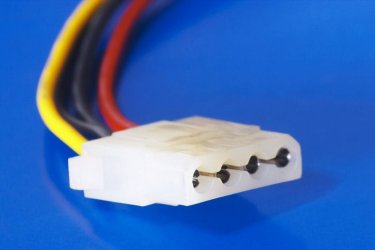
I'm talking about these connectors.
800px-Molex_female_connector.jpg
 

My Computer My Computer

Computer type
PC/Desktop
OS
10 Home x64
CPU
Intel Core i5 4670K
Motherboard
Gigabyte GA-Z87-D3HP
Memory
Corsair XMS3 8GB DDr3 1600MHz
Graphics Card(s)
Sapphire NITRO Radeon R9 Fury
Sound Card
Asus Xonar DX
Monitor(s) Displays
Acer H236HLbmjd
Screen Resolution
1920x1080
Hard Drives
Force GS 128GB - Seagate 320GB - WD Caviar Black 1TB - WD Caviar Blue 500GB
PSU
EVGA SuperNOVA 650 P2
Case
Silverstone Raven 3 RV03B-W
Keyboard
Topre Realforce 104UG-HiPro
Mouse
Mionix Naos 7000
Internet Speed
76/4 On a good day
Antivirus
SmartScreen
Browser
Internet Explorer 11
That's a Molex connector. What's at the other end of it?
 

My Computer My Computer

Computer type
PC/Desktop
Computer Manufacturer/Model Number
Ignatz Special; 4 speed manual gearbox; factory air conditioning; one of one
OS
Windows 7 Home Premium SP1, 64-bit
CPU
Intel Skylake i5-6600K, not overclocked
Motherboard
AsRock Z170M Extreme 4, micro ATX
Memory
8 GB HyperX DDR4-2666 (2 x 4 GB)
Graphics Card(s)
none; graphics are integrated on CPU
Sound Card
onboard: Realtek ALC1150; external: USB Behringer UF0-202
Monitor(s) Displays
Dell S2340M 23 inch IPS
Screen Resolution
1600 x 900
Hard Drives
System: Crucial MX100 series SSD, 128 GB;
Data: Samsung Spinpoint 103SJ, 1 TB;
Backup: WD Caviar Green WD30EZRX-00D8PB0, 3 TB
PSU
Rosewill SilentNight 500 watt fanless, semi-modular
Case
Antec Solo II
Cooling
Noctua NH-U12S; Noctua F12 intake, Noctua S12A exhaust
Keyboard
Microsoft 200 6JH-00001 USB
Mouse
Dell or Microsoft optical wired; USB
Antivirus
Microsoft Security Essentials and Malwarebytes Premium
Browser
Pale Moon
Other Info
All fans PWM; speeds at idle: CPU circa 500 rpm; intake circa 600 rpm; exhaust circa 600 rpm; CPU temps 27 idle and 47 C load in a warm room (27 C/81 F) when running Intel Extreme Tuning Utility stress test.
That's a Molex connector. What's at the other end of it?
There are many of them, they came with the case. I've connected most of them, but 1 is left over since the PSU didn't come with any more cables :rolleyes: Should I just leave it?
 

My Computer My Computer

Computer type
PC/Desktop
OS
10 Home x64
CPU
Intel Core i5 4670K
Motherboard
Gigabyte GA-Z87-D3HP
Memory
Corsair XMS3 8GB DDr3 1600MHz
Graphics Card(s)
Sapphire NITRO Radeon R9 Fury
Sound Card
Asus Xonar DX
Monitor(s) Displays
Acer H236HLbmjd
Screen Resolution
1920x1080
Hard Drives
Force GS 128GB - Seagate 320GB - WD Caviar Black 1TB - WD Caviar Blue 500GB
PSU
EVGA SuperNOVA 650 P2
Case
Silverstone Raven 3 RV03B-W
Keyboard
Topre Realforce 104UG-HiPro
Mouse
Mionix Naos 7000
Internet Speed
76/4 On a good day
Antivirus
SmartScreen
Browser
Internet Explorer 11
Yeahh, leave it.

Most PCs have several flapping in the breeze, unused. If you had a bunch of hard drives or other stuff to connect, you might use them.
 

My Computer My Computer

Computer type
PC/Desktop
Computer Manufacturer/Model Number
Ignatz Special; 4 speed manual gearbox; factory air conditioning; one of one
OS
Windows 7 Home Premium SP1, 64-bit
CPU
Intel Skylake i5-6600K, not overclocked
Motherboard
AsRock Z170M Extreme 4, micro ATX
Memory
8 GB HyperX DDR4-2666 (2 x 4 GB)
Graphics Card(s)
none; graphics are integrated on CPU
Sound Card
onboard: Realtek ALC1150; external: USB Behringer UF0-202
Monitor(s) Displays
Dell S2340M 23 inch IPS
Screen Resolution
1600 x 900
Hard Drives
System: Crucial MX100 series SSD, 128 GB;
Data: Samsung Spinpoint 103SJ, 1 TB;
Backup: WD Caviar Green WD30EZRX-00D8PB0, 3 TB
PSU
Rosewill SilentNight 500 watt fanless, semi-modular
Case
Antec Solo II
Cooling
Noctua NH-U12S; Noctua F12 intake, Noctua S12A exhaust
Keyboard
Microsoft 200 6JH-00001 USB
Mouse
Dell or Microsoft optical wired; USB
Antivirus
Microsoft Security Essentials and Malwarebytes Premium
Browser
Pale Moon
Other Info
All fans PWM; speeds at idle: CPU circa 500 rpm; intake circa 600 rpm; exhaust circa 600 rpm; CPU temps 27 idle and 47 C load in a warm room (27 C/81 F) when running Intel Extreme Tuning Utility stress test.
Is ie9 messing up? It seems like there should be another page here.
 

My Computers My Computers

System One System Two

  • Computer type
    PC/Desktop
    Computer Manufacturer/Model Number
    ALWAYS UNDER CONSTRUCTION
    OS
    Windows 11 Pro
    CPU
    Ryzen 9 5900X
    Motherboard
    Asus X570 Crosshair Viii Hero
    Memory
    32GB G Skill DDR4-3600
    Graphics Card(s)
    EVGA RTX 3080 FTW 3 Ultra
    Sound Card
    On Board/Sennheiser PC37X Headset
    Monitor(s) Displays
    3 X Asus 27"
    Screen Resolution
    2560x1440
    Hard Drives
    2 X 1 TB NVME drives
    PSU
    EVGA 850
    Case
    Phanteks Eclipse P400A
    Cooling
    EVGA 280 AIO
    Keyboard
    Logitech G510s/ Logitech G13
    Mouse
    Logitech G502
    Internet Speed
    24/1
    Antivirus
    ESET/MBAM Pro/SAS Pro
    Browser
    Chrome/ Firefox/ Edge
  • Computer type
    Laptop
    System Manufacturer/Model Number
    Dell 16 Plus
    OS
    Windows 11 Pro
    CPU
    Intel Ultra 9 288V
    Memory
    32 GB LPDDR5X 8533
    Monitor(s) Displays
    16" Mini-LED HDR600 Touch 90 Hz
    Screen Resolution
    2560X1600
    Hard Drives
    1 TB NVME
I thought I should post some snips to help with the different connectors :)


The 4 pin molex is a power connector for IDE HD, CD, & DVD drives. Can also have adapters connected for case fans, & possible case LED lighting.

Cable # 4 in the bottom snip.

Molex_female_connector_HD_CD.jpg


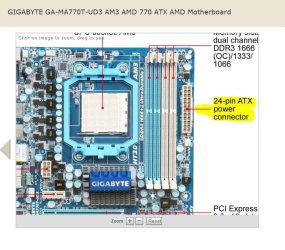
Most newer MB's have a 24 pin power connector from the PSU.

Cable # 1 in the bottom snip.

Older MB's only have 20 pin connection.

MB_ATX_Power_Connector.JPG

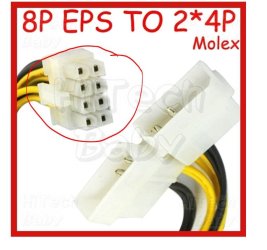
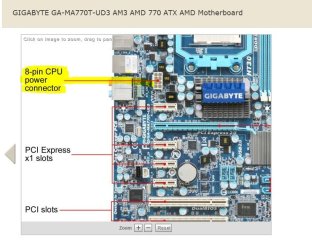
Then there are the ATX-12v-2x4 connections. Some MBs have one or two of these.

Cable # 2 in the bottom snip.

MB_8pin_connector.JPG

MB_8pin_Molex_connector.JPG

Also depending on the PSU, they may have one or two.

MB_Power_Supply_connectors.JPG


Cable # 3 is the SATA drives power connector.

:orb:

Hope this helps any new users following this thread ;)
 

My Computer My Computer

Computer type
PC/Desktop
Computer Manufacturer/Model Number
Built them myself, Science Experiments !
OS
Win7 Enterprise, Win7 x86 (Ult 7600), Win7 x64 Ult 7600, TechNet RTM on AMD x64 (2.8Ghz)
CPU
AMD fx8350 4ghz, AMD-32 2400mhz, AMD-64 3200mhz, AMDx64 2.8G
Motherboard
SIS 755, ECS-K8M890M-M (Ult 7600), GigaByte & others
Memory
2gb, 4gb on the Ult 7600, 4gb on Technet RTM, 32gb on FX8350
Graphics Card(s)
Draw my own Graphics, several nVidia cards
Sound Card
on motherboard
Monitor(s) Displays
19" flat scr, 28" I-Inc widescr,22" Emprex Widescr, 23" Acer
Screen Resolution
1280 x 1024, 1440 x 900, 1920 x 1080
Hard Drives
6 pata Ide HD's & 2 Sata HD's
added 80gb external on Ult 7600 computer,
numerous extra 1tb, 2TB, 3Tb SATA HD's
A collection of ext HD Docks w/ HDs
PSU
430w, 550w, 600w, 700, 800, etc
Case
All Generic Full Towers
Cooling
Open Air & a few fans, some w/ colored LEDs
Keyboard
Compaq & Dell recycled from GoodWill
Mouse
Made in China Optical Wired Mouse
Internet Speed
Fast Cable InterNet
Antivirus
AVG Free on 24 different Desktops, NO Problems!
Browser
IE 8 is preferred, but use FireFox sometimes
Other Info
Linksys Routers, switches, & Hubs
Too Many USB Flash Drives to count, Biggest is 64GB !
Eight computers in my home network.
Sixteen computers at my business network.
Linked via TeamViewer !
Lots of old used spare computer parts everywhere!
OK, I'm very pleased to hear this. I turned it on, and there is no beep! :D I guess switching round the RAM worked! Exept, the fan that isn't spinning properly is still making an annoying noise. Everything else is working, the CPU fan, GPU fan, but the thing that is making a noise it the fan at the back of the case.
I went into the BIOS, and I now need to know how to boot from USB (Windows 7 is on my Kingston USB) the BIOS recognises it, but when I hit F10 to save and quit, it just says "Select proper boot device then press any key to continue"
 

My Computer My Computer

Computer type
PC/Desktop
OS
10 Home x64
CPU
Intel Core i5 4670K
Motherboard
Gigabyte GA-Z87-D3HP
Memory
Corsair XMS3 8GB DDr3 1600MHz
Graphics Card(s)
Sapphire NITRO Radeon R9 Fury
Sound Card
Asus Xonar DX
Monitor(s) Displays
Acer H236HLbmjd
Screen Resolution
1920x1080
Hard Drives
Force GS 128GB - Seagate 320GB - WD Caviar Black 1TB - WD Caviar Blue 500GB
PSU
EVGA SuperNOVA 650 P2
Case
Silverstone Raven 3 RV03B-W
Keyboard
Topre Realforce 104UG-HiPro
Mouse
Mionix Naos 7000
Internet Speed
76/4 On a good day
Antivirus
SmartScreen
Browser
Internet Explorer 11
Check that the fan isn't catching on the case, or that the blades aren't catching on, or being fouled by, any wires/cables. It could also be a failing bearing.

When you boot up, what prompts do you get on screen besides Del/F2 to enter the BIOS?
 

My Computer My Computer

Computer type
PC/Desktop
Computer Manufacturer/Model Number
Dwarf Dwf/11/2012 r09/2013
OS
Windows 8.1 Pro RTM x64
CPU
Intel Core-i5-3570K 4-core @ 3.4GHz (Ivy Bridge) (OC 4.4GHz)
Motherboard
ASRock Z77 Extreme4-M
Memory
4 x 4GB DDR3-1600 Corsair Vengeance CMZ8GX3M2A1600C9B (16GB)
Graphics Card(s)
MSI GeForce GTX770 Gaming OC 2GB
Sound Card
Realtek High Definition on board solution (ALC 898)
Monitor(s) Displays
ViewSonic VA1912w Widescreen (VGA)
Screen Resolution
1440x900
Hard Drives
OCZ Agility 3 SSD 120GB SATA III x2 (RAID 0)
Samsung HD501LJ 500GB SATA II x2
Hitachi HDS721010CLA332 1TB SATA II
Iomega 1.5TB Ext USB 2.0
WD 2.0TB Ext USB 3.0
PSU
XFX Pro Series 850W Semi-Modular
Case
Gigabyte IF233
Cooling
1 x 120mm Front Inlet 1 x 120mm Rear Exhaust
Keyboard
Microsoft Comfort Curve Keyboard 3000 (USB)
Mouse
Microsoft Comfort Mouse 3000 for Business (USB)
Internet Speed
NetGear DG834Gv3 ADSL Modem/Router (Ethernet) ~4.0 Mb/s (O2)
Antivirus
Avast! 8.0.1497
Browser
IE 11
Other Info
Optical Drive: HL-DT-ST BD-RE BH10LS30 SATA Bluray
Lexmark S305 Printer/Scanner/Copier (USB)
WEI Score: 8.1/8.1/8.5/8.5/8.25
Asus Eee PC 1011PX Netbook (Windows 7 x86 Starter)
Check that the fan isn't catching on the case, or that the blades aren't catching on, or being fouled by, any wires/cables. It could also be a failing bearing.

When you boot up, what prompts do you get on screen besides Del/F2 to enter the BIOS?
In the manual it asks me to press Delete, but it asked me to press F1 or F2. I press F1.
The case fan doesn't seem to be catching anything, may it be a faulty fan or vibrations?
 

My Computer My Computer

Computer type
PC/Desktop
OS
10 Home x64
CPU
Intel Core i5 4670K
Motherboard
Gigabyte GA-Z87-D3HP
Memory
Corsair XMS3 8GB DDr3 1600MHz
Graphics Card(s)
Sapphire NITRO Radeon R9 Fury
Sound Card
Asus Xonar DX
Monitor(s) Displays
Acer H236HLbmjd
Screen Resolution
1920x1080
Hard Drives
Force GS 128GB - Seagate 320GB - WD Caviar Black 1TB - WD Caviar Blue 500GB
PSU
EVGA SuperNOVA 650 P2
Case
Silverstone Raven 3 RV03B-W
Keyboard
Topre Realforce 104UG-HiPro
Mouse
Mionix Naos 7000
Internet Speed
76/4 On a good day
Antivirus
SmartScreen
Browser
Internet Explorer 11
In BIOS there is a catagory called 'boot order' or something similar. You have to set the order of which device (CD, Hard drive) for bios to boot from first. I always list CD first, then the HD that windows is installed on then other drives. There should be another item in that same boot order catagory about-enable legacy devices. make that enabled so that you can boot from your USB drive. Then hit F10 and save. When you start to boot, you have a key (RTM) to select boot devise (This is a one time function), hit that key, just keep tapping it until you get to that screen. It will give you options of all bootable devices in your computer. Select your USB drive and exit. The computer should boot from the usb then. Also, the fan that is giving you promlems, what is the wire from it connected to? You should check the connection to make sure it is making good contact. You can plug it into pins on your MB labled fan or if it has a 4 pin connector you can connect it to the molex connection.

Also, when you turn on the power you should see at the bottom of your screen delete to enter BIOS and another key to enter boot menu. You have only about 5 seconds to press the key.
 

My Computers My Computers

System One System Two

  • Computer type
    PC/Desktop
    Computer Manufacturer/Model Number
    ALWAYS UNDER CONSTRUCTION
    OS
    Windows 11 Pro
    CPU
    Ryzen 9 5900X
    Motherboard
    Asus X570 Crosshair Viii Hero
    Memory
    32GB G Skill DDR4-3600
    Graphics Card(s)
    EVGA RTX 3080 FTW 3 Ultra
    Sound Card
    On Board/Sennheiser PC37X Headset
    Monitor(s) Displays
    3 X Asus 27"
    Screen Resolution
    2560x1440
    Hard Drives
    2 X 1 TB NVME drives
    PSU
    EVGA 850
    Case
    Phanteks Eclipse P400A
    Cooling
    EVGA 280 AIO
    Keyboard
    Logitech G510s/ Logitech G13
    Mouse
    Logitech G502
    Internet Speed
    24/1
    Antivirus
    ESET/MBAM Pro/SAS Pro
    Browser
    Chrome/ Firefox/ Edge
  • Computer type
    Laptop
    System Manufacturer/Model Number
    Dell 16 Plus
    OS
    Windows 11 Pro
    CPU
    Intel Ultra 9 288V
    Memory
    32 GB LPDDR5X 8533
    Monitor(s) Displays
    16" Mini-LED HDR600 Touch 90 Hz
    Screen Resolution
    2560X1600
    Hard Drives
    1 TB NVME
In BIOS there is a catagory called 'boot order' or something similar. You have to set the order of which device (CD, Hard drive) for bios to boot from first. I always list CD first, then the HD that windows is installed on then other drives. There should be another item in that same boot order catagory about-enable legacy devices. make that enabled so that you can boot from your USB drive. Then hit F10 and save. When you start to boot, you have a key (RTM) to select boot devise (This is a one time function), hit that key, just keep tapping it until you get to that screen. It will give you options of all bootable devices in your computer. Select your USB drive and exit. The computer should boot from the usb then. Also, the fan that is giving you promlems, what is the wire from it connected to? You should check the connection to make sure it is making good contact. You can plug it into pins on your MB labled fan or if it has a 4 pin connector you can connect it to the molex connection.

Also, when you turn on the power you should see at the bottom of your screen delete to enter BIOS and another key to enter boot menu. You have only about 5 seconds to press the key.
So, when I select my USB will it permanently boot from it? Or when I'm in Windows do I move the files over to my HD?
 

My Computer My Computer

Computer type
PC/Desktop
OS
10 Home x64
CPU
Intel Core i5 4670K
Motherboard
Gigabyte GA-Z87-D3HP
Memory
Corsair XMS3 8GB DDr3 1600MHz
Graphics Card(s)
Sapphire NITRO Radeon R9 Fury
Sound Card
Asus Xonar DX
Monitor(s) Displays
Acer H236HLbmjd
Screen Resolution
1920x1080
Hard Drives
Force GS 128GB - Seagate 320GB - WD Caviar Black 1TB - WD Caviar Blue 500GB
PSU
EVGA SuperNOVA 650 P2
Case
Silverstone Raven 3 RV03B-W
Keyboard
Topre Realforce 104UG-HiPro
Mouse
Mionix Naos 7000
Internet Speed
76/4 On a good day
Antivirus
SmartScreen
Browser
Internet Explorer 11
When you do the set up in bios that is permanent. When you do the boot options, that is a one time thing.
 

My Computers My Computers

System One System Two

  • Computer type
    PC/Desktop
    Computer Manufacturer/Model Number
    ALWAYS UNDER CONSTRUCTION
    OS
    Windows 11 Pro
    CPU
    Ryzen 9 5900X
    Motherboard
    Asus X570 Crosshair Viii Hero
    Memory
    32GB G Skill DDR4-3600
    Graphics Card(s)
    EVGA RTX 3080 FTW 3 Ultra
    Sound Card
    On Board/Sennheiser PC37X Headset
    Monitor(s) Displays
    3 X Asus 27"
    Screen Resolution
    2560x1440
    Hard Drives
    2 X 1 TB NVME drives
    PSU
    EVGA 850
    Case
    Phanteks Eclipse P400A
    Cooling
    EVGA 280 AIO
    Keyboard
    Logitech G510s/ Logitech G13
    Mouse
    Logitech G502
    Internet Speed
    24/1
    Antivirus
    ESET/MBAM Pro/SAS Pro
    Browser
    Chrome/ Firefox/ Edge
  • Computer type
    Laptop
    System Manufacturer/Model Number
    Dell 16 Plus
    OS
    Windows 11 Pro
    CPU
    Intel Ultra 9 288V
    Memory
    32 GB LPDDR5X 8533
    Monitor(s) Displays
    16" Mini-LED HDR600 Touch 90 Hz
    Screen Resolution
    2560X1600
    Hard Drives
    1 TB NVME
When you do the set up in bios that is permanent. When you do the boot options, that is a one time thing.
So I'll always have to boot from the USB? :(
 

My Computer My Computer

Computer type
PC/Desktop
OS
10 Home x64
CPU
Intel Core i5 4670K
Motherboard
Gigabyte GA-Z87-D3HP
Memory
Corsair XMS3 8GB DDr3 1600MHz
Graphics Card(s)
Sapphire NITRO Radeon R9 Fury
Sound Card
Asus Xonar DX
Monitor(s) Displays
Acer H236HLbmjd
Screen Resolution
1920x1080
Hard Drives
Force GS 128GB - Seagate 320GB - WD Caviar Black 1TB - WD Caviar Blue 500GB
PSU
EVGA SuperNOVA 650 P2
Case
Silverstone Raven 3 RV03B-W
Keyboard
Topre Realforce 104UG-HiPro
Mouse
Mionix Naos 7000
Internet Speed
76/4 On a good day
Antivirus
SmartScreen
Browser
Internet Explorer 11
You should set up bios first. Press start, hit the delete key. In bios press the optimized defaults key and reply yes. Then you need to go to the first catagory. There you will set uour time zone and basic stuff, the usually in the second catagory you will find boot order and set that up as I told you. after that press F10 and exit and shut down the computer.. Disconnect the power to all hard drives except the one you want to install windows on. then start the computer and enter boot options, select your USB and install windows. When windows is installed, shut down the computer and plug the power into all of your boot drives. Just make sure that the computer is off when you do those things and make sure that the HD you are installing windows on is the first hard drive listed in BIOS boot order.
 

My Computers My Computers

System One System Two

  • Computer type
    PC/Desktop
    Computer Manufacturer/Model Number
    ALWAYS UNDER CONSTRUCTION
    OS
    Windows 11 Pro
    CPU
    Ryzen 9 5900X
    Motherboard
    Asus X570 Crosshair Viii Hero
    Memory
    32GB G Skill DDR4-3600
    Graphics Card(s)
    EVGA RTX 3080 FTW 3 Ultra
    Sound Card
    On Board/Sennheiser PC37X Headset
    Monitor(s) Displays
    3 X Asus 27"
    Screen Resolution
    2560x1440
    Hard Drives
    2 X 1 TB NVME drives
    PSU
    EVGA 850
    Case
    Phanteks Eclipse P400A
    Cooling
    EVGA 280 AIO
    Keyboard
    Logitech G510s/ Logitech G13
    Mouse
    Logitech G502
    Internet Speed
    24/1
    Antivirus
    ESET/MBAM Pro/SAS Pro
    Browser
    Chrome/ Firefox/ Edge
  • Computer type
    Laptop
    System Manufacturer/Model Number
    Dell 16 Plus
    OS
    Windows 11 Pro
    CPU
    Intel Ultra 9 288V
    Memory
    32 GB LPDDR5X 8533
    Monitor(s) Displays
    16" Mini-LED HDR600 Touch 90 Hz
    Screen Resolution
    2560X1600
    Hard Drives
    1 TB NVME
NO. They are 2 different things bios is permanent, although you can go back and change it any time you want. The boot options is different than bios. The boot options is a one time thing.

If you select your USB in boot options it will boot from it that one time. The next time you start up it will boot as you set it up in bios.
 

My Computers My Computers

System One System Two

  • Computer type
    PC/Desktop
    Computer Manufacturer/Model Number
    ALWAYS UNDER CONSTRUCTION
    OS
    Windows 11 Pro
    CPU
    Ryzen 9 5900X
    Motherboard
    Asus X570 Crosshair Viii Hero
    Memory
    32GB G Skill DDR4-3600
    Graphics Card(s)
    EVGA RTX 3080 FTW 3 Ultra
    Sound Card
    On Board/Sennheiser PC37X Headset
    Monitor(s) Displays
    3 X Asus 27"
    Screen Resolution
    2560x1440
    Hard Drives
    2 X 1 TB NVME drives
    PSU
    EVGA 850
    Case
    Phanteks Eclipse P400A
    Cooling
    EVGA 280 AIO
    Keyboard
    Logitech G510s/ Logitech G13
    Mouse
    Logitech G502
    Internet Speed
    24/1
    Antivirus
    ESET/MBAM Pro/SAS Pro
    Browser
    Chrome/ Firefox/ Edge
  • Computer type
    Laptop
    System Manufacturer/Model Number
    Dell 16 Plus
    OS
    Windows 11 Pro
    CPU
    Intel Ultra 9 288V
    Memory
    32 GB LPDDR5X 8533
    Monitor(s) Displays
    16" Mini-LED HDR600 Touch 90 Hz
    Screen Resolution
    2560X1600
    Hard Drives
    1 TB NVME
Back
Top