Solved Fix dual boot mistake

Then you are not typing the commands correctly. Proofread them closely.

Yes, you can download Partition Wizard CD, rightclick the ISO file to burn to CD using Windows Image Burner, then boot it to Resize Win7 partition from the right by about 50 gb.

Be sure to check first if WIn7 partition is marked Active, because if its not then that's why it won't repair. Click Modify>Set to Active then run the Repairs.

Are you sure you marked it active?
 
I've marked it active and I have proofread them

The help suggest to try querymax and when I press enter nothing happens

I left qureymax for a bit and i came back and it says reclaimed byes 431gb
 

My Computer My Computer

At a glance

Windows 7 Professional 64bitIntel Core i5 - 2500K @ 3.30GHz4GB DDR3EVGA Nvidia GeForce GT 740 2GB DDR3
Computer type
PC/Desktop
Computer Manufacturer/Model Number
Custom Build
OS
Windows 7 Professional 64bit
CPU
Intel Core i5 - 2500K @ 3.30GHz
Motherboard
Gigabyte Z77-HD3
Memory
4GB DDR3
Graphics Card(s)
EVGA Nvidia GeForce GT 740 2GB DDR3
Screen Resolution
1680 x 1050
Hard Drives
1T Samaung HD/ 1T toshiba external drive/ 1T western digital external drive/ 2T seagate external drive/ 250gb samaung SSD
PSU
Antec 430W
Keyboard
Microsoft Wireless Keyboard 800
Mouse
Microsoft Wireless Mouse 1000
Antivirus
AVG
Browser
Internet Explorer
Ok two things. The new button in the windows instaillion screen is greyed out.
Will partition wizard make everything much simpler?? If so I might quickly run to parents shop.

Also I selected shrink it said shrunk by 439. Now what??

If same as surety max then I doubt it will work
 

My Computer My Computer

At a glance

Windows 7 Professional 64bitIntel Core i5 - 2500K @ 3.30GHz4GB DDR3EVGA Nvidia GeForce GT 740 2GB DDR3
Computer type
PC/Desktop
Computer Manufacturer/Model Number
Custom Build
OS
Windows 7 Professional 64bit
CPU
Intel Core i5 - 2500K @ 3.30GHz
Motherboard
Gigabyte Z77-HD3
Memory
4GB DDR3
Graphics Card(s)
EVGA Nvidia GeForce GT 740 2GB DDR3
Screen Resolution
1680 x 1050
Hard Drives
1T Samaung HD/ 1T toshiba external drive/ 1T western digital external drive/ 2T seagate external drive/ 250gb samaung SSD
PSU
Antec 430W
Keyboard
Microsoft Wireless Keyboard 800
Mouse
Microsoft Wireless Mouse 1000
Antivirus
AVG
Browser
Internet Explorer
You have to choose the unallocated space that you shrunk to create a New partition and Format it for install. It hasn't finished shrinking it yet.

It's going to shrink Win7 by way too much. So after you install, boot into the old Win7 partition to set it as Default and turn off its boot menu, reboot to test it boots into the old Win7 partition on its own now.

Next go into Disk Mgmt to Delete the rescue install you made, then I would immediately Extend the Win7 partition back into the space you shrunk: Partition or Volume - Extend
 
How do i create a new partition. it doesnt appear in instaillion screen.

and i oculdnt get partition wizard
 

My Computer My Computer

At a glance

Windows 7 Professional 64bitIntel Core i5 - 2500K @ 3.30GHz4GB DDR3EVGA Nvidia GeForce GT 740 2GB DDR3
Computer type
PC/Desktop
Computer Manufacturer/Model Number
Custom Build
OS
Windows 7 Professional 64bit
CPU
Intel Core i5 - 2500K @ 3.30GHz
Motherboard
Gigabyte Z77-HD3
Memory
4GB DDR3
Graphics Card(s)
EVGA Nvidia GeForce GT 740 2GB DDR3
Screen Resolution
1680 x 1050
Hard Drives
1T Samaung HD/ 1T toshiba external drive/ 1T western digital external drive/ 2T seagate external drive/ 250gb samaung SSD
PSU
Antec 430W
Keyboard
Microsoft Wireless Keyboard 800
Mouse
Microsoft Wireless Mouse 1000
Antivirus
AVG
Browser
Internet Explorer
Did the shrink complete?

After the shrink completes it will appear as Unallocated Space. As I said before you need to highlight it, then choose Drive Options>New to create and format a New partition there in the Unallocated space.
 
Ok good news. I'm installing windows on that unallocated space. What do i do once it is done
My only concern is when it reboots durnig installion, how does it know how to get back into windows.
Like won't the windows 8 problem take over it
 

My Computer My Computer

At a glance

Windows 7 Professional 64bitIntel Core i5 - 2500K @ 3.30GHz4GB DDR3EVGA Nvidia GeForce GT 740 2GB DDR3
Computer type
PC/Desktop
Computer Manufacturer/Model Number
Custom Build
OS
Windows 7 Professional 64bit
CPU
Intel Core i5 - 2500K @ 3.30GHz
Motherboard
Gigabyte Z77-HD3
Memory
4GB DDR3
Graphics Card(s)
EVGA Nvidia GeForce GT 740 2GB DDR3
Screen Resolution
1680 x 1050
Hard Drives
1T Samaung HD/ 1T toshiba external drive/ 1T western digital external drive/ 2T seagate external drive/ 250gb samaung SSD
PSU
Antec 430W
Keyboard
Microsoft Wireless Keyboard 800
Mouse
Microsoft Wireless Mouse 1000
Antivirus
AVG
Browser
Internet Explorer
If for some reason the new install doesn't configure a Dual Boot, install EasyBCD (click Download - no Name or Email required) to add the old WIn7 to a Dual Boot menu on the Add OS Entry tab.

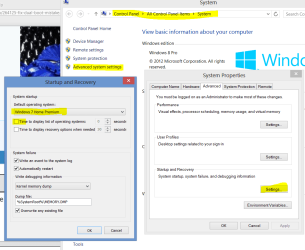
Then reboot into the old Win7, in Control Panel>System>Advanced System Settings>Startup set old Win7 as default OS with no boot menu, reboot to test that.

Then when it boots correctly confirm old Win7 is marked System Active in Disk Mgmt then delete the test install, Extend the old Win7 partition into the space you shrunk.

I'm going to bed. :sleepy:
 
All good :)
Never touching windows 8 again.

Sorry for the pain and not listening. I wad stressed, in year 12 and assessment task was due tomorrow, and that was only PC in house. To make me even more stressed I was on the most slowest and smallest Android phone ever. It has 512mb of ram, and a 3.2 inch screen. So small!!

Sorry for the pain :)
 

My Computer My Computer

At a glance

Windows 7 Professional 64bitIntel Core i5 - 2500K @ 3.30GHz4GB DDR3EVGA Nvidia GeForce GT 740 2GB DDR3
Computer type
PC/Desktop
Computer Manufacturer/Model Number
Custom Build
OS
Windows 7 Professional 64bit
CPU
Intel Core i5 - 2500K @ 3.30GHz
Motherboard
Gigabyte Z77-HD3
Memory
4GB DDR3
Graphics Card(s)
EVGA Nvidia GeForce GT 740 2GB DDR3
Screen Resolution
1680 x 1050
Hard Drives
1T Samaung HD/ 1T toshiba external drive/ 1T western digital external drive/ 2T seagate external drive/ 250gb samaung SSD
PSU
Antec 430W
Keyboard
Microsoft Wireless Keyboard 800
Mouse
Microsoft Wireless Mouse 1000
Antivirus
AVG
Browser
Internet Explorer
Are you able to boot directly into the old Win7 partition now after setting it as default here:

Capture.PNGclick to enlarge

If so does it's partition say System Active on it in Disk Mgmt?

If so you can rightclick the new OS to Delete it, then rightclick old Win7 to Extend into its space.
 
I'm in bed. Will see tomorrow. After editing boot manger deleteing windows 8 I got the option for both 7's.

Then removed then seven and restarted a couple of times and it boots into old seven.


My final question: do you recommend I get a partition wizard CD??
 

My Computer My Computer

At a glance

Windows 7 Professional 64bitIntel Core i5 - 2500K @ 3.30GHz4GB DDR3EVGA Nvidia GeForce GT 740 2GB DDR3
Computer type
PC/Desktop
Computer Manufacturer/Model Number
Custom Build
OS
Windows 7 Professional 64bit
CPU
Intel Core i5 - 2500K @ 3.30GHz
Motherboard
Gigabyte Z77-HD3
Memory
4GB DDR3
Graphics Card(s)
EVGA Nvidia GeForce GT 740 2GB DDR3
Screen Resolution
1680 x 1050
Hard Drives
1T Samaung HD/ 1T toshiba external drive/ 1T western digital external drive/ 2T seagate external drive/ 250gb samaung SSD
PSU
Antec 430W
Keyboard
Microsoft Wireless Keyboard 800
Mouse
Microsoft Wireless Mouse 1000
Antivirus
AVG
Browser
Internet Explorer
You can do it in Disk Mgmt more easily. Type Disk Management in Start Search box.

The important thing is to maximize the Disk Mgmt window to see clearly if the old Win7 partition is marked System Active.

If so then you're good to Delete the new OS and Extend old Win7 into the space you shrunk.

If not then you need to write the boot files to old Win7 partition by marking it Active and running three Startup Repairs, before you can delete the new install.

Look closely also for a little Win8 partition to delete.
 
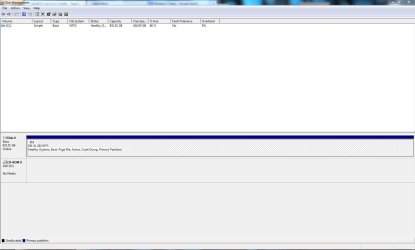
Please post back a screenshot of your maximized Disk Management drive map and listings:

1. Type Disk Management in Start Search box.
2. Open Disk Mgmt. window and maximize it.
3. Type Snipping Tool in Start Search box.
4. Open Snipping Tool, choose Rectangular Snip, click New, draw a box around full drive map and all listings.
5, Save Snip, attach using paper clip in Reply Box.

Tell us what is on each partition.
 
Here you go :)

It still says something about a CD Rom drive... is that normal?
 

Attachments

  • Capture.JPG
    Capture.JPG
    85 KB · Views: 5

My Computer My Computer

At a glance

Windows 7 Professional 64bitIntel Core i5 - 2500K @ 3.30GHz4GB DDR3EVGA Nvidia GeForce GT 740 2GB DDR3
Computer type
PC/Desktop
Computer Manufacturer/Model Number
Custom Build
OS
Windows 7 Professional 64bit
CPU
Intel Core i5 - 2500K @ 3.30GHz
Motherboard
Gigabyte Z77-HD3
Memory
4GB DDR3
Graphics Card(s)
EVGA Nvidia GeForce GT 740 2GB DDR3
Screen Resolution
1680 x 1050
Hard Drives
1T Samaung HD/ 1T toshiba external drive/ 1T western digital external drive/ 2T seagate external drive/ 250gb samaung SSD
PSU
Antec 430W
Keyboard
Microsoft Wireless Keyboard 800
Mouse
Microsoft Wireless Mouse 1000
Antivirus
AVG
Browser
Internet Explorer
When and where does it say that, and what is the exact wording?

How is performance?

How did you do with your assignment I stayed up til 3 am helping you rescue?
 
it says it right down the bottom, under Disk 0. It could just be my CD drive.

Well i think my assessment was good, i just have to wait for it to be marked.

Thanks again ;)
 

My Computer My Computer

At a glance

Windows 7 Professional 64bitIntel Core i5 - 2500K @ 3.30GHz4GB DDR3EVGA Nvidia GeForce GT 740 2GB DDR3
Computer type
PC/Desktop
Computer Manufacturer/Model Number
Custom Build
OS
Windows 7 Professional 64bit
CPU
Intel Core i5 - 2500K @ 3.30GHz
Motherboard
Gigabyte Z77-HD3
Memory
4GB DDR3
Graphics Card(s)
EVGA Nvidia GeForce GT 740 2GB DDR3
Screen Resolution
1680 x 1050
Hard Drives
1T Samaung HD/ 1T toshiba external drive/ 1T western digital external drive/ 2T seagate external drive/ 250gb samaung SSD
PSU
Antec 430W
Keyboard
Microsoft Wireless Keyboard 800
Mouse
Microsoft Wireless Mouse 1000
Antivirus
AVG
Browser
Internet Explorer
Back
Top