Solved Fix Duplicate Printer Entries in Print

CraigS26

New member
Local time
6:12 PM
Messages
12
Win 7 Hm Prem 64 ..... One day the normal selection in "File/Print" of [Canon MF 4500 Series UFRII LT] didn't work & I noticed I had to choose the next line/Same Canon Wording as a 2nd choice BUT with (Copy 1) after it for the Printer to start.

A Belarc Report today (below) shows Duplicate entries for my Canon Printer -BUT - Control Panel / Devices & Printers shows no sign of duplication. How can I eliminate the duplicate offerings when clk'ing File/Print?
I have the Printer Install CD if requ'd.

Many Thanks!
 

Attachments
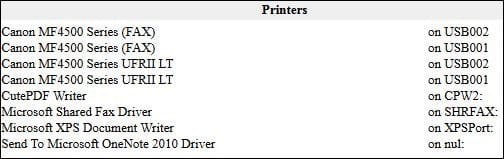
  • Belarc Printers.JPG
    Belarc Printers.JPG
    23.1 KB · Views: 22

My Computer

Computer Manufacturer/Model Number
Gateway DX4860-UB33P
OS
Windows 7 Home Premium 64bit
CPU
Intel 2nd Gen i5 3.3GHz
Motherboard
Gateway IPISB-VR 1.01 / BIOS: American Megatrends P02-A2
Memory
8 GB
Graphics Card(s)
Intel HD2000
Monitor(s) Displays
ASUS VS247H-P 23.6 in
I've seen this happen when the printer is connected to a different USB port - each port seems to create a new printer. I've not bothered to find a solution. I just try and keep the printer plugged into the same USB port.

You should be able to remove all of the unwanted printer entries. Let us know if you need help doing that.
 

My Computer

Computer type
Laptop
Computer Manufacturer/Model Number
Employer provided Dell Latitude
OS
W7 Pro SP1 64bit
CPU
i7
Memory
8GB
Graphics Card(s)
Intel HD Graphics
Hard Drives
crappy SSD
Antivirus
Employer mandated Symantec Endpoint Protection
Browser
Pale Moon 64bit, IE11 64bit & Chrome 64bit
Thanks for the Reply. I thought of Device Mgr/Printers and found a dark pair of Print/Fax lines and a 'lighter" pair. I Deleted the lighter pair and (my luck) That eliminated (in File/Print) the "normal" Print/Fax lines and left the ones with (Copy 1) - BUT it Prints. BTW, I had never changed the USB Port but may have Un-plugged the connection a time or two.

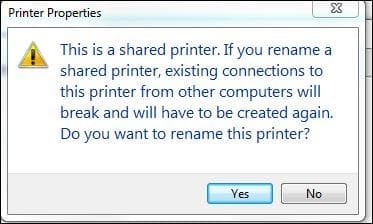
I see I can change the Name and Delete the (Copy1) part via Control Panel/Devices-Printers but I get a warning Below. The Model 4570dn means "Network" But There Are NO other computers Sharing this Canon or ever likely to..... So, OK to Name Chg ?
Wouldn't a 2nd computer just pick-up the changed name IF added later?

Thanks again! All the Best!
 

Attachments

  • Name Chg - Shared Issue.JPG
    Name Chg - Shared Issue.JPG
    24.1 KB · Views: 13
Last edited:

My Computer

Computer Manufacturer/Model Number
Gateway DX4860-UB33P
OS
Windows 7 Home Premium 64bit
CPU
Intel 2nd Gen i5 3.3GHz
Motherboard
Gateway IPISB-VR 1.01 / BIOS: American Megatrends P02-A2
Memory
8 GB
Graphics Card(s)
Intel HD2000
Monitor(s) Displays
ASUS VS247H-P 23.6 in
I usually delete the extra printers via Start > Devices and Printers.
 

My Computer

Computer type
Laptop
Computer Manufacturer/Model Number
Employer provided Dell Latitude
OS
W7 Pro SP1 64bit
CPU
i7
Memory
8GB
Graphics Card(s)
Intel HD Graphics
Hard Drives
crappy SSD
Antivirus
Employer mandated Symantec Endpoint Protection
Browser
Pale Moon 64bit, IE11 64bit & Chrome 64bit
I've left Bill Gates a message to call me about this.
In the meantime I'll Delete the (Copy 1) in the name and see what happens.
Might as well mark "Solved".

Edit: I Deleted a Grayed-out set of Canon (Print & Fax) Lines in Device Mgr and now a single set remains. The dark/active pair in Device Mgr obviously represented the Copy 1 pair and though the tag still remains, I have just one choice in Print drop-dn box that works. One day I'll learn how to delete the Copy 1 tag.
 
Last edited:

My Computer

Computer Manufacturer/Model Number
Gateway DX4860-UB33P
OS
Windows 7 Home Premium 64bit
CPU
Intel 2nd Gen i5 3.3GHz
Motherboard
Gateway IPISB-VR 1.01 / BIOS: American Megatrends P02-A2
Memory
8 GB
Graphics Card(s)
Intel HD2000
Monitor(s) Displays
ASUS VS247H-P 23.6 in
Back
Top