Duplicate Context menu entries in Start menu

strategist333

New member
Local time
8:58 PM
Messages
1
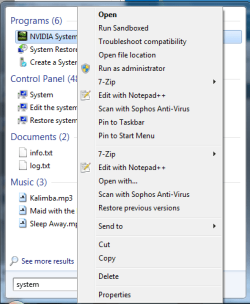
I don't know if this is a widespread problem, but I just noticed that I have duplicate context menu entries for "Files" and "Programs" that are reached by typing into the search box at the Start menu. See attached screenshot. This doesn't apply to Control Panel items, Videos, Documents, Music, etc.

Any solutions?
 

Attachments

  • Win7SS.png
    Win7SS.png
    15.9 KB · Views: 66

My Computer

OS
Windows 7 Pro (7600)
A long standing issue (XP also) with the context menu when accessed from certain locations.

One menu is appearing for the target, one for the link.

If you right click the offending item - check properties - you will see that your viewing the link, not the actual file.

Wierd, huh?

If I recall, I could avoid the problem if there were no "customizations" in the context menu.

I also remember a connection to the shortcut arrow. With the arrow shown, no doubling.

I really don't remember why it does that. One of the two.
 
Last edited by a moderator:
Hello Strategist, and welcome to Seven Forums.

You might see if the free program ShellExView may have these Context Menu "types" listed twice. If so, you can disable them to see if that stops them from duplicating.

If not, then you might try a System Restore using a restore point dated before this happened to see if it can fix it.

Hope this helps,
Shawn
 

My Computer

Computer type
PC/Desktop
Computer Manufacturer/Model Number
Self built custom
OS
64-bit Windows 11 Pro for Workstations
CPU
Intel i7-8700K OC'd to 5 GHz
Motherboard
ASUS ROG Maximus XI Formula Z390
Memory
64 GB (4x16GB) G.SKILL TridentZ RGB DDR4 3600 MHz
Graphics Card(s)
ASUS ROG-STRIX-GTX1080TI-O11G-GAMING
Sound Card
Integrated
Monitor(s) Displays
2 x Samsung Odyssey G7 27"
Screen Resolution
2560x1440
Hard Drives
1TB Samsung 990 PRO M.2,
4TB Samsung 990 PRO PRO M.2,
TerraMaster F8 SSD Plus NAS
PSU
Seasonic Prime Titanium 850W
Case
Thermaltake Core P3
Cooling
Corsair Hydro H115i
Keyboard
Logitech wireless K800
Mouse
Logitech MX Master 4
Internet Speed
2 Gb/s Download and 100 Mb/s Upload
Antivirus
Malwarebyte Anti-Malware Premium
Browser
Google Chrome
Other Info
Logitech Z625 speaker system,
Logitech BRIO 4K Pro webcam,
HP Color LaserJet Pro MFP M477fdn,
APC SMART-UPS RT 1000 XL - SURT1000XLI,
Galaxy S23 Plus phone
Four years(!) on and I appear to have exactly the same problem. Same OS (Win7 Pro 64 bit), same context links (7-Zip and Notepad++), latest versions.

The problem seems to be confined to shortcut links. And as mentioned by Antman, only when viewed from certain locations. For instance, all shortcuts within the Documents library (some kind of symbolic link) show this problem. However, navigating to the real location of these shortcuts and examining the context menu is OK.

ShellExView (link above) does not appear to show anything unusual as far as I can tell.

In fact, the duplicate context links are different. The first one refers to the destination of the shortcut (as you would expect), however, the second context menu entry refers to the shortcut (file) itself!! If I pick the second "Edit with Notepad++" menu item on a shortcut that links to a simple text file then I end up editing the binary shortcut file and not the destination text file!

 

My Computer

Computer type
PC/Desktop
Computer Manufacturer/Model Number
Custom Build
OS
Windows 7 Professional x64
CPU
Intel i7-4770K
Motherboard
Gigabyte GA-Z87N-WIFI
Memory
16GB 1600Mhz (2x8GB)
Graphics Card(s)
Nvidia GeForce 660 Ti
Monitor(s) Displays
Dell U2412M 24inch, Dell 1905FP 19inch
Screen Resolution
1920 x 1200 (16:10), 1280 x 1024 (5:4)
Hard Drives
120 GB SSD
1TB HDD
PSU
BeQuiet 530W
Case
Fractal Design Node 304
Cooling
Corsair H60 Liquid Cooler
Keyboard
Ducky DK9008 Shine 2
Mouse
Dell
Internet Speed
28Mbps Down, 6.5Mbps Up
Antivirus
Avast!
Browser
Chrome, Firefox, Opera
Interesting

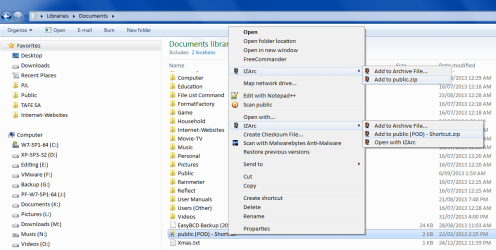
I just checked a shortcut in my Documents Library.

I have duplicate IZArc entries.
I have Notepad++ installed, but I only see one menu entry.
Context Menu - Duplicate Entries.png
 

My Computer

Computer type
PC/Desktop
Computer Manufacturer/Model Number
n/a
OS
W7 Ultimate SP1, LM19.2 MATE, W10 Home 1703, W10 Pro 1703 VM, #All 64 bit
CPU
AMD Phenom II x6 1100T, 3.3 GHz
Motherboard
ASUS M4A88T-M/USB3 (AM3)
Memory
12GB DDR3 1333 G-Skill (4GB x 2), G-Skill (2GB x 2)
Graphics Card(s)
NVIDIA GeForce GTX 660
Sound Card
Realtek?
Monitor(s) Displays
Samsung S23B350
Screen Resolution
1920x1080
Hard Drives
WD Green 2TB (SATA), WD Green 3TB (SATA), WD Blue 4TB (SATA), WD Blue 6TB (SATA)
PSU
Cooler Master
Case
Antec GX300 Tower
Cooling
3x Antec TRICOOL 120mm Fans
Mouse
Wired Optical
Internet Speed
DSL
Antivirus
Avast
Browser
Pale Moon (64 bit)
Other Info
2018-12-27 Upgraded HDDs
2015-12-10 Upgraded case, graphics card, storage
2015-08-15 Upgraded motherboard & RAM
2015-07-15 Upgraded LM17.1 to LM17.2
Back
Top