T tvcjess New member Local time 7:09 PM Messages 4 Jun 5, 2011 #1 not sure how i did this, but my screen is laying on its side. it is in a 'landscape' view not a 'portrait' view. Help! My Computer OSWindows 7 professional
not sure how i did this, but my screen is laying on its side. it is in a 'landscape' view not a 'portrait' view. Help!
Airbot ---------------------- VIP SF Team Local time 9:09 PM Messages 18,396 Jun 5, 2011 #2 Can you change it here? My Computer Computer typePC/DesktopComputer Manufacturer/Model NumberAirbot 2.0OSWindows 7 Ultimate x64 SP1CPUCore i7 920 (D0) @ 4Ghz, *26c idle *65c full load on airMotherboardAsus P6X58D Premium - Sata 6Gb/s - USB 3.0Memory12GB DDR3 Corsair Dominator -CMD12GX3M6A1600C8 at 1600MHzGraphics Card(s)Zotac Geforce GTX 770Sound CardASUS Xonar D2XMonitor(s) Displays1 LG 24" Flatron W2453V-PF 1 Samsung 24" P2450H both 2ms RTScreen Resolution1920x1080@60hzHard Drives1 Samsung 250GB 840 Evo SSD 1 OCZ Vertex2 180GB SSD 1 TB Samsung Spinpoint F1 7200RPM 32MB cache 2 500GB WD Caviar Blacks 7200RPM 32MB cache (WD5001AALS) Pioneer DVD Burner DVR-S18MPSUCorsair HX1000WCaseCooler Master HAF 932CoolingCase Fans *3 230mm, *1 140mm/CPU - *Tuniq Tower 120 ExtremeKeyboardLogitech Wireless MK700MouseLogitech Wireless MK700Internet SpeedDL 15 Mbps UL 0.98 MbpsAntivirusNoneBrowserFirefox NightlyOther InfoProcessor-7.7 *RAM- 7.9 *Graphics-7.9 *Gaming Graphics- 7.9 *SSD- 7.8 W.E.I final score= 7.7 *Phone- LG Nexus 5
MacGyvr Banned Local time 10:09 PM Messages 1,326 Location Charlotte, NC Jun 5, 2011 #3 Just go into display properties and change it back....it's just a dropdown choice. My Computer Computer Manufacturer/Model NumberCustomOSWindows 7 Ultimate RTM (Technet)CPU3.00 gigahertz Intel Core2 Duo E8400MotherboardASUSTeK Computer INC. P5K/EPU Rev 1.xxMemory4GBGraphics Card(s)ATI Radeon X1950 ProSound CardBuilt in HD AudioMonitor(s) Displays22" Gateway LCDScreen Resolution1920 x 1200Hard DrivesST3160023A [Hard drive] (160.04 GB) -- drive 0, rev 8.01, ST3500630AS [Hard drive] (500.11 GB) -- drive 2, rev 3.AAK ST3500630AS [Hard drive] (500.11 GB) -- drive 1, rev 3.AAKKeyboardLogitech G11MouseMicrosoft Wireless Laser Mouse 5000Internet Speed13.44 Mbps
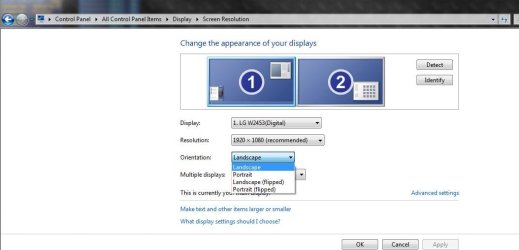
M McP2143 New member Member Local time 10:09 PM Messages 28 Jun 5, 2011 #4 Right click on an empty space in your desktop. Select > Screen Resolution. You can switch Landscape / Portrait mode there. Good luck!! Did You Post This Sideways??? I am dizzy just switching back and forth for 1 sec. and working the inverted mouse! My Computer OSWindows 7 Home Premium 64bit.
Right click on an empty space in your desktop. Select > Screen Resolution. You can switch Landscape / Portrait mode there. Good luck!! Did You Post This Sideways??? I am dizzy just switching back and forth for 1 sec. and working the inverted mouse!
T tvcjess New member Thread Starter Local time 7:09 PM Messages 4 Jun 5, 2011 #5 I have windows XPif that makes a difference. I did not find the option to change orientation in the dropdown menu under display properties My Computer OSWindows 7 professional
I have windows XPif that makes a difference. I did not find the option to change orientation in the dropdown menu under display properties
T tvcjess New member Thread Starter Local time 7:09 PM Messages 4 Jun 5, 2011 #6 IT WORKED IT WORKED. THANK YOU! I will go throw up now from dizziness. My Computer OSWindows 7 professional
T tvcjess New member Thread Starter Local time 7:09 PM Messages 4 Jun 5, 2011 #7 THANK YOU McP2143!!! You made my day! My Computer OSWindows 7 professional
MacGyvr Banned Local time 10:09 PM Messages 1,326 Location Charlotte, NC Jun 5, 2011 #8 tvcjess said: I have windows XPif that makes a difference. I did not find the option to change orientation in the dropdown menu under display properties Click to expand... Glad you got it sorted out, but just as a point, this forum is for Windows 7. If you do happen to ask about XP in the future, you should definitely specify that in the question or you'll continue to get answers that don't apply. My Computer Computer Manufacturer/Model NumberCustomOSWindows 7 Ultimate RTM (Technet)CPU3.00 gigahertz Intel Core2 Duo E8400MotherboardASUSTeK Computer INC. P5K/EPU Rev 1.xxMemory4GBGraphics Card(s)ATI Radeon X1950 ProSound CardBuilt in HD AudioMonitor(s) Displays22" Gateway LCDScreen Resolution1920 x 1200Hard DrivesST3160023A [Hard drive] (160.04 GB) -- drive 0, rev 8.01, ST3500630AS [Hard drive] (500.11 GB) -- drive 2, rev 3.AAK ST3500630AS [Hard drive] (500.11 GB) -- drive 1, rev 3.AAKKeyboardLogitech G11MouseMicrosoft Wireless Laser Mouse 5000Internet Speed13.44 Mbps
tvcjess said: I have windows XPif that makes a difference. I did not find the option to change orientation in the dropdown menu under display properties Click to expand... Glad you got it sorted out, but just as a point, this forum is for Windows 7. If you do happen to ask about XP in the future, you should definitely specify that in the question or you'll continue to get answers that don't apply.
H hyb1 New member Local time 8:09 PM Messages 6 Sep 21, 2012 #9 thank you very much .it worked for me .EXCELLENT MP 2143 My Computer OSwindows 7 64bits