Solved Fixit utility to fix windows update

KianWilliam

New member
Member
Local time
4:50 AM
Messages
41
Greetings:
My windows update remains in 0% when I click on download and install even after several hours or rebooting my laptop.
To fix it, I downloaded windowsdiagnosticupdate.diagcab from Mirosoft to fix the problems.
I run the program, it detected problems and started to resolve, yet after an hour and 45 minutes, it is still resolving, how much time do I have to wait?
I also downloaded 50202 as a last resort, yet this utility removes and install new component.
If fixit works, I would rather not use it.
Thanks ahead
Kian William
 

My Computer

Computer type
Laptop
Computer Manufacturer/Model Number
Dell
OS
Microsoft Windows 7 Ultimate 64-bit 7601 Multiprocessor Free Service Pack 1
CPU
Intel(R) Core(TM) i3 CPU M 330 @ 2.13GHz
Motherboard
Dell Inc. 08CNC9
Memory
2.00 GB
Graphics Card(s)
Intel(R) HD Graphics
Sound Card
(1) High Definition Audio Device (2) High Definition Audio
Screen Resolution
1366 x 768 x 32 bits (4294967296 colors) @ 60 Hz
Hard Drives
(1) WDC WD2500BEVT-75A23T0 ATA Device (2) General USB Flash Disk USB Device (3) Generic- Multi-Card USB Device
Antivirus
Panda
Browser
Chrome, FireFox, IE, Opera
Hello and welcome:

If your Winy7 computer is stuck on "checking for updates", you might try this.

NOTE:
On a fresh Windows 7 install, it may help to first install IE11 and MS .NET Framework 4.6.1.

NOTE:
If this is NOT a fresh install of Win7, you should already have both IE11 and .NET 4.6.1 AND you can probably skip KB3125574. You may already have KB3020369, as well. KB3172605 seems to be the "key" to getting this fixed...


  1. IF NOT ALREADY DONE: Download and save, but do not run yet, the standalone installers for KB3125574, KB3020369 and KB3172605 for your architecture (32-bit or 64-bit).
  2. Disconnect from the internet.
  3. Disable the Windows Update service in both the Windows Update applet itself ("never check for updates") AND from services.msc (RIGHT-click on it, select "Properties" and then change it to "manual" and STOP the service, then click "OK").
  4. REBOOT
  5. Run 3125574 and reboot
  6. Run 3020369 and reboot.
  7. Run 3172605 and reboot.
  8. Go into services.msc and change WU back to "Automatic-delayed start" and start the service.
  9. Reconnect to internet.
  10. Change WU to "notify me, but let me choose".
  11. Run a manual check for updates.
It should work for you now.
If it does not, or if you get specific error codes, then you may have a different problem.

Thanks,
MM
 

My Computer

Computer type
PC/Desktop
Computer Manufacturer/Model Number
Dell Studio XPS 8500
OS
OEM Windows 7 Ult (x64) SP1
CPU
Intel Core-i7 3770 @ 3.4 GHz
Motherboard
"Dell" branded
Memory
16 GB DDR3 SDRAM @ 1333 MHz
Graphics Card(s)
NVidia GeForce GT620 1 GB
Sound Card
THX TruStudio PC
Monitor(s) Displays
Dell U2410 Full HD
Hard Drives
2.0 TB SATA2 @ 7200 RPM
PSU
350W
Keyboard
MS 4000 Ergon - Wired
Mouse
Logitech Anywhere MX
Internet Speed
Cable HSI w/Turbo (router)
Antivirus
KIS-MBAM Premium-MBAE Premium
Browser
Fx (current version); IE
Other Info
And a Win7/64 Pro laptop; And a Win10/64 Pro desktop.
Thanks for your response,
I do not have problem checking for updates, windows do that perfectly, I can even select which update to be downloaded,
yet when I click on download and install, it will remain on 0%, with no progress.
diagnostic utility(.diagcab file) is still resolving problems, may be it is more than 3 hours, Do you know when it will finish?
I think I will be run my .msi file to reinstall my window's update component
KianWilliam
 

My Computer

Computer type
Laptop
Computer Manufacturer/Model Number
Dell
OS
Microsoft Windows 7 Ultimate 64-bit 7601 Multiprocessor Free Service Pack 1
CPU
Intel(R) Core(TM) i3 CPU M 330 @ 2.13GHz
Motherboard
Dell Inc. 08CNC9
Memory
2.00 GB
Graphics Card(s)
Intel(R) HD Graphics
Sound Card
(1) High Definition Audio Device (2) High Definition Audio
Screen Resolution
1366 x 768 x 32 bits (4294967296 colors) @ 60 Hz
Hard Drives
(1) WDC WD2500BEVT-75A23T0 ATA Device (2) General USB Flash Disk USB Device (3) Generic- Multi-Card USB Device
Antivirus
Panda
Browser
Chrome, FireFox, IE, Opera
Thanks for your response,
I do not have problem checking for updates, windows do that perfectly, I can even select which update to be downloaded,
yet when I click on download and install, it will remain on 0%, with no progress.

Right.
And that might be because of a widespread issue with the WU client that this procedure ought to fix.

diagnostic utility(.diagcab file) is still resolving problems, may be it is more than 3 hours, Do you know when it will finish?
I think I will be run my .msi file to reinstall my window's update component
KianWilliam
As I mentioned, if you try it and it does not work, or if you have other, specific errors, then you may well have a different/more complicated problem.

Alas, Windows Update issues can be very complicated to diagnose and resolve.
The "stuck at checking" with "0% progress" issue **sounds** like the very issue many of us experienced and which was fixed by installing the patches listed in my earlier reply (esp. KB3172605).

It really only takes about 5 minutes or less (it's just broken down into small steps).
It worked for many, many folks (including for me on two Win7 boxes).
If you do not wish to try it, that's certainly fine.
I understand.
In that case, please wait for help from someone more expert in these matters.

I hope you get it fixed up.
Cheers,

MM
 

My Computer

Computer type
PC/Desktop
Computer Manufacturer/Model Number
Dell Studio XPS 8500
OS
OEM Windows 7 Ult (x64) SP1
CPU
Intel Core-i7 3770 @ 3.4 GHz
Motherboard
"Dell" branded
Memory
16 GB DDR3 SDRAM @ 1333 MHz
Graphics Card(s)
NVidia GeForce GT620 1 GB
Sound Card
THX TruStudio PC
Monitor(s) Displays
Dell U2410 Full HD
Hard Drives
2.0 TB SATA2 @ 7200 RPM
PSU
350W
Keyboard
MS 4000 Ergon - Wired
Mouse
Logitech Anywhere MX
Internet Speed
Cable HSI w/Turbo (router)
Antivirus
KIS-MBAM Premium-MBAE Premium
Browser
Fx (current version); IE
Other Info
And a Win7/64 Pro laptop; And a Win10/64 Pro desktop.
Hi,
my win7 is not new, I have had it for several years, yet I do not have IE11 and regarding .net framework 4.6.1 I tried to check in update history, but diagcab is running and did not allow me to view and open windows update. I wrote down what you said before. Yet I still have hope diagcab will be able to fix this problem.
what do you think about running a .msi file, I downloaded it from microsoft, this utility reinstall windows update component from the root.
thanks for your response
KianWilliam
 

My Computer

Computer type
Laptop
Computer Manufacturer/Model Number
Dell
OS
Microsoft Windows 7 Ultimate 64-bit 7601 Multiprocessor Free Service Pack 1
CPU
Intel(R) Core(TM) i3 CPU M 330 @ 2.13GHz
Motherboard
Dell Inc. 08CNC9
Memory
2.00 GB
Graphics Card(s)
Intel(R) HD Graphics
Sound Card
(1) High Definition Audio Device (2) High Definition Audio
Screen Resolution
1366 x 768 x 32 bits (4294967296 colors) @ 60 Hz
Hard Drives
(1) WDC WD2500BEVT-75A23T0 ATA Device (2) General USB Flash Disk USB Device (3) Generic- Multi-Card USB Device
Antivirus
Panda
Browser
Chrome, FireFox, IE, Opera
Posting the link to Mike`s tutorial is so much easier. :)

Windows Update will not update and I've tried multiple fixes

How do you not have IE11 installed yet ?

Even if you don`t use it.


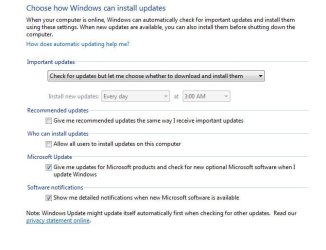
And as far as this disconnecting from the internet and stopping the update service, you don`t really have to do that. Just have your settings like this and do the updates and windows update will work perfectly.
 

Attachments

  • WUS.JPG
    WUS.JPG
    48.4 KB · Views: 34
Last edited:

My Computer

Computer type
PC/Desktop
Computer Manufacturer/Model Number
Skylake Special #666
OS
Windows 10 Pro x64
CPU
Intel Core i7 6700K
Motherboard
Asus Sabertooth Z170 Mark 1
Memory
GSkill TridentZ RGB 16GB 3600 16-16-16-36
Graphics Card(s)
EVGA GTX 980 Ti SC x2
Sound Card
Realtek High Definition
Monitor(s) Displays
AOC G2460PG
Screen Resolution
1920 x 1080 144Hz
Hard Drives
Samsung 860 Pro 256GB, Seagate Barracuda 4TB x2
PSU
EVGA 1000 P2, EVGA White Custom Braided Cables
Case
Corsair Vengeance C70 Gunmetal Black
Cooling
Corsair H100i v2, Corsair ML120 x2, Thermal Grizzly Kryonaut
Keyboard
Logitech G910 Orion Spectrum
Mouse
Logitech G700s
Internet Speed
Verizon Fios Quantum Gateway 75/75
Antivirus
Windows Defender, Malwarebytes Free 3.8.3
Browser
Chrome
Other Info
Corsair SP120 x4, LG Blu-ray Drive, Durabrand HT-395 100 Watt Dolby Digital Amp, Corsair H2100 Wireless 7.1 Headset
Hi again,
I could see my update history, yes , I do have .net frame work 4.6.1, version 1 and 2, I have 5 items for version 1. I always did not want to download and install IE11, could it be the cause of that?
KianWilliam
 

My Computer

Computer type
Laptop
Computer Manufacturer/Model Number
Dell
OS
Microsoft Windows 7 Ultimate 64-bit 7601 Multiprocessor Free Service Pack 1
CPU
Intel(R) Core(TM) i3 CPU M 330 @ 2.13GHz
Motherboard
Dell Inc. 08CNC9
Memory
2.00 GB
Graphics Card(s)
Intel(R) HD Graphics
Sound Card
(1) High Definition Audio Device (2) High Definition Audio
Screen Resolution
1366 x 768 x 32 bits (4294967296 colors) @ 60 Hz
Hard Drives
(1) WDC WD2500BEVT-75A23T0 ATA Device (2) General USB Flash Disk USB Device (3) Generic- Multi-Card USB Device
Antivirus
Panda
Browser
Chrome, FireFox, IE, Opera
Thanks for the links.
KianWilliam
 

My Computer

Computer type
Laptop
Computer Manufacturer/Model Number
Dell
OS
Microsoft Windows 7 Ultimate 64-bit 7601 Multiprocessor Free Service Pack 1
CPU
Intel(R) Core(TM) i3 CPU M 330 @ 2.13GHz
Motherboard
Dell Inc. 08CNC9
Memory
2.00 GB
Graphics Card(s)
Intel(R) HD Graphics
Sound Card
(1) High Definition Audio Device (2) High Definition Audio
Screen Resolution
1366 x 768 x 32 bits (4294967296 colors) @ 60 Hz
Hard Drives
(1) WDC WD2500BEVT-75A23T0 ATA Device (2) General USB Flash Disk USB Device (3) Generic- Multi-Card USB Device
Antivirus
Panda
Browser
Chrome, FireFox, IE, Opera
Dear MM,
I downloaded installers for KB3125574, KB3020369 and KB3172605 for 64-bit.
I am going to wait a little more for .diagcab , then I shall do the way you said.
many thanks again
KianWilliam
 

My Computer

Computer type
Laptop
Computer Manufacturer/Model Number
Dell
OS
Microsoft Windows 7 Ultimate 64-bit 7601 Multiprocessor Free Service Pack 1
CPU
Intel(R) Core(TM) i3 CPU M 330 @ 2.13GHz
Motherboard
Dell Inc. 08CNC9
Memory
2.00 GB
Graphics Card(s)
Intel(R) HD Graphics
Sound Card
(1) High Definition Audio Device (2) High Definition Audio
Screen Resolution
1366 x 768 x 32 bits (4294967296 colors) @ 60 Hz
Hard Drives
(1) WDC WD2500BEVT-75A23T0 ATA Device (2) General USB Flash Disk USB Device (3) Generic- Multi-Card USB Device
Antivirus
Panda
Browser
Chrome, FireFox, IE, Opera
AddRam,
Thank you for the link too.
The reason I do not have IE11 is that I use chrome, FF, Opera and safari.
KianWilliam
 

My Computer

Computer type
Laptop
Computer Manufacturer/Model Number
Dell
OS
Microsoft Windows 7 Ultimate 64-bit 7601 Multiprocessor Free Service Pack 1
CPU
Intel(R) Core(TM) i3 CPU M 330 @ 2.13GHz
Motherboard
Dell Inc. 08CNC9
Memory
2.00 GB
Graphics Card(s)
Intel(R) HD Graphics
Sound Card
(1) High Definition Audio Device (2) High Definition Audio
Screen Resolution
1366 x 768 x 32 bits (4294967296 colors) @ 60 Hz
Hard Drives
(1) WDC WD2500BEVT-75A23T0 ATA Device (2) General USB Flash Disk USB Device (3) Generic- Multi-Card USB Device
Antivirus
Panda
Browser
Chrome, FireFox, IE, Opera
Dear MM,
I downloaded installers for KB3125574, KB3020369 and KB3172605 for 64-bit.
I am going to wait a little more for .diagcab , then I shall do the way you said.
many thanks again
KianWilliam

Perfectly fine, of course.
And it's up to you whether you prefer thrash Zone's excellent and authoritative version of the steps or mine or that posted by someone else here or elsewhere (thankfully for all of us, there are quite a few such tutorials at a number of computer help fora now).
They all get to more or less the same place to get WU client up and running.
Some folks prefer diagrams, while others prefer written instructions.
However you get it fixed is quite fine -- that is all that matters.:)

As for not upgrading to IE 11, that's not advisable from a safety standpoint.
Even if you do not use IE for your default or everyday browser, many programs do use it "behind the scenes".
There are also occasional websites (fewer and fewer nowadays) that render better or are optimized for IE. Some of them no longer support versions of IE lower than IE11.
Older versions of IE are not secure, are not supported or updated by MS with security patches, and do create a security vulnerability for your system.
The bottom line: at some point, it would be a good idea to upgrade to IE11, for security reasons.

Keep us posted on your progress.

Cheers and good luck,
MM
 

My Computer

Computer type
PC/Desktop
Computer Manufacturer/Model Number
Dell Studio XPS 8500
OS
OEM Windows 7 Ult (x64) SP1
CPU
Intel Core-i7 3770 @ 3.4 GHz
Motherboard
"Dell" branded
Memory
16 GB DDR3 SDRAM @ 1333 MHz
Graphics Card(s)
NVidia GeForce GT620 1 GB
Sound Card
THX TruStudio PC
Monitor(s) Displays
Dell U2410 Full HD
Hard Drives
2.0 TB SATA2 @ 7200 RPM
PSU
350W
Keyboard
MS 4000 Ergon - Wired
Mouse
Logitech Anywhere MX
Internet Speed
Cable HSI w/Turbo (router)
Antivirus
KIS-MBAM Premium-MBAE Premium
Browser
Fx (current version); IE
Other Info
And a Win7/64 Pro laptop; And a Win10/64 Pro desktop.
Hi MM,
As soon as I get it fixed, I shall download and install IE11. I stopped downloading IEs since version 10.
Regarding my progress, I ran scanf too, it refers to some corrupted files, I ran checkdisk too after that.
I opened the event log regarding it, there is not degradation, now I am going to study CBS log file belong to scanf, if those corrupted files are windows update files, then I have to fix it. Either your way, my msi file or the other way.
I am getting to the bottom of it step by step. Thanks again for all informations.
KianWilliam
 

My Computer

Computer type
Laptop
Computer Manufacturer/Model Number
Dell
OS
Microsoft Windows 7 Ultimate 64-bit 7601 Multiprocessor Free Service Pack 1
CPU
Intel(R) Core(TM) i3 CPU M 330 @ 2.13GHz
Motherboard
Dell Inc. 08CNC9
Memory
2.00 GB
Graphics Card(s)
Intel(R) HD Graphics
Sound Card
(1) High Definition Audio Device (2) High Definition Audio
Screen Resolution
1366 x 768 x 32 bits (4294967296 colors) @ 60 Hz
Hard Drives
(1) WDC WD2500BEVT-75A23T0 ATA Device (2) General USB Flash Disk USB Device (3) Generic- Multi-Card USB Device
Antivirus
Panda
Browser
Chrome, FireFox, IE, Opera
Dear MM,
I studied logs belong to chkdsk and sfc commands, Fortunately the first one showed no degradation and the second one although after the scan messaged with some corrupted files but when I studied CBS.log, at the end of file it was printed all corrupted files were fixed and actually only there was one file. I could not respond you yesterday on account of problem with internet connection.
kind regards
Kian William
 

My Computer

Computer type
Laptop
Computer Manufacturer/Model Number
Dell
OS
Microsoft Windows 7 Ultimate 64-bit 7601 Multiprocessor Free Service Pack 1
CPU
Intel(R) Core(TM) i3 CPU M 330 @ 2.13GHz
Motherboard
Dell Inc. 08CNC9
Memory
2.00 GB
Graphics Card(s)
Intel(R) HD Graphics
Sound Card
(1) High Definition Audio Device (2) High Definition Audio
Screen Resolution
1366 x 768 x 32 bits (4294967296 colors) @ 60 Hz
Hard Drives
(1) WDC WD2500BEVT-75A23T0 ATA Device (2) General USB Flash Disk USB Device (3) Generic- Multi-Card USB Device
Antivirus
Panda
Browser
Chrome, FireFox, IE, Opera
Thanks to MM.
 

My Computer

Computer type
Laptop
Computer Manufacturer/Model Number
Dell
OS
Microsoft Windows 7 Ultimate 64-bit 7601 Multiprocessor Free Service Pack 1
CPU
Intel(R) Core(TM) i3 CPU M 330 @ 2.13GHz
Motherboard
Dell Inc. 08CNC9
Memory
2.00 GB
Graphics Card(s)
Intel(R) HD Graphics
Sound Card
(1) High Definition Audio Device (2) High Definition Audio
Screen Resolution
1366 x 768 x 32 bits (4294967296 colors) @ 60 Hz
Hard Drives
(1) WDC WD2500BEVT-75A23T0 ATA Device (2) General USB Flash Disk USB Device (3) Generic- Multi-Card USB Device
Antivirus
Panda
Browser
Chrome, FireFox, IE, Opera
Hi:

OK, that's good to hear.
Thanks for taking the time to update us.

Cheers,
MM
 

My Computer

Computer type
PC/Desktop
Computer Manufacturer/Model Number
Dell Studio XPS 8500
OS
OEM Windows 7 Ult (x64) SP1
CPU
Intel Core-i7 3770 @ 3.4 GHz
Motherboard
"Dell" branded
Memory
16 GB DDR3 SDRAM @ 1333 MHz
Graphics Card(s)
NVidia GeForce GT620 1 GB
Sound Card
THX TruStudio PC
Monitor(s) Displays
Dell U2410 Full HD
Hard Drives
2.0 TB SATA2 @ 7200 RPM
PSU
350W
Keyboard
MS 4000 Ergon - Wired
Mouse
Logitech Anywhere MX
Internet Speed
Cable HSI w/Turbo (router)
Antivirus
KIS-MBAM Premium-MBAE Premium
Browser
Fx (current version); IE
Other Info
And a Win7/64 Pro laptop; And a Win10/64 Pro desktop.
you welcome.
KianWilliam
 

My Computer

Computer type
Laptop
Computer Manufacturer/Model Number
Dell
OS
Microsoft Windows 7 Ultimate 64-bit 7601 Multiprocessor Free Service Pack 1
CPU
Intel(R) Core(TM) i3 CPU M 330 @ 2.13GHz
Motherboard
Dell Inc. 08CNC9
Memory
2.00 GB
Graphics Card(s)
Intel(R) HD Graphics
Sound Card
(1) High Definition Audio Device (2) High Definition Audio
Screen Resolution
1366 x 768 x 32 bits (4294967296 colors) @ 60 Hz
Hard Drives
(1) WDC WD2500BEVT-75A23T0 ATA Device (2) General USB Flash Disk USB Device (3) Generic- Multi-Card USB Device
Antivirus
Panda
Browser
Chrome, FireFox, IE, Opera
Back
Top