
New Re-Install of Windows 7 after having Windows 10 installed (no driver for GMA3600 on Windows 10). Reinstalled Windows 7 via manufacture recovery discs and usb dvd drive. This machine originally came with a 32GB ssd which failed and was replaced with a 250GB SSD which it has been happily running Windows 7 on for over a year, installed from System image first time. Now won’t accept those images. It originally came with Windows 7 Starter which was upgraded to Home Premium via Anytime Upgrade. I am not sure if the anytime upgrade will still work (I still have the key though), so am trying to get it set up and updated from original disks in Windows 7 starter initially before attempting the upgrade. The Machine is a ‘Fizzbook Spin’ (basically an Intel Classmate) with touch screen and learning software. Atom N2600 Cedarview processor, 2GB RAM. (7 year old boy is nagging me to get it fixed).
Latest CBS file attached.
Any advice welcome please? Should I now try installing the new RST driver? Doesn’t seem much point as the system recognises the SSD and I’ve read the Microsoft driver is ok. I did read on here somewhere that updating the RST driver sometimes fixed Windows update.
I also tried this SubINACL fix – didn’t work and machine wasn’t working well afterwards so re-installed again. Latest install done to points listed above.
https://support.microsoft.com/en-gb/kb/968003
Or should I just give up, leave it without updates, install his games and music and just say he can’t go on the internet (he’s restricted to 3 websites anyway). It will only run Windows 7 due to the GMA3600 driver – which only works on Windows 7 – so no Windows 10 and no Linux for it. It was dual booted with Linux for a while but we got sick of the stretched screen on Linux. We wanted him to have a Windows 7 laptop rather than a tablet so he got to do some computing and learned to type and not just play games.
- Installed from Manufacturer recovery discs (has Service Pack 1).Activated pre-installed Microsoft Security Essentials on connecting to Internet.
- Installed ie11 (to save it crashing during updates later). No issues. I have also tried without installing that – it makes no difference). Windows update not working (constantly searching for a day)
- Installed latest Windows update agent. Windows update not working
- Disk check and scannow ok
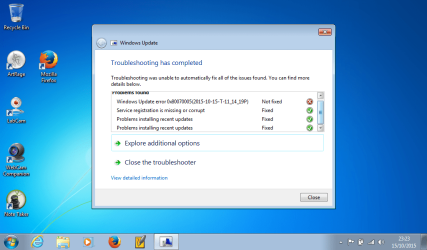
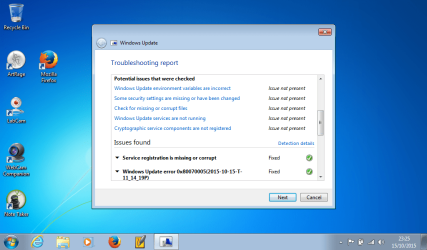
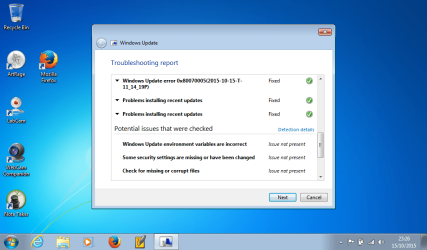
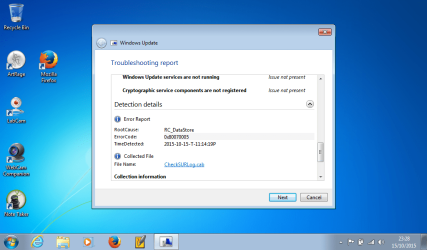
- Ran Windows update fixit (results below – error code 80070005.
- Installed Malwarebytes, turned MSE and internet connection off and scanned with Malwarebytes. Nothing found. Uninstalled Malwarebytes, turned MSE back on, restarted internet connection.
- Ran Windows update fixit again – same results
- Tried turning Windows updates to ‘Never’, rebooted and then re-set to automatic updates.
- Downloaded latest Intel Rapid Storage Technology driver. Unable to open file as it said needed Microsoft.net 4.5.2.
- Manually installed Microsoft.net 4.5.2 – rebooted.
- Uninstalled original RST driver in device manager – it was reinstalled again.
- Uninstalled original RST in Control Panel – Programs, which also removed driver.
- Rebooted – SSD drive recognised (again) and SSD drivers re-installed. Device Manager showed RST driver replaced with Microsoft AHCI1.0 Serial ATA driver.
Latest CBS file attached.
Any advice welcome please? Should I now try installing the new RST driver? Doesn’t seem much point as the system recognises the SSD and I’ve read the Microsoft driver is ok. I did read on here somewhere that updating the RST driver sometimes fixed Windows update.
I also tried this SubINACL fix – didn’t work and machine wasn’t working well afterwards so re-installed again. Latest install done to points listed above.
https://support.microsoft.com/en-gb/kb/968003
Or should I just give up, leave it without updates, install his games and music and just say he can’t go on the internet (he’s restricted to 3 websites anyway). It will only run Windows 7 due to the GMA3600 driver – which only works on Windows 7 – so no Windows 10 and no Linux for it. It was dual booted with Linux for a while but we got sick of the stretched screen on Linux. We wanted him to have a Windows 7 laptop rather than a tablet so he got to do some computing and learned to type and not just play games.
Attachments

My Computer
- Computer type
- Laptop
- Computer Manufacturer/Model Number
- Sony Vaio VPCCW2S1E
- OS
- W7 HP 64 bit
- CPU
- Core i3 1st gen
- Memory
- 8gb
- Graphics Card(s)
- Nvidia 330M
- Internet Speed
- 8 mbps
- Browser
- Firefox


