Flac Codecs

RST101

Xtreme PC Gamer
Guru
VIP
Local time
12:56 AM
Messages
1,086
Location
Ellesmere Port, UK.
Does anybody on this fine forum know how to enable my use of the flac format? Been to the various places that Iv'e been pointed towards when both trying to open in explorer and also media player and Iv'e had no joy thus far. Has anybody had any success in getting the said format to play. your help would be greatly appreciated.


p.s I wish not to change from WMP12 so comments on get this media player and that media player will fall on deaf ears (and eyes).
 

My Computer

Computer Manufacturer/Model Number
Custom Build.
OS
Windows 7 Ultimate x64.
CPU
i5 760 @ 4.2Ghz. 1.18v
Motherboard
Gigabyte - H55M-USB3
Memory
4g Corsair xms3 ddr3, 1600Mhz.
Graphics Card(s)
Gigabyte GTX-560Ti soc edition
Sound Card
Asus Xonar Dx - Logitech Z5500.
Monitor(s) Displays
Acer 22" LCD Wide screen 1680-1050 -Samsung 42" Plasma....
Screen Resolution
1680/1050 -----1920/1080p.
Hard Drives
2x 2TB Seagate Go Flex,
1x 1TB Seagate,
1x 640WD Black,
x16 Gig sandisc flash drive,
1x8Gig sandisc flash drive.
PSU
XigmaTek 80plus NRP-PC702 - 700w dual 30a.
Case
Venus Gamers Midi Tower Case with LED Display
Cooling
Arctic Freezer 7 Pro Rev 2... x2 Arctic F8 case fans........
Keyboard
Logitech G15-v2 Gaming.
Mouse
Microsoft Sidewinder X8.
Internet Speed
Virgin Media - 50mb down- 8mb up.
Other Info
x2 Xbox 360 wireless controllers...

Dual layer optical disc drive...

Chrome 79million

A.V = MSE

My Computer

Computer Manufacturer/Model Number
self built
OS
7600.20510 x86
CPU
P4 550 3.4 GHz HT running at 3.5 GHz
Motherboard
MSI PM8M3-V (MS-7211 v1.x) Micro-ATX mainboard
Memory
OCZ 2 GB(2x1GB) DDR400mHz running @ 414 mHz
Graphics Card(s)
HIS Radeon HD 3850 IceQ 3 Turbo HDMI Dual DL-DVI AGP
Sound Card
MOTU Traveler firewire studio interface 192 kHz 24 bit
Monitor(s) Displays
22" widescreen Acer X223W LCD, 17" Compaq P75 CRT
Screen Resolution
1680x1050 and 1280x1024
Hard Drives
SATA I x2 WD, 400 GB and 120 GB, SATA 2 WD Caviar Black 1 TB
PSU
350W generic
Case
Cybertronpc, it glows blue
Cooling
stock cpu fan, Ice-Q 3 gpu and system, many case fans
Keyboard
Logitch Classical Keyboard 200
Mouse
Logitech Mediaplay cordless
Internet Speed
1792/448 kbits/sec
Other Info
SATA II PCI fake RAID adapter, 1 GB Readyboost, original ATI Remote Wonder (even works with WMC perfectly), Logitech Rumblepad 2 game controller x2
Thanks mate. It is supposed to play in wmp (dont know about 12) and even though I have installed it is still not recognized in explorer as any kind of format.
 

My Computer

Computer Manufacturer/Model Number
Custom Build.
OS
Windows 7 Ultimate x64.
CPU
i5 760 @ 4.2Ghz. 1.18v
Motherboard
Gigabyte - H55M-USB3
Memory
4g Corsair xms3 ddr3, 1600Mhz.
Graphics Card(s)
Gigabyte GTX-560Ti soc edition
Sound Card
Asus Xonar Dx - Logitech Z5500.
Monitor(s) Displays
Acer 22" LCD Wide screen 1680-1050 -Samsung 42" Plasma....
Screen Resolution
1680/1050 -----1920/1080p.
Hard Drives
2x 2TB Seagate Go Flex,
1x 1TB Seagate,
1x 640WD Black,
x16 Gig sandisc flash drive,
1x8Gig sandisc flash drive.
PSU
XigmaTek 80plus NRP-PC702 - 700w dual 30a.
Case
Venus Gamers Midi Tower Case with LED Display
Cooling
Arctic Freezer 7 Pro Rev 2... x2 Arctic F8 case fans........
Keyboard
Logitech G15-v2 Gaming.
Mouse
Microsoft Sidewinder X8.
Internet Speed
Virgin Media - 50mb down- 8mb up.
Other Info
x2 Xbox 360 wireless controllers...

Dual layer optical disc drive...

Chrome 79million

A.V = MSE
Does anybody on this fine forum know how to enable my use of the flac format? Been to the various places that Iv'e been pointed towards when both trying to open in explorer and also media player and Iv'e had no joy thus far. Has anybody had any success in getting the said format to play. your help would be greatly appreciated.


p.s I wish not to change from WMP12 so comments on get this media player and that media player will fall on deaf ears (and eyes).


Hi Guy

I'm a BIG supporter of FLAC -- I HATE compressed mp3 music.

1) install NERO mega plugin pack -- this will allow you to create "Virtual" or real Audio CD's directly from FLAC files.

2) Winamp or other similar sofware will rip CD's etc directly to FLAC (and play FLAC directly).

3) Mount the virtual CD and then use whatever music software you need to copy to IPOD (or other music device -- I still use a Minidisc player -- beats the shXT out of IPODS even though it's for old Dinosaurs like me.

If you can't find th NERO mega plugin pack PM me and I'll send it to you --works fine on W7 X-64 (even build 7068).

However this link should work

Chose the Romanian mirror rather than the US one -- no DRM probs.


http://www.softpedia.com/get/Multimedia/Video/Codec-Packs-Video-Codecs/Nero-Mega-Plugin-Pack.shtml


Added -- Winamp etc play FLAC direcly -- and if you use Audio streaming such as Squeezebox etc. these devices will also play flac directly.

BTW once you've ripped FLAC to a virtual Audio CD ( or compiled your own CD from FLAC) all the standard CD players will play the music. It's always better to keep music UNCOMPRESSED then you can do anything you like with it. FLAC whilst compressed is LOSSLESS.

P me if you need more help on FLAC.

cheers
jimbo
 

My Computer

Computer type
PC/Desktop
Computer Manufacturer/Model Number
Custom built, several laptops HP/ASUS
OS
Linux CENTOS 7 / various Windows OS'es and servers
CPU
Intel i7 Intel i5
Memory
8GB, 16GB
Graphics Card(s)
On Motherboard
Sound Card
Realtek HD audio
Monitor(s) Displays
Apple Cinema display, Samsung LCD
Screen Resolution
1920 X 1080
Hard Drives
4 X 1TB SATA
Mouse
Toshiba wireless laser
Internet Speed
> 20MB up
Will it work even without having Nero installed. I hate Nero as it is just bloatware in my opinion. Thanks for the response anyway jimbo. I shall look around google for said product if I don't need Nero installed.
 

My Computer

Computer Manufacturer/Model Number
Custom Build.
OS
Windows 7 Ultimate x64.
CPU
i5 760 @ 4.2Ghz. 1.18v
Motherboard
Gigabyte - H55M-USB3
Memory
4g Corsair xms3 ddr3, 1600Mhz.
Graphics Card(s)
Gigabyte GTX-560Ti soc edition
Sound Card
Asus Xonar Dx - Logitech Z5500.
Monitor(s) Displays
Acer 22" LCD Wide screen 1680-1050 -Samsung 42" Plasma....
Screen Resolution
1680/1050 -----1920/1080p.
Hard Drives
2x 2TB Seagate Go Flex,
1x 1TB Seagate,
1x 640WD Black,
x16 Gig sandisc flash drive,
1x8Gig sandisc flash drive.
PSU
XigmaTek 80plus NRP-PC702 - 700w dual 30a.
Case
Venus Gamers Midi Tower Case with LED Display
Cooling
Arctic Freezer 7 Pro Rev 2... x2 Arctic F8 case fans........
Keyboard
Logitech G15-v2 Gaming.
Mouse
Microsoft Sidewinder X8.
Internet Speed
Virgin Media - 50mb down- 8mb up.
Other Info
x2 Xbox 360 wireless controllers...

Dual layer optical disc drive...

Chrome 79million

A.V = MSE
winamp will play flac codecs. I think Mediamonkey also wil play flac codecs and VLC should also play flac codecs.

Cheers
jimbo
 

My Computer

Computer type
PC/Desktop
Computer Manufacturer/Model Number
Custom built, several laptops HP/ASUS
OS
Linux CENTOS 7 / various Windows OS'es and servers
CPU
Intel i7 Intel i5
Memory
8GB, 16GB
Graphics Card(s)
On Motherboard
Sound Card
Realtek HD audio
Monitor(s) Displays
Apple Cinema display, Samsung LCD
Screen Resolution
1920 X 1080
Hard Drives
4 X 1TB SATA
Mouse
Toshiba wireless laser
Internet Speed
> 20MB up
personally i use foobar2000 simply download add files then right click to convert to mp3 or just play in foobar as flac format :geek:
 

My Computer

Computer Manufacturer/Model Number
built my own
OS
win7 ultimate / virtual box
CPU
Intel Core i7 3770K,1155, Ivy Bridge
Motherboard
MSI Z77A-G43
Memory
GSkill Ripjaws Z Series 1600 CL 9.0 16GB
Graphics Card(s)
KFA2 GeForce GTX 670 EX OC 2048MB GDDR5 PCI-E gfx card
Sound Card
onboard Nvidia HDMI audio
Monitor(s) Displays
ASUS VK222H 22" widescreen LCD monitor
Screen Resolution
1680x1050
Hard Drives
Kingston 128gb SSD
OCZ Vertex 90gb SSD
500GB WDCaviar 16mb 5000KS
320GB WDCaviar 16mb 3200AAKS sata 2
1TB Samsung 16mb HD103SJ sata 2
PSU
Corsair HX 750W ATX2.2 Modular
Cooling
Antec 25 Kuhler H2O 620
Keyboard
logitech
Mouse
logitech MX518
Internet Speed
7mb adsl
There's loads of decent apps including foobar. You are literally spoilt for choice.

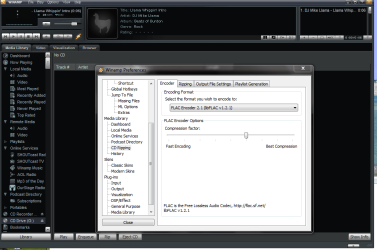
I use Winamp simply because I'm used to it and it rips to FLAC really fast and the GUI is simple and intuitive.

Unlike MP3 compression (or other LOSSY compression) FLAC is LOSSLESS so you don't have to worry about the quality of encoding -- all MP3's BTW are NOT created equal even at the same level of compression so the quality of the encoder IS important. In this case with FLAC any encoder will do the job properly -- the encoding although compressed is 100% LOSSLESS.

Enc image shot

(works in W7 X-64 no probs).

cheers
jimbo
 

Attachments

  • winamp.png
    winamp.png
    45.1 KB · Views: 1,822

My Computer

Computer type
PC/Desktop
Computer Manufacturer/Model Number
Custom built, several laptops HP/ASUS
OS
Linux CENTOS 7 / various Windows OS'es and servers
CPU
Intel i7 Intel i5
Memory
8GB, 16GB
Graphics Card(s)
On Motherboard
Sound Card
Realtek HD audio
Monitor(s) Displays
Apple Cinema display, Samsung LCD
Screen Resolution
1920 X 1080
Hard Drives
4 X 1TB SATA
Mouse
Toshiba wireless laser
Internet Speed
> 20MB up
There's really only one Codec pack that I'll use anymore these days. It's lightweight and has all codecs needed to play any file in Vista and W7. There's no extraneous crud like some others carry and it's constantly being updated as codecs and certain filter tools are released.
Shark007 Codec Pack and 64bit Tools

He's developed a pack specifically for W7 now and the x64 tool are all you'll need including the ability to set either the 32 or 64bit WMP as the default one used when you call WMP. That's important because some codecs simply don't work in a 64bit environment due to lazy developers, and this allows you to easily set the 32bit player as default which has no working difference from the 64bit player.

Shark007 was simply a frustrated user as we all were back with Vista when finding Codecs that worked was a lesson in frustration. From those simple roots he has become one of the top packager of Codecs for Windows today and has a board at Wilders Security forums dedicated to his codec pack development.
He's constantly working on his pack and listening to users requests, to improve this beauty, but I guarantee you'll be happy with this set as it has everything you'll need and the ability to customize the install.

Read the instructions tho as any other installed pack must be uninstalled before using this pack.
 

My Computer

Computer Manufacturer/Model Number
Personal Build
OS
Vista Ult 64bit - Windows 7 Ult 7264 64bit
CPU
Intel Core 2 Duo E6750
Motherboard
Asus Commando
Memory
4 G's Crucial Ballistix Tracer
Graphics Card(s)
BFG Nvidia 8800 GTS 340
Sound Card
Creative Sound Blaster X-FI Platinum FATAL1TY
Monitor(s) Displays
2-22" HP W2207 LCD
Screen Resolution
1920 x 1080
Hard Drives
3 x 500G WD Caviar SATA II
PSU
Enermax Noise Taker II 600W
Case
NZXT Lexa Classic (dual doored & windowed)
Cooling
Zalman 9700 CPU cooler - 4 x 120mm, 1 x 90mm fans
Keyboard
Logitech MX 5500
Mouse
Logitech MX Revolution
Internet Speed
Blazing...
Directshow Filters for Ogg Vorbis, Speex, Theora and FLAC :: Main / HomePage

this is what i installed and works great for me on WMP12, if I'm off track or too late i apologize. i just saw you are in need of flac codes for wmp12. really no reason to install the full nero mega plugin unless you need it. Not required to run flac.
I personally don't use that player much, but want to help out as i must have lossless audio as well .
Looking to see how or where to install my shn codec for wmp12 - have in for winamp and all others - i see no place in wmp folder for plugins
 

My Computer

Computer Manufacturer/Model Number
dell optiplex - 2003
OS
windows7 7600 x86
CPU
itel pentium 4
Memory
3.00 GB
Graphics Card(s)
diamond radion x1050
Sound Card
SoundMax
Monitor(s) Displays
dell 2408wfp dell e172fp
Screen Resolution
1920 x 1200 1280 x 1024
Hard Drives
2 - 80 GB internals WD
1 - 01 TB ext
2 - 750 GB ext
1- 500 GB ext
all running on system no problems
Keyboard
old logitech cordless
Mouse
logitech wireless
Internet Speed
16 / 4
Other Info
networked into my sbs2003 server running sp1 still
it's a wonder I could even get windows 7 to connect to it

My Computer

Computer Manufacturer/Model Number
Acer Aspire X3200
OS
Windows 7 Beta Build 7000
CPU
AMD Athlon 64 x2 4050E
Memory
2048 MB
Graphics Card(s)
nVidia Geforce 8200
Sound Card
High Definition Audio (onboard)
Screen Resolution
1280 x 1024
Hard Drives
160 GB SATA
I might be wrong but I don't think WMP has user settable "plugins" so you are stuck with whatever Microsoft dishes up.

For Audio there are so many better choices around and smaller too -- apart from Winamp, Media Monkey, Foobar etc etc why not go for the really simple and FREE player VLC. (It "does" DVD's as well).

If you need a Music Organiser / Media Library system or whatever then that's another issue but as a player VLC will handle almost any codec in the known universe including those "from a galaxy far far away...".

Cheers
jimbo
 

My Computer

Computer type
PC/Desktop
Computer Manufacturer/Model Number
Custom built, several laptops HP/ASUS
OS
Linux CENTOS 7 / various Windows OS'es and servers
CPU
Intel i7 Intel i5
Memory
8GB, 16GB
Graphics Card(s)
On Motherboard
Sound Card
Realtek HD audio
Monitor(s) Displays
Apple Cinema display, Samsung LCD
Screen Resolution
1920 X 1080
Hard Drives
4 X 1TB SATA
Mouse
Toshiba wireless laser
Internet Speed
> 20MB up
I use Media Monkey to play my music. You need to have both WMP and Quicktime installed because MM piggybacks on those for some formats.

Maybe for movies, but not for audio, i've ran media monkey without wmp nor quicktime or realplayer

i would not use the same program to run audio and video - winamp can do it, but km player is a lot better for the video - as in the same way media monkey or Jriver or winamp are better and specialize in audio. Media Center - J. River Media Center software

as for libraries go - the best i have found to date - is orangecd - OrangeCD – Best CD catalog software to organize MP3 collection this is the only cataloger i'd use, and it connects with winamp or others to play files from catalogue as well, most do not.

The only way to figure this out is to try them out one at a time and see what you like. I did that and a lot of research to come up with my conclusions, but opinions are just like A#holes everyone has one. lol
 

My Computer

Computer Manufacturer/Model Number
dell optiplex - 2003
OS
windows7 7600 x86
CPU
itel pentium 4
Memory
3.00 GB
Graphics Card(s)
diamond radion x1050
Sound Card
SoundMax
Monitor(s) Displays
dell 2408wfp dell e172fp
Screen Resolution
1920 x 1200 1280 x 1024
Hard Drives
2 - 80 GB internals WD
1 - 01 TB ext
2 - 750 GB ext
1- 500 GB ext
all running on system no problems
Keyboard
old logitech cordless
Mouse
logitech wireless
Internet Speed
16 / 4
Other Info
networked into my sbs2003 server running sp1 still
it's a wonder I could even get windows 7 to connect to it
but I guarantee you'll be happy with this set
Yup, this is an excellent find and I appreciate your link and description, haven't tried all the file formats yet, and may well go back to WinAmp - but WMP 12 is pretty solid and looks good so, not having a built in rejection response to Microsoft (just healthy suspicion) and now being able to play my amon Tobin in Flac I'm pretty pleased.
 

My Computer

Computer Manufacturer/Model Number
AMD Athlon 64 3200+, Lenovo G560 i3
OS
Windows 7 Ultimate, Ubuntu
Motherboard
Gigabyte K8T8000
Memory
DDR 2Gb (!)
Graphics Card(s)
6600GT
Monitor(s) Displays
MultiMonitor (2) LCD
Hard Drives
Old Seagate 75
Big Western Digital
Samsung 500Gb pulled out of an external drive and installed
Ext: Maxtor (Firewire), 1Gb Lacie (Samsung)
Mouse
Logitech MX620 Cordless
There's really only one Codec pack that I'll use anymore these days. It's lightweight and has all codecs needed to play any file in Vista and W7. There's no extraneous crud like some others carry and it's constantly being updated as codecs and certain filter tools are released.
Shark007 Codec Pack and 64bit Tools

.


Hi there
any WORKING links to this package

Cheers
jimbo
 

Attachments

  • codecs.png
    codecs.png
    21.2 KB · Views: 34

My Computer

Computer type
PC/Desktop
Computer Manufacturer/Model Number
Custom built, several laptops HP/ASUS
OS
Linux CENTOS 7 / various Windows OS'es and servers
CPU
Intel i7 Intel i5
Memory
8GB, 16GB
Graphics Card(s)
On Motherboard
Sound Card
Realtek HD audio
Monitor(s) Displays
Apple Cinema display, Samsung LCD
Screen Resolution
1920 X 1080
Hard Drives
4 X 1TB SATA
Mouse
Toshiba wireless laser
Internet Speed
> 20MB up
Personally I use foobar2000 for all my audio needs it's very versatile (hopefully I'll be able to listen to some music when I get the realtek issue sorted) it comes with everything needed to play most media formats.

If you do need something specific by way of a codec you can go to:

Free-Codecs.com :: Download latest audio codecs, video codecs, codec packs and tools, FREE!
or
Codec Guide: K-Lite Codec Pack and other useful stuff

The both have a great selection of free codecs and utilities available.

I tried win7codec pack and after installation I was unable to play mp3 files, so I removed it.
 

My Computer

Computer Manufacturer/Model Number
Generic
OS
Clients: XP/Win7/ubuntu
CPU
E8400
Motherboard
Gigabyte EP35-DS3R
Memory
4Gb HyperX
Graphics Card(s)
ATI 4850
Sound Card
Onboard
Monitor(s) Displays
Samsung P970
Screen Resolution
1280 by 1024
Hard Drives
Samsung SATA-II 500Gb x 3
PSU
Corsair HX520
Case
chieftec
Cooling
Zalman
Keyboard
Logitech
Mouse
Logitech
Internet Speed
512kb

My Computer

Computer Manufacturer/Model Number
AMD Athlon 64 3200+, Lenovo G560 i3
OS
Windows 7 Ultimate, Ubuntu
Motherboard
Gigabyte K8T8000
Memory
DDR 2Gb (!)
Graphics Card(s)
6600GT
Monitor(s) Displays
MultiMonitor (2) LCD
Hard Drives
Old Seagate 75
Big Western Digital
Samsung 500Gb pulled out of an external drive and installed
Ext: Maxtor (Firewire), 1Gb Lacie (Samsung)
Mouse
Logitech MX620 Cordless
well I tried to get the codec from Shark007's FREE Codec solutions - Windows 7 codecs, but stupid as it may seem. All the immediate download links on the page send you somewhere else to software I don't want.

It kinda seems the site was created for advertising someone else's software than the intended codec.

Am I alone in thinking the site is very poorly made?
 

My Computer

OS
Windows 7 Home Premium 64bit
Don't be put off by the route to the download site. Follow the link to MajorGeeks.com near the bottom of Shark007's explanation page. Choose the Official Mirror at the top of the MajorGeeks page and you will get the Win7Codecs file. Remember his instructions, particularly to uninstall all other codecs. It worked fine for me. You also need WMPTagPlus. Good luck.

Nick.
 
Last edited:

My Computer

OS
Windows 7 Ultimate 32 bit
all sorted, thanks heaps for the pointers.
 

My Computer

OS
Windows 7 Home Premium 64bit
Back
Top