Flash issue - apparently does not work in IE

riffwraith

New member
Member
VIP
Local time
6:05 AM
Messages
240
Flash is installed on my computer; actually just installed the latest version moments ago.

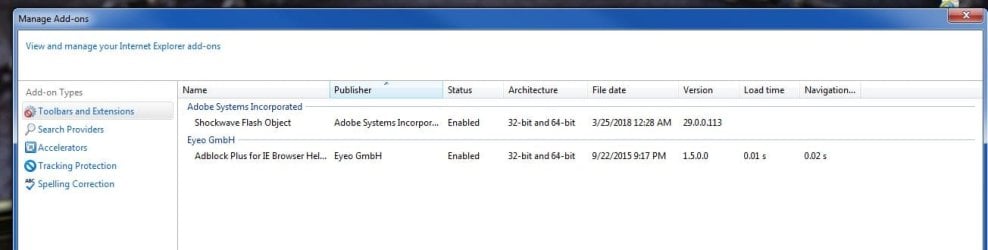
Tools > Manage Add Ons > Toolbars And Extensions shows that Flash is installed, and enabled. It also shows the latest version I d/l-ed.

If I go here:

https://helpx.adobe.com/flash-player.html

- and click "check now", I get:

Sorry, Flash Player is either not installed or not enabled.
Please go to step 2.


Step 2 being install Flash.

Any ideas?

Thanks in advance.
 

My Computer My Computer

Computer type
PC/Desktop
Computer Manufacturer/Model Number
Custom
OS
W7 64 Ult
CPU
Intel Core i9-7940x
Motherboard
ASUS x299 TUF
Memory
GSkill 128GB
Graphics Card(s)
AMD Radeon RX 560
Sound Card
RME
Screen Resolution
1920x1080
Hard Drives
5
PSU
BeQuiet!
Case
BeQuiet!
Keyboard
HyperX
Mouse
Logitech
Browser
IE - what else is there?
Have a look in Control Panel under Programs & Features & see if Adobe Flash Player is installed. It should show the date & version installed.

Then check in your browser to under settings to add Flash or allow Flash to be used. If you view videos in your browser it will tell you if Flash is not installed, as you wont be able to view them if it's not.

Open IE 11, click on the little Gearwheel up on the RH top corner, when that opens, click on Manage Add Ons, when that opens click on the little arrow under Show, the select All Add Ons, then make sure Shockwave Flash Object, under the Adobe heading is enabled.

Sorry this coming in dribs & drabs, but I am having intermittent modem failure problems.
 
Last edited:

My Computer My Computer

Computer type
PC/Desktop
Computer Manufacturer/Model Number
Self built using existing case
OS
Windows 7 Home Premium 64 bit sp1
CPU
Intel i5 3570 3.4Ghz Ivy Bridge SKT 1155 quad core
Motherboard
Gigabyte Z77-HD3 SKT 1155 2xSata 3, 4x USB 3.0
Memory
G-Skill Rip Jaws 16Gb (8x2) DDR3 -1600 PC3 12800 CL 10 red
Graphics Card(s)
Gigabyte NVIDIA GT610 1Gb DDR3 810/1200 PCI-E 2.0 Silent
Sound Card
NVIDIA High Definition & Realtech High Definition Audio
Monitor(s) Displays
2 x Philips 226V4L 16:9 aspect ratio
Screen Resolution
1920 x 1080 HD
Hard Drives
Samsung 840 Pro 256gb SSD, SATA 3.
Hitachi Touro Portable 1tb, USB 3.0 HDD used for image b/ups.
PSU
Corsair VS450
Case
Codeng
Cooling
PSU fan & CPU fan
Keyboard
Logitech
Mouse
Logitech Wireless trackball M570
Internet Speed
Wireless 3G. 3mg down & 550kb up.
Antivirus
Bitdefender Internet Security 2020
Browser
Opera (Current Version) & Firefox
Other Info
MS Office 2013 Pro. Davis weather station software. MGE Nova 600 avr UPS.
Hi

1. It is. Correct date and vers

2. check in your browser to under settings - I have nothing called 'settings'

3. Already did that, as alluded to in the op :)
 

My Computer My Computer

Computer type
PC/Desktop
Computer Manufacturer/Model Number
Custom
OS
W7 64 Ult
CPU
Intel Core i9-7940x
Motherboard
ASUS x299 TUF
Memory
GSkill 128GB
Graphics Card(s)
AMD Radeon RX 560
Sound Card
RME
Screen Resolution
1920x1080
Hard Drives
5
PSU
BeQuiet!
Case
BeQuiet!
Keyboard
HyperX
Mouse
Logitech
Browser
IE - what else is there?
Under Programs & Features, in Control Panel, is the Flash Player installed the one for Active X, which is the one needed for IE 11.

Did you click on the Show arrow, that I mentioned in Manage Add Ons?.
 

My Computer My Computer

Computer type
PC/Desktop
Computer Manufacturer/Model Number
Self built using existing case
OS
Windows 7 Home Premium 64 bit sp1
CPU
Intel i5 3570 3.4Ghz Ivy Bridge SKT 1155 quad core
Motherboard
Gigabyte Z77-HD3 SKT 1155 2xSata 3, 4x USB 3.0
Memory
G-Skill Rip Jaws 16Gb (8x2) DDR3 -1600 PC3 12800 CL 10 red
Graphics Card(s)
Gigabyte NVIDIA GT610 1Gb DDR3 810/1200 PCI-E 2.0 Silent
Sound Card
NVIDIA High Definition & Realtech High Definition Audio
Monitor(s) Displays
2 x Philips 226V4L 16:9 aspect ratio
Screen Resolution
1920 x 1080 HD
Hard Drives
Samsung 840 Pro 256gb SSD, SATA 3.
Hitachi Touro Portable 1tb, USB 3.0 HDD used for image b/ups.
PSU
Corsair VS450
Case
Codeng
Cooling
PSU fan & CPU fan
Keyboard
Logitech
Mouse
Logitech Wireless trackball M570
Internet Speed
Wireless 3G. 3mg down & 550kb up.
Antivirus
Bitdefender Internet Security 2020
Browser
Opera (Current Version) & Firefox
Other Info
MS Office 2013 Pro. Davis weather station software. MGE Nova 600 avr UPS.
There is no "show" button. Flash is enabled:

sw.jpg

is the Flash Player installed the one for Active X

Yes:

cp.jpg

Thanks again.
 

My Computer My Computer

Computer type
PC/Desktop
Computer Manufacturer/Model Number
Custom
OS
W7 64 Ult
CPU
Intel Core i9-7940x
Motherboard
ASUS x299 TUF
Memory
GSkill 128GB
Graphics Card(s)
AMD Radeon RX 560
Sound Card
RME
Screen Resolution
1920x1080
Hard Drives
5
PSU
BeQuiet!
Case
BeQuiet!
Keyboard
HyperX
Mouse
Logitech
Browser
IE - what else is there?
Ok, I seem to have found the problem. When I turn ActiveX filtering off, flash works. The sites that told me I needed flash, the Adobe site, etc.

ActiveX filtering disables flash? Did not know this.

Cheers.
 

My Computer My Computer

Computer type
PC/Desktop
Computer Manufacturer/Model Number
Custom
OS
W7 64 Ult
CPU
Intel Core i9-7940x
Motherboard
ASUS x299 TUF
Memory
GSkill 128GB
Graphics Card(s)
AMD Radeon RX 560
Sound Card
RME
Screen Resolution
1920x1080
Hard Drives
5
PSU
BeQuiet!
Case
BeQuiet!
Keyboard
HyperX
Mouse
Logitech
Browser
IE - what else is there?
No I did not know that, but I have never had any problems Active X & Flash Player.

Glad to hear you have fixed the problem & it's now working.
 

My Computer My Computer

Computer type
PC/Desktop
Computer Manufacturer/Model Number
Self built using existing case
OS
Windows 7 Home Premium 64 bit sp1
CPU
Intel i5 3570 3.4Ghz Ivy Bridge SKT 1155 quad core
Motherboard
Gigabyte Z77-HD3 SKT 1155 2xSata 3, 4x USB 3.0
Memory
G-Skill Rip Jaws 16Gb (8x2) DDR3 -1600 PC3 12800 CL 10 red
Graphics Card(s)
Gigabyte NVIDIA GT610 1Gb DDR3 810/1200 PCI-E 2.0 Silent
Sound Card
NVIDIA High Definition & Realtech High Definition Audio
Monitor(s) Displays
2 x Philips 226V4L 16:9 aspect ratio
Screen Resolution
1920 x 1080 HD
Hard Drives
Samsung 840 Pro 256gb SSD, SATA 3.
Hitachi Touro Portable 1tb, USB 3.0 HDD used for image b/ups.
PSU
Corsair VS450
Case
Codeng
Cooling
PSU fan & CPU fan
Keyboard
Logitech
Mouse
Logitech Wireless trackball M570
Internet Speed
Wireless 3G. 3mg down & 550kb up.
Antivirus
Bitdefender Internet Security 2020
Browser
Opera (Current Version) & Firefox
Other Info
MS Office 2013 Pro. Davis weather station software. MGE Nova 600 avr UPS.
Back
Top