Solved flashplayer install

longshanks

New member
Member
VIP
Local time
10:01 PM
Messages
156
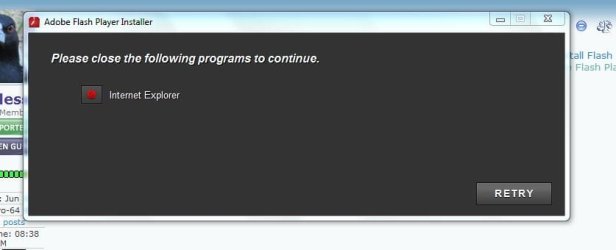
I have been on sites recently and they have said your flash player needs updating so I tried but half way through ,I get a message (,please close internet explore to continue.)I have tried going to my emails and
opening a link I got that sent me directly to the flash player install.so as far has I know I haven't opened I/e. But it still didn't work.
I have tried installing it from Firefox opera and I/e nothing works .any help would be appreciated
 

My Computer

OS
windows 7
Motherboard
asus
Memory
2gb
Monitor(s) Displays
acer
Hard Drives
seagate

My Computer

Computer Manufacturer/Model Number
Put together
OS
Win7 Pro-64 Bit
CPU
i7-2600-3.4GHz
Motherboard
ASRock Z68M
Memory
8 GIG DDR3
Graphics Card(s)
onboard
Sound Card
onboard
Hard Drives
Seagate 1TB 7200RPM
PSU
680 W
Case
black
Cooling
stock fans
Keyboard
Microsoft
Mouse
Microsoft optical
flash player install

Thanks Bright Blessings but no go tried uninstall //tried install ,I went right to forums, from desktop.no
browser, right to your reply tried your suggestions and got this. (check attachment)
 

Attachments

  • Capture  100.JPG
    Capture 100.JPG
    25.4 KB · Views: 11

My Computer

OS
windows 7
Motherboard
asus
Memory
2gb
Monitor(s) Displays
acer
Hard Drives
seagate
When you get this message, is task manager showing IE running?
 

My Computer

Computer Manufacturer/Model Number
Put together
OS
Win7 Pro-64 Bit
CPU
i7-2600-3.4GHz
Motherboard
ASRock Z68M
Memory
8 GIG DDR3
Graphics Card(s)
onboard
Sound Card
onboard
Hard Drives
Seagate 1TB 7200RPM
PSU
680 W
Case
black
Cooling
stock fans
Keyboard
Microsoft
Mouse
Microsoft optical
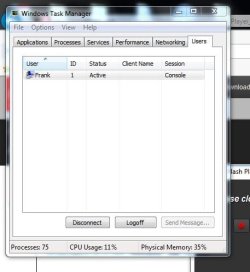
Morning, just checked task master and this is what I see. I have been trying other things and still no go .
even went to add on's/toolbars extensions/shockwave flash object,(this from flash player helpline).
everything is enabled.so I am still stuck I really need your help.
 

Attachments

  • Capture  101.JPG
    Capture 101.JPG
    33.3 KB · Views: 8

My Computer

OS
windows 7
Motherboard
asus
Memory
2gb
Monitor(s) Displays
acer
Hard Drives
seagate
Each of your screen shots shows an open windows behind the popups,
To see what is running go to the Applications section of Task Manager,
Click on each and End Task.
Processes section,
iexplore.exe
iexplore.exe*32
End Process *32 first/ refresh page see if the other is still running.
Or post additional screen shots showing the two sections I'm pointing to.
 

My Computer

Computer type
PC/Desktop
Computer Manufacturer/Model Number
Custom assembled by me :}
OS
Win-7-Pro64bit 7-H-Prem-64bit
CPU
i7-5930K 2nd i9-9940x both water blocked VRM's too
Motherboard
ASUS SABERTOOTH X99 2nd ASUS x299 Apex
Memory
Trident-z 3200C14 2nd Trident-z 3600C16
Graphics Card(s)
EVGA 1080ti ftw3 2nd Titan Xp both water blocked
Sound Card
Built-in Realtek
Monitor(s) Displays
1-AOC G2460PG 24"G-Sync 144Hz/ 2nd 1-ASUS VG248QE 24" 144Hz
Screen Resolution
1920 x 1080 144Hz
Hard Drives
2-Samsung M.2 Evo & Evo Plus
2-Samsung 850 EVO 500GB SSD's/ 3-2.5 W.D. Black 1tb-&3-1tb/3-3.5 WD Black 1tb hdd's
PSU
EVGA SuperNOVA 1000-P2 2nd 1200-P2
Case
2-Corsair Obsidian Series 450D Black ATX Mid Tower
Cooling
Custom water loops
Keyboard
Logitech G710+/ 2nd Logitech G910
Mouse
2-RedDragon M901 Perdition 16400 dpi Gaming mouse = wired
Internet Speed
Comcast Ping 19ms 89.31mbps download speed 6.12mbps upload
Antivirus
Malwarebytes Pro/ Superantispyware Pro
Browser
FireFox & Pale moon
Other Info
2nd ASUS X299 Apex/Intel i9-9940x with Custom water loop/7H-Prem-x64/Corsair 450D case/Ram Trident-z 3600C16 4x8gb / Samsung970Evo plus 500gb SSD/Dual ssd EZ swap evo/PSU EVGA SuperNova 1200w-P2 80+Platinum/GPU Titan Xp /8-ML-140 on push-pull on 2-280GTX rads
Thanks once again for your reply's',I have tried to put down what you asked for not sure if it's any use.
I have windows essentials no other anti virus, I am running windows 7. and I have .
Google/Firefox/and internet explorer .don't. Understand this if I go straight to my emails from desktop.
I am not using a browser, so when I open your email and follow your link to install flash player. Why does'
it tell me to shut down Internet explorer.
 

My Computer

OS
windows 7
Motherboard
asus
Memory
2gb
Monitor(s) Displays
acer
Hard Drives
seagate
In your first screenshot I can see a browser window open, I'm assuming it is internet explorer, if you click on a link in an email it will open in IE if that is your default browser. That is why I suggested to look in the task manager when no browser is open. Is your email a web based such as gmail or whatnot or is it an email programme on your pc, Also Thrashzone gave clear instructions as to how to check your task manager and how to do it.
 

My Computer

Computer Manufacturer/Model Number
Put together
OS
Win7 Pro-64 Bit
CPU
i7-2600-3.4GHz
Motherboard
ASRock Z68M
Memory
8 GIG DDR3
Graphics Card(s)
onboard
Sound Card
onboard
Hard Drives
Seagate 1TB 7200RPM
PSU
680 W
Case
black
Cooling
stock fans
Keyboard
Microsoft
Mouse
Microsoft optical
All email services use an open browser which you may not notice depending on the email service,
Here is a picture to show you how to open task manager and end an Applications Task,
View attachment 282525
 
Last edited:

My Computer

Computer type
PC/Desktop
Computer Manufacturer/Model Number
Custom assembled by me :}
OS
Win-7-Pro64bit 7-H-Prem-64bit
CPU
i7-5930K 2nd i9-9940x both water blocked VRM's too
Motherboard
ASUS SABERTOOTH X99 2nd ASUS x299 Apex
Memory
Trident-z 3200C14 2nd Trident-z 3600C16
Graphics Card(s)
EVGA 1080ti ftw3 2nd Titan Xp both water blocked
Sound Card
Built-in Realtek
Monitor(s) Displays
1-AOC G2460PG 24"G-Sync 144Hz/ 2nd 1-ASUS VG248QE 24" 144Hz
Screen Resolution
1920 x 1080 144Hz
Hard Drives
2-Samsung M.2 Evo & Evo Plus
2-Samsung 850 EVO 500GB SSD's/ 3-2.5 W.D. Black 1tb-&3-1tb/3-3.5 WD Black 1tb hdd's
PSU
EVGA SuperNOVA 1000-P2 2nd 1200-P2
Case
2-Corsair Obsidian Series 450D Black ATX Mid Tower
Cooling
Custom water loops
Keyboard
Logitech G710+/ 2nd Logitech G910
Mouse
2-RedDragon M901 Perdition 16400 dpi Gaming mouse = wired
Internet Speed
Comcast Ping 19ms 89.31mbps download speed 6.12mbps upload
Antivirus
Malwarebytes Pro/ Superantispyware Pro
Browser
FireFox & Pale moon
Other Info
2nd ASUS X299 Apex/Intel i9-9940x with Custom water loop/7H-Prem-x64/Corsair 450D case/Ram Trident-z 3600C16 4x8gb / Samsung970Evo plus 500gb SSD/Dual ssd EZ swap evo/PSU EVGA SuperNova 1200w-P2 80+Platinum/GPU Titan Xp /8-ML-140 on push-pull on 2-280GTX rads
Morning I am running Windows essentials for all my security. And when I get the message to shut down I/e I go to taskmaster and see this.
 

Attachments

  • Capture  101.JPG
    Capture 101.JPG
    33.3 KB · Views: 7

My Computer

OS
windows 7
Motherboard
asus
Memory
2gb
Monitor(s) Displays
acer
Hard Drives
seagate
longshanks, when you open task manager, click on the Processes tab at the top, your is opening to the Users tab. On the processes tab, follow ThrashZone's suggestion in post#6 above

http://www.sevenforums.com/browsers-mail/301714-flashplayer-install.html#post2505087

When you open your email, it is opening through IE, that is why it says close IE. Close that out before you try to install and it won't ask you to close IE. If it does, open task manager, go to the processes tab, and end the IE process.

16gybv8.jpg


Close iexplore.exe NOT explorer.exe!

A Guy
 

My Computer

Computer type
PC/Desktop
OS
Windows 10 Home x64
CPU
INTEL Core i5-750 Quad-Core 3.37GHz
Motherboard
ASUS P7P55D
Memory
HyperX Fury Black Series 8GB (2 x 4GB) 1866Mhz
Graphics Card(s)
EVGA GeForce GTX 750 Superclocked 1GB 128-Bit GDDR5
Monitor(s) Displays
LG 32MA68HY 32" IPS
Screen Resolution
1920 x 1080
Hard Drives
Samsung 840 Evo 120GB, SEAGATE 500GB Barracuda® 7200.12, SATA 3 Gb/s, 7200 RPM, 16MB cache
PSU
ANTEC TruePower New TP-550, 80 PLUS, 550W
Case
ANTEC Three Hundred Illusion
Cooling
COOLER MASTER Hyper 212 Plus, 4 x 120mm 1 x 140mm Noctua's
Internet Speed
85 + Mbps
Antivirus
Avast
Browser
Vivaldi
Thanks Thrashzone/Bright Blessings. I have fixed it.(well not me personally) one answer to the question, was to go to I/e tools/disable ActiveX did it then tried again to install flash player, it worked.

.

.
 

My Computer

OS
windows 7
Motherboard
asus
Memory
2gb
Monitor(s) Displays
acer
Hard Drives
seagate
Glad you got it sorted, and thank you for telling your fix.:thumbsup:
 

My Computer

Computer Manufacturer/Model Number
Put together
OS
Win7 Pro-64 Bit
CPU
i7-2600-3.4GHz
Motherboard
ASRock Z68M
Memory
8 GIG DDR3
Graphics Card(s)
onboard
Sound Card
onboard
Hard Drives
Seagate 1TB 7200RPM
PSU
680 W
Case
black
Cooling
stock fans
Keyboard
Microsoft
Mouse
Microsoft optical
Thanks Thrashzone/Bright Blessings. I have fixed it.(well not me personally) one answer to the question, was to go to I/e tools/disable ActiveX did it then tried again to install flash player, it worked.
Yes if you ever see this Blue circle with a slash through it right click and disable active x filtering,
active%20x-comp-view.jpg

Thanks for the update,
Cheers.
 

My Computer

Computer type
PC/Desktop
Computer Manufacturer/Model Number
Custom assembled by me :}
OS
Win-7-Pro64bit 7-H-Prem-64bit
CPU
i7-5930K 2nd i9-9940x both water blocked VRM's too
Motherboard
ASUS SABERTOOTH X99 2nd ASUS x299 Apex
Memory
Trident-z 3200C14 2nd Trident-z 3600C16
Graphics Card(s)
EVGA 1080ti ftw3 2nd Titan Xp both water blocked
Sound Card
Built-in Realtek
Monitor(s) Displays
1-AOC G2460PG 24"G-Sync 144Hz/ 2nd 1-ASUS VG248QE 24" 144Hz
Screen Resolution
1920 x 1080 144Hz
Hard Drives
2-Samsung M.2 Evo & Evo Plus
2-Samsung 850 EVO 500GB SSD's/ 3-2.5 W.D. Black 1tb-&3-1tb/3-3.5 WD Black 1tb hdd's
PSU
EVGA SuperNOVA 1000-P2 2nd 1200-P2
Case
2-Corsair Obsidian Series 450D Black ATX Mid Tower
Cooling
Custom water loops
Keyboard
Logitech G710+/ 2nd Logitech G910
Mouse
2-RedDragon M901 Perdition 16400 dpi Gaming mouse = wired
Internet Speed
Comcast Ping 19ms 89.31mbps download speed 6.12mbps upload
Antivirus
Malwarebytes Pro/ Superantispyware Pro
Browser
FireFox & Pale moon
Other Info
2nd ASUS X299 Apex/Intel i9-9940x with Custom water loop/7H-Prem-x64/Corsair 450D case/Ram Trident-z 3600C16 4x8gb / Samsung970Evo plus 500gb SSD/Dual ssd EZ swap evo/PSU EVGA SuperNova 1200w-P2 80+Platinum/GPU Titan Xp /8-ML-140 on push-pull on 2-280GTX rads
flsh player install

Thanks everybody. tried this go to I/e click tools /uncheck /active x. then try to install it again and it worked .installed flash player. at the end of install it said you have successfully installed flash player.
but I still go on some sites (not dodgy ones) and I get the message your flash player needs updating.
But when I check with flash player it says' I have the up to date version. so I am still confused.
 

My Computer

OS
windows 7
Motherboard
asus
Memory
2gb
Monitor(s) Displays
acer
Hard Drives
seagate
Post a link to the site where the issue occurs,
Cheers.
 

My Computer

Computer type
PC/Desktop
Computer Manufacturer/Model Number
Custom assembled by me :}
OS
Win-7-Pro64bit 7-H-Prem-64bit
CPU
i7-5930K 2nd i9-9940x both water blocked VRM's too
Motherboard
ASUS SABERTOOTH X99 2nd ASUS x299 Apex
Memory
Trident-z 3200C14 2nd Trident-z 3600C16
Graphics Card(s)
EVGA 1080ti ftw3 2nd Titan Xp both water blocked
Sound Card
Built-in Realtek
Monitor(s) Displays
1-AOC G2460PG 24"G-Sync 144Hz/ 2nd 1-ASUS VG248QE 24" 144Hz
Screen Resolution
1920 x 1080 144Hz
Hard Drives
2-Samsung M.2 Evo & Evo Plus
2-Samsung 850 EVO 500GB SSD's/ 3-2.5 W.D. Black 1tb-&3-1tb/3-3.5 WD Black 1tb hdd's
PSU
EVGA SuperNOVA 1000-P2 2nd 1200-P2
Case
2-Corsair Obsidian Series 450D Black ATX Mid Tower
Cooling
Custom water loops
Keyboard
Logitech G710+/ 2nd Logitech G910
Mouse
2-RedDragon M901 Perdition 16400 dpi Gaming mouse = wired
Internet Speed
Comcast Ping 19ms 89.31mbps download speed 6.12mbps upload
Antivirus
Malwarebytes Pro/ Superantispyware Pro
Browser
FireFox & Pale moon
Other Info
2nd ASUS X299 Apex/Intel i9-9940x with Custom water loop/7H-Prem-x64/Corsair 450D case/Ram Trident-z 3600C16 4x8gb / Samsung970Evo plus 500gb SSD/Dual ssd EZ swap evo/PSU EVGA SuperNova 1200w-P2 80+Platinum/GPU Titan Xp /8-ML-140 on push-pull on 2-280GTX rads
Back
Top