Solved Fluctuating Internet - WTF

inaniloquent

goodbye windows 7
Member
VIP
Local time
3:52 PM
Messages
190
Location
UK
This is by far the most annoying and completely retarded problem I have had with my internet ever. It started around 2 weeks ago. Now, my (wireless) internet always shows itself as connected in the system tray, at 4 bars of strength. The most common things I use my PC for (other than drawing, playing different games or using Photoshop) are Skype calls and Minecraft (an awesome and very affordable video game, google if you have not heard of).
Now, recently, if I am in a Skype call and am playing on my friend's Minecraft server, Skype's little green icon stops being green and turns to grey, meaning it's attempting to reconnect. During this, everything I am saying lags to shit and sounds like hellspawn to my friends. However, I can hear everything they are saying completely fine, unless the call decides to drop, which doesn't happen every time, strangely. Minecraft lags, and everything I do is either undone or doesn't happen.
However, a minute or so later, Skype turns green again and my friends can hear me normally again. Minecraft begins to behave - but this only stays for a minute or so longer until the internet drops again.
When the internet drops, the strength bar in the corner nearly always stays the same - sometimes the bars drop to 3 or 2, and sometimes the little yellow triangle pops up over it momentarily.
If I'm not in a call but am still using the internet, the Skype icon never changes, so I'm assuming that means my internet isn't dropping, although I'm not sure... sometimes, web pages load very slowly or not at all, so that might not be the case.
This problem is not affecting anyone else in my household.

So, why the hell is my PC doing this to me, and how do I fix it? My dad fiddled with my USB ports on the back of my PC to find they were loose, and now he says they aren't anymore - my internet worked for a day or so - but now it's back to being bollocks. I beg all of you, help me!
 

My Computer

Computer type
PC/Desktop
Computer Manufacturer/Model Number
Custom build
OS
Windows 7 Home Premium 64-Bit
CPU
i5-4590
Motherboard
GIGABYTE H97M-HD3
Memory
Corsair DDR3 8GB
Graphics Card(s)
GeForce GTX 970
Monitor(s) Displays
LG Electronics W1942 - 19 inches
Screen Resolution
1440x900
Hard Drives
Corsair Neutron SSD 119GB, Toshiba External 931GB
PSU
Corsair CX600
Keyboard
Logitech K360 Wireless
Mouse
Logitech Wireless Mouse M325
Browser
Firefox
Have you tried connecting a ethernet cable to your router and trying, if that works it would suggest a router problem. If not try that ....
 

My Computer

OS
Windows 7 Premium x64
Now, recently, if I am in a Skype call and am playing on my friend's Minecraft server, Skype's little green icon stops being green and turns to grey, meaning it's attempting to reconnect.
My belief would be that nobody else in your household is using half the traffic you are. That's a lot of bandwidth to be trying to consume between those two applications. Do you happen to know what speed your connection is?

If not, I suggest you go to SpeedTest.net/ and run their speed test, and report the results.
 

My Computer

Computer Manufacturer/Model Number
HP 6000 Pro Micro Tower
OS
W7 Professional x64
CPU
Core 2 Duo 2.93
Memory
2 GB
Graphics Card(s)
ATI Radeon 4695
Monitor(s) Displays
Two HP 17's
Hard Drives
150GB Sata Drive
Case
Tiny. Kinda cute.
Keyboard
HP Supplied. Surprisingly nice.
Mouse
Gateway Mouse from an E2610D
Internet Speed
45 mbps
Have you tried connecting a ethernet cable to your router and trying, if that works it would suggest a router problem. If not try that ....
My router is too far to do that; I'm in a room upstairs and the root is just under the stairs. I'm technically not far away, but I am too far for a cable.
 

My Computer

Computer type
PC/Desktop
Computer Manufacturer/Model Number
Custom build
OS
Windows 7 Home Premium 64-Bit
CPU
i5-4590
Motherboard
GIGABYTE H97M-HD3
Memory
Corsair DDR3 8GB
Graphics Card(s)
GeForce GTX 970
Monitor(s) Displays
LG Electronics W1942 - 19 inches
Screen Resolution
1440x900
Hard Drives
Corsair Neutron SSD 119GB, Toshiba External 931GB
PSU
Corsair CX600
Keyboard
Logitech K360 Wireless
Mouse
Logitech Wireless Mouse M325
Browser
Firefox
Now, recently, if I am in a Skype call and am playing on my friend's Minecraft server, Skype's little green icon stops being green and turns to grey, meaning it's attempting to reconnect.
My belief would be that nobody else in your household is using half the traffic you are. That's a lot of bandwidth to be trying to consume between those two applications. Do you happen to know what speed your connection is?

If not, I suggest you go to SpeedTest.net/ and run their speed test, and report the results.
But Skype often fails even when I'm not using Minecraft... so I'm not sure if that's the problem.
Even so, my internet is crap. http://www.speedtest.net/result/1207050693.png
Yesterday, the download speed was just over 2MB...
Besides, it used to work fine, so I don't understand.
 

My Computer

Computer type
PC/Desktop
Computer Manufacturer/Model Number
Custom build
OS
Windows 7 Home Premium 64-Bit
CPU
i5-4590
Motherboard
GIGABYTE H97M-HD3
Memory
Corsair DDR3 8GB
Graphics Card(s)
GeForce GTX 970
Monitor(s) Displays
LG Electronics W1942 - 19 inches
Screen Resolution
1440x900
Hard Drives
Corsair Neutron SSD 119GB, Toshiba External 931GB
PSU
Corsair CX600
Keyboard
Logitech K360 Wireless
Mouse
Logitech Wireless Mouse M325
Browser
Firefox
But Skype often fails even when I'm not using Minecraft... so I'm not sure if that's the problem.
Even so, my internet is crap. http://www.speedtest.net/result/1207050693.png
Yesterday, the download speed was just over 2MB...
Besides, it used to work fine, so I don't understand.
In this situation, I think the problem is your connection speed. If one (Skype/Minecraft) works fine without the other running, then I don't think it's a machine or even a problem with your LAN. Something to remember is that even if you had an insanely fast connection, if you're skyping a friend who has dial up, you'll see dial-up quality.

When you say it used to work fine, is that referring to a previous point in time with the same machine, or a different one?


p.s: if you're using skype to talk to your friends you're playing minecraft with, I'd suggest something like Ventrilo that uses voice only. It'd save you a LOT of bandwidth, and I think saving bandwidth would be ideal for you right now.
 

My Computer

Computer Manufacturer/Model Number
HP 6000 Pro Micro Tower
OS
W7 Professional x64
CPU
Core 2 Duo 2.93
Memory
2 GB
Graphics Card(s)
ATI Radeon 4695
Monitor(s) Displays
Two HP 17's
Hard Drives
150GB Sata Drive
Case
Tiny. Kinda cute.
Keyboard
HP Supplied. Surprisingly nice.
Mouse
Gateway Mouse from an E2610D
Internet Speed
45 mbps
Wireless signal has changed for the worse I reckon. Some wireless setups are pretty poor at getting through a couple of walls. You problem is mainly to do with poor upload performance based on your fault description, not download speed.
 

My Computer

OS
Windows 7
But Skype often fails even when I'm not using Minecraft... so I'm not sure if that's the problem.
Even so, my internet is crap. http://www.speedtest.net/result/1207050693.png
Yesterday, the download speed was just over 2MB...
Besides, it used to work fine, so I don't understand.
In this situation, I think the problem is your connection speed. If one (Skype/Minecraft) works fine without the other running, then I don't think it's a machine or even a problem with your LAN. Something to remember is that even if you had an insanely fast connection, if you're skyping a friend who has dial up, you'll see dial-up quality.

When you say it used to work fine, is that referring to a previous point in time with the same machine, or a different one?


p.s: if you're using skype to talk to your friends you're playing minecraft with, I'd suggest something like Ventrilo that uses voice only. It'd save you a LOT of bandwidth, and I think saving bandwidth would be ideal for you right now.
The thing is, often one does work by itself without the other running. None of my friends are using dial-up, so I don't think that is the issue.. also, they won't be willing to change their communication platform just because my internet sucks - partly because we use a lot of skype's features (such as pasting screenshots, sharing files, IM) and partly because they're lazy :cool:

I meant that it used to work in the past with the same machine. I think. It started a lot longer ago than I realised - I think it was about a month ago; it used to happen maybe 2 or 3 times a week but now it's every day.
 

My Computer

Computer type
PC/Desktop
Computer Manufacturer/Model Number
Custom build
OS
Windows 7 Home Premium 64-Bit
CPU
i5-4590
Motherboard
GIGABYTE H97M-HD3
Memory
Corsair DDR3 8GB
Graphics Card(s)
GeForce GTX 970
Monitor(s) Displays
LG Electronics W1942 - 19 inches
Screen Resolution
1440x900
Hard Drives
Corsair Neutron SSD 119GB, Toshiba External 931GB
PSU
Corsair CX600
Keyboard
Logitech K360 Wireless
Mouse
Logitech Wireless Mouse M325
Browser
Firefox
Wireless signal has changed for the worse I reckon. Some wireless setups are pretty poor at getting through a couple of walls. You problem is mainly to do with poor upload performance based on your fault description, not download speed.
My fault description? What do you mean? And also, I have a rangeplus usb dongle so I don't think the 2 walls it has to go through are causing the issue.. especially since my internet used to work just fine (although I only started using minecraft servers about a month and a half ago)
 

My Computer

Computer type
PC/Desktop
Computer Manufacturer/Model Number
Custom build
OS
Windows 7 Home Premium 64-Bit
CPU
i5-4590
Motherboard
GIGABYTE H97M-HD3
Memory
Corsair DDR3 8GB
Graphics Card(s)
GeForce GTX 970
Monitor(s) Displays
LG Electronics W1942 - 19 inches
Screen Resolution
1440x900
Hard Drives
Corsair Neutron SSD 119GB, Toshiba External 931GB
PSU
Corsair CX600
Keyboard
Logitech K360 Wireless
Mouse
Logitech Wireless Mouse M325
Browser
Firefox
especially since my internet used to work just fine (although I only started using minecraft servers about a month and a half ago)
Wait. Are you saying your internet (and I'm guessing you're referring to Skype) used to work fine prior to using minecraft?
 

My Computer

Computer Manufacturer/Model Number
HP 6000 Pro Micro Tower
OS
W7 Professional x64
CPU
Core 2 Duo 2.93
Memory
2 GB
Graphics Card(s)
ATI Radeon 4695
Monitor(s) Displays
Two HP 17's
Hard Drives
150GB Sata Drive
Case
Tiny. Kinda cute.
Keyboard
HP Supplied. Surprisingly nice.
Mouse
Gateway Mouse from an E2610D
Internet Speed
45 mbps
especially since my internet used to work just fine (although I only started using minecraft servers about a month and a half ago)
Wait. Are you saying your internet (and I'm guessing you're referring to Skype) used to work fine prior to using minecraft?
Yeah, I never used to have issues with skype. Right now I'm trying to skype call with my friends (without doing anything else) and it's still failing.
 

My Computer

Computer type
PC/Desktop
Computer Manufacturer/Model Number
Custom build
OS
Windows 7 Home Premium 64-Bit
CPU
i5-4590
Motherboard
GIGABYTE H97M-HD3
Memory
Corsair DDR3 8GB
Graphics Card(s)
GeForce GTX 970
Monitor(s) Displays
LG Electronics W1942 - 19 inches
Screen Resolution
1440x900
Hard Drives
Corsair Neutron SSD 119GB, Toshiba External 931GB
PSU
Corsair CX600
Keyboard
Logitech K360 Wireless
Mouse
Logitech Wireless Mouse M325
Browser
Firefox
inaniloquent, there are many possibilities for the change in performance/stability of your network. Have you moved things (furniture, location of PC or router) around...either in the room where your desktop is, or the room where your router is? Also, believe it or not, equipment can degrade in performance over time, ESPECIALLY if it is subpar (cheap) equipment, or if it subjected to suboptimal conditions, such as heat, static electricity, or issues with power (surges, brownouts, etc...).

To start some real troubleshooting, open a command line, and type ping 4.2.2.2 -t
This will start a continuous ping to one of THE DNS servers on the Internet backbone. You are wanting to look at how often packets are dropped (timeouts, TTL expired, etc...) AND latency (ping times).

See how this looks without doing any Skype or Minecraft. Then, leave it going, and see how/if it changes when you Skype and/or Minecraft. Post your results here.......
 

My Computer

Computer Manufacturer/Model Number
ME!
OS
Windows 7 Pro 64bit
CPU
Intel i5 750 - OCed @ 3.57GHz
Motherboard
Gigabyte P55A-UD3
Memory
8GB DDR3
Graphics Card(s)
GTX260
Sound Card
onboard sound
Monitor(s) Displays
Dual 22" LCD
Screen Resolution
1680x1050 x 2
Hard Drives
removable - 2x Samsung F1 1TB; WD Caviar Black 1TB
PSU
I forgot - 750W Antec
Case
Antec P18something
Cooling
I blow on the CPU from time to time
Mouse
Logitech MX laser
Internet Speed
7Mb
inaniloquent, there are many possibilities for the change in performance/stability of your network. Have you moved things (furniture, location of PC or router) around...either in the room where your desktop is, or the room where your router is? Also, believe it or not, equipment can degrade in performance over time, ESPECIALLY if it is subpar (cheap) equipment, or if it subjected to suboptimal conditions, such as heat, static electricity, or issues with power (surges, brownouts, etc...).

To start some real troubleshooting, open a command line, and type ping 4.2.2.2 -t
This will start a continuous ping to one of THE DNS servers on the Internet backbone. You are wanting to look at how often packets are dropped (timeouts, TTL expired, etc...) AND latency (ping times).

See how this looks without doing any Skype or Minecraft. Then, leave it going, and see how/if it changes when you Skype and/or Minecraft. Post your results here.......

I haven't moved my room around for a good few months and the living room never changes, so I know that furniture isn't an issue. Furthermore, the dongle I use is relatively expensive (£25).. it never gets really hot in my room and we don't have power issues in the area I live in. It's only a year old, too.

This morning the internet was working fine, no problems. When using skype with 1 person it seemed to be okay, too. But as soon as my friend put the server up and I tried to connect, I experienced lag and drop outs. I attached a screenshot.
 

Attachments

  • Untitled.png
    Untitled.png
    99.6 KB · Views: 89

My Computer

Computer type
PC/Desktop
Computer Manufacturer/Model Number
Custom build
OS
Windows 7 Home Premium 64-Bit
CPU
i5-4590
Motherboard
GIGABYTE H97M-HD3
Memory
Corsair DDR3 8GB
Graphics Card(s)
GeForce GTX 970
Monitor(s) Displays
LG Electronics W1942 - 19 inches
Screen Resolution
1440x900
Hard Drives
Corsair Neutron SSD 119GB, Toshiba External 931GB
PSU
Corsair CX600
Keyboard
Logitech K360 Wireless
Mouse
Logitech Wireless Mouse M325
Browser
Firefox
Wow, notice not only the drops, but look how the ping times spike into the seconds range right before the drops. Looks like Minecraft could either be saturating your Internet connection, or it could be stealing all of your PC's CPU cycles, bogging it down.

A couple more things you can do to narrow it down. Do the same thing with the pings, but this time, ping your router (default gateway). If you don't know the IP address to use, do the command ipconfig. Be sure you are looking at the correct interface. Doing this ping will show if it's the connection to your wireless router that is dropping, or if it is the Internet connection. If the pings look fine, I would suspect your PC is taking a performance hit causing the drops.

Also, you can pull up the Task Manager (CTRL-SHIFT-Escape) to look at what your PC is doing in terms of performance while this is all happening. You can see what process(es) is/are causing the performance (percent CPU and memory usage). You can also see the network performance.
 

My Computer

Computer Manufacturer/Model Number
ME!
OS
Windows 7 Pro 64bit
CPU
Intel i5 750 - OCed @ 3.57GHz
Motherboard
Gigabyte P55A-UD3
Memory
8GB DDR3
Graphics Card(s)
GTX260
Sound Card
onboard sound
Monitor(s) Displays
Dual 22" LCD
Screen Resolution
1680x1050 x 2
Hard Drives
removable - 2x Samsung F1 1TB; WD Caviar Black 1TB
PSU
I forgot - 750W Antec
Case
Antec P18something
Cooling
I blow on the CPU from time to time
Mouse
Logitech MX laser
Internet Speed
7Mb
Wow, notice not only the drops, but look how the ping times spike into the seconds range right before the drops. Looks like Minecraft could either be saturating your Internet connection, or it could be stealing all of your PC's CPU cycles, bogging it down.

A couple more things you can do to narrow it down. Do the same thing with the pings, but this time, ping your router (default gateway). If you don't know the IP address to use, do the command ipconfig. Be sure you are looking at the correct interface. Doing this ping will show if it's the connection to your wireless router that is dropping, or if it is the Internet connection. If the pings look fine, I would suspect your PC is taking a performance hit causing the drops.

Also, you can pull up the Task Manager (CTRL-SHIFT-Escape) to look at what your PC is doing in terms of performance while this is all happening. You can see what process(es) is/are causing the performance (percent CPU and memory usage). You can also see the network performance.
Yeah D: looks like fun. Btw, I just did another ping 4.2.2.2 -t test with just a skype call, and even then it was failing.

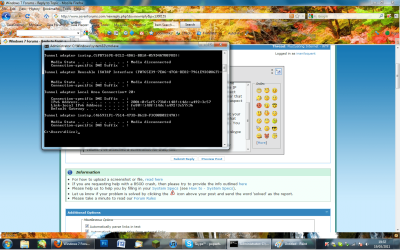
When I type ipconfig into cmd, my default gateway doesn't seem to have any values. I've attached a screenshot for that, too. When you talk about the task manager, there are a couple of things I did to try and sort it out. I set the priority of Minecraft & Skype to 'High' to see if that would help but it didn't make a difference.

And whilst I've been typing this out and remaining in a skype call, the internet has stabilised again and there haven't been any drops. The problem is so unreliable in that it happens not at all sometimes and then starts again for ages, it's unbearable.
 

Attachments

  • Untitled2.png
    Untitled2.png
    143.3 KB · Views: 26
  • derp.png
    derp.png
    222.9 KB · Views: 25

My Computer

Computer type
PC/Desktop
Computer Manufacturer/Model Number
Custom build
OS
Windows 7 Home Premium 64-Bit
CPU
i5-4590
Motherboard
GIGABYTE H97M-HD3
Memory
Corsair DDR3 8GB
Graphics Card(s)
GeForce GTX 970
Monitor(s) Displays
LG Electronics W1942 - 19 inches
Screen Resolution
1440x900
Hard Drives
Corsair Neutron SSD 119GB, Toshiba External 931GB
PSU
Corsair CX600
Keyboard
Logitech K360 Wireless
Mouse
Logitech Wireless Mouse M325
Browser
Firefox
And whilst I've been typing this out and remaining in a skype call, the internet has stabilised again and there haven't been any drops. The problem is so unreliable in that it happens not at all sometimes and then starts again for ages, it's unbearable.
This is sounding to me like it's an issue with your ISP's connection to you. Do you use cable or dsl? It could just be that you've cable and one of your neighbor's is torrenting or downloading massive files and that's sacking your bandwidth.
 

My Computer

Computer Manufacturer/Model Number
HP 6000 Pro Micro Tower
OS
W7 Professional x64
CPU
Core 2 Duo 2.93
Memory
2 GB
Graphics Card(s)
ATI Radeon 4695
Monitor(s) Displays
Two HP 17's
Hard Drives
150GB Sata Drive
Case
Tiny. Kinda cute.
Keyboard
HP Supplied. Surprisingly nice.
Mouse
Gateway Mouse from an E2610D
Internet Speed
45 mbps
Another thing you can try as well.. Have you ever taken your computer to the ROUTER itself and plugged directly in?

This way you can see if its not the wireless adapter.... You have a lot of tunneling.

I am sure that you have a computer next to the DSL/Cable Modem... Can you do a

Speedtest.net

Couple of Tests: (Use your compuer)
1. Directly plugged into the Modem... Copy that
2. Do a speed test, connected by Router... Copy That
3. Ping your router using LAN .. copy results
4. Ping your router using WLAN.. copy results

Then what you need to do is when you have your PC on the LAN
Run your game and skype and perform the previous tests that WEBmattR had you do
to see if there are any changes.

we need to see if its your wireless adapter, the walls, or anything like that.
I know you may have not had this stuff happen in the past but stuff does goes through
deterioration after a while and looses performance.
 

My Computer

Computer Manufacturer/Model Number
HP Pavilion Elite HPE-410f
OS
Windows 7 Ultimate x64
CPU
AMD Phenom x6 1045t
Motherboard
N/A
Memory
8 GB
Graphics Card(s)
ATI Radeon HD 5570
Sound Card
Realtek Highdefinition Audio / 5.1 Dolby Setup
Monitor(s) Displays
HP w2207h Widescreen
Screen Resolution
1680*1050
Hard Drives
1 TB (fixed), 320 Portable maxtor, Server Hard drives
PSU
350 Watt
Case
HP CASE
Cooling
Bass
Keyboard
Logitech MX 5500
Mouse
Logitech MX 5500
Internet Speed
ROAD RUNNER 16MB D/512 U
And whilst I've been typing this out and remaining in a skype call, the internet has stabilised again and there haven't been any drops. The problem is so unreliable in that it happens not at all sometimes and then starts again for ages, it's unbearable.
This is sounding to me like it's an issue with your ISP's connection to you. Do you use cable or dsl? It could just be that you've cable and one of your neighbor's is torrenting or downloading massive files and that's sacking your bandwidth.
I seriously doubt this is the cause of the issue since no one else in my household is experiencing problems. This is an issue with my PC.
 

My Computer

Computer type
PC/Desktop
Computer Manufacturer/Model Number
Custom build
OS
Windows 7 Home Premium 64-Bit
CPU
i5-4590
Motherboard
GIGABYTE H97M-HD3
Memory
Corsair DDR3 8GB
Graphics Card(s)
GeForce GTX 970
Monitor(s) Displays
LG Electronics W1942 - 19 inches
Screen Resolution
1440x900
Hard Drives
Corsair Neutron SSD 119GB, Toshiba External 931GB
PSU
Corsair CX600
Keyboard
Logitech K360 Wireless
Mouse
Logitech Wireless Mouse M325
Browser
Firefox
Another thing you can try as well.. Have you ever taken your computer to the ROUTER itself and plugged directly in?

This way you can see if its not the wireless adapter.... You have a lot of tunneling.

I am sure that you have a computer next to the DSL/Cable Modem... Can you do a

Speedtest.net

Couple of Tests: (Use your compuer)
1. Directly plugged into the Modem... Copy that
2. Do a speed test, connected by Router... Copy That
3. Ping your router using LAN .. copy results
4. Ping your router using WLAN.. copy results

Then what you need to do is when you have your PC on the LAN
Run your game and skype and perform the previous tests that WEBmattR had you do
to see if there are any changes.

we need to see if its your wireless adapter, the walls, or anything like that.
I know you may have not had this stuff happen in the past but stuff does goes through
deterioration after a while and looses performance.
I can't plug my PC into the router because it's too far away and there is no room to put my PC down there. It's been plugged into it before and it worked fine, but then again, I wasn't having internet issues then.
I might be able to get my PC down there and plug it in if I get permission from my parents... aha. :zip:
 

My Computer

Computer type
PC/Desktop
Computer Manufacturer/Model Number
Custom build
OS
Windows 7 Home Premium 64-Bit
CPU
i5-4590
Motherboard
GIGABYTE H97M-HD3
Memory
Corsair DDR3 8GB
Graphics Card(s)
GeForce GTX 970
Monitor(s) Displays
LG Electronics W1942 - 19 inches
Screen Resolution
1440x900
Hard Drives
Corsair Neutron SSD 119GB, Toshiba External 931GB
PSU
Corsair CX600
Keyboard
Logitech K360 Wireless
Mouse
Logitech Wireless Mouse M325
Browser
Firefox
I might be able to do it now, since I'm home alone due to illness... hmm.. gotta find one of them ethernet cable thingies. *runs around house*
 

My Computer

Computer type
PC/Desktop
Computer Manufacturer/Model Number
Custom build
OS
Windows 7 Home Premium 64-Bit
CPU
i5-4590
Motherboard
GIGABYTE H97M-HD3
Memory
Corsair DDR3 8GB
Graphics Card(s)
GeForce GTX 970
Monitor(s) Displays
LG Electronics W1942 - 19 inches
Screen Resolution
1440x900
Hard Drives
Corsair Neutron SSD 119GB, Toshiba External 931GB
PSU
Corsair CX600
Keyboard
Logitech K360 Wireless
Mouse
Logitech Wireless Mouse M325
Browser
Firefox
Back
Top