Fluctuating router speed

ibshaw

New member
Pro User
Local time
6:58 PM
Messages
352
Location
Scotland
Hi, this is something that has puzzled me for a while. We have a relatively slow broadband speed at around 3.5Mbs however until recently our router has been stable and being "always on" would usually give this consistently. Over the past weeks the speed for no apparent reason drops to around 0.5Mbs requiring a soft re-boot to get the speed back to what it was - this would perhaps happen once or twice a week. It got to the point of annoyance so I changed to the TT supplied router one which although was not as good as the Netgear DGND3300v2 we were using started to act the same after a week or so. I am now onto my third router (Linksys x3500) which ran stable for a couple of weeks then same thing. To my knowledge, interference from nearby wireless has not changed and the router is set to auto channel so that, in theory, it should find the quietest one. I am running a mix of cable and N wireless on the 2.4Ghz channel. I am on TalkTalk and have used their line checker (not sure how good that is) and it says my line is fine and reports no problems.

Any suggestions ?
 
Last edited:

My Computer

Computer Manufacturer/Model Number
HP Desktop Slimline
OS
Windows 7 Home Premium 64-bit
CPU
Athlon
Memory
3GB
Graphics Card(s)
Integrated
Monitor(s) Displays
HP 20" LCD
Hard Drives
500GB
Internet Speed
Slow
Thanks for reply. It's not the speed that is the problem (usually around 3.5Mbs), although we'd like it faster, its the fact that it drops to around 0.5Mbs for no apparent reason and only way to get it back is to do a soft re-boot of the router.
 

My Computer

Computer Manufacturer/Model Number
HP Desktop Slimline
OS
Windows 7 Home Premium 64-bit
CPU
Athlon
Memory
3GB
Graphics Card(s)
Integrated
Monitor(s) Displays
HP 20" LCD
Hard Drives
500GB
Internet Speed
Slow
Do you have other computers to see if the problems are the same on them ?
 

My Computer

OS
Windows 7 Pro 64 bit
Does this happe at specific times during the day? Have you got near neighbours who have broadband? If so can you ask them if they suffer in the dame way? Are you using the TalkTalk supplied router? Not much point going to TalkTlk for help, they will likely say it is your BT line who in turn will say that if it is a line fault within the house they will charge for repairs. Have you got a separate ADSL line from the box where the line enters the house? If not have you tried changing the filters?
Sorry for all the questions but down here in Cornwall we had the same problem but now have fibre optic BB. 75mb download all the time!
 

My Computer

Computer type
PC/Desktop
OS
Microsoft Windows 7 Home Premium 64-bit 7601 Multiprocessor Free Service Pack 1
CPU
Intel(R) Core(TM) i7-3770 CPU @ 3.40GHz
Motherboard
ASUSTeK COMPUTER INC. P8H77-M
Memory
8.00 GB
Graphics Card(s)
Intel(R) HD Graphics 4000
Sound Card
On Board
Monitor(s) Displays
Dell 24"
Screen Resolution
1920 x 1080
Hard Drives
(1) INTEL SSDSC2CT180A3 ATA Device (2) ST500DM002-1BD142 ATA Device (3) WDC WD3200AAKS-75L9A0 ATA Device (4) Generic- Compact Flash USB Device (5) Generic- MS/MS-Pro USB Device (6) Generic- SD/MMC USB Device (7) Generic- SM/xD-Picture USB
PSU
500w Corsair
Case
Cooler Master
Cooling
3 Fans
Keyboard
Logitech MK300
Mouse
Logitech WOM
Internet Speed
75Mb
Antivirus
Norton 360
Browser
Firefox, Opera, IE
Have you tried using a DNS jumper to find your fastest DNS server, You can even switch to a different one to see if that solves your issue, It did for me and i am with Talk Talk too.

Here is one for you Dns Jumper | Sordum.org
 

My Computer

OS
Windows 7 Pro 64 bit
I'm willing to bet a small amount of money that you do not live in a Market 3 area. (This means Talktalk own your line).

I won't ask where you live, but if you put your phone number/address into here: SamKnows - Broadband Availability Checker see what it says. If you don't see TalkTalk LLU in the list it gives you, then BT own your line.

If this is the case, and this happens at specific times (6pm-12am during the week, all weekend) then the chances are your ISP have not bought enough capacity from BT. When you reset your router, you "jump" to a different server (which may not be so overloaded) and the problem repeats.
 

My Computer

Computer type
PC/Desktop
Computer Manufacturer/Model Number
Medion Erazer (note to self: insert model number) - with custom additions
OS
Windows 10 Pro x64
CPU
Intel Core i5 7400 @ 3.00GHz
Motherboard
OEM supllied with PC
Memory
8GB 2133Mhz DDR4 (OEM supplied)
Graphics Card(s)
Gygabyte Windforce GTX 1050Ti (Factory Overclocked)
Sound Card
Realtek
Monitor(s) Displays
Acer Al1980 + HKC
Screen Resolution
1360*768(HKC) / 1280*1024(Acer)
Hard Drives
1TB Toshiba
1TB WD Caviar Green
120GB Samsung Evo 840
PSU
OEM supplied (no power rating on case)
Case
OEM Supplied
Cooling
Stock
Keyboard
Logitech Wireless
Mouse
Logitect Wireless
Internet Speed
40Mb/s Down 10Mb/s Up
Antivirus
Defender
Browser
Firefox
Ok, lets establish whether it's you or your line. Please ensure you are using a wired PC to test this.

Hopefully your phone socket looks like this:
485d1194380953-identifying-master-sockets-bt_master_socket_2.jpg


If it does, unscrew the faceplate, and you'll find a "hidden" socket. This is the point where your phone line enters your house. Anything beyond this point is not your responsibility, and TalkTalk cannot charge you to fix a problem (if you have one). Plug your router into there (and make sure you use a new ADSL filter if you have one). If the problem does not improve (and I suspect it won't, as you've used 3 routers) then you need to take this up with TalkTalk

Edit: just realised I'm not replying to the OP. On the other hand, this is still good advice so I will leave it up.
 

My Computer

Computer type
PC/Desktop
Computer Manufacturer/Model Number
Medion Erazer (note to self: insert model number) - with custom additions
OS
Windows 10 Pro x64
CPU
Intel Core i5 7400 @ 3.00GHz
Motherboard
OEM supllied with PC
Memory
8GB 2133Mhz DDR4 (OEM supplied)
Graphics Card(s)
Gygabyte Windforce GTX 1050Ti (Factory Overclocked)
Sound Card
Realtek
Monitor(s) Displays
Acer Al1980 + HKC
Screen Resolution
1360*768(HKC) / 1280*1024(Acer)
Hard Drives
1TB Toshiba
1TB WD Caviar Green
120GB Samsung Evo 840
PSU
OEM supplied (no power rating on case)
Case
OEM Supplied
Cooling
Stock
Keyboard
Logitech Wireless
Mouse
Logitect Wireless
Internet Speed
40Mb/s Down 10Mb/s Up
Antivirus
Defender
Browser
Firefox
Thanks to everyone for taking the time to reply - interesting theories especially the one about the ISP and ownership of the line and possibly restricting bandwidth during peak times if I understood that is where you were coming from ?. I can confirm I have always connected directly to the master socket and have disconnected all bell wires so the speed I am getting is probably best I will can get until such time as fibre comes along but, if you can see cows from your window as we can, chances are it will be take a while... LOL. Also, the DNS server reply looks interesting so I will give that a go. I have not taken a note of when this slowing of the line occurs but now since your replies I will do that and report back.

Again, much appreciate your feedback.
 
Last edited:

My Computer

Computer Manufacturer/Model Number
HP Desktop Slimline
OS
Windows 7 Home Premium 64-bit
CPU
Athlon
Memory
3GB
Graphics Card(s)
Integrated
Monitor(s) Displays
HP 20" LCD
Hard Drives
500GB
Internet Speed
Slow
Can I also just check what speed exactly is dropping to 0.5 Mb/s. Is it the sync speed or the thoroughput speed.

You can get your sync speed by going to 192.168.1.1 on your router, (assuming TTs firmware hasn't changed) - click on the button that says "DSL" (or something like that.. second green light down) and then check the "downstream speed".

The thoroughput speed, is what you get from http://www.speedtest.net

I didn't exactly mean they are restricting the bandwidth, however it's possible they haven't bought a big enough "pipe" to carry everyones data, so everyone gets slowed down. Heres a guide: http://www.sevenforums.com/network-...tion-what-how-works-why-my-internet-slow.html

On Fibre, if it makes you feel any better, I live in a major city, had fibre at my old address, moved 10 minutes down the road, and no fibre here.
 

My Computer

Computer type
PC/Desktop
Computer Manufacturer/Model Number
Medion Erazer (note to self: insert model number) - with custom additions
OS
Windows 10 Pro x64
CPU
Intel Core i5 7400 @ 3.00GHz
Motherboard
OEM supllied with PC
Memory
8GB 2133Mhz DDR4 (OEM supplied)
Graphics Card(s)
Gygabyte Windforce GTX 1050Ti (Factory Overclocked)
Sound Card
Realtek
Monitor(s) Displays
Acer Al1980 + HKC
Screen Resolution
1360*768(HKC) / 1280*1024(Acer)
Hard Drives
1TB Toshiba
1TB WD Caviar Green
120GB Samsung Evo 840
PSU
OEM supplied (no power rating on case)
Case
OEM Supplied
Cooling
Stock
Keyboard
Logitech Wireless
Mouse
Logitect Wireless
Internet Speed
40Mb/s Down 10Mb/s Up
Antivirus
Defender
Browser
Firefox
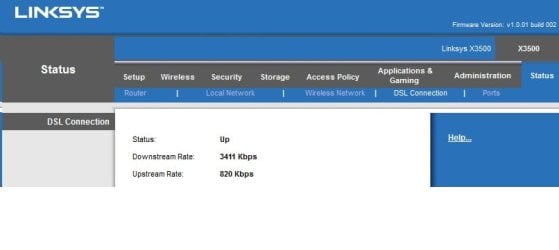
As you can see below..... it was the downstream I was referring to - a speedtest gives slightly less than this figure but when it slows down it goes to approx 480kbs and have to re-boot to get it back up.

Sorry, forgot to attach the image.... see next post.
3+jgeeHAhehepGLv5Za7RL5MobRC4AgKTxarkeEGq5RqjlwiYSufIGkQsAIGmkyOX9s9Z+5OIlEWiRyJU3iFwAAEnj9+UaG3hIjlxjRC60SuTKG0QuAICk4YlFbEMiV94gcgEAJA1PLGIbErnyBpELACBpeGIR25DIlTeIXAAAScMTi9iGRK68QeQCAEganljENiRy5Q0iFwBA0vDEIrYhkStvELkAAJLGFLnOErkw2v8PU7Ka1pRVEpIAAAAASUVORK5CYII=
 

My Computer

Computer Manufacturer/Model Number
HP Desktop Slimline
OS
Windows 7 Home Premium 64-bit
CPU
Athlon
Memory
3GB
Graphics Card(s)
Integrated
Monitor(s) Displays
HP 20" LCD
Hard Drives
500GB
Internet Speed
Slow
As you can see below..... it was the downstream I was referring to - a speedtest gives slightly less than this figure but when it slows down it goes to approx 480kbps and have to re-boot to get it back up.

Severedsolo - just read your article on Contention - very interesting.


3+jgeeHAhehepGLv5Za7RL5MobRC4AgKTxarkeEGq5RqjlwiYSufIGkQsAIGmkyOX9s9Z+5OIlEWiRyJU3iFwAAEnj9+UaG3hIjlxjRC60SuTKG0QuAICk4YlFbEMiV94gcgEAJA1PLGIbErnyBpELACBpeGIR25DIlTeIXAAAScMTi9iGRK68QeQCAEganljENiRy5Q0iFwBA0vDEIrYhkStvELkAAJLGFLnOErkw2v8PU7Ka1pRVEpIAAAAASUVORK5CYII=
 

Attachments

  • status.jpg
    status.jpg
    20.1 KB · Views: 0

My Computer

Computer Manufacturer/Model Number
HP Desktop Slimline
OS
Windows 7 Home Premium 64-bit
CPU
Athlon
Memory
3GB
Graphics Card(s)
Integrated
Monitor(s) Displays
HP 20" LCD
Hard Drives
500GB
Internet Speed
Slow
So to be clear - the "Downstream Rate" in that picture drops to 512Kbps (or similar?)

This is a problem with your exchange then, as what is happening is the exchange is telling your router the highest speed it can give it is 512Kbps I had a similar problem a few years back, you'll need to contact your ISP
 

My Computer

Computer type
PC/Desktop
Computer Manufacturer/Model Number
Medion Erazer (note to self: insert model number) - with custom additions
OS
Windows 10 Pro x64
CPU
Intel Core i5 7400 @ 3.00GHz
Motherboard
OEM supllied with PC
Memory
8GB 2133Mhz DDR4 (OEM supplied)
Graphics Card(s)
Gygabyte Windforce GTX 1050Ti (Factory Overclocked)
Sound Card
Realtek
Monitor(s) Displays
Acer Al1980 + HKC
Screen Resolution
1360*768(HKC) / 1280*1024(Acer)
Hard Drives
1TB Toshiba
1TB WD Caviar Green
120GB Samsung Evo 840
PSU
OEM supplied (no power rating on case)
Case
OEM Supplied
Cooling
Stock
Keyboard
Logitech Wireless
Mouse
Logitect Wireless
Internet Speed
40Mb/s Down 10Mb/s Up
Antivirus
Defender
Browser
Firefox
Yes, this happens perhaps once or twice a week - I have to agree it has to be at the exchange as I have tried 3 different routers with same problem. What puzzles me slightly is, if I do a soft re-boot it always comes back to the normal speed but then I think you have already explained earlier that when I do this the server changes with possibly less traffic.

I'll pose the question on the TalkTalk forum and see if anyone else has had a similar scenario.

Thanks for your replies.
 

My Computer

Computer Manufacturer/Model Number
HP Desktop Slimline
OS
Windows 7 Home Premium 64-bit
CPU
Athlon
Memory
3GB
Graphics Card(s)
Integrated
Monitor(s) Displays
HP 20" LCD
Hard Drives
500GB
Internet Speed
Slow
Back
Top