Folder and its files can't be deleted.

Sonyack

New member
Local time
10:28 AM
Messages
8
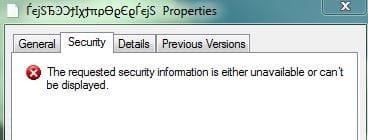
So I installed Windows 7 RC 7100 from a dvd with Vista present, choosing what I assumed was the clean install option. The installation rounded up the old windows and put it in a folder called windows.old. I got what I needed out of there, and deleted the windows.old folder and stuff got deleted, except the windows.old folder and some remaining sub-folders. There are two files way down in the last folder that won't be deleted. Windows 7 claims they are not there, so they cannot be renamed and cannot be compressed. Plus they have 0 bytes. These files are labeled in what looks like real Coptic script. These files can be moved and the folders that contain them too. Windows 7 will not delete them, saying that they are not where they are anymore.

I figure that when I deleted the windows.old folder, something went wrong and now Windows 7 shows them to be there, but also thinks they are not there - weird that it has enough to think they are there but not enough to think it can delete them.

Anyway, how can I get rid of whatever is there?
 

My Computer

OS
Windows 7 RC Build 7100
I don't think there is anything you can do to get rid of them besides a format. I've had something like that for over a year on one of my disks that is 400 GB full and I have no place to move the stuff temp away to fix it. I tried a little looking for ways, like software or commands, but nothing deleted the files.

Here's mine.
 

Attachments

  • Capture.JPG
    Capture.JPG
    18 KB · Views: 32

My Computer

Computer Manufacturer/Model Number
self built
OS
7600.20510 x86
CPU
P4 550 3.4 GHz HT running at 3.5 GHz
Motherboard
MSI PM8M3-V (MS-7211 v1.x) Micro-ATX mainboard
Memory
OCZ 2 GB(2x1GB) DDR400mHz running @ 414 mHz
Graphics Card(s)
HIS Radeon HD 3850 IceQ 3 Turbo HDMI Dual DL-DVI AGP
Sound Card
MOTU Traveler firewire studio interface 192 kHz 24 bit
Monitor(s) Displays
22" widescreen Acer X223W LCD, 17" Compaq P75 CRT
Screen Resolution
1680x1050 and 1280x1024
Hard Drives
SATA I x2 WD, 400 GB and 120 GB, SATA 2 WD Caviar Black 1 TB
PSU
350W generic
Case
Cybertronpc, it glows blue
Cooling
stock cpu fan, Ice-Q 3 gpu and system, many case fans
Keyboard
Logitch Classical Keyboard 200
Mouse
Logitech Mediaplay cordless
Internet Speed
1792/448 kbits/sec
Other Info
SATA II PCI fake RAID adapter, 1 GB Readyboost, original ATI Remote Wonder (even works with WMC perfectly), Logitech Rumblepad 2 game controller x2
files cant be deleted

So I installed Windows 7 RC 7100 from a dvd with Vista present, choosing what I assumed was the clean install option. The installation rounded up the old windows and put it in a folder called windows.old. I got what I needed out of there, and deleted the windows.old folder and stuff got deleted, except the windows.old folder and some remaining sub-folders. There are two files way down in the last folder that won't be deleted. Windows 7 claims they are not there, so they cannot be renamed and cannot be compressed. Plus they have 0 bytes. These files are labeled in what looks like real Coptic script. These files can be moved and the folders that contain them too. Windows 7 will not delete them, saying that they are not where they are anymore.

I figure that when I deleted the windows.old folder, something went wrong and now Windows 7 shows them to be there, but also thinks they are not there - weird that it has enough to think they are there but not enough to think it can delete them.

Anyway, how can I get rid of whatever is there?

I think torrentg is correct but could you right click one of them and tell us the properties and who the owners are?

Thanks

Ken
 

My Computer

Computer Manufacturer/Model Number
HP Pavillion dv-7 1005 Tx
OS
Win 8 Release candidate 8400
CPU
[email protected]
Memory
4 gigs
Graphics Card(s)
Nvidia 9600M
Sound Card
HD built-in
Monitor(s) Displays
17" Wxga
Screen Resolution
1440x900
Cooling
none
Internet Speed
45Mb down 5Mb up
Try running a disk check (chkdsk /f) on the drive.
 

My Computer

OS
XPSP3, Se7en RTM
CPU
AMD Athlon XP 2600+ @ 2.30GHz
Motherboard
GA-7N400S-L; nForce2 Ultra400R
Memory
Corsair VS 1x1024MB400 + 2x512MB400 DDR
Graphics Card(s)
nVIDIA GeForce 6600 AGP8X 128-bit, 256mb
Sound Card
Onboard nVIDIA MCP2-S dolby digital; Realtek ALC655
Screen Resolution
1024x768
Hard Drives
2x80GB ATA-100, 1x200GB ATA-100
PSU
Generic 450W (12V~18A)
Cooling
CPU stock cooling, 3 case fans
Keyboard
Standard
Mouse
PS/2 optical mouse
Internet Speed
2048/512
hows about the Take Ownership shortcut?
 

My Computer

Computer Manufacturer/Model Number
eMachines W3503
OS
7 Pro Build 7600.16385x64 [2.0 WEI]
CPU
Intel(R) Celeron(R) D CPU 3.33GHz
Memory
2.00 GB RAM (1.87 GB usable)
Graphics Card(s)
ATI Radeon™ X300 based integrated graphics
Sound Card
6-channel (5.1) ATI High Definition Audio
Monitor(s) Displays
eMachines® 17" LCD Flat Panel Monitor (17F3)
Screen Resolution
1024 x 768 @ 85Hz
Hard Drives
160GB HDD (7200rpm, 2MB cache)
Yeah, I've done all the tricks like trying to take ownership, using other OS, chkdsk too. Nothing fixes it.

Here's one of the file's permissions.
 

Attachments

  • Capture.JPG
    Capture.JPG
    18.4 KB · Views: 14

My Computer

Computer Manufacturer/Model Number
self built
OS
7600.20510 x86
CPU
P4 550 3.4 GHz HT running at 3.5 GHz
Motherboard
MSI PM8M3-V (MS-7211 v1.x) Micro-ATX mainboard
Memory
OCZ 2 GB(2x1GB) DDR400mHz running @ 414 mHz
Graphics Card(s)
HIS Radeon HD 3850 IceQ 3 Turbo HDMI Dual DL-DVI AGP
Sound Card
MOTU Traveler firewire studio interface 192 kHz 24 bit
Monitor(s) Displays
22" widescreen Acer X223W LCD, 17" Compaq P75 CRT
Screen Resolution
1680x1050 and 1280x1024
Hard Drives
SATA I x2 WD, 400 GB and 120 GB, SATA 2 WD Caviar Black 1 TB
PSU
350W generic
Case
Cybertronpc, it glows blue
Cooling
stock cpu fan, Ice-Q 3 gpu and system, many case fans
Keyboard
Logitch Classical Keyboard 200
Mouse
Logitech Mediaplay cordless
Internet Speed
1792/448 kbits/sec
Other Info
SATA II PCI fake RAID adapter, 1 GB Readyboost, original ATI Remote Wonder (even works with WMC perfectly), Logitech Rumblepad 2 game controller x2
had the same problem. old securom files. just do what i did... give up and just make the folder (not the contents, just the folder) hidden. poof they're gone.
maybe i'm just lazy :D
 

My Computer

Computer Manufacturer/Model Number
eMachines W3502
OS
Windows 7 Ultimate x32
CPU
Intel Celeron D 3.2 Ghz 533 fsb (LGA 775)
Motherboard
Intel D101GGC
Memory
1 GB (2x512MB) PC-3200 DDR @ 200Mhz
Graphics Card(s)
Nvidia GeForce 9400GT- 1GB
Sound Card
Sound Blaster X-Fi Xtreame Gamer
Monitor(s) Displays
19" LCD HDtv
Screen Resolution
1360x768 @ 60Htz
Hard Drives
SeaGate Barracuda 750GB
SeaGate Barracuda 100GB
Toshiba CD/DVDW/ TS-H552D [DVD+R, DL]
PSU
stock (idk)
Case
The busted remains of the stock case
Cooling
Dust cooled, waitwut?
Keyboard
Stock. Missing a few keys.
Mouse
Logitech LX8 5-btn mouse (wireless)
Internet Speed
TWC 10Mb
Other Info
Keeps going, and going, and going.......
folder cant be deleted

I don't think there is anything you can do to get rid of them besides a format. I've had something like that for over a year on one of my disks that is 400 GB full and I have no place to move the stuff temp away to fix it. I tried a little looking for ways, like software or commands, but nothing deleted the files.

Here's mine.
If you are absolutely sure you want to get rid of them there are a couple of ways.

1-boot from a dos cd and delete them *.* even if they are -h,-s,-x (hidden,system files, and read only) DOS doesn't know that.

2- some apps (Im gonna use one called treesize) are able to delete anything. I have deleted winsxs files from within windows.

3- if your dual booting delete them from the other partition. This doesn't always work

Hope it helps some.

Ken
 

My Computer

Computer Manufacturer/Model Number
HP Pavillion dv-7 1005 Tx
OS
Win 8 Release candidate 8400
CPU
[email protected]
Memory
4 gigs
Graphics Card(s)
Nvidia 9600M
Sound Card
HD built-in
Monitor(s) Displays
17" Wxga
Screen Resolution
1440x900
Cooling
none
Internet Speed
45Mb down 5Mb up
If you can move them, why not move them on a flash drive and them nuke the flash drive?
 

My Computer

OS
7264x64/7260x86
It's only possible to cut and paste within the same partition. Trying anywhere else it gives the same error as when trying to delete. "Could not find this item"
 

My Computer

Computer Manufacturer/Model Number
self built
OS
7600.20510 x86
CPU
P4 550 3.4 GHz HT running at 3.5 GHz
Motherboard
MSI PM8M3-V (MS-7211 v1.x) Micro-ATX mainboard
Memory
OCZ 2 GB(2x1GB) DDR400mHz running @ 414 mHz
Graphics Card(s)
HIS Radeon HD 3850 IceQ 3 Turbo HDMI Dual DL-DVI AGP
Sound Card
MOTU Traveler firewire studio interface 192 kHz 24 bit
Monitor(s) Displays
22" widescreen Acer X223W LCD, 17" Compaq P75 CRT
Screen Resolution
1680x1050 and 1280x1024
Hard Drives
SATA I x2 WD, 400 GB and 120 GB, SATA 2 WD Caviar Black 1 TB
PSU
350W generic
Case
Cybertronpc, it glows blue
Cooling
stock cpu fan, Ice-Q 3 gpu and system, many case fans
Keyboard
Logitch Classical Keyboard 200
Mouse
Logitech Mediaplay cordless
Internet Speed
1792/448 kbits/sec
Other Info
SATA II PCI fake RAID adapter, 1 GB Readyboost, original ATI Remote Wonder (even works with WMC perfectly), Logitech Rumblepad 2 game controller x2
After taking ownership did you check to see if you have full control and applies to folder, subfolders and files?.
 

My Computer

Computer Manufacturer/Model Number
Custom workstation /// Lenovo X61t tablet notebook
OS
Windows 7 RTM x64
CPU
Core i7 980X @ 4.04GHz OC /// Core Duo L7500 @ 1.6GHz
Motherboard
Asus P6T6 WS Revolution ///
Memory
12GB G. Skill @ DDR-1600 OC /// 4GB
Graphics Card(s)
Saphire HD4870 Toxic 1GB /// Intel Mobile GMA X3100
Monitor(s) Displays
Dual Eizo 24" SX2461W /// 12"
Screen Resolution
1920x1200 /// 1400x1050
Hard Drives
Workstation:
5x 750GB Barracuda-11 on Areca ARC-1220;
4x 1.5TB Barracuda-11 on Intel ICH10R;
Volumes:
300GB RAID 0, 2.7TB RAID 10 on Intel;
100GB RAID 0, 1.4TB RAID 10 on Areca ///
Notebook: G.Skill Titan 256GB SSD
PSU
Tagan ITZ 1100
Case
GHS-1500 ///
Cooling
Thermalright IFX-14 + a slew of stealth fans ///
Keyboard
Logitech Edge ///
Mouse
Logitech Wireless Optical Trackball
Internet Speed
5Mbps down / 820Kbps up
Other Info
Main use: photography;
DVD Drive: L.G GGW-H20L Blu-Ray / DVD;
OC: QPI/DRAM @ 1.33v, CPU @ 1.293v, DRAM Bus @ 1.65v, CPU PLL @ 1.88v, CPU mult = 25x, BCLK = 160, DDR3-1604 @ 7-8-7-24

My Computer

Computer Manufacturer/Model Number
eMachines W3503
OS
7 Pro Build 7600.16385x64 [2.0 WEI]
CPU
Intel(R) Celeron(R) D CPU 3.33GHz
Memory
2.00 GB RAM (1.87 GB usable)
Graphics Card(s)
ATI Radeon™ X300 based integrated graphics
Sound Card
6-channel (5.1) ATI High Definition Audio
Monitor(s) Displays
eMachines® 17" LCD Flat Panel Monitor (17F3)
Screen Resolution
1024 x 768 @ 85Hz
Hard Drives
160GB HDD (7200rpm, 2MB cache)
BINGO!!! Unlocker did it! Thanks everyone for your ready replies, and to andythecurefan.
 

My Computer

OS
Windows 7 RC Build 7100

My Computer

OS
XPSP3, Se7en RTM
CPU
AMD Athlon XP 2600+ @ 2.30GHz
Motherboard
GA-7N400S-L; nForce2 Ultra400R
Memory
Corsair VS 1x1024MB400 + 2x512MB400 DDR
Graphics Card(s)
nVIDIA GeForce 6600 AGP8X 128-bit, 256mb
Sound Card
Onboard nVIDIA MCP2-S dolby digital; Realtek ALC655
Screen Resolution
1024x768
Hard Drives
2x80GB ATA-100, 1x200GB ATA-100
PSU
Generic 450W (12V~18A)
Cooling
CPU stock cooling, 3 case fans
Keyboard
Standard
Mouse
PS/2 optical mouse
Internet Speed
2048/512
unlocker

+1

Forgot all about unlocker! Good to know it works in Win7. I couldn't get it to work under Vista though. :confused:

If you had to run it in compat mode.

Unlocker is great

also +1

Ken
 

My Computer

Computer Manufacturer/Model Number
HP Pavillion dv-7 1005 Tx
OS
Win 8 Release candidate 8400
CPU
[email protected]
Memory
4 gigs
Graphics Card(s)
Nvidia 9600M
Sound Card
HD built-in
Monitor(s) Displays
17" Wxga
Screen Resolution
1440x900
Cooling
none
Internet Speed
45Mb down 5Mb up
I've been a long time user of Unlocker and have even tried using that on my files. In my case, it says that no locking handle is found...meaning the files aren't locked to begin with.

But glad the OP got his sorted. :D

Edit: Oh wow. Instead of unlocking the files, I just tried using Unlocker to straight delete and it worked! Thanks for bringing my attention to this program. Good stuff.
 

My Computer

Computer Manufacturer/Model Number
self built
OS
7600.20510 x86
CPU
P4 550 3.4 GHz HT running at 3.5 GHz
Motherboard
MSI PM8M3-V (MS-7211 v1.x) Micro-ATX mainboard
Memory
OCZ 2 GB(2x1GB) DDR400mHz running @ 414 mHz
Graphics Card(s)
HIS Radeon HD 3850 IceQ 3 Turbo HDMI Dual DL-DVI AGP
Sound Card
MOTU Traveler firewire studio interface 192 kHz 24 bit
Monitor(s) Displays
22" widescreen Acer X223W LCD, 17" Compaq P75 CRT
Screen Resolution
1680x1050 and 1280x1024
Hard Drives
SATA I x2 WD, 400 GB and 120 GB, SATA 2 WD Caviar Black 1 TB
PSU
350W generic
Case
Cybertronpc, it glows blue
Cooling
stock cpu fan, Ice-Q 3 gpu and system, many case fans
Keyboard
Logitch Classical Keyboard 200
Mouse
Logitech Mediaplay cordless
Internet Speed
1792/448 kbits/sec
Other Info
SATA II PCI fake RAID adapter, 1 GB Readyboost, original ATI Remote Wonder (even works with WMC perfectly), Logitech Rumblepad 2 game controller x2
file deletion

I've been a long time user of Unlocker and have even tried using that on my files. In my case, it says that no locking handle is found...meaning the files aren't locked to begin with.

But glad the OP got his sorted. :D

Edit: Oh wow. Instead of unlocking the files, I just tried using Unlocker to straight delete and it worked! Thanks for bringing my attention to this program. Good stuff.

Are there any properties on the files or does it error out?

Ken
 

My Computer

Computer Manufacturer/Model Number
HP Pavillion dv-7 1005 Tx
OS
Win 8 Release candidate 8400
CPU
[email protected]
Memory
4 gigs
Graphics Card(s)
Nvidia 9600M
Sound Card
HD built-in
Monitor(s) Displays
17" Wxga
Screen Resolution
1440x900
Cooling
none
Internet Speed
45Mb down 5Mb up
Well, the files are deleted now but in explorer they showed 1 kb and 2kb. When you right click them though, in properties they would say 0 kb and like I posted, no security permissions at all. Like a corrupted rogue file I guess.

I also used this on a flash program file which was the only one left, previously unable to be deleted, in the system32 folder of a previous OS install.

My HDD is clean now of these files.

Anyhow, +1 to Andy.
 

My Computer

Computer Manufacturer/Model Number
self built
OS
7600.20510 x86
CPU
P4 550 3.4 GHz HT running at 3.5 GHz
Motherboard
MSI PM8M3-V (MS-7211 v1.x) Micro-ATX mainboard
Memory
OCZ 2 GB(2x1GB) DDR400mHz running @ 414 mHz
Graphics Card(s)
HIS Radeon HD 3850 IceQ 3 Turbo HDMI Dual DL-DVI AGP
Sound Card
MOTU Traveler firewire studio interface 192 kHz 24 bit
Monitor(s) Displays
22" widescreen Acer X223W LCD, 17" Compaq P75 CRT
Screen Resolution
1680x1050 and 1280x1024
Hard Drives
SATA I x2 WD, 400 GB and 120 GB, SATA 2 WD Caviar Black 1 TB
PSU
350W generic
Case
Cybertronpc, it glows blue
Cooling
stock cpu fan, Ice-Q 3 gpu and system, many case fans
Keyboard
Logitch Classical Keyboard 200
Mouse
Logitech Mediaplay cordless
Internet Speed
1792/448 kbits/sec
Other Info
SATA II PCI fake RAID adapter, 1 GB Readyboost, original ATI Remote Wonder (even works with WMC perfectly), Logitech Rumblepad 2 game controller x2
Back
Top