Folder Content Arrangement

Danette

New member
Local time
6:18 PM
Messages
25
I have many folders placed within a folder. I would like to have them aligned to grid (which I do) and be able to place them in any order I choose. The problem is that, when I use "Auto arrange" they automatically are rearranged in alphabetical order whenever I add a new folder or delete a folder, no matter what the "Sort by" choice is. If I don't use "Auto arrange", whenever I add a folder, there are gaps created and some of the folders are placed outside the main folder borders, so that scrolling is then required.
 

My Computer

Computer type
PC/Desktop
Computer Manufacturer/Model Number
Dell Optiplex
OS
Windows 7 Home Premium 32bit
Are you talking about your desktop or your Windows filing system?
 

My Computer

Computer type
PC/Desktop
Computer Manufacturer/Model Number
HP p6-2020t
OS
Win 7 Ult 64-bit
CPU
G620 2.6GHZ Pentium R
Memory
6 GB
Monitor(s) Displays
25" HPLV2311
Screen Resolution
1920 x 1200
Hard Drives
1 SATA, 1 exterior SATA
Case
HP
Cooling
PSU
Antivirus
Glasswire
Browser
Waterfox; Firefox; Chrome for work
Other Info
Firewall--Glasswire
Similar specs in Gateway DX4200
Verizon FIOS Wired network

1 other Win7 computer-- has SSD
Are you talking about your desktop or your Windows filing system?

It's not about organizing folders on the desktop. It's about organizing multiple folders within a folder.
 

My Computer

Computer type
PC/Desktop
Computer Manufacturer/Model Number
Dell Optiplex
OS
Windows 7 Home Premium 32bit
I asked because I have no "Auto-Arrange" in my Win Explorer menu. I have "Sort by-- name, date, type, size, tags" and they all work fine in my subfolders and sub-sub-folders except tags, which I don't use. Can you send a screenshot of the misaligned folders?
 

My Computer

Computer type
PC/Desktop
Computer Manufacturer/Model Number
HP p6-2020t
OS
Win 7 Ult 64-bit
CPU
G620 2.6GHZ Pentium R
Memory
6 GB
Monitor(s) Displays
25" HPLV2311
Screen Resolution
1920 x 1200
Hard Drives
1 SATA, 1 exterior SATA
Case
HP
Cooling
PSU
Antivirus
Glasswire
Browser
Waterfox; Firefox; Chrome for work
Other Info
Firewall--Glasswire
Similar specs in Gateway DX4200
Verizon FIOS Wired network

1 other Win7 computer-- has SSD
I asked because I have no "Auto-Arrange" in my Win Explorer menu. I have "Sort by-- name, date, type, size, tags" and they all work fine in my subfolders and sub-sub-folders except tags, which I don't use. Can you send a screenshot of the misaligned folders?

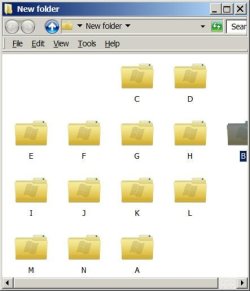
Attached.

Originally, the "New Folder" had all sub-folders in it arranged alphabetically. In the image, you can see that folders "A" and "B" have been moved. Because the Auto-arrange feature is turned off (for this image), gaps are left where the two folders were prior to being moved. In addition to the gaps, folder "B" is also placed outside the border of "New Folder" rather than being arranged in the next row of folders.

Turning Auto-arrange on, prevents the gap and bleed-over past the border but, when any adjustment, deletion or addition occurs, the folders are all rearranged alphabetically. The objective is to keep the folders in any position to which they are moved, with no gaps or bleed-over, and retain those moved positions despite any further changes within "New Folder".

My baseline for expecting this is that Win XP performed according to what I trying to achieve, above, in Win7.
 

Attachments

  • Folder Example.JPG
    Folder Example.JPG
    26.5 KB · Views: 6

My Computer

Computer type
PC/Desktop
Computer Manufacturer/Model Number
Dell Optiplex
OS
Windows 7 Home Premium 32bit
I have to drop out of this discussion. I always use list view. But WinXP was a lot easier to use than 7. I still mourn its loss.
 
Last edited:

My Computer

Computer type
PC/Desktop
Computer Manufacturer/Model Number
HP p6-2020t
OS
Win 7 Ult 64-bit
CPU
G620 2.6GHZ Pentium R
Memory
6 GB
Monitor(s) Displays
25" HPLV2311
Screen Resolution
1920 x 1200
Hard Drives
1 SATA, 1 exterior SATA
Case
HP
Cooling
PSU
Antivirus
Glasswire
Browser
Waterfox; Firefox; Chrome for work
Other Info
Firewall--Glasswire
Similar specs in Gateway DX4200
Verizon FIOS Wired network

1 other Win7 computer-- has SSD
Back
Top