Solved Folder Scanning

Axel Slingland

New member
Member
Local time
9:03 PM
Messages
23
Location
The Lost Coast
Hey hey... I'm back with another silly question. Back on Windows XP and before when I would scroll down a list of folders in Windows Explorer, each folder you saw would automatically show what was in that folder. Thus you could easily see what is in each folder. But in Windows 7 I have to click on each folder with the mouse to see what's in it, as scrolling down the list shows nothing but the name of the folder you're on. Is there a way to change that?

Thanks in advance. As always any assistance is greatly appreciated.
 

My Computers

System One System Two

  • Computer type
    PC/Desktop
    Computer Manufacturer/Model Number
    Custom Build
    OS
    Windows 7 64 Home
    CPU
    FX 6300 3.5 GHz w/4.1 GHz Boost 6-Core 64bit
    Motherboard
    Gigabyte 78LMT USB3
    Memory
    8Gb DDR3
    Graphics Card(s)
    Asus Nvidia GeForce GTX 750 Ti 2Gb
    Hard Drives
    500Gb Western Digital 7,200 RPM SATA Hard Drive
    1Tb Seagate USB 3.0 External Hard Drive
    2Tb Seagate USB 3.0 External Hard Drive x2
    8Tb Seagate USB 3.0 External Hard Drive x2
    Antivirus
    Avast Free
    Browser
    Firefox / Chrome
  • Computer type
    PC/Desktop
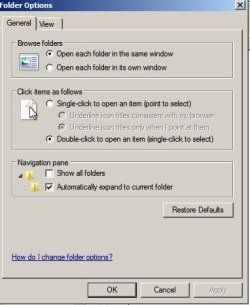
Try setting folder options like this.

Folder Options.jpg

Start> Computer > Organize > Folder Options
 

My Computer

Computer type
Laptop
Computer Manufacturer/Model Number
ASUS
OS
Microsoft Windows 7 Home Premium 64-bit 7601 Multiprocessor Free Service Pack 1
CPU
AMD C-60 APU with Radeon(tm) HD Graphics
Motherboard
ASUSTeK COMPUTER INC. X501U
Memory
4.00 GB
Graphics Card(s)
AMD Radeon HD 6290 Graphics
Sound Card
(1) AMD High Definition Audio Device (2) Realtek High Defi
Screen Resolution
1366 x 768 x 32 bits (4294967296 colors) @ 60 Hz
Hard Drives
Hitachi HTS545050A7E380 SATA Disk Device
Antivirus
Comodo CIS & FW, SecureAplus App Whitelisting, Threatfire
Browser
Cyberfox 64bit, Opera 64bit, Airfox
Other Info
Spy-The-Spy, HitmanPro.Alert, Norton Connect Safe, MJRegWatcher, BitDefender TrafficLight, Voodoo Shield, Zemana AntiMalware
Thanks for replying. But that didn't do it. Do you have any other ideas I could try?
 

My Computers

System One System Two

  • Computer type
    PC/Desktop
    Computer Manufacturer/Model Number
    Custom Build
    OS
    Windows 7 64 Home
    CPU
    FX 6300 3.5 GHz w/4.1 GHz Boost 6-Core 64bit
    Motherboard
    Gigabyte 78LMT USB3
    Memory
    8Gb DDR3
    Graphics Card(s)
    Asus Nvidia GeForce GTX 750 Ti 2Gb
    Hard Drives
    500Gb Western Digital 7,200 RPM SATA Hard Drive
    1Tb Seagate USB 3.0 External Hard Drive
    2Tb Seagate USB 3.0 External Hard Drive x2
    8Tb Seagate USB 3.0 External Hard Drive x2
    Antivirus
    Avast Free
    Browser
    Firefox / Chrome
  • Computer type
    PC/Desktop
I can't think of anything.
 

My Computer

Computer type
Laptop
Computer Manufacturer/Model Number
ASUS
OS
Microsoft Windows 7 Home Premium 64-bit 7601 Multiprocessor Free Service Pack 1
CPU
AMD C-60 APU with Radeon(tm) HD Graphics
Motherboard
ASUSTeK COMPUTER INC. X501U
Memory
4.00 GB
Graphics Card(s)
AMD Radeon HD 6290 Graphics
Sound Card
(1) AMD High Definition Audio Device (2) Realtek High Defi
Screen Resolution
1366 x 768 x 32 bits (4294967296 colors) @ 60 Hz
Hard Drives
Hitachi HTS545050A7E380 SATA Disk Device
Antivirus
Comodo CIS & FW, SecureAplus App Whitelisting, Threatfire
Browser
Cyberfox 64bit, Opera 64bit, Airfox
Other Info
Spy-The-Spy, HitmanPro.Alert, Norton Connect Safe, MJRegWatcher, BitDefender TrafficLight, Voodoo Shield, Zemana AntiMalware
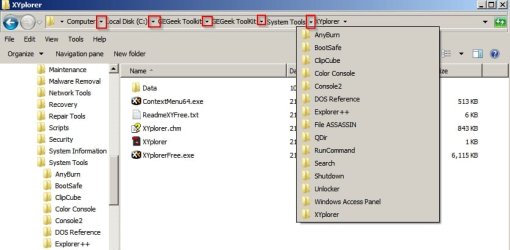
Okay that feature has been removed in Windows 7 and I can't find a way to get it back. You might consider using portable XYplorerFree - if you create an elevated shortcut and pin it to taskbar or start menu you can run it from there. If you scroll through folders in the left pane contents are expanded in the right pane.

Other than that you could use breadcrumb navigation in explorer by clicking the dropdown arrows in the address bar.

Breadcrumbs.jpg
 

My Computer

Computer type
Laptop
Computer Manufacturer/Model Number
ASUS
OS
Microsoft Windows 7 Home Premium 64-bit 7601 Multiprocessor Free Service Pack 1
CPU
AMD C-60 APU with Radeon(tm) HD Graphics
Motherboard
ASUSTeK COMPUTER INC. X501U
Memory
4.00 GB
Graphics Card(s)
AMD Radeon HD 6290 Graphics
Sound Card
(1) AMD High Definition Audio Device (2) Realtek High Defi
Screen Resolution
1366 x 768 x 32 bits (4294967296 colors) @ 60 Hz
Hard Drives
Hitachi HTS545050A7E380 SATA Disk Device
Antivirus
Comodo CIS & FW, SecureAplus App Whitelisting, Threatfire
Browser
Cyberfox 64bit, Opera 64bit, Airfox
Other Info
Spy-The-Spy, HitmanPro.Alert, Norton Connect Safe, MJRegWatcher, BitDefender TrafficLight, Voodoo Shield, Zemana AntiMalware
Well, I suppose this is just another of the many things about Windows 7 that I will just have to get used to. The real problem is that the more advanced Windows gets, the older I get, and the less I remember... I remember working at a computer company in the phone support department back in the 1980's and a lot of what I knew back then doesn't seem to apply anymore. Those computers we had back then don't compare to some of the ones we have today.

We had computers by a company named Anasazi from Phoenix, Arizona. They were quite old, even when the newest computer systems available were 286 12Mhz, but they served the purpose for what the company did, which was produce database software for car dealerships to keep track of their inventory. Later I moved from the San Francisco Bay Area to Page, Arizona. While there I found out that Anasazi means "The Ancient Ones" in Navajo, and refers to the ancient Pueblo Peoples of the Four Corners region, circa around 700 AD...
rofl3.gif


Anyway, thanks for your help, Mate! It is greatly appreciated.

Ax
 

My Computers

System One System Two

  • Computer type
    PC/Desktop
    Computer Manufacturer/Model Number
    Custom Build
    OS
    Windows 7 64 Home
    CPU
    FX 6300 3.5 GHz w/4.1 GHz Boost 6-Core 64bit
    Motherboard
    Gigabyte 78LMT USB3
    Memory
    8Gb DDR3
    Graphics Card(s)
    Asus Nvidia GeForce GTX 750 Ti 2Gb
    Hard Drives
    500Gb Western Digital 7,200 RPM SATA Hard Drive
    1Tb Seagate USB 3.0 External Hard Drive
    2Tb Seagate USB 3.0 External Hard Drive x2
    8Tb Seagate USB 3.0 External Hard Drive x2
    Antivirus
    Avast Free
    Browser
    Firefox / Chrome
  • Computer type
    PC/Desktop
Back
Top