Solved Folder thumbnails issues with music collection

Derek10

New member
Member
Local time
8:13 PM
Messages
87
Hi, I am new here :)

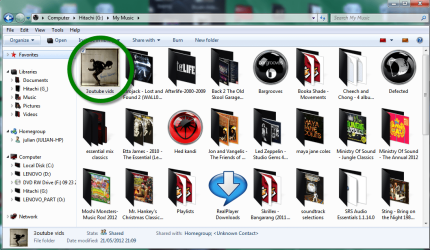
I have issues with my music collection I am trying to tidy up it and is going OK, but I want it to show a thumbnail for each group or album, and they show fine in some folders and others no (in one of them the image is corrupt but I have sorted it), despite all they have an album art image, as this screenshot shows.

imagefs.png


Any help would be appreciated

Also as a plus I would like thumbnails to show straight instead of slanted as any image thumbnail, as they are a bit obscured by the folder, without going one for one manually as I could find, but that is less important for now :)

Many thanks :)
 

My Computer

Computer Manufacturer/Model Number
Custom
OS
Windows 7 Ultimate 64-bit SP1
CPU
Intel Celeron G530
Motherboard
Gigabyte GA-H61M-S2-B3
Memory
2 GB DDR3 Kingston 1333 (1066)
Graphics Card(s)
POV Nvidia Geforce GT530
Sound Card
Onboard
Monitor(s) Displays
Samsung SyncMaster S19B150
Screen Resolution
1366x768
Hard Drives
Laptop HDD TOSHIBA MK3265GSX
PSU
Generic 500W
Cooling
Stock
Keyboard
Logitech S 510 Wireless
Mouse
IBM MO28UO
Internet Speed
30 mbps
to get the album pic to show on the folders then go into each folder and name the album art for that folder,
" folder" as you have a few to do then copy the word folder and then it is just highlighting each album art and paste the new "folder" title


the album art shows this way on a folder by default (angled) and im not aware of any way to change it, if you open the music folder in your library then you can arrange by album , this would show the folders by album covers /art .

welcome to sevenforums.
 

My Computer

Computer Manufacturer/Model Number
Hewlett packard/p6512uk
OS
Microsoft Windows 7 Home Premium 64-bit 7600
CPU
IIx4 amd athelon 635 processor
Motherboard
FOXCONN 2AA9
Memory
2x2gb
Graphics Card(s)
ati radeon HD 5450
Sound Card
(1) Realtek High Definition Audio (2) AMD High Definition
Monitor(s) Displays
samsung lcd tv 32"
Screen Resolution
1360x 768
Hard Drives
(1) WDC WD10 01FAES-60Z2A0 SATA Disk Device (2) Maxtor OneTouch USB Device (3) ST310003 33AS USB Device (4) WD My Book 1111 USB Device
PSU
?
Cooling
air!
Keyboard
wireless hp
Mouse
wireless Hp,optical
Internet Speed
1.10mb/s
Antivirus
MSE
Browser
Firefox
Many thanks for your reply and your welcome :)

It was that! I've renamed every image to "folder" (before that it was named after the album/artist) and now shows fine in *almost* all folders who have album art but there are some who still shows as empty folder as generic files, I will look at these if reloading thumbnail cache does not solve it.

Regarding the folder thumbnails themselves, yeah, I would like to make them show "flat" because currently (slanted) they look a bit awkward for album art images, but I use Winamp Library mainly so this is currently least concert but, anyway, it would be nice :)
 

My Computer

Computer Manufacturer/Model Number
Custom
OS
Windows 7 Ultimate 64-bit SP1
CPU
Intel Celeron G530
Motherboard
Gigabyte GA-H61M-S2-B3
Memory
2 GB DDR3 Kingston 1333 (1066)
Graphics Card(s)
POV Nvidia Geforce GT530
Sound Card
Onboard
Monitor(s) Displays
Samsung SyncMaster S19B150
Screen Resolution
1366x768
Hard Drives
Laptop HDD TOSHIBA MK3265GSX
PSU
Generic 500W
Cooling
Stock
Keyboard
Logitech S 510 Wireless
Mouse
IBM MO28UO
Internet Speed
30 mbps
glad thats helped, i use winamp also but i dont use the winamp library, i choose my album from windows library and have my music set to open with winamp, you could also do that and still view the albums in the windows library in the flat album art view.
 

My Computer

Computer Manufacturer/Model Number
Hewlett packard/p6512uk
OS
Microsoft Windows 7 Home Premium 64-bit 7600
CPU
IIx4 amd athelon 635 processor
Motherboard
FOXCONN 2AA9
Memory
2x2gb
Graphics Card(s)
ati radeon HD 5450
Sound Card
(1) Realtek High Definition Audio (2) AMD High Definition
Monitor(s) Displays
samsung lcd tv 32"
Screen Resolution
1360x 768
Hard Drives
(1) WDC WD10 01FAES-60Z2A0 SATA Disk Device (2) Maxtor OneTouch USB Device (3) ST310003 33AS USB Device (4) WD My Book 1111 USB Device
PSU
?
Cooling
air!
Keyboard
wireless hp
Mouse
wireless Hp,optical
Internet Speed
1.10mb/s
Antivirus
MSE
Browser
Firefox
Many thanks :) Yeah I sometimes use Winamp library but mostly use Explorer because it is more easy for me. I will try your advice :)

glad thats helped, i use winamp also but i dont use the winamp library, i choose my album from windows library and have my music set to open with winamp, you could also do that and still view the albums in the windows library in the flat album art view.
 

My Computer

Computer Manufacturer/Model Number
Custom
OS
Windows 7 Ultimate 64-bit SP1
CPU
Intel Celeron G530
Motherboard
Gigabyte GA-H61M-S2-B3
Memory
2 GB DDR3 Kingston 1333 (1066)
Graphics Card(s)
POV Nvidia Geforce GT530
Sound Card
Onboard
Monitor(s) Displays
Samsung SyncMaster S19B150
Screen Resolution
1366x768
Hard Drives
Laptop HDD TOSHIBA MK3265GSX
PSU
Generic 500W
Cooling
Stock
Keyboard
Logitech S 510 Wireless
Mouse
IBM MO28UO
Internet Speed
30 mbps
Hi again :)

After some time, I am trying to make the icons "flat" with the icon procedure because I want to move them to my netbook and the library view strangely doesn't seem to work here... and I've tried in a bunch of folders, but the thumbnail shown is extremely tiny compared to the default folder thumbnails, the .ico image size is 200x200 I believe (I batch converted them with irfanview)...

Here is a Screenshot of my issue, notice the flat but tiny pics compared to the rest ones:

sinttulofju.png


Any help will be appreciated, thanks :)
 

My Computer

Computer Manufacturer/Model Number
Custom
OS
Windows 7 Ultimate 64-bit SP1
CPU
Intel Celeron G530
Motherboard
Gigabyte GA-H61M-S2-B3
Memory
2 GB DDR3 Kingston 1333 (1066)
Graphics Card(s)
POV Nvidia Geforce GT530
Sound Card
Onboard
Monitor(s) Displays
Samsung SyncMaster S19B150
Screen Resolution
1366x768
Hard Drives
Laptop HDD TOSHIBA MK3265GSX
PSU
Generic 500W
Cooling
Stock
Keyboard
Logitech S 510 Wireless
Mouse
IBM MO28UO
Internet Speed
30 mbps
you need to make the icons a larger size, try with a larger png of them and use an online converter. here...

ConvertICO.com - Convert .PNG format files to .ICO or .ICO format files to .PNG : Windows Vista compatible icons

also, try this, open your music library, if you have it monitoring your music folder this will work. then click the arrange by tag and select album, it will show the albums with flat albumart and the correct size, no need to change icons etc.
it wont show this way in your music folder in the users folder but it will show this way in the music library,

mlib.png

not all my albumart is showing because im lazy and haven't bothered.
 

My Computer

Computer Manufacturer/Model Number
Hewlett packard/p6512uk
OS
Microsoft Windows 7 Home Premium 64-bit 7600
CPU
IIx4 amd athelon 635 processor
Motherboard
FOXCONN 2AA9
Memory
2x2gb
Graphics Card(s)
ati radeon HD 5450
Sound Card
(1) Realtek High Definition Audio (2) AMD High Definition
Monitor(s) Displays
samsung lcd tv 32"
Screen Resolution
1360x 768
Hard Drives
(1) WDC WD10 01FAES-60Z2A0 SATA Disk Device (2) Maxtor OneTouch USB Device (3) ST310003 33AS USB Device (4) WD My Book 1111 USB Device
PSU
?
Cooling
air!
Keyboard
wireless hp
Mouse
wireless Hp,optical
Internet Speed
1.10mb/s
Antivirus
MSE
Browser
Firefox
you need to make the icons a larger size, try with a larger png of them and use an online converter. here...

ConvertICO.com - Convert .PNG format files to .ICO or .ICO format files to .PNG : Windows Vista compatible icons

also, try this, open your music library, if you have it monitoring your music folder this will work. then click the arrange by tag and select album, it will show the albums with flat albumart and the correct size, no need to change icons etc.
it wont show this way in your music folder in the users folder but it will show this way in the music library,

View attachment 212039

not all my albumart is showing because im lazy and haven't bothered.

Thanks and sorry for late reply :(

When I show them by Album, most thumbnails are missing showing the generic icon, but if shown as normal folder they are shown (slanted), why? I've tried clearing thumbnail cache but nothing!!

Many thanks again :)
 

My Computer

Computer Manufacturer/Model Number
Custom
OS
Windows 7 Ultimate 64-bit SP1
CPU
Intel Celeron G530
Motherboard
Gigabyte GA-H61M-S2-B3
Memory
2 GB DDR3 Kingston 1333 (1066)
Graphics Card(s)
POV Nvidia Geforce GT530
Sound Card
Onboard
Monitor(s) Displays
Samsung SyncMaster S19B150
Screen Resolution
1366x768
Hard Drives
Laptop HDD TOSHIBA MK3265GSX
PSU
Generic 500W
Cooling
Stock
Keyboard
Logitech S 510 Wireless
Mouse
IBM MO28UO
Internet Speed
30 mbps
Ok ,i've had a look at the albums that were not showing any art in the album view in the library, the thing i kept seeing was that they were folders with sub folders,
it seems they need to be single folders to display the way you want with flat art, thumbnails in a folder view will always show on an angle within the folder.
so you have a few choices,

  1. keep creating icons out of the album covers ,to view in explorer
  2. create single folders for each disc in a multiple album ,ie title/ cd1, cd2, cd3. to view in the library.
  3. have your collection display in the album/library view in a media player, and forget about the view in explorer.
 

My Computer

Computer Manufacturer/Model Number
Hewlett packard/p6512uk
OS
Microsoft Windows 7 Home Premium 64-bit 7600
CPU
IIx4 amd athelon 635 processor
Motherboard
FOXCONN 2AA9
Memory
2x2gb
Graphics Card(s)
ati radeon HD 5450
Sound Card
(1) Realtek High Definition Audio (2) AMD High Definition
Monitor(s) Displays
samsung lcd tv 32"
Screen Resolution
1360x 768
Hard Drives
(1) WDC WD10 01FAES-60Z2A0 SATA Disk Device (2) Maxtor OneTouch USB Device (3) ST310003 33AS USB Device (4) WD My Book 1111 USB Device
PSU
?
Cooling
air!
Keyboard
wireless hp
Mouse
wireless Hp,optical
Internet Speed
1.10mb/s
Antivirus
MSE
Browser
Firefox
i had a play with the convertico site and i chose a picture this size to convert to an icon ,
and it worked.

pic 1
Bryan-Adams-Cuts-Like-A-Knife-542190.jpg

i had to save it as a png in paint so i could upload it to convertico ,

i got this back

bapngico_png1.png

end result, full size icon displaying
(click pic several times to see fullsize image)

21-05-2012 21-10-24.png


on the forum we cant upload icons unless they are in a compressed zip or rar file.
here is the icon if you want to try it,
p.s. i had bryan sign it for you ;)


View attachment bapngico.rar
 
Last edited:

My Computer

Computer Manufacturer/Model Number
Hewlett packard/p6512uk
OS
Microsoft Windows 7 Home Premium 64-bit 7600
CPU
IIx4 amd athelon 635 processor
Motherboard
FOXCONN 2AA9
Memory
2x2gb
Graphics Card(s)
ati radeon HD 5450
Sound Card
(1) Realtek High Definition Audio (2) AMD High Definition
Monitor(s) Displays
samsung lcd tv 32"
Screen Resolution
1360x 768
Hard Drives
(1) WDC WD10 01FAES-60Z2A0 SATA Disk Device (2) Maxtor OneTouch USB Device (3) ST310003 33AS USB Device (4) WD My Book 1111 USB Device
PSU
?
Cooling
air!
Keyboard
wireless hp
Mouse
wireless Hp,optical
Internet Speed
1.10mb/s
Antivirus
MSE
Browser
Firefox
Cool many thanks :)


The image you uploaded works like a charm!! but I can't make the rest of my albumarts to work!
For example with another Bryan Adams album art :D I get the tiny image despite the PNG file uploaded to convertICO is enough big! or it needs to be bigger

Here is a image of my issue the left image is the PNG file opened with Irfanview!
sinttulooux.png


-------------------------
EDIT: Yes seems that it needs bigger images as 400x400 more or less or ConvertICO will output a small 64x64 ICO file, I am batch processing to resize all albumarts to 400x400 then uploading to convertICO and works fine as convertICO ICO files are now 256x256.
I will post when finished to report success or not :)
 

My Computer

Computer Manufacturer/Model Number
Custom
OS
Windows 7 Ultimate 64-bit SP1
CPU
Intel Celeron G530
Motherboard
Gigabyte GA-H61M-S2-B3
Memory
2 GB DDR3 Kingston 1333 (1066)
Graphics Card(s)
POV Nvidia Geforce GT530
Sound Card
Onboard
Monitor(s) Displays
Samsung SyncMaster S19B150
Screen Resolution
1366x768
Hard Drives
Laptop HDD TOSHIBA MK3265GSX
PSU
Generic 500W
Cooling
Stock
Keyboard
Logitech S 510 Wireless
Mouse
IBM MO28UO
Internet Speed
30 mbps
ok good ,
you can find better sizes and images if you type the album title in google images,thats where i got the bryan adams cover i made into the icon for you.

i dont know him personally, :D
 

My Computer

Computer Manufacturer/Model Number
Hewlett packard/p6512uk
OS
Microsoft Windows 7 Home Premium 64-bit 7600
CPU
IIx4 amd athelon 635 processor
Motherboard
FOXCONN 2AA9
Memory
2x2gb
Graphics Card(s)
ati radeon HD 5450
Sound Card
(1) Realtek High Definition Audio (2) AMD High Definition
Monitor(s) Displays
samsung lcd tv 32"
Screen Resolution
1360x 768
Hard Drives
(1) WDC WD10 01FAES-60Z2A0 SATA Disk Device (2) Maxtor OneTouch USB Device (3) ST310003 33AS USB Device (4) WD My Book 1111 USB Device
PSU
?
Cooling
air!
Keyboard
wireless hp
Mouse
wireless Hp,optical
Internet Speed
1.10mb/s
Antivirus
MSE
Browser
Firefox
Finally all success after spending almost all day :D
Now all is neat, tidy and well organized
sinttulopa.png


Many thanks Boohbah, I will add you more rep as you was very helpful, when the forum allows me ;)
 

My Computer

Computer Manufacturer/Model Number
Custom
OS
Windows 7 Ultimate 64-bit SP1
CPU
Intel Celeron G530
Motherboard
Gigabyte GA-H61M-S2-B3
Memory
2 GB DDR3 Kingston 1333 (1066)
Graphics Card(s)
POV Nvidia Geforce GT530
Sound Card
Onboard
Monitor(s) Displays
Samsung SyncMaster S19B150
Screen Resolution
1366x768
Hard Drives
Laptop HDD TOSHIBA MK3265GSX
PSU
Generic 500W
Cooling
Stock
Keyboard
Logitech S 510 Wireless
Mouse
IBM MO28UO
Internet Speed
30 mbps
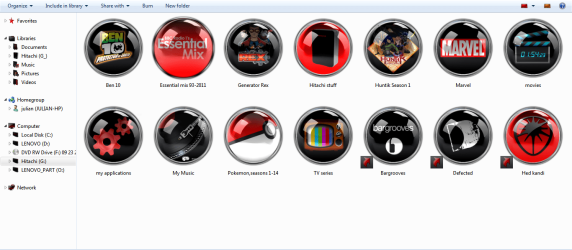
looks much better, dont worry about the rep, im glad you got it sorted the way you wanted, i do understand about having folders display exactly as you want, i am a little obsessed that way too,
(but not with subfolders)

mostly my kids cartoons on this external

ht.png
 

My Computer

Computer Manufacturer/Model Number
Hewlett packard/p6512uk
OS
Microsoft Windows 7 Home Premium 64-bit 7600
CPU
IIx4 amd athelon 635 processor
Motherboard
FOXCONN 2AA9
Memory
2x2gb
Graphics Card(s)
ati radeon HD 5450
Sound Card
(1) Realtek High Definition Audio (2) AMD High Definition
Monitor(s) Displays
samsung lcd tv 32"
Screen Resolution
1360x 768
Hard Drives
(1) WDC WD10 01FAES-60Z2A0 SATA Disk Device (2) Maxtor OneTouch USB Device (3) ST310003 33AS USB Device (4) WD My Book 1111 USB Device
PSU
?
Cooling
air!
Keyboard
wireless hp
Mouse
wireless Hp,optical
Internet Speed
1.10mb/s
Antivirus
MSE
Browser
Firefox
Many thanks, yeah I too, specially with music collection and photo albums :)

Very nice icons you have :)
 

My Computer

Computer Manufacturer/Model Number
Custom
OS
Windows 7 Ultimate 64-bit SP1
CPU
Intel Celeron G530
Motherboard
Gigabyte GA-H61M-S2-B3
Memory
2 GB DDR3 Kingston 1333 (1066)
Graphics Card(s)
POV Nvidia Geforce GT530
Sound Card
Onboard
Monitor(s) Displays
Samsung SyncMaster S19B150
Screen Resolution
1366x768
Hard Drives
Laptop HDD TOSHIBA MK3265GSX
PSU
Generic 500W
Cooling
Stock
Keyboard
Logitech S 510 Wireless
Mouse
IBM MO28UO
Internet Speed
30 mbps
the icons are homemade in photoshop, kind member ARC made me the button icon psd,and i put the image in as i like.
 

My Computer

Computer Manufacturer/Model Number
Hewlett packard/p6512uk
OS
Microsoft Windows 7 Home Premium 64-bit 7600
CPU
IIx4 amd athelon 635 processor
Motherboard
FOXCONN 2AA9
Memory
2x2gb
Graphics Card(s)
ati radeon HD 5450
Sound Card
(1) Realtek High Definition Audio (2) AMD High Definition
Monitor(s) Displays
samsung lcd tv 32"
Screen Resolution
1360x 768
Hard Drives
(1) WDC WD10 01FAES-60Z2A0 SATA Disk Device (2) Maxtor OneTouch USB Device (3) ST310003 33AS USB Device (4) WD My Book 1111 USB Device
PSU
?
Cooling
air!
Keyboard
wireless hp
Mouse
wireless Hp,optical
Internet Speed
1.10mb/s
Antivirus
MSE
Browser
Firefox
OK, I though at first you found them on Internet good job :)

I have a last question about this, sorry.

I want to move all the new music collection to my netbook (it has currently the same old higgledy-piggledy shown in the OP, but I've deleted it), I tried with a random folder (all folders have the ICO file inside), but the icon in the netbook's Explorer is the default again. Is there a way to make the flat icons appear in the laptop as well without configure them again? (which is very tedious) A quick search said this has to do with relative paths or something but I can't find how!


For example:
Here is the folder and its contents I've copied from my desktop:
sinttulozy.png


And here is the result in the laptop
sinttulokma.png


Many thanks (again) :)
 

My Computer

Computer Manufacturer/Model Number
Custom
OS
Windows 7 Ultimate 64-bit SP1
CPU
Intel Celeron G530
Motherboard
Gigabyte GA-H61M-S2-B3
Memory
2 GB DDR3 Kingston 1333 (1066)
Graphics Card(s)
POV Nvidia Geforce GT530
Sound Card
Onboard
Monitor(s) Displays
Samsung SyncMaster S19B150
Screen Resolution
1366x768
Hard Drives
Laptop HDD TOSHIBA MK3265GSX
PSU
Generic 500W
Cooling
Stock
Keyboard
Logitech S 510 Wireless
Mouse
IBM MO28UO
Internet Speed
30 mbps
If there is I'm not aware, I reckon you will have to re do them as you have done on the desktop,at least you already have the icons.:(:D
 

My Computer

Computer Manufacturer/Model Number
Hewlett packard/p6512uk
OS
Microsoft Windows 7 Home Premium 64-bit 7600
CPU
IIx4 amd athelon 635 processor
Motherboard
FOXCONN 2AA9
Memory
2x2gb
Graphics Card(s)
ati radeon HD 5450
Sound Card
(1) Realtek High Definition Audio (2) AMD High Definition
Monitor(s) Displays
samsung lcd tv 32"
Screen Resolution
1360x 768
Hard Drives
(1) WDC WD10 01FAES-60Z2A0 SATA Disk Device (2) Maxtor OneTouch USB Device (3) ST310003 33AS USB Device (4) WD My Book 1111 USB Device
PSU
?
Cooling
air!
Keyboard
wireless hp
Mouse
wireless Hp,optical
Internet Speed
1.10mb/s
Antivirus
MSE
Browser
Firefox
Many thanks, yeah getting the icons was the most time spending part, anyway, now gets start to work with the laptop hehe :D
 

My Computer

Computer Manufacturer/Model Number
Custom
OS
Windows 7 Ultimate 64-bit SP1
CPU
Intel Celeron G530
Motherboard
Gigabyte GA-H61M-S2-B3
Memory
2 GB DDR3 Kingston 1333 (1066)
Graphics Card(s)
POV Nvidia Geforce GT530
Sound Card
Onboard
Monitor(s) Displays
Samsung SyncMaster S19B150
Screen Resolution
1366x768
Hard Drives
Laptop HDD TOSHIBA MK3265GSX
PSU
Generic 500W
Cooling
Stock
Keyboard
Logitech S 510 Wireless
Mouse
IBM MO28UO
Internet Speed
30 mbps
once your done it will be easy to stay on top of them as you will only need to do them as you add them, just a tip, if you change the name of a customized folder, the icon will revert to the default folder, dont panic just re do the customization.
 
Last edited:

My Computer

Computer Manufacturer/Model Number
Hewlett packard/p6512uk
OS
Microsoft Windows 7 Home Premium 64-bit 7600
CPU
IIx4 amd athelon 635 processor
Motherboard
FOXCONN 2AA9
Memory
2x2gb
Graphics Card(s)
ati radeon HD 5450
Sound Card
(1) Realtek High Definition Audio (2) AMD High Definition
Monitor(s) Displays
samsung lcd tv 32"
Screen Resolution
1360x 768
Hard Drives
(1) WDC WD10 01FAES-60Z2A0 SATA Disk Device (2) Maxtor OneTouch USB Device (3) ST310003 33AS USB Device (4) WD My Book 1111 USB Device
PSU
?
Cooling
air!
Keyboard
wireless hp
Mouse
wireless Hp,optical
Internet Speed
1.10mb/s
Antivirus
MSE
Browser
Firefox
Back
Top