Folders appear empty but utilities disagree

rdrean

New member
Local time
7:51 PM
Messages
3
I'm not positive how to properly word this...

I want to use a utility to delete all my empty folders. Mainly because itunes had its way with my music drive and moved all the files off the root and into a new "Music" folder it recently created after an update, I dont why but its itunes and I hate it. Now I am left with hundreds of empty folders and sub-folders where music once lived. Problem is NOT all are empty, some music remains, so I can't just delete them all on my own blindly. I have tried about 4 utilities that search for empty folders but they do not see any as empty. I have turned on "show hidden files/folders/etc" in the options. They are still empty. Any thoughts on how to remove these empty folders or make the utilities see empty folders as empty?

Thanks!
 

My Computer My Computer

At a glance

7 home premium 64 bit
OS
7 home premium 64 bit

My Computer My Computer

At a glance

win7 home premium-64bit-SP1-IE10T6600 2.2Ghz4 GbATI Mobility Radeon HD 4530
Computer type
Laptop
Computer Manufacturer/Model Number
HP pavilion DV6
OS
win7 home premium-64bit-SP1-IE10
CPU
T6600 2.2Ghz
Motherboard
HP Model 3628
Memory
4 Gb
Graphics Card(s)
ATI Mobility Radeon HD 4530
Sound Card
IDT High Definition
Screen Resolution
1366x768 @ 60Hz
Hard Drives
500Gb Western Digital
Antivirus
MSE
Other Info
Malwarebytes Antimalware + Spybot-Search&Destroy
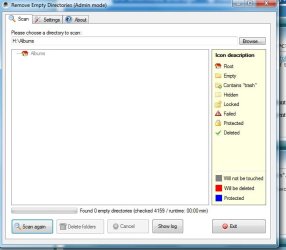
I had tried that one. Again...this may be my own user error but I attached two scrn grabs.

1. The folder I see (just an example) in the "albums" sub dir that has nothing, even hidden files

2. The result from scanning the entire albums dir.

Any other thoughts on what my issue may be?
 

Attachments

  • folder-error1.jpg
    folder-error1.jpg
    9.8 KB · Views: 11
  • folder-error2.jpg
    folder-error2.jpg
    36.6 KB · Views: 13

My Computer My Computer

At a glance

7 home premium 64 bit
OS
7 home premium 64 bit
I'm not sure how organised/disorganised your music file system is pre- and post-itunes, but if you're willing to raze that structure and start anew ...

Use XNView, a media file manager, to move ALL your music files to a new folder. You can search with a .mp3 through the subdirectories. Double-check to see if the search dug deep enough with a few sampling. When satisfied, delete all but the new folder with all your music files. Then you can rebuild the directory structure for your music files.

If you have non-music files in these folders, perhaps a *.* search would get all the files from the itunes folder structure.
 

My Computer My Computer

At a glance

Windows 7 Home Premium x64
OS
Windows 7 Home Premium x64
rdrean,
Win 7 is not eXPired.

Your itunes do not belong in the root of your system drive.
They belong under Music.

Do you still have a problem with zero-length folders? If yes, give us one concrete example please. this will help to diagnose your problem.

Give very serious consideration to filling out your system specs ( a word to the wise).
Update your SevenForums System Specs
User CP (located on the top menu bar) |
Your Profile | Edit System Spec
(left-hand column)

To gather info, use Speccy (my favorite) or SIW or System Info

Add the word laptop or desktop or netbook to the
“system manufacturer” block, for example,
Toshiba Satellite L305D notebook.

Provide full windows version info, for example:
MS Windows 7 Ultimate SP1 64-bit

Use the “Other Info” block for Optical Reader,
Mouse, touchpad, wifi adapter, speakers, monitor, etc

Scroll down and click on SAVE CHANGES.
============================================
thanks, karl
 

My Computer My Computer

At a glance

MS Windows 7 Ultimate SP1 64-bitAMD A10-4600M6.00 GB Dual-Channel DDR3 @ 798MHz (11-11-12-28)AMD Radeon HD 7660G
Computer Manufacturer/Model Number
Toshiba Satellite S875D-S7239 laptop
OS
MS Windows 7 Ultimate SP1 64-bit
CPU
AMD A10-4600M
Motherboard
AMD Pumori (Socket FT1)
Memory
6.00 GB Dual-Channel DDR3 @ 798MHz (11-11-12-28)
Graphics Card(s)
AMD Radeon HD 7660G
Sound Card
High Definition Audio Device
Monitor(s) Displays
Generic PnP Monitor (1600x900@60Hz)
Screen Resolution
1600x900@60Hz
Hard Drives
SSD 119GB Corsair CSSD-V128GB2 ATA Device
Keyboard
Standard PS/2 Keyboard
Mouse
HP Wireless Optical Mobile Mouse Model FHA-3410
Internet Speed
What the local pub, local coffee shop offers.
Other Info
Optical Drive:MATSHITA BD-CMB UJ160B ATA Device


Also have an Asus ha1002xp netbook with Win 7 Ultimate installed.
I thought the info I provided would be enough to get some help. When I am back on the home machine I will post full specs.

Itunes is not on my system drive...I didn't indicate as much did I? I have a separate drive that stores my music, called "1TB MUSIC" Also, I dont care if it all goes into the "Music" folder or the "Blueberry" folder, I really just want a utility to see empty folders/directories and delete them. But either way I thought the screen grabs I posted showed that the zero folders were not being deleted. My second post...Is that a concrete example?

Thanks!
 

My Computer My Computer

At a glance

7 home premium 64 bit
OS
7 home premium 64 bit
click on the link for WDO in my signature. WDO, when you run it, will first automatically run a quick scan. When the quick scan finishes then run a full scan.
 

My Computer My Computer

At a glance

MS Windows 7 Ultimate SP1 64-bitAMD A10-4600M6.00 GB Dual-Channel DDR3 @ 798MHz (11-11-12-28)AMD Radeon HD 7660G
Computer Manufacturer/Model Number
Toshiba Satellite S875D-S7239 laptop
OS
MS Windows 7 Ultimate SP1 64-bit
CPU
AMD A10-4600M
Motherboard
AMD Pumori (Socket FT1)
Memory
6.00 GB Dual-Channel DDR3 @ 798MHz (11-11-12-28)
Graphics Card(s)
AMD Radeon HD 7660G
Sound Card
High Definition Audio Device
Monitor(s) Displays
Generic PnP Monitor (1600x900@60Hz)
Screen Resolution
1600x900@60Hz
Hard Drives
SSD 119GB Corsair CSSD-V128GB2 ATA Device
Keyboard
Standard PS/2 Keyboard
Mouse
HP Wireless Optical Mobile Mouse Model FHA-3410
Internet Speed
What the local pub, local coffee shop offers.
Other Info
Optical Drive:MATSHITA BD-CMB UJ160B ATA Device


Also have an Asus ha1002xp netbook with Win 7 Ultimate installed.
Back
Top