
You are using an out of date browser. It may not display this or other websites correctly.
You should upgrade or use an alternative browser.
You should upgrade or use an alternative browser.
Solved Folders as icons, pictures as thumbnails
- Thread starter Anixx
- Start date
I wish.
I'm sure there's some way to do this, but I don't know how. I've been looking for a way to do this for years (since the days of Windows Vista).
I'm sure there's some way to do this, but I don't know how. I've been looking for a way to do this for years (since the days of Windows Vista).
My Computer
At a glance
Windows 7 Professional x64Intel Core i7-4510U CPU8 GB RAMIntel(R) HD Graphics (I so wish I could upgra...
- Computer type
- Laptop
- Computer Manufacturer/Model Number
- Dell Inspiron 15 7000 Series
- OS
- Windows 7 Professional x64
- CPU
- Intel Core i7-4510U CPU
- Memory
- 8 GB RAM
- Graphics Card(s)
- Intel(R) HD Graphics (I so wish I could upgrade this)
- Screen Resolution
- 1920x1080
- Keyboard
- Laptop keyboard
- Mouse
- Microsoft Mouse
- Internet Speed
- Nothing to write home about
- Antivirus
- Malwarebytes Anti Malware
- Browser
- Pale Moon (Firefox fork)
- Other Info
- My primary laptop has Windows 10 on it, and my shared desktop (which is actually a laptop being used as a desktop) has Windows 7 Professional on it. I still use both, but I would say I use my laptop a bit more now.
xmmm...I am wondering the same thing.
My Computer
At a glance
windows 7 proffesional x64Intel(R) Core(TM) i3-2330M CPU @ 2.20GHz4GBAMD RADON 6470M
- Computer type
- Laptop
- Computer Manufacturer/Model Number
- Dell
- OS
- windows 7 proffesional x64
- CPU
- Intel(R) Core(TM) i3-2330M CPU @ 2.20GHz
- Motherboard
- 0FTJWD Dell Inc.
- Memory
- 4GB
- Graphics Card(s)
- AMD RADON 6470M
- Hard Drives
- 465,76 GB
- Antivirus
- Bitdefender
- Browser
- firefox
Sorry to bump such an old thread, but I've found a solution to this.
Step 1: Disable all thumbnails (don't worry, we'll get our file icons back soon enough).
Step 2: Download the program SageThumbs.
Step 3: In the SageThumbs settings, choose the file types you want to display as thumbnails.
Step 4: Enjoy no more live folders!
Step 1: Disable all thumbnails (don't worry, we'll get our file icons back soon enough).
Step 2: Download the program SageThumbs.
Step 3: In the SageThumbs settings, choose the file types you want to display as thumbnails.
Step 4: Enjoy no more live folders!
My Computer
At a glance
Windows 7 Professional x64Intel Core i7-4510U CPU8 GB RAMIntel(R) HD Graphics (I so wish I could upgra...
- Computer type
- Laptop
- Computer Manufacturer/Model Number
- Dell Inspiron 15 7000 Series
- OS
- Windows 7 Professional x64
- CPU
- Intel Core i7-4510U CPU
- Memory
- 8 GB RAM
- Graphics Card(s)
- Intel(R) HD Graphics (I so wish I could upgrade this)
- Screen Resolution
- 1920x1080
- Keyboard
- Laptop keyboard
- Mouse
- Microsoft Mouse
- Internet Speed
- Nothing to write home about
- Antivirus
- Malwarebytes Anti Malware
- Browser
- Pale Moon (Firefox fork)
- Other Info
- My primary laptop has Windows 10 on it, and my shared desktop (which is actually a laptop being used as a desktop) has Windows 7 Professional on it. I still use both, but I would say I use my laptop a bit more now.
I knew about this but in my view it is not exactly a good solution. The set of filetypes for which it can display thumbnails is smaller than what Windows thumbnailer can.
My Computer
At a glance
Windows 7
- Computer type
- PC/Desktop
- OS
- Windows 7
After trying if for a while, I actually agree with you. I find it pretty annoying not having filetype icons. Plus, thumbnails are loaded significantly slower.I knew about this but in my view it is not exactly a good solution. The set of filetypes for which it can display thumbnails is smaller than what Windows thumbnailer can.
I'm pretty sure imageres.dll is what handles icon rendering (not alignment, so modifying that won't solve our 32x32 icons issue) so that's where I would start looking.
My Computer
At a glance
Windows 7 Professional x64Intel Core i7-4510U CPU8 GB RAMIntel(R) HD Graphics (I so wish I could upgra...
- Computer type
- Laptop
- Computer Manufacturer/Model Number
- Dell Inspiron 15 7000 Series
- OS
- Windows 7 Professional x64
- CPU
- Intel Core i7-4510U CPU
- Memory
- 8 GB RAM
- Graphics Card(s)
- Intel(R) HD Graphics (I so wish I could upgrade this)
- Screen Resolution
- 1920x1080
- Keyboard
- Laptop keyboard
- Mouse
- Microsoft Mouse
- Internet Speed
- Nothing to write home about
- Antivirus
- Malwarebytes Anti Malware
- Browser
- Pale Moon (Firefox fork)
- Other Info
- My primary laptop has Windows 10 on it, and my shared desktop (which is actually a laptop being used as a desktop) has Windows 7 Professional on it. I still use both, but I would say I use my laptop a bit more now.
I was wondering if that could be the case. Do you have any idea where in the registry that would be?
My Computer
At a glance
Windows 7 Professional x64Intel Core i7-4510U CPU8 GB RAMIntel(R) HD Graphics (I so wish I could upgra...
- Computer type
- Laptop
- Computer Manufacturer/Model Number
- Dell Inspiron 15 7000 Series
- OS
- Windows 7 Professional x64
- CPU
- Intel Core i7-4510U CPU
- Memory
- 8 GB RAM
- Graphics Card(s)
- Intel(R) HD Graphics (I so wish I could upgrade this)
- Screen Resolution
- 1920x1080
- Keyboard
- Laptop keyboard
- Mouse
- Microsoft Mouse
- Internet Speed
- Nothing to write home about
- Antivirus
- Malwarebytes Anti Malware
- Browser
- Pale Moon (Firefox fork)
- Other Info
- My primary laptop has Windows 10 on it, and my shared desktop (which is actually a laptop being used as a desktop) has Windows 7 Professional on it. I still use both, but I would say I use my laptop a bit more now.
SageThumbs does not work with PDF files which is very important for me.Step 2: Download the program SageThumbs.
My Computer
At a glance
Windows 7
- Computer type
- PC/Desktop
- OS
- Windows 7
Nor does it work with video files AFAIK. It's especially problematic when you are viewing icons that are 16x16px (details view or small icons) when it doesn't show a filetype icon, but rather the thumbnail (which is useless with 16x16 icons).
I've done a bit of messing around, and I have found some of the icons in imageres.dll that are used in live folders. However, I don't think we'd get very far by simply editing these though (due to the way Windows renders live folders). I think it would be better to fully disable folder thumbnails whilst not messing with picture thumbnails somehow. I'm sure some modification can be made to imageres.dll, but I currently don't know how it would be done.
I've done a bit of messing around, and I have found some of the icons in imageres.dll that are used in live folders. However, I don't think we'd get very far by simply editing these though (due to the way Windows renders live folders). I think it would be better to fully disable folder thumbnails whilst not messing with picture thumbnails somehow. I'm sure some modification can be made to imageres.dll, but I currently don't know how it would be done.
My Computer
At a glance
Windows 7 Professional x64Intel Core i7-4510U CPU8 GB RAMIntel(R) HD Graphics (I so wish I could upgra...
- Computer type
- Laptop
- Computer Manufacturer/Model Number
- Dell Inspiron 15 7000 Series
- OS
- Windows 7 Professional x64
- CPU
- Intel Core i7-4510U CPU
- Memory
- 8 GB RAM
- Graphics Card(s)
- Intel(R) HD Graphics (I so wish I could upgrade this)
- Screen Resolution
- 1920x1080
- Keyboard
- Laptop keyboard
- Mouse
- Microsoft Mouse
- Internet Speed
- Nothing to write home about
- Antivirus
- Malwarebytes Anti Malware
- Browser
- Pale Moon (Firefox fork)
- Other Info
- My primary laptop has Windows 10 on it, and my shared desktop (which is actually a laptop being used as a desktop) has Windows 7 Professional on it. I still use both, but I would say I use my laptop a bit more now.
By the way, if to set a custom icon for a folder, Windows does not display it as live folder. I wonder if it is possible, to make ALL icons custom in the same sense?
My Computer
At a glance
Windows 7
- Computer type
- PC/Desktop
- OS
- Windows 7
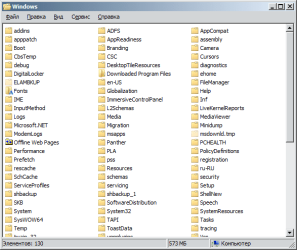
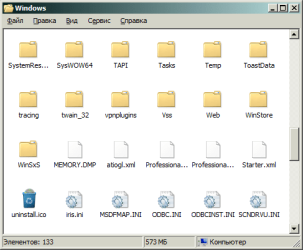
By the way, I have recently changed the icon for the folders to this one. I like it more. The reg file is attached.
Attachments
Last edited:
My Computer
At a glance
Windows 7
- Computer type
- PC/Desktop
- OS
- Windows 7
Interesting icon scheme, are those the icons used in MMC?
Windows stores data for custom folder icons in a Desktop.ini file, which will be created in the folder that the user applies a custom icon to. I have never been able to get a Desktop.ini file to work simply by copying it from one folder to another; it must be generated by Windows. The only other alternative I could think of would be to right-click on every single folder and changing the icon in the customization tab under properties. So I'd say changing every folder to use a custom icon is probably not the best way to go, unfortunately.
Windows stores data for custom folder icons in a Desktop.ini file, which will be created in the folder that the user applies a custom icon to. I have never been able to get a Desktop.ini file to work simply by copying it from one folder to another; it must be generated by Windows. The only other alternative I could think of would be to right-click on every single folder and changing the icon in the customization tab under properties. So I'd say changing every folder to use a custom icon is probably not the best way to go, unfortunately.
My Computer
At a glance
Windows 7 Professional x64Intel Core i7-4510U CPU8 GB RAMIntel(R) HD Graphics (I so wish I could upgra...
- Computer type
- Laptop
- Computer Manufacturer/Model Number
- Dell Inspiron 15 7000 Series
- OS
- Windows 7 Professional x64
- CPU
- Intel Core i7-4510U CPU
- Memory
- 8 GB RAM
- Graphics Card(s)
- Intel(R) HD Graphics (I so wish I could upgrade this)
- Screen Resolution
- 1920x1080
- Keyboard
- Laptop keyboard
- Mouse
- Microsoft Mouse
- Internet Speed
- Nothing to write home about
- Antivirus
- Malwarebytes Anti Malware
- Browser
- Pale Moon (Firefox fork)
- Other Info
- My primary laptop has Windows 10 on it, and my shared desktop (which is actually a laptop being used as a desktop) has Windows 7 Professional on it. I still use both, but I would say I use my laptop a bit more now.
Yes.Interesting icon scheme, are those the icons used in MMC?
I think it is the theme initially developed for Longhorn, but later left unused because of introduction of live folders.
My Computer
At a glance
Windows 7
- Computer type
- PC/Desktop
- OS
- Windows 7
I found a way to disable the Live Folders. Disable the "Typed Data Thumbnail Handler" shell extension with ShellExView utility. After I had done this, folders are shown as folder icons while pictures, videos and pdf files are shown as thumbnails. Also folders are shown as thumbnails when large icons view is enabled. In short, everything works as desired.

Last edited:
My Computer
At a glance
Windows 7
- Computer type
- PC/Desktop
- OS
- Windows 7
Looks good. I will give it a try. Thanks!By the way, I have recently changed the icon for the folders to this one. I like it more. The reg file is attached.
My Computer
At a glance
Windows 7 Pro x64
- Computer type
- PC/Desktop
- OS
- Windows 7 Pro x64
Great work, Anixx. I'll try it for myself.
My Computer
At a glance
Windows 7 Professional x64Intel Core i7-4510U CPU8 GB RAMIntel(R) HD Graphics (I so wish I could upgra...
- Computer type
- Laptop
- Computer Manufacturer/Model Number
- Dell Inspiron 15 7000 Series
- OS
- Windows 7 Professional x64
- CPU
- Intel Core i7-4510U CPU
- Memory
- 8 GB RAM
- Graphics Card(s)
- Intel(R) HD Graphics (I so wish I could upgrade this)
- Screen Resolution
- 1920x1080
- Keyboard
- Laptop keyboard
- Mouse
- Microsoft Mouse
- Internet Speed
- Nothing to write home about
- Antivirus
- Malwarebytes Anti Malware
- Browser
- Pale Moon (Firefox fork)
- Other Info
- My primary laptop has Windows 10 on it, and my shared desktop (which is actually a laptop being used as a desktop) has Windows 7 Professional on it. I still use both, but I would say I use my laptop a bit more now.
I can't seem to find the "Typed Data Thumbnail Handler" extension in Windows 7 x64, though I did find it on Windows 8. I'll keep looking, maybe they renamed it. Could you perhaps post the CLSID for the extension?
My Computer
At a glance
Windows 7 Professional x64Intel Core i7-4510U CPU8 GB RAMIntel(R) HD Graphics (I so wish I could upgra...
- Computer type
- Laptop
- Computer Manufacturer/Model Number
- Dell Inspiron 15 7000 Series
- OS
- Windows 7 Professional x64
- CPU
- Intel Core i7-4510U CPU
- Memory
- 8 GB RAM
- Graphics Card(s)
- Intel(R) HD Graphics (I so wish I could upgrade this)
- Screen Resolution
- 1920x1080
- Keyboard
- Laptop keyboard
- Mouse
- Microsoft Mouse
- Internet Speed
- Nothing to write home about
- Antivirus
- Malwarebytes Anti Malware
- Browser
- Pale Moon (Firefox fork)
- Other Info
- My primary laptop has Windows 10 on it, and my shared desktop (which is actually a laptop being used as a desktop) has Windows 7 Professional on it. I still use both, but I would say I use my laptop a bit more now.
Yeah, that CLSID doesn't seem to exist on Windows 7. Strange...
My Computer
At a glance
Windows 7 Professional x64Intel Core i7-4510U CPU8 GB RAMIntel(R) HD Graphics (I so wish I could upgra...
- Computer type
- Laptop
- Computer Manufacturer/Model Number
- Dell Inspiron 15 7000 Series
- OS
- Windows 7 Professional x64
- CPU
- Intel Core i7-4510U CPU
- Memory
- 8 GB RAM
- Graphics Card(s)
- Intel(R) HD Graphics (I so wish I could upgrade this)
- Screen Resolution
- 1920x1080
- Keyboard
- Laptop keyboard
- Mouse
- Microsoft Mouse
- Internet Speed
- Nothing to write home about
- Antivirus
- Malwarebytes Anti Malware
- Browser
- Pale Moon (Firefox fork)
- Other Info
- My primary laptop has Windows 10 on it, and my shared desktop (which is actually a laptop being used as a desktop) has Windows 7 Professional on it. I still use both, but I would say I use my laptop a bit more now.
Similar threads
- Replies
- 3
- Views
- 2K
- Replies
- 4
- Views
- 8K
- Replies
- 12
- Views
- 12K
- Replies
- 27
- Views
- 5K
- Replies
- 18
- Views
- 12K