Rendering Issue with Icons/Pictures/Browsers/Aero

Stormhunter

New member
Local time
1:11 PM
Messages
15
Location
England
I recently Purchased parts for a new PC that I built myself, I have had experience building pc's for my friends and have never had any issues with windows 7 before. I installed windows from a thumbstick usb (64bit Home Premium) as I didn't purchase a CD rom drive as installing windows was the only thing I would need it for.
System Specs:

i3-2100
8GB Corsair Vengence at 1600mhz
128GB sandisk ssd
CX500 Corsair Builder PSU
Asus P8Z77-M PRO Motherboard
Nvidia GT430 4GB

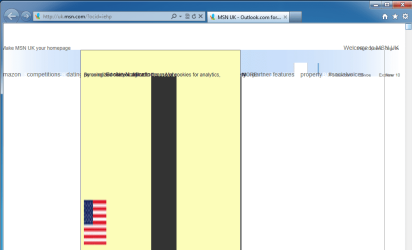
On inital installation of windows I have no issues, only when I updated drivers did the issues occur. When windows was running opening internet explorer caused issues:
Untitled.png
When moving the cursor around, this strange effect would occur more, when the cursor was still this image would just flicker.
When I first installed windows and updated drivers from windows updater activating Aero would cause the PC to crash instantly, no blue screen just the mouse cursor unresponsive and it would stay that way for hours, keyboard input would do nothing either and the clock remained the same time so the computer had completely frozen up meaning holding the power button was the only way to get out of windows.
I then tried reinstalling a few times: without a ram stick or without the gpu, the problem remained to occur with windows crashing completely every 5 to 10 minutes. This morning I tried plugging the SSD into a different sata drive and it hasn't crashed since although the issues other than crashing remain to occur:
Untitled1.png
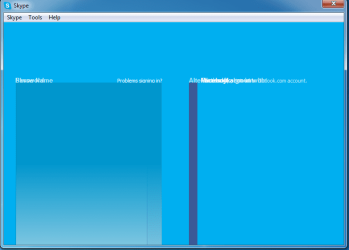
As seen here the same issue occurs with skype which I installed with a usb thumbstick as Internet Explorer wasn't an option.
Untitled2.png
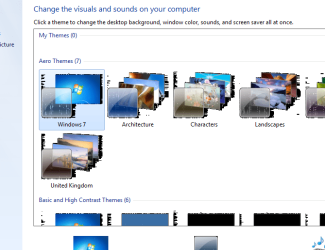
Also this strange black pixel formation has occured around the icons in windows explorer. This problem occured before any drivers were installed with and without using the vga adapter.
I ran a Ram test using the inbuilt on in windows and memtestx86 both showed no problems with my ram.
I also ran an SSD test named SSDlife Pro which said my SSD had eight years of life left.

It would be highly appreciated if anyone were to suggest any fixes for these issues as the PC is pretty much unusable in it's current state even though it is now stable without crashes.
I will take any suggestion and will post more information if asked, thank you for you time.
 
Last edited:

My Computer My Computer

At a glance

Windows 7 Ultimate x64
Computer type
PC/Desktop
OS
Windows 7 Ultimate x64
Hi stormhunter, Welcome to the forums, Where did you get the motherboard and device drivers from? Did you just rely on windows update to supply the drivers . If you would be so kind and fill us in on your system specs we may be able to help you further :)
 

My Computer My Computer

At a glance

win 7 ultimate32bit, Win8.1pro wmc 32bitamd phenom x4 9600corsair twinxs 2x2gb2x nvidia 1gb 8500gt
Computer type
PC/Desktop
Computer Manufacturer/Model Number
self build
OS
win 7 ultimate32bit, Win8.1pro wmc 32bit
CPU
amd phenom x4 9600
Motherboard
asus m2n32-sli deluxe
Memory
corsair twinxs 2x2gb
Graphics Card(s)
2x nvidia 1gb 8500gt
Sound Card
onboard
Monitor(s) Displays
23" PB Viseo 233d
Screen Resolution
1920x1080
Hard Drives
maxtor sata 500gb
maxtor sata 320gb
fujitsu sata200gb
PSU
oryxx tornado 750w
Case
thermaltake xaser lll
Cooling
artic freezer64 pro + 7 case fans
Hello Pebbly, thank you for replying :)
I did leave the system specs in the original post, is there any more you require?

Yes, I did allow windows update to download all the drivers expect graphics drivers which I downloaded on a different pc and copied across via a usb drive.
 

My Computer My Computer

At a glance

Windows 7 Ultimate x64
Computer type
PC/Desktop
OS
Windows 7 Ultimate x64

My Computer My Computer

At a glance

win 7 ultimate32bit, Win8.1pro wmc 32bitamd phenom x4 9600corsair twinxs 2x2gb2x nvidia 1gb 8500gt
Computer type
PC/Desktop
Computer Manufacturer/Model Number
self build
OS
win 7 ultimate32bit, Win8.1pro wmc 32bit
CPU
amd phenom x4 9600
Motherboard
asus m2n32-sli deluxe
Memory
corsair twinxs 2x2gb
Graphics Card(s)
2x nvidia 1gb 8500gt
Sound Card
onboard
Monitor(s) Displays
23" PB Viseo 233d
Screen Resolution
1920x1080
Hard Drives
maxtor sata 500gb
maxtor sata 320gb
fujitsu sata200gb
PSU
oryxx tornado 750w
Case
thermaltake xaser lll
Cooling
artic freezer64 pro + 7 case fans
Thanks again Pebbly, currently in the process of downloading all the necessary drivers
I will post when I have installed them all :)
 

My Computer My Computer

At a glance

Windows 7 Ultimate x64
Computer type
PC/Desktop
OS
Windows 7 Ultimate x64
I downloaded the chipset driver and motherboard drivers and other software from the Asus website and installed it one at a time. They seemed to install okay but the problems were still occuring. I got to the USB 3.0 Intel driver which caused many problems, the pc wouldn't boot as it went straight to blue screen instead of windows, System restore said it wouldn't work due to recently installed software preventing the restore. I gave up and reinstalled windows again but all the problems are still occuring after I reinstalled all the motherboard and chipset drivers except the usb 3.0 one. Opening google chrome caused the pc to instantly crash on normal mode but works perfectly in safe mode with networking on.
What do you think I should do from here?
 

My Computer My Computer

At a glance

Windows 7 Ultimate x64
Computer type
PC/Desktop
OS
Windows 7 Ultimate x64
Hi Stormhunter, In device manager are there any yellow exclaimation marks against any of the devices ?, If this is a brand new mobo and you have never had it running correctly is it possible the mobo is no good :(
Try installing the OS with just 1 stick of ram, see if that makes a difference
You are the 2nd person today to have problems with this mobo model !
 

My Computer My Computer

At a glance

win 7 ultimate32bit, Win8.1pro wmc 32bitamd phenom x4 9600corsair twinxs 2x2gb2x nvidia 1gb 8500gt
Computer type
PC/Desktop
Computer Manufacturer/Model Number
self build
OS
win 7 ultimate32bit, Win8.1pro wmc 32bit
CPU
amd phenom x4 9600
Motherboard
asus m2n32-sli deluxe
Memory
corsair twinxs 2x2gb
Graphics Card(s)
2x nvidia 1gb 8500gt
Sound Card
onboard
Monitor(s) Displays
23" PB Viseo 233d
Screen Resolution
1920x1080
Hard Drives
maxtor sata 500gb
maxtor sata 320gb
fujitsu sata200gb
PSU
oryxx tornado 750w
Case
thermaltake xaser lll
Cooling
artic freezer64 pro + 7 case fans
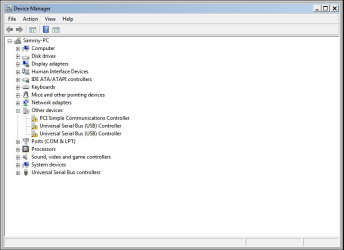
Hello Pebbly, In device manager there is yellow exclamation marks:
Untitled.png
I will try installing with one stick of ram and without the graphics card and see if that shows an improvement and get back to you, Thank you for the help again!
Is it possible I may have to send the motherboard back to amazon and order a different board? :(
 

My Computer My Computer

At a glance

Windows 7 Ultimate x64
Computer type
PC/Desktop
OS
Windows 7 Ultimate x64
Hi Stormhunter, It looks like the chipset driver did'nt install correctly the USB controller is because you did'nt install those drivers (did you try to install the Intel and the Asmedia drivers ) do you remember which USB driver gave you the problem ?
Let us know how you get on :)
 

My Computer My Computer

At a glance

win 7 ultimate32bit, Win8.1pro wmc 32bitamd phenom x4 9600corsair twinxs 2x2gb2x nvidia 1gb 8500gt
Computer type
PC/Desktop
Computer Manufacturer/Model Number
self build
OS
win 7 ultimate32bit, Win8.1pro wmc 32bit
CPU
amd phenom x4 9600
Motherboard
asus m2n32-sli deluxe
Memory
corsair twinxs 2x2gb
Graphics Card(s)
2x nvidia 1gb 8500gt
Sound Card
onboard
Monitor(s) Displays
23" PB Viseo 233d
Screen Resolution
1920x1080
Hard Drives
maxtor sata 500gb
maxtor sata 320gb
fujitsu sata200gb
PSU
oryxx tornado 750w
Case
thermaltake xaser lll
Cooling
artic freezer64 pro + 7 case fans
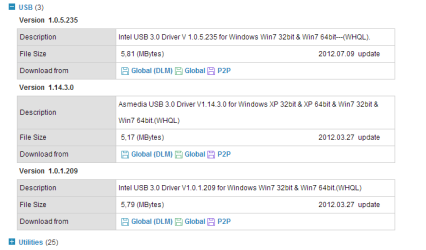
Hello Pebbly, I only installed the top USB 3.0 driver, that was the one that caused the problem , do you suggest I install all three of these:
Untitled.png
I believe the error was to do with the file named iusb3xhc.sys
 

My Computer My Computer

At a glance

Windows 7 Ultimate x64
Computer type
PC/Desktop
OS
Windows 7 Ultimate x64

My Computer My Computer

At a glance

win 7 ultimate32bit, Win8.1pro wmc 32bitamd phenom x4 9600corsair twinxs 2x2gb2x nvidia 1gb 8500gt
Computer type
PC/Desktop
Computer Manufacturer/Model Number
self build
OS
win 7 ultimate32bit, Win8.1pro wmc 32bit
CPU
amd phenom x4 9600
Motherboard
asus m2n32-sli deluxe
Memory
corsair twinxs 2x2gb
Graphics Card(s)
2x nvidia 1gb 8500gt
Sound Card
onboard
Monitor(s) Displays
23" PB Viseo 233d
Screen Resolution
1920x1080
Hard Drives
maxtor sata 500gb
maxtor sata 320gb
fujitsu sata200gb
PSU
oryxx tornado 750w
Case
thermaltake xaser lll
Cooling
artic freezer64 pro + 7 case fans
Hi Stormhunter, I'm going to ask for more help from our members see if anyone can help who is more used to dealing with issues like yours :)
 

My Computer My Computer

At a glance

win 7 ultimate32bit, Win8.1pro wmc 32bitamd phenom x4 9600corsair twinxs 2x2gb2x nvidia 1gb 8500gt
Computer type
PC/Desktop
Computer Manufacturer/Model Number
self build
OS
win 7 ultimate32bit, Win8.1pro wmc 32bit
CPU
amd phenom x4 9600
Motherboard
asus m2n32-sli deluxe
Memory
corsair twinxs 2x2gb
Graphics Card(s)
2x nvidia 1gb 8500gt
Sound Card
onboard
Monitor(s) Displays
23" PB Viseo 233d
Screen Resolution
1920x1080
Hard Drives
maxtor sata 500gb
maxtor sata 320gb
fujitsu sata200gb
PSU
oryxx tornado 750w
Case
thermaltake xaser lll
Cooling
artic freezer64 pro + 7 case fans
Thanks Pebbly, I will have a look in the bios to see about these things that Greg has mentioned.
I have just reinstalled windows with one stick of ram and without the Graphics card and only installed the necessary updates, internet explorer 9 worked fine but then I updated it to Internet Explorer 10 which had the issues the same as before and crashed the pc. :(
 

My Computer My Computer

At a glance

Windows 7 Ultimate x64
Computer type
PC/Desktop
OS
Windows 7 Ultimate x64
Stormhunter, this may be a shot in the dark but try re flashing your bios, I had that issue once and the bios flash resolved it.
 

My Computer My Computer

At a glance

Windows 10 Pro X64Intel(R) Core(TM) i5-3570K CPU OC@ 4.5GHZ Turbo8.00 GB DDR3 1600MhzMSI Gaming X GTX 1070
Computer type
PC/Desktop
Computer Manufacturer/Model Number
Dude Build
OS
Windows 10 Pro X64
CPU
Intel(R) Core(TM) i5-3570K CPU OC@ 4.5GHZ Turbo
Motherboard
MSI Z77A-G45 Gaming
Memory
8.00 GB DDR3 1600Mhz
Graphics Card(s)
MSI Gaming X GTX 1070
Sound Card
Realtek High Definition
Monitor(s) Displays
Dell S23O9W, HP L1710
Screen Resolution
DELL-1920 x 1080 HP-1280 x1024
Hard Drives
Crucial m4 256 SSD, WD 7200RPM 500GB WD 1TB
PSU
Seasonic X650 GOLD
Case
Zalman Z12
Cooling
Antec Kuhler 920
Keyboard
Logitech
Mouse
MSI DS100 Interceptor
Internet Speed
50 down and 5 up
Antivirus
MSE
Browser
Chrome, IE 11
Other Info
Logitech X-620 Speakers
Hello Dude, after flashing do you recommend I re-install windows?
 

My Computer My Computer

At a glance

Windows 7 Ultimate x64
Computer type
PC/Desktop
OS
Windows 7 Ultimate x64
Not if flashing solved the issue
 

My Computer My Computer

At a glance

Windows 10 Pro X64Intel(R) Core(TM) i5-3570K CPU OC@ 4.5GHZ Turbo8.00 GB DDR3 1600MhzMSI Gaming X GTX 1070
Computer type
PC/Desktop
Computer Manufacturer/Model Number
Dude Build
OS
Windows 10 Pro X64
CPU
Intel(R) Core(TM) i5-3570K CPU OC@ 4.5GHZ Turbo
Motherboard
MSI Z77A-G45 Gaming
Memory
8.00 GB DDR3 1600Mhz
Graphics Card(s)
MSI Gaming X GTX 1070
Sound Card
Realtek High Definition
Monitor(s) Displays
Dell S23O9W, HP L1710
Screen Resolution
DELL-1920 x 1080 HP-1280 x1024
Hard Drives
Crucial m4 256 SSD, WD 7200RPM 500GB WD 1TB
PSU
Seasonic X650 GOLD
Case
Zalman Z12
Cooling
Antec Kuhler 920
Keyboard
Logitech
Mouse
MSI DS100 Interceptor
Internet Speed
50 down and 5 up
Antivirus
MSE
Browser
Chrome, IE 11
Other Info
Logitech X-620 Speakers
Okay so everything seems to be okay at the moment, The realtek audio drivers for some reason seemed to install Vista64 and when restarted caused the system to be unable to boot, luckily I created a restore point and reverted to before that issue. The only problem I have now is the PCI Simple Communications Controller showing a yellow exclamations mark, I am going to let windows update install all the software it wants to install now and hope that it doesn't stop the current stable condition on the PC. Thanks for the help so far Dude and Pebbly :)
 

My Computer My Computer

At a glance

Windows 7 Ultimate x64
Computer type
PC/Desktop
OS
Windows 7 Ultimate x64
If you get the hardware ID for that device, you can find drivers for it by google search, or posting it here.

Double click on the PCI Simple Communications Controller entry and on the new window select the "details" tab, and from the "property" drop-down menu, select "hardware ID".

Then you see some code in the white box below, rightclick on the longest one and select "copy" then you can search yourself with google for a driver for that hardware ID, or post it here for further assistance.

Btw, did flashing the BIOS solve the display issues in the screenshots above?
 

My Computer My Computer

At a glance

Win 7 Pro 64-bit 7601AMD Phenom 9650 QuadCore, revision DR-B35 GB yes I run 2x 2GB and 1x 1GB, different b...NVIDIA GeForce 9800 GT 512 Mb, unknown manufa...
Computer type
PC/Desktop
Computer Manufacturer/Model Number
custom built
OS
Win 7 Pro 64-bit 7601
CPU
AMD Phenom 9650 QuadCore, revision DR-B3
Motherboard
ASUS M4A78
Memory
5 GB yes I run 2x 2GB and 1x 1GB, different brand, spank me.
Graphics Card(s)
NVIDIA GeForce 9800 GT 512 Mb, unknown manufacturer.
Sound Card
Crappy Realtek Integrated Audio
Monitor(s) Displays
Fujitsu Siemens P19-3P
Screen Resolution
1280 x 1024 x 32 bits @ 60 Hz Oh yeah, 4:3 rocks!
Hard Drives
(1) MAXTOR S TM3320613AS SATA Disk Device (2) STM35004 18AS SATA Disk Device (3) TOSHIBA USB 2.5"-HDD
PSU
whatever, around 450w
Case
Scavenged from old company PC, 10+ years old
Cooling
CPU fan, GPU fan, case fan, nothing fancy
Keyboard
Microsoft, PS/2, white.
Mouse
Optical, logitec.
Internet Speed
effective max speeds: 70-ish kB/s down 30-ish kB/s up
Antivirus
Avira, free edition.
Browser
Firefox with FXChrome to make it look like Google Chrome :P
Other Info
Was discarded by previous owner due to "horrible performance".
Was running Win Xp from a IDE drive. Yeah. Was a pain.
SATA II drive and Win7 and it zips away! Yay!
Flashing the bios did not fix them problems in the screenshots unfortunately, although it did allow me to install the intel HD graphics driver which would not install previously.
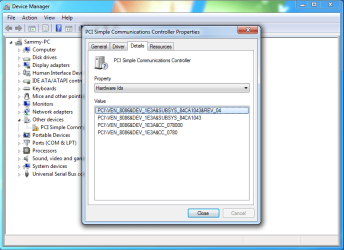
This is the Hardware ID for the PCI error:
Untitled.png
To help with searching the values:
PCI\VEN_8086&DEV_1E3A&SUBSYS_84CA1043&REV_04
PCI\VEN_8086&DEV_1E3A&SUBSYS_84CA1043
PCI\VEN_8086&DEV_1E3A&CC_078000
PCI\VEN_8086&DEV_1E3A&CC_0780
Thanks for your help
 
Last edited:

My Computer My Computer

At a glance

Windows 7 Ultimate x64
Computer type
PC/Desktop
OS
Windows 7 Ultimate x64

My Computer My Computer

At a glance

Win 7 Pro 64-bit 7601AMD Phenom 9650 QuadCore, revision DR-B35 GB yes I run 2x 2GB and 1x 1GB, different b...NVIDIA GeForce 9800 GT 512 Mb, unknown manufa...
Computer type
PC/Desktop
Computer Manufacturer/Model Number
custom built
OS
Win 7 Pro 64-bit 7601
CPU
AMD Phenom 9650 QuadCore, revision DR-B3
Motherboard
ASUS M4A78
Memory
5 GB yes I run 2x 2GB and 1x 1GB, different brand, spank me.
Graphics Card(s)
NVIDIA GeForce 9800 GT 512 Mb, unknown manufacturer.
Sound Card
Crappy Realtek Integrated Audio
Monitor(s) Displays
Fujitsu Siemens P19-3P
Screen Resolution
1280 x 1024 x 32 bits @ 60 Hz Oh yeah, 4:3 rocks!
Hard Drives
(1) MAXTOR S TM3320613AS SATA Disk Device (2) STM35004 18AS SATA Disk Device (3) TOSHIBA USB 2.5"-HDD
PSU
whatever, around 450w
Case
Scavenged from old company PC, 10+ years old
Cooling
CPU fan, GPU fan, case fan, nothing fancy
Keyboard
Microsoft, PS/2, white.
Mouse
Optical, logitec.
Internet Speed
effective max speeds: 70-ish kB/s down 30-ish kB/s up
Antivirus
Avira, free edition.
Browser
Firefox with FXChrome to make it look like Google Chrome :P
Other Info
Was discarded by previous owner due to "horrible performance".
Was running Win Xp from a IDE drive. Yeah. Was a pain.
SATA II drive and Win7 and it zips away! Yay!
Back
Top