Folders to move to save space on SSD

Backdraft

New member
Local time
12:03 AM
Messages
10
Hi,

I've been looking into getting an SSD as my main system drive (C:). However as we all know MS and Windows programs like to clutter the folders (My Documents) with random and outdated crap as time goes along. I was wondering which steps to take/data to move onto another drive in order to preserve as much of that precious finite space.

I can already think of:

  • Moving User Profile
  • Moving ProgramData folder (both of which there are guides on this site)

Is there anything else (hidden or otherwise) I should be aware of to keep Windows from cluttering up the HDD? Thanks.
 

My Computer My Computer

At a glance

Windows 7 Professional x64
OS
Windows 7 Professional x64
Whenever you download anything, make sure you search it high and low to find the button to click to ensure it gets downloaded to your other drive. Most, if not all programs have this option, and most say "Browse" to look up the other hard drive.

So long as you have 10 or more gigabytes I wouldnt worry too much about it, perform defragmentation and disk checks, make sure you rebuild the index to the other hard drive, make sure you move the internet's temporary files folder to the other hard drive along with its download location

Make sure your paging file is moved to the other hard drive. uninstall unneeded programs off the SSD, reinstall and install all programs to the other hard drive. uncheck unneeded windows features.

Have I gone far enough? Pretty soon I'll have you speeding up your system by disabling visual effects and more!
 
Last edited by a moderator:

My Computer My Computer

At a glance

Microsoft Windows 8.1 Pro 64-bitIntel(R) Core(TM) i3-4130 CPU @ 3.40GHz8.00 GBNone
Computer type
PC/Desktop
Computer Manufacturer/Model Number
Custom Asus Build
OS
Microsoft Windows 8.1 Pro 64-bit
CPU
Intel(R) Core(TM) i3-4130 CPU @ 3.40GHz
Motherboard
B85M-E
Memory
8.00 GB
Graphics Card(s)
None
Sound Card
Realtek High Definition Audio
Monitor(s) Displays
Asus 23.6" Monitor
Screen Resolution
1920 x 1080 x 32 bits (4294967296 colors) @ 60 Hz
Hard Drives
INTEL SSDSC2BW180A4
Samsung SSD 840 PRO Series
PSU
Seasonic S12II-380Bronze
Case
Lian Li
Cooling
Fan, Passive
Keyboard
Logitech K120
Mouse
Microsoft Touch Mouse
Internet Speed
4ms Ping, 19.0 Mbps Download, 19.0 Mbps Upload
Antivirus
Eset Endpoint
Browser
Internet Explorer, Chrome
DustSailor's got it right, but I'd like to add a couple of things.

The hibernation file is equal in size to the amount of RAM, hence, it can be huge; if you don't hibernate you can remove it.
To do so:

Step 1.
  • Go to Start menu, type 'power', choose Change Power-Saving Settings
  • In the window that opens, choose Change Plan Settings
  • In the window that opens, choose Change Advanced Power Settings
  • In the window that opens, find the Hibernate option in the list and disable it
  • Be certain to click the APPLY button.
  • 'OK' your way out of all these windows


Step 2.

  • Go to Start menu, type 'cmd' to open up a command prompt
  • Type 'powercfg.exe -h off' (no quotes and make sure you are Administrator (you'll see it in the Title Bar of the command window))
  • Hit <ENTER>
  • Type 'exit'
  • Hit <ENTER>
---
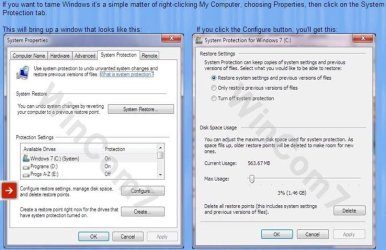
Reduce the size of your System Restore points. Windows 7 allocates a default 12% of your drive which can also be huge.

To do so:
 

Attachments

  • SysRestore.jpg
    SysRestore.jpg
    59.3 KB · Views: 508

My Computer My Computer

At a glance

Windows 7 Home Premium x64AMD Phenom II X6 1600T16GB PC3-10700 (1342MHz)ATI Radeon 5770 HD (x2) CrossFire
Computer Manufacturer/Model Number
OEM - Me
OS
Windows 7 Home Premium x64
CPU
AMD Phenom II X6 1600T
Motherboard
GigaByte GZ-990FXA-UD3
Memory
16GB PC3-10700 (1342MHz)
Graphics Card(s)
ATI Radeon 5770 HD (x2) CrossFire
Sound Card
On-board RealTek chipset
Monitor(s) Displays
3x Hanns-G 1920x1080 Monitors
Screen Resolution
3x Hanns-G 1920x1080 Monitors
Hard Drives
Intel 25-V SSD 40GB: 218 MB/s AT: 0.1ms
Intel X-25M SSD 80GB: 230MB/s AT: 0.1ms
Seagate 750GB: 133 MB/s AT: 13ms (perpendicular storage)
Buffalo HD-PCTU3 1TB External drive
PSU
OCZ Stealth X Stream 750W
Case
Cheap (unknown)
Cooling
Stock
Keyboard
HP USB
Mouse
LogiTech USB
Internet Speed
1.5 Mbps - Slow - At the tail-end of a rural network
Other Info
Printer: Epson Stylus C-84
Scanner: HP 3500C Flatbed
DVD-RW: Plextor
DVD-ROM: Unknown
WEI: 7.4
Back
Top