folders wont stay on the view i select

dmorgan924

New member
Local time
6:52 AM
Messages
4
on win 7 pro, the folder views will not stay on the view i select. any ideas how to correct this?
 

My Computer My Computer

At a glance

windows 7 proP4 3.2ghz HT3 gig
OS
windows 7 pro
CPU
P4 3.2ghz HT
Memory
3 gig
I have found that sometimes, if I change the view of one folder in My Documents, the view in other folders change.
 

My Computer My Computer

At a glance

Windows 10, Home Clean InstallIntel Core2 processsor Q8200(2.33Ghz 1333FSB)...6 gbATI Radeon 256MB HD3650
Computer type
PC/Desktop
Computer Manufacturer/Model Number
Dell XPS 420
OS
Windows 10, Home Clean Install
CPU
Intel Core2 processsor Q8200(2.33Ghz 1333FSB) Quad Core Tech
Motherboard
Dell
Memory
6 gb
Graphics Card(s)
ATI Radeon 256MB HD3650
Sound Card
Intergrated 7.1 Channel Audio
Monitor(s) Displays
Dell SP2009W 20"
Hard Drives
640 GB Serial ATA Hard drive
Cooling
Fan
Keyboard
Dell USB Keyboard
Mouse
Dell Premium Optical USB
Internet Speed
DSL 2.85
on win 7 pro, the folder views will not stay on the view i select. any ideas how to correct this?

When you say folders don't keep the view you give them, do you mean that you assign a view, close the folder, and then when you reopen it the view has reverted back?

Or is it that you assign a view to a folder, but that view does not propagate to it's subfolders?

This is what I do, in either case:

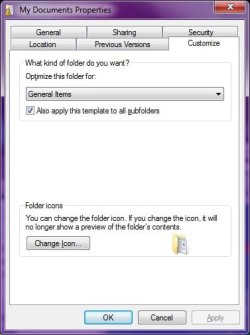
1) Right-click the folder, then select "Properties"
2) Click the "Customize" tab:
3) In the "Optimize this folder for:" list, select the desired view template
4) If you want the view to be used by subfolders also, click "Also apply this template to all subfolders" to add a checkmark
5) Click "OK":
view1.jpg

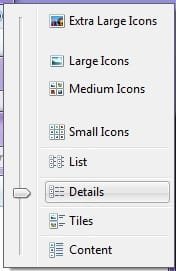
6) Use the "View Slider" to adjust the icon view to what you want:
view2.jpg

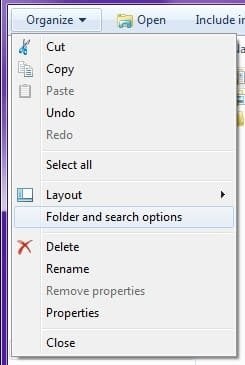
7) Click "Organize", then select "Folder and search options":
view3.jpg

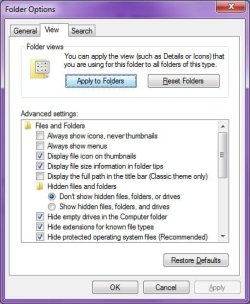
8) Click the "View" Tab
9) Click "Apply to Folders"
view4.jpg


In the above instructions, steps 7 - 9 is used only if you want all folders that use the same template (for example, "Pictures") to look the same, regardless of whether or not they are subfolders.

Hope that helps.
 
Last edited:

My Computer My Computer

At a glance

Windows 7 Professional 32-bit SP1AMD A4/A63.00GB EDOVMware SVGA 3D
Computer type
PC/Desktop
Computer Manufacturer/Model Number
Virtual Machine
OS
Windows 7 Professional 32-bit SP1
CPU
AMD A4/A6
Motherboard
Intel Corporation 440BX Desktop Reference Platform
Memory
3.00GB EDO
Graphics Card(s)
VMware SVGA 3D
Sound Card
High Definition Audio Device
Monitor(s) Displays
Generic Non-PnP Monitor on VMware SVGA 3D
Screen Resolution
1440x900
Hard Drives
1 x 60GB VMware Virtual SATA Hard Drive ATA Device
Antivirus
Kaspersky Total Security
any other ideas for this? does any one else have this problem. here is more detail.

folder views will not stay to what i set them to, like on XP.

whenever i go to "my documents" for example, and then change the view to details, and then go to photos and make that view thumbnails, and go back to docs, the docs are now in the same view as photos. it does this for all folders.

in xp, all changes i made to folders would stay.

i've read and tried several things but have not been able to fix it.


im using win7 pro, with all current updates.


any fixes?

eek.gif
 

My Computer My Computer

At a glance

windows 7 proP4 3.2ghz HT3 gig
OS
windows 7 pro
CPU
P4 3.2ghz HT
Memory
3 gig
any other ideas for this? does any one else have this problem. here is more detail.

folder views will not stay to what i set them to, like on XP.

whenever i go to "my documents" for example, and then change the view to details, and then go to photos and make that view thumbnails, and go back to docs, the docs are now in the same view as photos. it does this for all folders.

in xp, all changes i made to folders would stay.

i've read and tried several things but have not been able to fix it.


im using win7 pro, with all current updates.


any fixes?
eek.gif

Have you checked to see that the View Templates for "My Documents" is set to "Documents", and "My Pictures" is set to "Pictures"? If both folders are using the same template, then this could explain why changing the view in one propagates to the other.

And are you changing views in the Library versions of the folders (Libraries are not actual folders, but are rather an advanced form of Search), or in the folders themselves?
 

My Computer My Computer

At a glance

Windows 7 Professional 32-bit SP1AMD A4/A63.00GB EDOVMware SVGA 3D
Computer type
PC/Desktop
Computer Manufacturer/Model Number
Virtual Machine
OS
Windows 7 Professional 32-bit SP1
CPU
AMD A4/A6
Motherboard
Intel Corporation 440BX Desktop Reference Platform
Memory
3.00GB EDO
Graphics Card(s)
VMware SVGA 3D
Sound Card
High Definition Audio Device
Monitor(s) Displays
Generic Non-PnP Monitor on VMware SVGA 3D
Screen Resolution
1440x900
Hard Drives
1 x 60GB VMware Virtual SATA Hard Drive ATA Device
Antivirus
Kaspersky Total Security
anyone else?

Tried the steps above but no luck. This is most annoying with DVD's that contain 7000+ digital photos. They all show up with the "Documents" template setting. When I do the steps above on the root folder, only the root changes but not the subfolders. When I proceed to click on the subfolders, they show up as document details list. Then when I go back to the root folder, it too has lost its setting and reverts back to documents template.
 

My Computer My Computer

At a glance

DOS 6.2, NT4 server, 2000 server, 2003 server...
OS
DOS 6.2, NT4 server, 2000 server, 2003 server, XP Pro, Win7x64Pro
Change folder options

^ Is that what you are talking about? As doing that will set every folder(with the exception of templated folders... i think) to the current way you are viewing.
 

My Computer My Computer

At a glance

Windows 7 Pro 64-Biti716GBNvidia
Computer Manufacturer/Model Number
Custom
OS
Windows 7 Pro 64-Bit
CPU
i7
Motherboard
Gigabyte
Memory
16GB
Graphics Card(s)
Nvidia
Sound Card
Onboard
Monitor(s) Displays
Asus
Hard Drives
Seagate
PSU
Antec
Case
Fractial Design
Cooling
Stock
Re: Thermodust

Done that over a hundred times. It doesn't stick and it doesn't apply to certain folders like those that had previously been templated.
 

My Computer My Computer

At a glance

DOS 6.2, NT4 server, 2000 server, 2003 server...
OS
DOS 6.2, NT4 server, 2000 server, 2003 server, XP Pro, Win7x64Pro
Back
Top