Fonts - Delete

How to Delete Fonts in Windows 7 and Windows 8


   Information
A font is a collection of numbers, symbols, and characters. A font describes a certain typeface, along with other qualities, such as size, spacing, and pitch.

This tutorial will show you how to delete fonts of your choice that are installed in Windows 7 and Windows 8.

For a list of all default fonts that come supplied with Windows 7, see: Fonts supplied with Windows 7

For a list of all default fonts that come supplied with Windows 8, see: Fonts supplied with Windows 8

   Warning
You do not want to delete a font that is being used by Windows. Typically the fonts that are not in use and safe to delete are the default fonts set to Hide in the Details Pane, and the fonts installed by you.

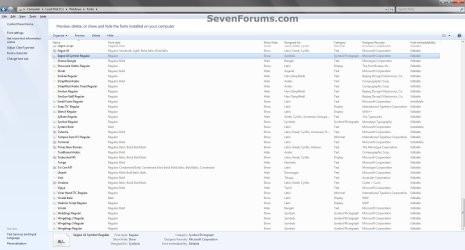
1754d1230222575-fonts-delete-detail_pane.jpg


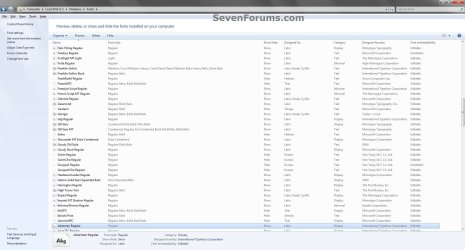
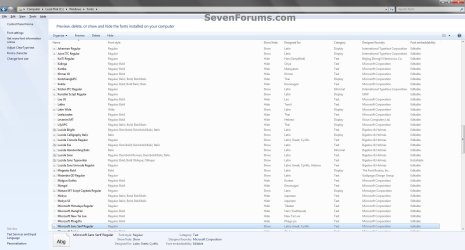
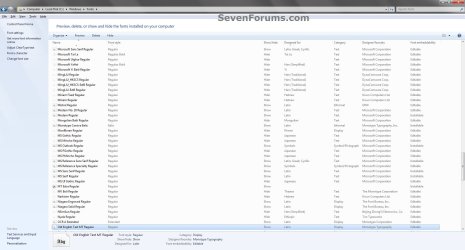
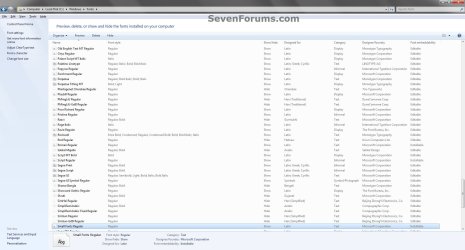
EXAMPLE: Default Fonts in Windows 7
NOTE: This was from a English Windows 7 Ultimate with Office installed to compare with your fonts to help know which ones are the default ones.
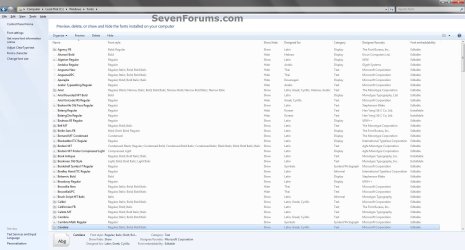
Default_Fonts-1.jpg

Default_Fonts-2.jpg

Default_Fonts-3.jpg

Default_Fonts-4.jpg

Default_Fonts-5.jpg

Default_Fonts-6.jpg

Default_Fonts-7.jpg


OPTION ONE

To Delete Fonts in the Fonts Folder


1. Open the Control Panel (icons view) in Windows 7 or Windows 8.

2. Click/tap on the Fonts icon.

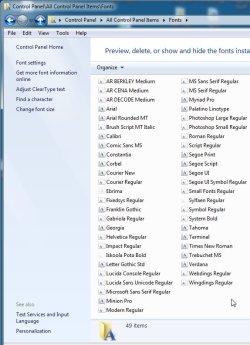
3. Select a individual font or font family that you want to delete. (See screenshots below)
TIP: To select more than one font at a time, press and hold down the Ctrl key while you click on each font.
NOTE: A individual font only has a single page on it's icon. A font family has more than one page stacked on it's icon. It means that it has more individual fonts included in that font family. If you wanted to only delete a individual font in the font family, you will need to click on the font family to see the individual fonts inside the font family first.
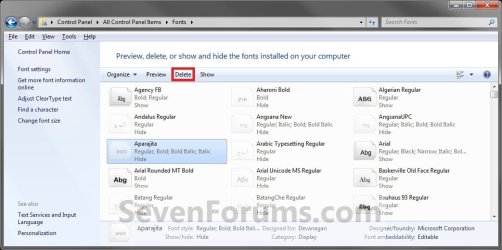
Delete.jpg

Delete-2.jpg

4. Click/tap on the Delete button on the toolbar. (See screenshots above)
NOTE: You can also right click on the font and click on Delete. If delete a font family, then it will delete all of the individual fonts in the font family as well.

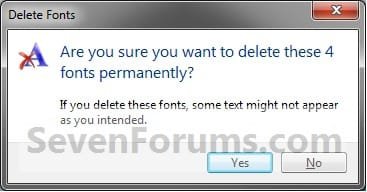
5. Click/tap on Yes to confrim the deletion. (See screenshots below)
NOTE: The left screenshot is for a individual font, and the right screenshot is for a font family.
Confirm-1.jpgConfirm-2.jpg


OPTION TWO

To Manually Delete Fonts in Registry Editor


1. Press the Windows + R keys to open the Run dialog, type regedit, and click/tap on OK.

2. If prompted by UAC, then click/tap on Yes (if in adminsitrator account) or type in the administrator's password (if in standard account).

3. In regedit, navigate to the location below. (see screenshot below)

Code:
HKEY_LOCAL_MACHINE\SOFTWARE\Microsoft\Windows NT\CurrentVersion\Fonts
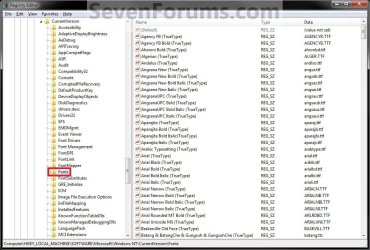
REG.jpg
4. In the right pane of Fonts, right click on the font name that you want to delete and click on Delete.

5. Click/tap on Yes to approve the deletion.

6. If you have 64-bit Windows Installed
   Note
To also delete the font as well in 64-bit Windows, you will also need to do this step.

If you have a 32-bit Windows installed, then skip this step since doing steps 1 to 5 will delete the font in it.

A) In regedit, navigate to the location below. (see screenshot below)

Code:
HKEY_LOCAL_MACHINE\SOFTWARE\Wow6432Node\Microsoft\Windows NT\CurrentVersion\Fonts
B) Repeat steps 4 and 5.
7. Repeat steps 4 to 6 for any other font you would like to delete

8. When finished, restart the computer to apply.
That's it,
Shawn


Attachments

  • Detail_pane.jpg
    Detail_pane.jpg
    6.5 KB · Views: 109,777
Last edited:
Fonts gone wild

There are a large number of fonts showing up in Win 7 that I attempted to delete since I can't see any possible use for them. These include mostly foreign fonts like
Batang, Hebrew, Thai, Han Chinese, etc. When you attempt to delete most of these you get the message that they are protected as system fonts. :mad:
 

My Computer

Computer Manufacturer/Model Number
My Build
OS
Windows 7 Ultimate
CPU
Pentium Dual Core 2.8 Mhz
Motherboard
ASUS PK5E
Memory
4GB
Graphics Card(s)
ATI Crossfire
Sound Card
On board
Monitor(s) Displays
Samsung 21"
Hard Drives
WD 150 GB
WD 750 GB
There are a large number of fonts showing up in Win 7 that I attempted to delete since I can't see any possible use for them. These include mostly foreign fonts like
Batang, Hebrew, Thai, Han Chinese, etc. When you attempt to delete most of these you get the message that they are protected as system fonts. :mad:
------------------------------------------------------------------------------
Exactly.
I thought that my original post had sufficient clarity. My "tag" maybe would reinforce that. I do know my way around computers in some detail, in fact Windows 7/Vista/XP/98/95/3.11 as well as CP/M, Linux BBC OS and one or two others.
And I do know how to remove a font ot two.
But I'm always happy to learn more. I read many more posts than I make.
I did mention a couple of those specific system fonts of the Batang variety.
And the point about this is that it's my computer and I get to choose what I put on my computer, except that Microsoft are telling me that I have to lumber my computer with their baggage. *
And I don't want it.


*PS I actually like Microsoft. Anyone old enough to have experienced CP/M will know what a relief MSDOS was.
 

My Computer

Computer Manufacturer/Model Number
Mesh PC
OS
Win 7
CPU
Intel core 2 duo
Memory
4 gig
Hard Drives
1 x250 gig
1 x 500 gig
Mouse
MS lasermouse 5000 -'cos it scrolls smoothly, no wheel click
Internet Speed
10mb - cable
Other Info
The mouse took most research. I hate that click on the wheel, this one has the old fashioned smooth wheel. There aren't many about.
The problem I have is that "hidden" fonts still show when I use programs such as Photo Filtre. I always have to choose from a big, long list of fonts, most of which I will never use.
 

My Computer

OS
Windows 7
Hello Selkie, and welcome to Seven Forums.

Hiding fonts will not always keep them hidden in 3rd party programs. Can you delete them instead of hiding them?
 

My Computer

Computer type
PC/Desktop
Computer Manufacturer/Model Number
Self built custom
OS
64-bit Windows 11 Pro for Workstations
CPU
Intel i7-8700K OC'd to 5 GHz
Motherboard
ASUS ROG Maximus XI Formula Z390
Memory
64 GB (4x16GB) G.SKILL TridentZ RGB DDR4 3600 MHz
Graphics Card(s)
ASUS ROG-STRIX-GTX1080TI-O11G-GAMING
Sound Card
Integrated
Monitor(s) Displays
2 x Samsung Odyssey G7 27"
Screen Resolution
2560x1440
Hard Drives
1TB Samsung 990 PRO M.2,
4TB Samsung 990 PRO PRO M.2,
TerraMaster F8 SSD Plus NAS
PSU
Seasonic Prime Titanium 850W
Case
Thermaltake Core P3
Cooling
Corsair Hydro H115i
Keyboard
Logitech wireless K800
Mouse
Logitech MX Master 4
Internet Speed
2 Gb/s Download and 100 Mb/s Upload
Antivirus
Malwarebyte Anti-Malware Premium
Browser
Google Chrome
Other Info
Logitech Z625 speaker system,
Logitech BRIO 4K Pro webcam,
HP Color LaserJet Pro MFP M477fdn,
APC SMART-UPS RT 1000 XL - SURT1000XLI,
Galaxy S23 Plus phone
I've deleted some, but many of them cannot be deleted. It's a great idea to have all those fonts available, just a pain in the neck sifting through all of them every time. What part of "hide" doesn't the program understand?
Also, if I do want to use a foreign language font, what do I do - install a language pack? Is there a recommended place to go to find this?
 

My Computer

OS
Windows 7
Setting a font to hide sets it to hide in Windows and any compliant program. A 3rd party program may not be compiant or compatible with this, so it may not be hidden from within that program. Unfortunately it's up to the program developer to make their program work properly or not.

I'm not sure about your second question, but you might post it as a "New Thread" in the General Discussion forum to see if someone may know more on that.
 

My Computer

Computer type
PC/Desktop
Computer Manufacturer/Model Number
Self built custom
OS
64-bit Windows 11 Pro for Workstations
CPU
Intel i7-8700K OC'd to 5 GHz
Motherboard
ASUS ROG Maximus XI Formula Z390
Memory
64 GB (4x16GB) G.SKILL TridentZ RGB DDR4 3600 MHz
Graphics Card(s)
ASUS ROG-STRIX-GTX1080TI-O11G-GAMING
Sound Card
Integrated
Monitor(s) Displays
2 x Samsung Odyssey G7 27"
Screen Resolution
2560x1440
Hard Drives
1TB Samsung 990 PRO M.2,
4TB Samsung 990 PRO PRO M.2,
TerraMaster F8 SSD Plus NAS
PSU
Seasonic Prime Titanium 850W
Case
Thermaltake Core P3
Cooling
Corsair Hydro H115i
Keyboard
Logitech wireless K800
Mouse
Logitech MX Master 4
Internet Speed
2 Gb/s Download and 100 Mb/s Upload
Antivirus
Malwarebyte Anti-Malware Premium
Browser
Google Chrome
Other Info
Logitech Z625 speaker system,
Logitech BRIO 4K Pro webcam,
HP Color LaserJet Pro MFP M477fdn,
APC SMART-UPS RT 1000 XL - SURT1000XLI,
Galaxy S23 Plus phone
Some info most at Microsoft will NOT give, about how to delete stubborn files/folders. The reason they won't delete is b/c the only user/account that has FULL permission to do so is someone called the "TrustedInstaller", which is not even the owner of the computer/Installer of Windows!!!

I've done this to delete stubborn screensavers & fonts the people at MS think that only the "TrustedInstaller" should have permission to do. Here's what needs to be done:

http://www.sevenforums.com/tutorials/1911-take-ownership-shortcut.html

1. R-click the file you want deleted, choose Properties & select the Security tab.
2. Under Permission for SYSTEM, click Advanced.
3. Select the Owner tab & click Edit.
4. UAC will pop-up (or not)
5. Choose your User & click Apply, then OK & OK (back to file/folder's Properties box).
6. Still at the Security tab, click Edit under Group/user names.
7. UAC will pop-up (or not)
8. Select same group/user as in #5 above.
9. Under Permissions for SYSTEM choose Full Control - Allow.
10. Click Apply & Ok out of Properties. Now the file/folder should delete no problem.

I also used the Orb to search the whole computer for other instances of the file. For instance, the Ribbon screensaver, that I got rid of; was also found in multiple folders in the C:\Windows\winsxs folder. Once those files were deleted, the folders they were in were also deleted. No problems have come up for me since deleting some screensavers & fonts this way. Please note: only delete fonts that are set to 'HIDE' in the Fonts folder! Important!
 
Last edited by a moderator:

My Computer

Computer type
PC/Desktop
Computer Manufacturer/Model Number
Self built comfuser
OS
10 Pro. 64Bit
CPU
AMD FX 4100, 4-Core Black Edition. Socket AM3+ ~ 3.60GHz
Motherboard
ASUS M5A97 LE R2.0
Memory
2x 4GB Kingston HyperX DDR3-1866 (PC3-14900) - 8GB Total
Graphics Card(s)
ASUS Radeon HD 6670-2GD3
Sound Card
Onboard High Definition Audio Device
Monitor(s) Displays
HP 2009m LCD
Screen Resolution
1600x900, True Color (32bit), 60Hertz
Hard Drives
WD Blue - 1TB, 3D NAND - SATA SSD
PSU
XFX Pro 450W Core Edition - Fully Wired
Case
Antec Super Lanboy
Cooling
Stock CPU fan + 2 (1 front, 1 back) 120mm Antec fans
Keyboard
Logitech MK700/MK710
Mouse
Logitech M705
Internet Speed
Frontier FiOS 50/50
Antivirus
Windows Security
Browser
Vivaldi
Other Info
1x ASUS DRW-24B1ST Multi-DVD Rewriter
1x RocketFish AIO Media Card Reader
1x WD 1TB Passport USB External Drive
I removed a lot of them using the registry and the system and apps are working good after reboot. Thanks for this tutorial.
 

My Computer

Computer type
Laptop
Computer Manufacturer/Model Number
Acer Aspire 5810T8929
OS
Windows 10 Home 64b
CPU
Intel Core Solo 1.4Ghz 800Mhz FSB
Memory
Samsung 4GB DDR3
Graphics Card(s)
Intel GMA 4500MHD
Screen Resolution
1366x768
Hard Drives
Seagate Momentus XT (Hybrid HD) 750GB
Internet Speed
40 Mbs
Antivirus
Kaspersky Free Antivirus
Browser
Chrome 60.0.3112.113 (Official Build) (64-bit)
You're most welcome LM. :)
 

My Computer

Computer type
PC/Desktop
Computer Manufacturer/Model Number
Self built custom
OS
64-bit Windows 11 Pro for Workstations
CPU
Intel i7-8700K OC'd to 5 GHz
Motherboard
ASUS ROG Maximus XI Formula Z390
Memory
64 GB (4x16GB) G.SKILL TridentZ RGB DDR4 3600 MHz
Graphics Card(s)
ASUS ROG-STRIX-GTX1080TI-O11G-GAMING
Sound Card
Integrated
Monitor(s) Displays
2 x Samsung Odyssey G7 27"
Screen Resolution
2560x1440
Hard Drives
1TB Samsung 990 PRO M.2,
4TB Samsung 990 PRO PRO M.2,
TerraMaster F8 SSD Plus NAS
PSU
Seasonic Prime Titanium 850W
Case
Thermaltake Core P3
Cooling
Corsair Hydro H115i
Keyboard
Logitech wireless K800
Mouse
Logitech MX Master 4
Internet Speed
2 Gb/s Download and 100 Mb/s Upload
Antivirus
Malwarebyte Anti-Malware Premium
Browser
Google Chrome
Other Info
Logitech Z625 speaker system,
Logitech BRIO 4K Pro webcam,
HP Color LaserJet Pro MFP M477fdn,
APC SMART-UPS RT 1000 XL - SURT1000XLI,
Galaxy S23 Plus phone
FONTS

I installed a greeting card program in Dec. 2010, and it would appear that a lot of fonts were installed. When I use Excel spread sheet, a prompt comes up advising me to uninstall some fonts, though everything still works.
I opened the fonts folder, and in details view, several fonts are identified under "date modified", corresponding to the date of installation of the greeting card program.
Does "date modified" mean that a particular font was added on the referenced date, or that it was modified in some way?
How can I identify the unwanted fonts for deletion?
Please note that I have uninstalled the program as I do not like it.
 

My Computer

OS
Windows 7
Hello Hatstead,

I have added screenshots of all the default fonts listed in Windows 7 at the top of the tutorial to help you determine which ones the program may have added. The Date Modified could mean either one, but it would be good one to check agains the list first.

Hope this helps,
Shawn
 

My Computer

Computer type
PC/Desktop
Computer Manufacturer/Model Number
Self built custom
OS
64-bit Windows 11 Pro for Workstations
CPU
Intel i7-8700K OC'd to 5 GHz
Motherboard
ASUS ROG Maximus XI Formula Z390
Memory
64 GB (4x16GB) G.SKILL TridentZ RGB DDR4 3600 MHz
Graphics Card(s)
ASUS ROG-STRIX-GTX1080TI-O11G-GAMING
Sound Card
Integrated
Monitor(s) Displays
2 x Samsung Odyssey G7 27"
Screen Resolution
2560x1440
Hard Drives
1TB Samsung 990 PRO M.2,
4TB Samsung 990 PRO PRO M.2,
TerraMaster F8 SSD Plus NAS
PSU
Seasonic Prime Titanium 850W
Case
Thermaltake Core P3
Cooling
Corsair Hydro H115i
Keyboard
Logitech wireless K800
Mouse
Logitech MX Master 4
Internet Speed
2 Gb/s Download and 100 Mb/s Upload
Antivirus
Malwarebyte Anti-Malware Premium
Browser
Google Chrome
Other Info
Logitech Z625 speaker system,
Logitech BRIO 4K Pro webcam,
HP Color LaserJet Pro MFP M477fdn,
APC SMART-UPS RT 1000 XL - SURT1000XLI,
Galaxy S23 Plus phone
Shawn,
Thank you for your reply.
I don't see a tutorial or a list of fonts.
Please point me to same.
 

My Computer

OS
Windows 7
You can go to the first page of this tutorial thread to see the tutorial with the default font screenshots toward the top.
 

My Computer

Computer type
PC/Desktop
Computer Manufacturer/Model Number
Self built custom
OS
64-bit Windows 11 Pro for Workstations
CPU
Intel i7-8700K OC'd to 5 GHz
Motherboard
ASUS ROG Maximus XI Formula Z390
Memory
64 GB (4x16GB) G.SKILL TridentZ RGB DDR4 3600 MHz
Graphics Card(s)
ASUS ROG-STRIX-GTX1080TI-O11G-GAMING
Sound Card
Integrated
Monitor(s) Displays
2 x Samsung Odyssey G7 27"
Screen Resolution
2560x1440
Hard Drives
1TB Samsung 990 PRO M.2,
4TB Samsung 990 PRO PRO M.2,
TerraMaster F8 SSD Plus NAS
PSU
Seasonic Prime Titanium 850W
Case
Thermaltake Core P3
Cooling
Corsair Hydro H115i
Keyboard
Logitech wireless K800
Mouse
Logitech MX Master 4
Internet Speed
2 Gb/s Download and 100 Mb/s Upload
Antivirus
Malwarebyte Anti-Malware Premium
Browser
Google Chrome
Other Info
Logitech Z625 speaker system,
Logitech BRIO 4K Pro webcam,
HP Color LaserJet Pro MFP M477fdn,
APC SMART-UPS RT 1000 XL - SURT1000XLI,
Galaxy S23 Plus phone
Got it. Thanks a lot. I shall compare this list with installed fonts on my system.
 

My Computer

OS
Windows 7
You're welcome mate. :)
 

My Computer

Computer type
PC/Desktop
Computer Manufacturer/Model Number
Self built custom
OS
64-bit Windows 11 Pro for Workstations
CPU
Intel i7-8700K OC'd to 5 GHz
Motherboard
ASUS ROG Maximus XI Formula Z390
Memory
64 GB (4x16GB) G.SKILL TridentZ RGB DDR4 3600 MHz
Graphics Card(s)
ASUS ROG-STRIX-GTX1080TI-O11G-GAMING
Sound Card
Integrated
Monitor(s) Displays
2 x Samsung Odyssey G7 27"
Screen Resolution
2560x1440
Hard Drives
1TB Samsung 990 PRO M.2,
4TB Samsung 990 PRO PRO M.2,
TerraMaster F8 SSD Plus NAS
PSU
Seasonic Prime Titanium 850W
Case
Thermaltake Core P3
Cooling
Corsair Hydro H115i
Keyboard
Logitech wireless K800
Mouse
Logitech MX Master 4
Internet Speed
2 Gb/s Download and 100 Mb/s Upload
Antivirus
Malwarebyte Anti-Malware Premium
Browser
Google Chrome
Other Info
Logitech Z625 speaker system,
Logitech BRIO 4K Pro webcam,
HP Color LaserJet Pro MFP M477fdn,
APC SMART-UPS RT 1000 XL - SURT1000XLI,
Galaxy S23 Plus phone
I think i have a problem in my font collection... i have added many many fonts. I'm having issues in Photoshop that i suspect is caused by a font issue. (guessing somewhat). I have backed up all my fonts and i want to delete all the fonts i have installed, effectively restoring the font folder to is default / installed state.

I'm just not sure how to do this.

Do i just delete them all, and any that i'm 'allowed' to delete will remove my installed ones? (i use directory opus not windows explorer, which has more 'power', i don't want to screw things up)

I can't find a obvious way to restore to default collection. I read the guide, but it does not seem to cover this. I have over 9,500 fonts so deleting them individually is not a practical option.

Thanks for any help..

EDIT:

Never mind.. i was frustrated.. deleted the lot, apart from system protected ones.. i'll reinstall the required fonts from my backup when i need them. Thanks
 
Last edited:

My Computer

OS
Windows 7 Ultimate x64
CPU
Intel Core i5-3570K
Motherboard
P8Z77-V (LGA1155)
Memory
8.00 GB Dual-Channel DDR3
Graphics Card(s)
1535MB GeForce GTX 480 (EVGA)
Sound Card
x-fi extreme music
Monitor(s) Displays
2 x 22"
Screen Resolution
1680x1050 x 2
Hard Drives
SSD, SATA & IDE
PSU
700W
I too had font funk when I noticed there was sixty thousand fonts everytime I pulled down my font drop-box down in Photoshop.
(I'm new at Win7)

First I tried deleting them (as one would expect to work) then I found this tutorial, went right to the OPTION 2 (registry method) ...but... first I set a restore point with "System settings and files" as the type.

Did the deed as described at the top of this thread (OPTION 2- registry) and re-booted, they were gone, nice!...but... then I noticed the system was using a different font now for desktop icon labels and such, so I decided to go back to that restore point I set earlier.

This is where it got interesting, I did the restore, rebooted and the desktop icon labels looked right again, but I noticed Windows didn't put back all the fonts I deleted (which was nice).

It only restored:

Ebrima (hidden)
Gabriola
Iskoola Pota Bold (hidden)
Sylfaen (hidden)

I suspect one or more of those (hidden) fonts contain the system's default font for the OS.

Anyway I decided that was nice compromise, my fonts drop-box in Photoshop is much more manageable now without all the worlds fonts. I rebooted again and tried my apps and Windows stuff trying to see if anything was adversly affected and all seems well.

I didn't take a before screenshot (you all know how many fonts are there) but here is the after screenshot, both Control Panel-Fonts, and what appears in Photoshop's font drop-box:
 

Attachments

  • Fonts_after_delete-restore_2.jpg
    Fonts_after_delete-restore_2.jpg
    61.8 KB · Views: 541
  • Fonts_after_delete-restore_1.jpg
    Fonts_after_delete-restore_1.jpg
    50.6 KB · Views: 387

My Computer

OS
Windows 7 Home Premium
Note: I don't know why those screen shots look so bad, they are nice and clear pics (the files I uploaded) must be some automatic resizing thing going on with the forum software.
 

My Computer

OS
Windows 7 Home Premium
Back
Top